
1. ເກີນview
The Kaiser KSB-4226 Professional Speaker System is designed to deliver powerful and high-quality sound for various events, presentations, and parties. This system features three 12-inch speakers and a 2-inch tweeter, providing deep bass and clear audio with a maximum output of 40,000 W PMPO (170W RMS). Its robust construction and professional design make it suitable for both indoor and outdoor use, ensuring durability and consistent performance.
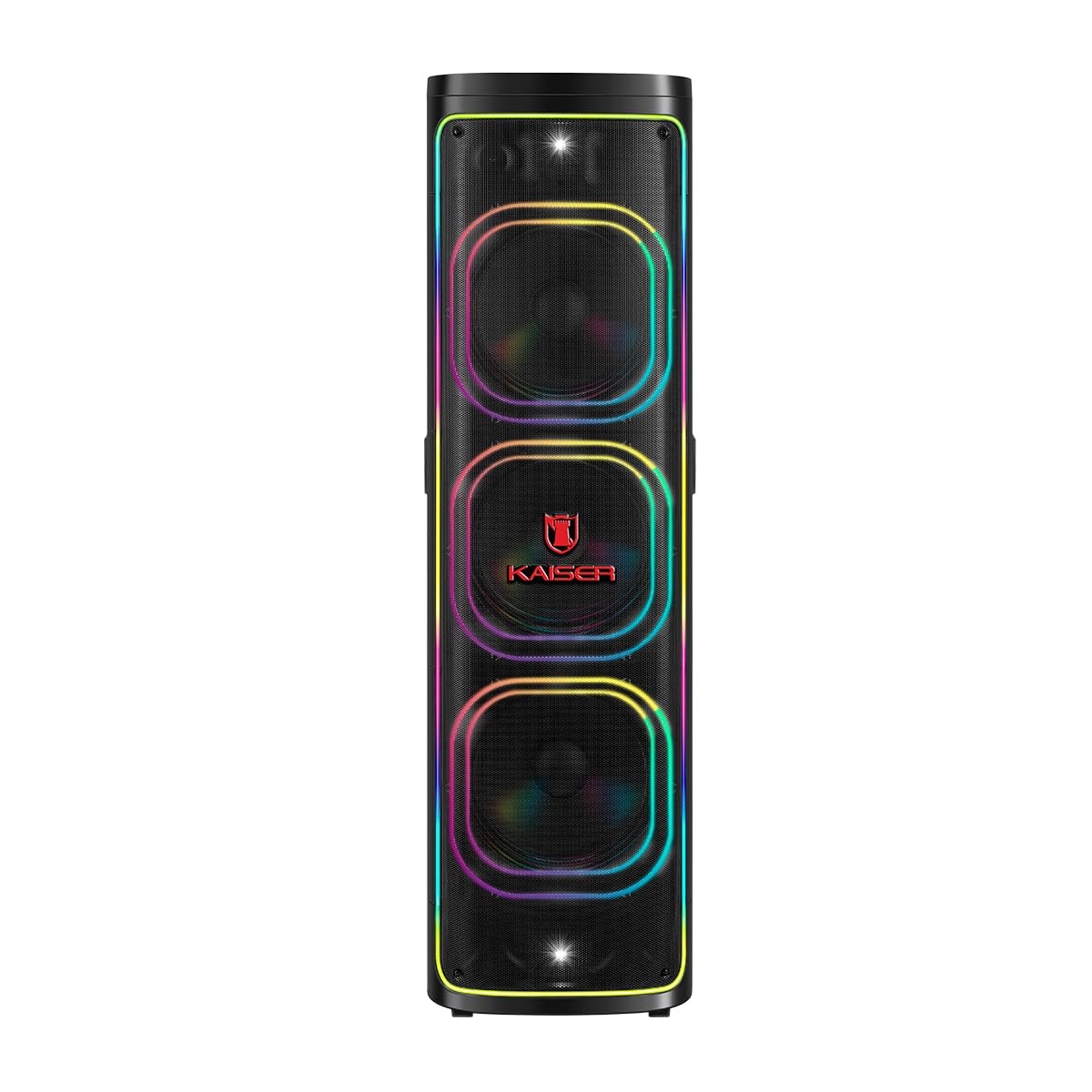
ຮູບ 1: ດ້ານຫນ້າ view of the Kaiser KSB-4226 Professional Speaker System.
2. ຂໍ້ມູນຄວາມປອດໄພ
- ແຫຼ່ງພະລັງງານ: ໃຫ້ແນ່ໃຈວ່າລຳໂພງໄດ້ເຊື່ອມຕໍ່ກັບແຫຼ່ງພະລັງງານທີ່ກົງກັບລະດັບສຽງtage ລະບຸໄວ້ໃນອຸປະກອນ.
- ການລະບາຍອາກາດ: Do not block ventilation openings. Allow adequate space around the speaker for proper airflow.
- ນ້ໍາແລະຄວາມຊຸ່ມ: Keep the speaker away from water, rain, and excessive moisture. This unit is IPX4 splashproof, but not waterproof.
- ຄວາມຮ້ອນ: Do not place the speaker near heat sources such as radiators, heat registers, stoves, or other heat-producing appliances.
- ທໍາຄວາມສະອາດ: Unplug the speaker from the power outlet before cleaning. Use a dry cloth for cleaning.
- ການບໍລິການ: ຢ່າພະຍາຍາມບໍລິການຜະລິດຕະພັນນີ້ດ້ວຍຕົນເອງ. ອ້າງເຖິງການບໍລິການທັງtoົດໃຫ້ກັບພະນັກງານບໍລິການທີ່ມີຄຸນວຸດທິ.
- ການຈັດວາງ: ວາງລຳໂພງໄວ້ເທິງພື້ນຜິວທີ່ໝັ້ນຄົງ ແລະ ຮາບພຽງເພື່ອປ້ອງກັນບໍ່ໃຫ້ມັນຕົກ.
3. ເນື້ອໃນຊຸດ
ກວດສອບວ່າລາຍການທັງຫມົດແມ່ນມີຢູ່ໃນຊຸດ:
- Kaiser KSB-4226 Professional Speaker System
- ໄມໂຄຣໂຟນໄຮ້ສາຍ
- ສາຍໄຟ
- ການຄວບຄຸມໄລຍະໄກ
- ຄູ່ມືຜູ້ໃຊ້ (ເອກະສານນີ້)

Figure 2: Included accessories: remote control and power cable.
4. ຄຸນລັກສະນະຂອງຜະລິດຕະພັນ
- High-Performance Sound: Equipped with three 12-inch speakers and a 2-inch tweeter for powerful bass and clear, crisp audio.
- ຜົນຜະລິດພະລັງງານສູງ: 40,000 W PMPO (170W RMS) ideal for large events, presentations, meetings, and parties.
- ຜົນກະທົບສຽງປະສົມປະສານ: Customize your musical experience with various ambient and style effects.
- ການອອກແບບທີ່ແຂງແຮງ ແລະ ທົນທານ: High-quality construction for long-lasting and reliable use.
- ການນໍາໃຊ້ອະເນກປະສົງ: Perfect for indoor and outdoor settings, from family gatherings to professional events.
- Powerful and Clear Audio: Capable of filling large spaces with uniform, high-quality sound.
- ການເຊື່ອມໂຍງງ່າຍດາຍ: Compatible with various audio sources for enhanced practicality.
- ການເຊື່ອມຕໍ່ Bluetooth: ການຖ່າຍທອດສຽງໄຮ້ສາຍແບບບໍ່ມີຮອຍຕໍ່.
- KSR-Link Technology: For connecting multiple compatible Kaiser speakers.
- Square Light: Integrated LED lighting for dynamic visual effects.
5. ຕັ້ງຄ່າ
- ແກະກ່ອງ: Carefully remove the speaker system and all accessories from the packaging.
- ການຈັດວາງ: Position the speaker on a stable, flat surface. Ensure there is enough space around the unit for proper ventilation.
- ການເຊື່ອມຕໍ່ພະລັງງານ: Connect the power cable to the speaker's power input and then to a suitable electrical outlet.
- ເປີດ: Locate the power switch on the control panel (refer to Figure 3) and turn the unit ON. The display should light up.
6. ຄໍາແນະນໍາການດໍາເນີນງານ
6.1. ການເຊື່ອມຕໍ່ບູທູດ
- ເປີດລະບົບລໍາໂພງ.
- ກົດ ໂໝດ button on the control panel until "BLUE" appears on the display, indicating Bluetooth mode.
- ໃນອຸປະກອນມືຖືຂອງທ່ານ (ໂທລະສັບສະຫຼາດ, ແທັບເລັດ, ແລະອື່ນໆ), ເປີດໃຊ້ Bluetooth ແລະຄົ້ນຫາອຸປະກອນທີ່ມີຢູ່.
- Select "KSB-4226" (or similar model name) from the list of devices to pair.
- Once connected, you will hear a confirmation tone, and the display will show "Connected".
- You can now play audio from your device through the speaker system.
6.2. ການຫຼິ້ນບັດ USB/TF
- Insert a USB flash drive or TF (Micro SD) card into the corresponding port on the control panel.
- The speaker system should automatically switch to USB/TF mode and begin playing audio fileຖ້າບໍ່, ໃຫ້ກົດປຸ່ມ ໂໝດ ປຸ່ມເພື່ອເລືອກການປ້ອນຂໍ້ມູນທີ່ຖືກຕ້ອງ.
- Use the playback controls (Play/Pause, Previous, Next) on the control panel or remote control to manage your music.
6.3. ເຄື່ອງປ້ອນຂໍ້ມູນ AUX
- Connect an external audio device (e.g., MP3 player, laptop) to the AUX IN port using a 3.5mm audio cable.
- ກົດ ໂໝດ ກົດປຸ່ມຈົນກ່ວາ "AUX" ປາກົດຢູ່ໃນຈໍສະແດງຜົນ.
- ຫຼິ້ນສຽງຈາກອຸປະກອນທີ່ເຊື່ອມຕໍ່ຂອງທ່ານ.
6.4. ການນຳໃຊ້ໄມໂຄຣໂຟນ
- Connect the wireless microphone (or a wired microphone to MIC 1/MIC 2 input).
- Adjust the microphone volume using the dedicated VOL MIC knob on the control panel.
- Adjust echo effects using the ແອັກໂກ້ knob for karaoke or vocal performances.
6.5. KSR-Link (True Wireless Stereo)
To connect two KSB-4226 units for a stereo experience:
- Ensure both KSB-4226 speakers are powered on and in Bluetooth mode, but not yet paired with any device.
- On one speaker (this will be the master unit), press and hold the KSR-LINK button. You will hear a tone.
- The master unit will search for the second speaker. Once connected, you will hear another confirmation tone, and the display will indicate TWS mode.
- Now, connect your mobile device to the master KSB-4226 via Bluetooth as described in section 6.1.
- Audio will now play in true stereo across both speakers.
7. ການຄວບຄຸມແລະການເຊື່ອມຕໍ່
7.1. ກະດານຄວບຄຸມດ້ານເທິງ

ຮູບທີ 3: ແຜງຄວບຄຸມດ້ານເທິງ.
- ສະຫວິດໄຟຟ້າ: ເປີດ/ປິດເຄື່ອງ.
- ປຸ່ມລະດັບສຽງ: ປັບລະດັບສຽງຫຼັກ.
- ປຸ່ມ MODE: Switches between input sources (Bluetooth, USB, TF Card, AUX).
- ປຸ່ມ PLAY/PAUSE: ຫຼິ້ນ ຫຼືຢຸດການຫຼິ້ນສຽງຊົ່ວຄາວ.
- ປຸ່ມກ່ອນ/ໜ້າ: ຂ້າມໄປຫາເພງກ່ອນໜ້ານີ້ ຫຼື ຕໍ່ໄປ.
- ປຸ່ມ LED: Controls the LED lighting effects.
- ປຸ່ມ EQ: ເລືອກການຕັ້ງຄ່າຄວາມເທົ່າທຽມໄວ້ລ່ວງຫນ້າ.
- ປຸ່ມປິດສຽງ: ປິດສຽງອອກ.
- ປຸ່ມ X-BASS: ເສີມຂະຫຍາຍຜົນຜະລິດເບດ.
- VOL MIC Knob: ປັບລະດັບສຽງໄມໂຄຣໂຟນ.
- ປຸ່ມ ECHO: ປັບຜົນກະທົບສຽງດັງຂອງໄມໂຄຣໂຟນ.
- GRAVES (Bass) Knob: ປັບລະດັບສຽງເບດ.
- AGUDOS (Treble) Knob: ປັບລະດັບສຽງສາມຫຼ່ຽມ.
- MIC 1.IN / MIC 2.IN: 6.3mm inputs for wired microphones.
- AUX ໃນ: ສຽບ 3.5 ມມ ສຳລັບອຸປະກອນສຽງພາຍນອກ.
- ຊ່ອງສຽບບັດ TF: ສຳລັບຫຼິ້ນບັດ Micro SD.
- ພອດ USB: ສໍາລັບການຫຼິ້ນ USB flash drive.
- DC ໃນ: Power input for charging/operation.
7.2. ການເຊື່ອມຕໍ່ແຜງດ້ານຫລັງ

ຮູບທີ 4: ແຜງດ້ານຫຼັງ.
- ການປ້ອນຂໍ້ມູນພະລັງງານ AC: ເຊື່ອມຕໍ່ກັບການສະຫນອງພະລັງງານຕົ້ນຕໍ.
- ຜົນຜະລິດສຽງ (RCA): For connecting to other audio systems or recording devices.
- ລຳໂພງ Output: For connecting passive speakers (if applicable, refer to specific model details).
8. ບໍາລຸງຮັກສາ
- ທໍາຄວາມສະອາດ: ໃຊ້ຜ້າປຽກແຫ້ງເພື່ອເຮັດຄວາມສະອາດດ້ານນອກຂອງລຳໂພງ. ຢ່າໃຊ້ເຄື່ອງເຮັດຄວາມສະອາດຂັດຫຼືສານລະລາຍ.
- ການເກັບຮັກສາ: ເມື່ອບໍ່ໄດ້ໃຊ້ເປັນເວລາດົນ, ໃຫ້ເກັບຮັກສາລຳໂພງໄວ້ໃນບ່ອນເຢັນ, ແຫ້ງ, ຫ່າງຈາກແສງແດດໂດຍກົງ ແລະ ອຸນຫະພູມທີ່ຮ້າຍກາດ.
- ການດູແລຫມໍ້ໄຟ: If the speaker has an internal rechargeable battery, ensure it is fully charged before long-term storage to maintain battery health.
9. ການແກ້ໄຂບັນຫາ
| ບັນຫາ | ສາເຫດທີ່ເປັນໄປໄດ້ | ການແກ້ໄຂ |
|---|---|---|
| ບໍ່ມີພະລັງງານ | Power cable not connected; Power switch OFF; No power from outlet. | ກວດສອບການເຊື່ອມຕໍ່ສາຍໄຟ; ເປີດສະວິດໄຟ; ທົດສອບປລັກສຽບດ້ວຍອຸປະກອນອື່ນ. |
| ບໍ່ມີສຽງ | ລະດັບສຽງຕໍ່າເກີນໄປ; ຮູບແບບການປ້ອນຂໍ້ມູນບໍ່ຖືກຕ້ອງ; ອຸປະກອນບໍ່ໄດ້ເຊື່ອມຕໍ່ຢ່າງຖືກຕ້ອງ. | Increase volume; Press MODE to select correct input; Reconnect audio source. |
| Bluetooth ບໍ່ເຊື່ອມຕໍ່ | Speaker not in Bluetooth mode; Device Bluetooth OFF; Too far from speaker. | Press MODE to select Bluetooth; Enable Bluetooth on device; Move device closer (within 10m). |
| ໄມໂຄຣໂຟນບໍ່ເຮັດວຽກ | Microphone volume too low; Microphone OFF; Incorrect input. | Increase VOL MIC; Ensure microphone is ON; Check if wired mic is in MIC 1/2. |
10. ຂໍ້ມູນຈໍາເພາະ
- ຍີ່ຫໍ້: ໄກເຊີ
- ຕົວແບບ: KSB-4226
- ການຕັ້ງຄ່າລຳໂພງ: 3 x 12-inch speakers + 2-inch tweeter
- ພະລັງງານ RMS: 170W
- Peak Music Power Output (PMPO): 40,000 ວັດ
- ເຕັກໂນໂລຍີການເຊື່ອມຕໍ່: Bluetooth (2.4 GHz frequency response)
- ໂModeດອອກສຽງ: ອ້ອມຮອບ
- ປະເພດລຳໂພງ: ບັນຍາກາດ
- ວິທີການຄວບຄຸມ: ແຕະ
- ແຫຼ່ງພະລັງງານ: ສາຍໄຟຟ້າ
- ຂະໜາດ (DxWxH): 45 x 45 x 151.6 cm (ປະມານ 17.7 x 17.7 x 59.7 ນິ້ວ)
- ອຸປະກອນເສີມລວມ: Wireless microphone, remote control, power cable.

Figure 5: Kaiser KSB-4226 dimensions.
11. ການຮັບປະກັນແລະການສະຫນັບສະຫນູນ
This Kaiser KSB-4226 Professional Speaker System comes with a ການຮັບປະກັນຂອງຜູ້ຜະລິດ 90 ວັນ ນັບຈາກວັນທີ່ຊື້. ການຮັບປະກັນນີ້ກວມເອົາຂໍ້ບົກພ່ອງຈາກການຜະລິດພາຍໃຕ້ການນໍາໃຊ້ປົກກະຕິ. ມັນບໍ່ກວມເອົາຄວາມເສຍຫາຍທີ່ເກີດຈາກການໃຊ້ຜິດ, ອຸບັດຕິເຫດ, ການດັດແປງທີ່ບໍ່ໄດ້ຮັບອະນຸຍາດ, ຫຼື ການສວມໃສ່ແລະການຈີກຂາດຕາມປົກກະຕິ.
For technical support, warranty claims, or service inquiries, please contact your retailer or visit the official Kaiser webເວັບໄຊທ໌ສໍາລັບຂໍ້ມູນການບໍລິການລູກຄ້າ.
12. Product Demonstration (Related Model)
The following video demonstrates features and lighting effects of a similar Kaiser speaker model (KDS-1202). While the model number differs, many operational aspects and visual features are comparable to the KSB-4226.
Video: Demonstration of a Kaiser speaker system (KDS-1202) showcasing features like LED lighting and controls.