
1. ຜະລິດຕະພັນເກີນview
The Kaiser KSB-4008 is a versatile portable Bluetooth speaker designed for powerful audio output and dynamic lighting effects. It features an 8-inch woofer, 2.5-inch tweeter, and mid-range drivers, delivering 40W RMS of balanced sound. Integrated RGB LED lighting enhances the atmosphere for various events. With KSR-Link technology, you can wirelessly connect another compatible speaker for an expanded sound experience. The speaker includes a rechargeable battery, Bluetooth connectivity, and supports USB and Micro SD inputs for diverse music playback options. Its robust and portable design makes it suitable for both indoor and outdoor use.
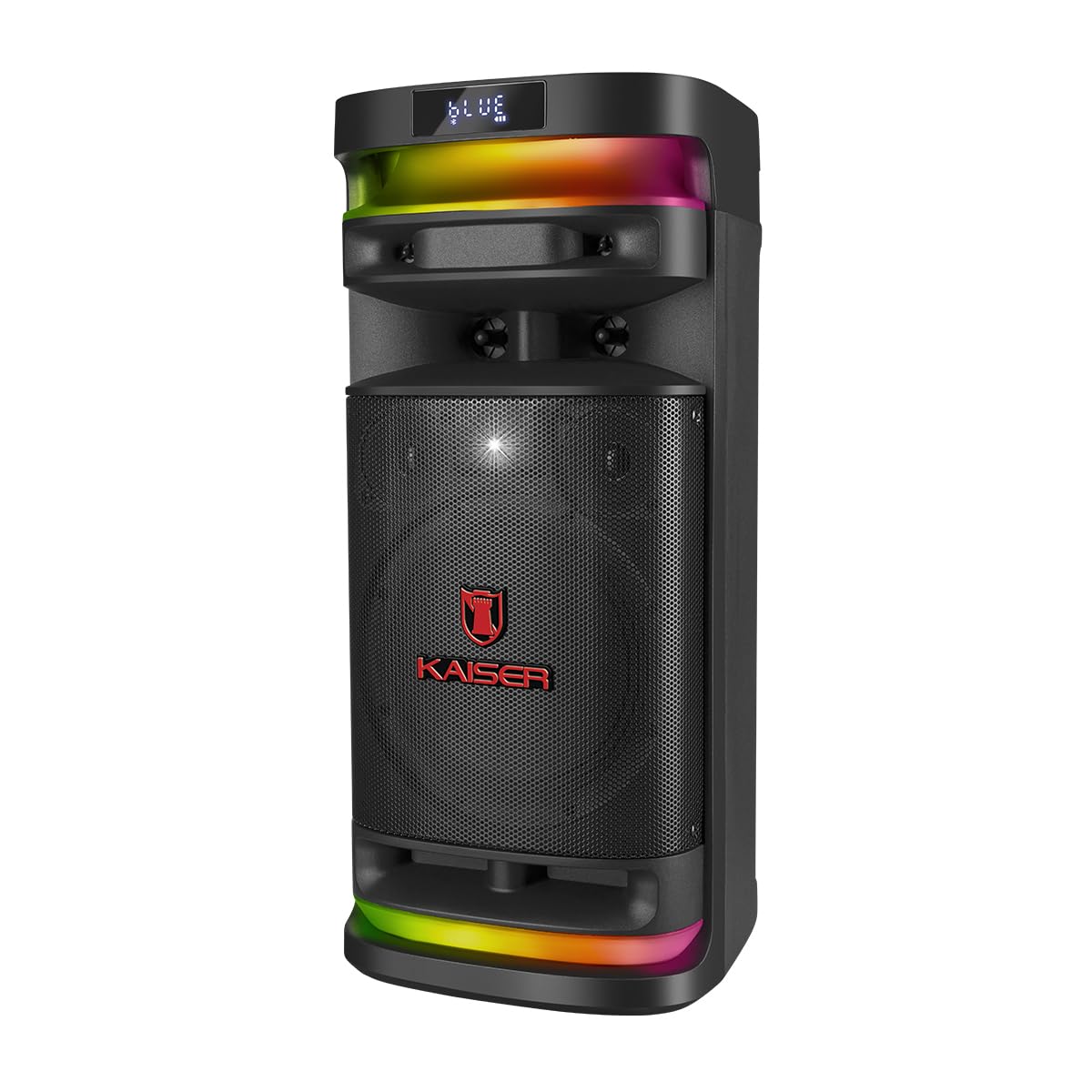
ຮູບທີ 1.1: ດ້ານໜ້າ view of the Kaiser KSB-4008 Portable Bluetooth Speaker, showcasing its speaker grille and RGB LED light strips.
ຄຸນນະສົມບັດທີ່ສໍາຄັນ:
- 40W RMS Power: Provides powerful and balanced audio output.
- Full Speaker Configuration: Includes an 8-inch woofer, 2.5-inch tweeter, and mid-range for comprehensive sound reproduction.
- RGB LED Light Effect: Multi-color lighting creates a vibrant atmosphere.
- KSR-Link Technology: Allows wireless connection to another compatible speaker for ampສຽງສະແດງໃຫ້ເຫັນ.
- ການເຊື່ອມຕໍ່ອະເນກປະສົງ: Supports Bluetooth, USB, and Micro SD for various audio sources.
- ແບັດເຕີຣີທີ່ສາມາດສາກໄດ້: Enables extended use without constant power connection.
- Portable and Sturdy Design: Easy to transport for indoor or outdoor events.
2. ເນື້ອໃນຊຸດ
ກະລຸນາກວດເບິ່ງກ່ອງສໍາລັບລາຍການຕໍ່ໄປນີ້:
- Kaiser KSB-4008 Portable Bluetooth Speaker
- ໄມໂຄຣໂຟນໄຮ້ສາຍ
- Charging Cable (for microphone)
- ຄູ່ມືຜູ້ໃຊ້ (ເອກະສານນີ້)

ຮູບທີ 2.1: Included wireless microphone and its USB charging cable.
3. ຄໍາແນະນໍາຄວາມປອດໄພ
To ensure safe operation and prevent damage, please read and follow these safety guidelines:
- ຢ່າເຮັດໃຫ້ລໍາໂພງຖືກນໍ້າ, ຄວາມຊຸ່ມຊື່ນ, ຫຼືອຸນຫະພູມທີ່ຮຸນແຮງ.
- ຫຼີກລ່ຽງການວາງລຳໂພງໄວ້ໃກ້ແຫຼ່ງຄວາມຮ້ອນ ຫຼື ແສງແດດໂດຍກົງເປັນເວລາດົນ.
- ຮັບປະກັນການລະບາຍອາກາດທີ່ເຫມາະສົມ; ຫ້າມປິດຊ່ອງລະບາຍອາກາດໃດໆ.
- Use only the specified charging cables and power adapters.
- Do not attempt to open, modify, or repair the speaker yourself. Refer all servicing to qualified personnel.
- ຮັກສາລໍາໂພງຢູ່ຫ່າງຈາກເດັກນ້ອຍ ແລະສັດລ້ຽງ.
- Operate the speaker within its specified voltage ແລະຂໍ້ຈໍາກັດໃນປະຈຸບັນ.
- ຫຼີກລ່ຽງການຟັງໃນປະລິມານທີ່ສູງເກີນໄປເປັນເວລາດົນໆເພື່ອປ້ອງກັນຄວາມເສຍຫາຍຂອງການໄດ້ຍິນ.
4. ອົງປະກອບຂອງຜະລິດຕະພັນແລະການຄວບຄຸມ
Familiarize yourself with the various parts and controls of your KSB-4008 speaker.
ຮູບທີ 4.1: Top Control Panel Layout.
ຟັງຊັນແຜງຄວບຄຸມ:
- ສະຫວິດໄຟຟ້າ: ເປີດ/ປິດລຳໂພງ.
- CARGA (Charge) Indicator: Lights up when charging.
- AUX Input: Jack 3.5mm ສໍາລັບອຸປະກອນສຽງພາຍນອກ.
- ພອດ USB: ສໍາລັບ USB flash drives.
- ຊ່ອງສຽບ Micro SD: For Micro SD cards.
- ການປ້ອນຂໍ້ມູນ MIC: 6.35mm jack for wired microphone (if used).
- GUIT Input: 6.35mm jack for guitar (if used).
- VOL MIC (Microphone Volume): Adjusts the volume of the microphone.
- VOLUMEN (Master Volume): Adjusts the overall speaker volume.
- ປຸ່ມ LED: Controls the RGB LED light effects.
- GRAB Button: For recording audio (functionality may vary).
- MIC PRIO (Microphone Priority): ບຸລິມະສິດສຽງໄມໂຄຣໂຟນຫຼາຍກວ່າເພງ.
- REPETIR (Repeat) Button: ຫຼິ້ນຊ້ຳເພງ ຫຼື ລາຍການເພງປັດຈຸບັນ.
- Previous Track / Rewind Button: Skips to previous track or rewinds.
- ປຸ່ມຫຼິ້ນ/ຢຸດຊົ່ວຄາວ: ຫຼິ້ນ ຫຼືຢຸດການຫຼິ້ນສຽງຊົ່ວຄາວ.
- Next Track / Fast Forward Button: Skips to next track or fast forwards.
- MODO BT (Mode/Bluetooth) Button: Switches between input modes (Bluetooth, USB, Micro SD, AUX) and initiates Bluetooth pairing.
5. ການຕິດຕັ້ງແລະການນໍາໃຊ້ເບື້ອງຕົ້ນ
5.1 ກຳລັງສາກລຳໂພງ
- Connect the speaker to a power outlet using a compatible charging cable (not explicitly listed but implied).
- The 'CARGA' indicator light on the control panel will illuminate during charging.
- Once fully charged, the indicator light may change color or turn off. Disconnect the speaker from the power source.
5.2 ການເປີດ/ປິດ
- To turn ON the speaker, toggle the ພະລັງງານ switch to the 'ON' position.
- To turn OFF the speaker, toggle the ພະລັງງານ ສະວິດໄປຕຳແໜ່ງ 'ປິດ'.
5.3 Wireless Microphone Setup
- Ensure the wireless microphone is charged. Use the provided USB charging cable if necessary.
- Turn on the microphone using its power button.
- The microphone should automatically pair with the speaker. If not, refer to the microphone's specific instructions for pairing.
- ປັບລະດັບສຽງໄມໂຄຣໂຟນໂດຍໃຊ້ປຸ່ມ VOL MIC knob on the speaker's control panel.
6. ຄໍາແນະນໍາການດໍາເນີນງານ
6.1 ການເຊື່ອມຕໍ່ Bluetooth
- ເປີດລຳໂພງ.
- ກົດ MODO BT button repeatedly until 'BLUE' or 'BT' appears on the display, indicating Bluetooth mode. The speaker will enter pairing mode.
- ໃນອຸປະກອນມືຖືຂອງທ່ານ, ເປີດໃຊ້ Bluetooth ແລະຊອກຫາອຸປະກອນທີ່ມີຢູ່.
- Select 'Kaiser KSB-4008' (or similar name) from the list.
- Once connected, the speaker will confirm with an audible prompt, and the display will show a stable Bluetooth icon.
6.2 USB / Micro SD ຫຼິ້ນໄດ້
- Insert a USB flash drive or Micro SD card into the respective port/slot.
- The speaker should automatically switch to USB or Micro SD mode and begin playing audio fileຖ້າບໍ່, ໃຫ້ກົດປຸ່ມ MODO BT button to select the correct input mode.
- ໃຊ້ປຸ່ມຫຼິ້ນ/ຢຸດຊົ່ວຄາວ, ເພງກ່ອນໜ້ານີ້ ແລະ ເພງຕໍ່ໄປ ເພື່ອຄວບຄຸມການຫຼິ້ນຄືນ.
6.3 AUX Input
- ເຊື່ອມຕໍ່ອຸປະກອນສຽງພາຍນອກ (ເຊັ່ນ: ໂທລະສັບສະຫຼາດ, ເຄື່ອງຫຼິ້ນ MP3) ກັບ AUX input using a 3.5mm audio cable.
- ກົດ MODO BT button to select AUX input mode.
- ຄວບຄຸມການຫຼິ້ນຄືນຈາກອຸປະກອນທີ່ເຊື່ອມຕໍ່ຂອງທ່ານ.
6.4 KSR-Link Technology (True Wireless Stereo)
KSR-Link allows you to connect two KSB-4008 speakers wirelessly for a stereo sound experience.
- Ensure both KSB-4008 speakers are powered on and in Bluetooth mode, but not connected to any device.
- ໃນລຳໂພງໜຶ່ງ (ອັນນີ້ຈະເປັນລຳໂພງຫຼັກ), ກົດປຸ່ມຄ້າງໄວ້ MODO BT button for a few seconds until you hear a confirmation tone, indicating KSR-Link pairing mode.
- ລຳໂພງສອງຕົວຈະເຊື່ອມຕໍ່ກັນໂດຍອັດຕະໂນມັດ. ເມື່ອເຊື່ອມຕໍ່ແລ້ວ, ທ່ານຈະໄດ້ຍິນສຽງຢືນຢັນອີກຄັ້ງ.
- ຕອນນີ້, ເຊື່ອມຕໍ່ອຸປະກອນມືຖືຂອງທ່ານກັບລຳໂພງຫຼັກຜ່ານ Bluetooth ຕາມທີ່ໄດ້ອະທິບາຍໄວ້ໃນພາກ 6.1.
- ດຽວນີ້ສຽງຈະຫຼິ້ນໃນສະເຕຣິໂອຜ່ານລຳໂພງທັງສອງ.
6.5 RGB LED Light Control
- ກົດ LED button on the control panel to cycle through different light modes or to turn the lights off.
6.6 ການປັບລະດັບສຽງ
- Adjust the overall speaker volume using the ປະລິມານ ລູກບິດ.
- Adjust the wireless microphone volume using the VOL MIC ລູກບິດ.
7. ບໍາລຸງຮັກສາ
7.1 ການທໍາຄວາມສະອາດ
- Always turn off the speaker and disconnect it from power before cleaning.
- ໃຊ້ຜ້າປຽກອ່ອນໆເຊັດພື້ນຜິວພາຍນອກ.
- ຢ່າໃຊ້ເຄື່ອງເຮັດຄວາມສະອາດຂັດ, ຂີ້ເຜີ້ງ, ຫຼືສານລະລາຍເພາະວ່າພວກມັນອາດຈະທໍາລາຍການສໍາເລັດຮູບ.
- ຫຼີກເວັ້ນການໄດ້ຮັບຄວາມຊຸ່ມຊື່ນເຂົ້າໄປໃນຊ່ອງເປີດໃດໆ.
7.2 ການເກັບຮັກສາ
- ເກັບຮັກສາລຳໂພງໄວ້ໃນບ່ອນທີ່ເຢັນ, ແຫ້ງ, ຫ່າງຈາກແສງແດດໂດຍກົງ ແລະ ອຸນຫະພູມທີ່ຮ້າຍກາດ.
- ຖ້າເກັບຮັກສາໄວ້ເປັນໄລຍະເວລາ, ສາກແບັດເຕີຣີໃຫ້ເຫຼືອປະມານ 50% ທຸກໆສອງສາມເດືອນເພື່ອຮັກສາສຸຂະພາບຂອງແບັດເຕີຣີ.
8. ການແກ້ໄຂບັນຫາ
If you encounter issues with your KSB-4008 speaker, refer to the following common problems and solutions:
| ບັນຫາ | ສາເຫດທີ່ເປັນໄປໄດ້ | ການແກ້ໄຂ |
|---|---|---|
| ລຳໂພງບໍ່ເປີດ. | ແບັດເຕີຣີໝົດ. ສະວິດໄຟປິດຢູ່. | Charge the speaker. Ensure the POWER switch is in the 'ON' position. |
| ບໍ່ມີສຽງອອກ. | Volume is too low. Incorrect input mode. Device not connected properly. | ເພີ່ມທະວີການ ປະລິມານ ລູກບິດ. ກົດ MODO BT to select the correct input. Reconnect your audio source. |
| ອຸປະກອນ Bluetooth ບໍ່ສາມາດຈັບຄູ່ໄດ້. | ລຳໂພງບໍ່ຢູ່ໃນໂໝດຈັບຄູ່. ອຸປະກອນໄກເກີນໄປ. ແຊກແຊງ. | Ensure speaker is in Bluetooth pairing mode (display shows 'BLUE' or 'BT'). Move device closer to speaker. Turn off other Bluetooth devices. |
| ໄມໂຄຣໂຟນໄຮ້ສາຍບໍ່ເຮັດວຽກ. | Microphone battery low. Microphone not turned on. VOL MIC is low. | Charge the microphone. Turn on the microphone. Increase the VOL MIC ລູກບິດ. |
| KSR-Link connection fails. | Speakers already connected to a device. Incorrect pairing procedure. | Ensure both speakers are not connected to any Bluetooth device. Follow KSR-Link pairing steps carefully. |
9. ຂໍ້ມູນຈໍາເພາະ
Technical specifications for the Kaiser KSB-4008 Portable Bluetooth Speaker:

ຮູບທີ 9.1: Kaiser KSB-4008 Speaker Dimensions.
| ຄຸນສົມບັດ | ຂໍ້ມູນຈໍາເພາະ |
|---|---|
| ຍີ່ຫໍ້ | ໄກເຊີ |
| ຕົວແບບ | KSB-4008 |
| ປະເພດລຳໂພງ | ບັນຍາກາດ |
| Peak Power Handling (RMS) | 40 ວັດ |
| ຂະໜາດ Woofer | 8 ນິ້ວ |
| ຂະ ໜາດ Tweeter | 2.5 ນິ້ວ |
| ການເຊື່ອມຕໍ່ | Bluetooth, USB, Micro SD, AUX |
| ຄຸນນະສົມບັດພິເສດ | RGB LED Light, KSR-Link Technology, Rechargeable Battery |
| ຂະໜາດສິນຄ້າ (LxWxH) | 37.4 x 36.2 x 80 cm (Note: Image shows 56.7 x 26.5 x 25 cm, please verify actual dimensions) |
| ນ້ໍາຫນັກລາຍການ | 500 g |
| ອົງປະກອບລວມ | ໄມໂຄຣໂຟນໄຮ້ສາຍ |
Note: Product dimensions from specifications (37.4 x 36.2 x 80 cm) differ from the provided image (56.7 x 26.5 x 25 cm). Please refer to the product packaging for the most accurate dimensions.
10. ການຮັບປະກັນແລະການສະຫນັບສະຫນູນ
For warranty information and technical support, please refer to the warranty card included with your product or visit the official Kaiser webເວັບໄຊ. ຮັກສາໃບຮັບເງິນການຊື້ຂອງທ່ານໄວ້ເປັນຫຼັກຖານການຊື້ສໍາລັບການຮຽກຮ້ອງການຮັບປະກັນໃດໆ.