
CINMOORE CM-C2LU
CINMOORE Dummy Camera User Manual
Model: CM-C2LU
Brand: CINMOORE
1. ບົດແນະນຳ
Thank you for choosing the CINMOORE Dummy Camera. This indoor security camera is designed to provide reliable surveillance and peace of mind for your home or office. Featuring advanced AI detection, two-way audio, and clear night vision, it offers comprehensive monitoring capabilities. This manual will guide you through the setup, operation, and maintenance of your device.

ຮູບພາບ: ທາງຫນ້າ view of the CINMOORE Dummy Camera, a white, spherical camera with a dark lens and a blue indicator light, featuring the CINMOORE logo at its base.
2. ມີຫຍັງແດ່
ກະລຸນາກວດສອບເນື້ອໃນຂອງຊຸດເພື່ອໃຫ້ແນ່ໃຈວ່າລາຍການທັງຫມົດມີຢູ່:
- CINMOORE Security Camera × 1
- Mounting Bracket Base × 1
- ຕົວແປງໄຟຟ້າ× 1
- Data Cable × 1
- Screw Anchors × 1
- ຄູ່ມືຜູ້ໃຊ້× 1
3. ຕັ້ງຄ່າ
The CINMOORE Dummy Camera offers flexible installation options for various indoor environments.
3.1 ຕົວເລືອກການຕິດຕັ້ງ
The camera can be installed using the following methods:
- ເພດານ Mount: Ideal for wide-angle coverage from above.
- ພູຕັ້ງໂຕະ: Simple placement on any flat surface.
- ຕົວຍຶດຕິດWallາ: Secure installation on a vertical surface.
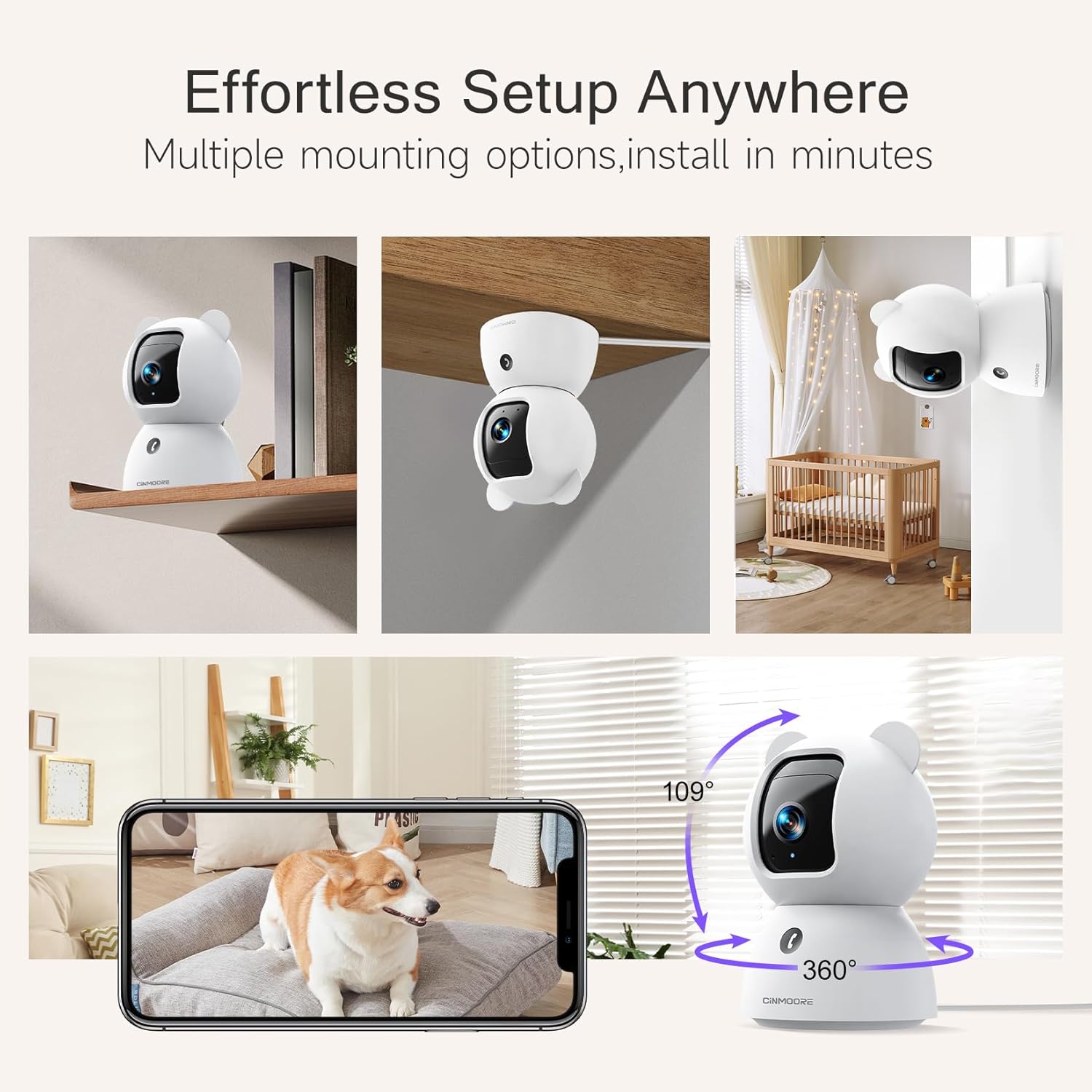
Image: A collage showing the CINMOORE Dummy Camera mounted in various positions: on a shelf, inverted on a ceiling, and on a wall, demonstrating its versatile installation options.
3.2 ຂັ້ນຕອນການຕິດຕັ້ງເບື້ອງຕົ້ນ
- ເປີດ: Connect the camera to the power adapter using the provided data cable and plug it into a power outlet.
- ດາວໂຫລດແອັບ:: Download the official CINMOORE app from your smartphone's app store (iOS/Android).
- ການລົງທະບຽນບັນຊີ: ເປີດ app ແລະລົງທະບຽນສໍາລັບບັນຊີໃຫມ່ຫຼືເຂົ້າສູ່ລະບົບຖ້າຫາກວ່າທ່ານມີແລ້ວ.
- ເພີ່ມອຸປະກອນ: Follow the in-app instructions to add your new camera. This typically involves scanning a QR code on the camera or connecting to its temporary Wi-Fi hotspot.
- ການເຊື່ອມຕໍ່ Wi-Fi: Connect the camera to your home Wi-Fi network (2.4GHz recommended).
- ການຈັດວາງ: Position the camera in your desired location, ensuring it has a clear view ຂອງພື້ນທີ່ທີ່ທ່ານຕ້ອງການຕິດຕາມ.
4. ຄໍາແນະນໍາການດໍາເນີນງານ
4.1 Video Quality and Viewing
The camera captures video in 2.5K resolution, providing clear and detailed images. You can view ອາຫານສົດແລະບັນທຶກ footage through the CINMOORE app.

Image: A side-by-side comparison demonstrating the superior clarity of 2.5K resolution (left, showing a baby) versus 2K resolution (right, showing a puppy).
4.2 Pan & Tilt (PTZ) Functionality
The camera features PTZ (Pan, Tilt, Zoom) technology, allowing for 360-degree coverage. You can remotely control the camera's viewing angle through the app to monitor different areas of a room.

Image: The CINMOORE Dummy Camera surrounded by icons representing its features: Ultra HD 2.5K, Sound/Crying Alerts, Smart Night Vision, Encrypted Local Storage (up to 256GB), Secure Cloud Storage, Full Duplex Audio, Human/Pet Tracking, One-Touch Call, and Pan & Tilt, emphasizing its 360-degree protection.
4.3 ສຽງສອງທາງ
Utilize the full-duplex two-way audio feature to communicate with people or pets in the camera's vicinity. This allows for natural, real-time conversations.

Image: A scene depicting a person speaking through a smartphone to a dog via the CINMOORE Dummy Camera, illustrating the two-way audio feature with speech bubbles.
4.4 ວິໄສທັດກາງຄືນ
The camera is equipped with clear IR night vision, providing 2.5K clarity even in low-light or complete darkness, with a range of up to 33 feet.

ຮູບພາບ: ບຸກຄົນ viewing a black-and-white night vision feed from the CINMOORE Dummy Camera on their smartphone, showing a baby and a dog in a crib, demonstrating clear IR night vision in a dark room.
4.5 AI Alerts and Detection
The camera supports various AI-powered detection features without monthly fees, including:
- ກວດຈັບການເຄື່ອນໄຫວ: Alerts you to general movement.
- ການກວດຫາຄົນ: Specifically identifies human figures.
- ການກວດຫາສັດລ້ຽງ: Recognizes pet activity.
- Cry Detection: Notifies you of baby crying sounds.

Image: Two children playing near the CINMOORE Dummy Camera, with icons below representing its AI detection capabilities: Person, Pet, Motion, and Crying, highlighting its no-monthly-fee AI alerts.
4.6 ຕົວເລືອກການເກັບຮັກສາ
The camera offers flexible and secure storage solutions:
- ບ່ອນຈັດເກັບຂໍ້ມູນ SD: Supports local storage via an SD card (not included), expandable up to 512GB. Ensure "SD Card Encryption" is enabled in the app for secure viewing.
- Cloud Storage: Offers AWS Cloud Storage with a 30-day free trial, providing bank-level encrypted storage for your recordings.

Image: A diagram showing the CINMOORE Dummy Camera with callouts for its storage features: SD card slot (expandable up to 512GB), Reset Button, and AWS Cloud Storage (30-day free trial), emphasizing encrypted and secure flexible storage.
5. ບໍາລຸງຮັກສາ
To ensure optimal performance and longevity of your CINMOORE Dummy Camera, follow these maintenance guidelines:
- ທໍາຄວາມສະອາດ: ເຊັດເລນກ້ອງຖ່າຍຮູບ ແລະ ຮ່າງກາຍດ້ວຍຜ້າອ່ອນ ແລະ ແຫ້ງ. ຫຼີກເວັ້ນການນໍາໃຊ້ສານເຄມີທີ່ຮຸນແຮງຫຼືວັດສະດຸຂັດ.
- ການຈັດວາງ: ໃຫ້ແນ່ໃຈວ່າກ້ອງຖ່າຍຮູບຖືກວາງໄວ້ໃນສະຖານທີ່ທີ່ໝັ້ນຄົງ, ຫ່າງຈາກແສງແດດໂດຍກົງ, ອຸນຫະພູມທີ່ຮຸນແຮງ ແລະ ຄວາມຊຸ່ມຊື່ນສູງ.
- ການອັບເດດເຟີມແວ: Regularly check for and install firmware updates through the CINMOORE app to ensure your camera has the latest features and security enhancements.
- ການສະຫນອງພະລັງງານ: ໃຊ້ພຽງແຕ່ອະແດບເຕີໄຟຟ້າຕົ້ນສະບັບທີ່ມາພ້ອມກັບກ້ອງຖ່າຍຮູບເທົ່ານັ້ນ.
6. ການແກ້ໄຂບັນຫາ
If you encounter issues with your CINMOORE Dummy Camera, refer to the following common troubleshooting steps:
- ກ້ອງຖ່າຍຮູບອອບລາຍ: Check your Wi-Fi connection and ensure the camera is within range of your router. Restart the camera by unplugging and re-plugging the power adapter.
- ຄຸນນະພາບວິດີໂອບໍ່ດີ: Ensure the lens is clean and free from dust. Check your internet speed; a stable connection is crucial for high-resolution streaming.
- ບໍ່ມີສຽງ: Verify that the microphone and speaker settings are enabled in the app. Ensure there are no obstructions blocking the microphone or speaker on the camera.
- Detection Not Working: Check the detection sensitivity settings in the app. Ensure the camera's view ແມ່ນຈະແຈ້ງ ແລະ ບໍ່ມີສິ່ງກີດຂວາງ.
- ບໍ່ສາມາດເຊື່ອມຕໍ່ກັບແອັບ: Ensure you have the latest version of the CINMOORE app. Try resetting the camera (using the reset button, if available) and re-adding it to the app.
For further assistance, please contact CINMOORE customer support.
7. ຂໍ້ມູນຈໍາເພາະ
| ຊື່ຕົວແບບ | ກ້ອງຫຼັງຄວາມປອດໄພ |
| ໝາຍເລກຕົວແບບ | CM-C2LU |
| ຍີ່ຫໍ້ | ຊິນມົວ |
| ເຕັກໂນໂລຊີການເຊື່ອມຕໍ່ | ມີສາຍ, Wi-Fi |
| ຄວາມລະອຽດການຖ່າຍວິດີໂອ | 2.5K |
| ການນຳໃຊ້ພາຍໃນ/ນອກ | ພາຍໃນ |
| ຄຸນນະສົມບັດພິເສດ | 2 Way Audio, Cry Detection, HD Resolution, PTZ Technology |
| ຂອບເຂດວິໄສທັດກາງຄືນ | 33 ຟຸດ |
| ປະເພດການຕິດຕັ້ງ | Ceiling Mount / Tabletop Mount / Wall Mount |
| ວັດສະດຸ | Acrylonitrile Butadiene Styrene (ABS) |
| ຂະໜາດລາຍການ L x W x H | 7.6 x 7.6 x 11.4 ຊັງຕີແມັດ |
| ນ້ໍາຫນັກລາຍການ | 340 g |
| ລະດັບຄວາມຕ້ານທານນ້ໍາ | ກັນນ້ຳ |
| ການນໍາໃຊ້ທີ່ແນະນໍາ | Baby Monitoring, Pet Monitoring, Indoor Home Security, Office Surveillance |
8. ການຮັບປະກັນແລະການສະຫນັບສະຫນູນ
ການຮັບປະກັນ: The CINMOORE Dummy Camera comes with a 1-year warranty from the date of purchase. Please retain your proof of purchase for warranty claims.
ສະຫນັບສະຫນູນ: For technical support, troubleshooting assistance, or warranty inquiries, please visit the official CINMOORE website or contact their customer service team. Refer to the product packaging or the CINMOORE app for specific contact details.
Ask a question about this manual
Ask about setup, troubleshooting, compatibility, parts, safety, or missing instructions. Manuals+ will review the question and use this page’s manual context to help answer it.