
1. ບົດແນະນຳ
This manual provides essential information for the safe and efficient operation of your Tornado 65UA5300E 65-inch 4K Frameless Android Smart TV. Please read it thoroughly before using the product and retain it for future reference.

ຮູບພາບ 1.1: ດ້ານຫນ້າ view of the Tornado 65UA5300E Smart TV, showcasing its frameless design and included stand.
2. ຂໍ້ມູນຄວາມປອດໄພ
ປະຕິບັດຕາມຄວາມລະມັດລະວັງດ້ານຄວາມປອດໄພຂັ້ນພື້ນຖານສະເໝີເມື່ອໃຊ້ໂທລະທັດເຄື່ອງນີ້ເພື່ອຫຼຸດຜ່ອນຄວາມສ່ຽງຕໍ່ການເກີດອັກຄີໄພ, ໄຟຟ້າຊອດ ແລະ ການບາດເຈັບ.
- ຢ່າເຮັດໃຫ້ໂທລະທັດຖືກຝົນຫຼືຄວາມຊຸ່ມຊື່ນ.
- ຮັບປະກັນການລະບາຍອາກາດທີ່ເຫມາະສົມ; ຫ້າມປິດປະຕູລະບາຍອາກາດ.
- ຢ່າວາງໂທລະທັດໃສ່ລົດເຂັນ, ຂາຕັ້ງ, ຂາຕັ້ງ, ວົງເລັບ, ຫຼືໂຕະທີ່ບໍ່ໝັ້ນຄົງ.
- ຖອດສາຍໂທລະທັດໃນເວລາມີພາຍຸຟ້າຜ່າ ຫຼືເມື່ອບໍ່ໄດ້ໃຊ້ເປັນເວລາດົນນານ.
- ອ້າງອີງການບໍລິການທັງໝົດໃຫ້ກັບພະນັກງານບໍລິການທີ່ມີຄຸນວຸດທິ.
3. ເນື້ອໃນຊຸດ
ກວດສອບວ່າລາຍການທັງຫມົດແມ່ນມີຢູ່ໃນຊຸດ:
- Tornado 65UA5300E 65-inch 4K Frameless Android Smart TV
- ການຄວບຄຸມໄລຍະໄກ
- ສາຍໄຟ
- ຂາຕັ້ງໂທລະທັດ (2 ໜ່ວຍ)
- screws ສໍາລັບສະພາແຫ່ງປະຈໍາ
- ຄູ່ມືຜູ້ໃຊ້ (ເອກະສານນີ້)
4. ຕັ້ງຄ່າ
4.1 ການຫຸ້ມຫໍ່
ເອົາໂທລະທັດອອກຈາກການຫຸ້ມຫໍ່ຢ່າງລະມັດລະວັງ. ແນະນຳໃຫ້ເກັບຮັກສາການຫຸ້ມຫໍ່ເດີມໄວ້ເພື່ອການຂົນສົ່ງ ຫຼື ການສ້ອມແປງໃນອະນາຄົດ.
4.2 ການຕິດຕັ້ງ
If you are not wall-mounting the TV, attach the included stand pieces. Place the TV face down on a soft, flat surface to prevent screen damage. Align each stand piece with the corresponding slots on the bottom of the TV and secure them with the provided screws.
ຮູບພາບ 4.1: ດ້ານລຸ່ມ view of the TV, illustrating the designated areas for stand attachment.
4.3 ການຕິດຝາ
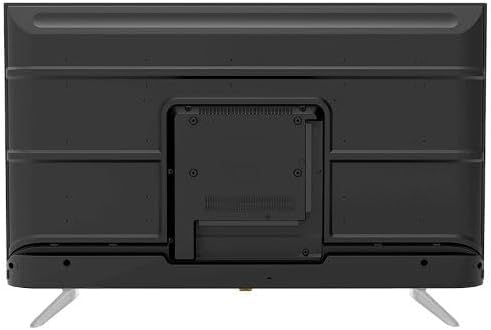
For wall mounting, remove the stand (if attached). Use a VESA-compatible wall mount (not included) that supports the TV's weight and dimensions. Consult a professional for wall mounting to ensure safety and proper installation.

ຮູບພາບ 4.2: ດ້ານຫລັງ view of the TV, highlighting the VESA mounting pattern and various input/output ports.
4.4 ການເຊື່ອມຕໍ່ອຸປະກອນຕໍ່
ເຊື່ອມຕໍ່ອຸປະກອນພາຍນອກຂອງທ່ານກັບໂທລະພາບໂດຍໃຊ້ພອດທີ່ເຫມາະສົມ:
- HDMI: For high-definition devices like Blu-ray players, gaming consoles, or set-top boxes. The TV has 3 HDMI ports, one with ARC support.
- USB: For connecting USB storage devices to play media (video, photos, music). The TV has 2 USB ports.
- LAN: ສໍາລັບການເຊື່ອມຕໍ່ອິນເຕີເນັດແບບມີສາຍ.
- RF ປ້ອນຂໍ້ມູນ: For connecting an antenna or satellite dish for the built-in digital receiver.
- ຜົນຜະລິດສຽງດິຈິຕອນ (Optical): ສໍາລັບການເຊື່ອມຕໍ່ກັບລະບົບສຽງພາຍນອກ.
- Jack ຫູຟັງ (3.5mm): ສໍາລັບການເຊື່ອມຕໍ່ຫູຟັງ.

ຮູບພາບ 4.3: ຂ້າງ view of the TV, illustrating the accessible side input ports.
4.5 ການເປີດເຄື່ອງເບື້ອງຕົ້ນ ແລະຕົວຊ່ວຍສ້າງການຕັ້ງຄ່າ
After connecting the power cable, press the power button on the remote control or TV. The TV will guide you through an initial setup wizard, including language selection, network connection (Wi-Fi or LAN), channel scanning, and Google account setup for Android TV features.
5. ປະຕິບັດການໂທລະພາບ
5.1 ການຄວບຄຸມໄລຍະໄກເກີນview
The included remote control allows you to navigate the TV's functions. It features dedicated buttons for power, volume, channel, input selection, smart TV apps (Netflix, YouTube, Prime Video, Disney+), Google Assistant voice search, and menu navigation.
5.2 ຫນ້າທີ່ພື້ນຖານ
- ເປີດ/ປິດ: ກົດປຸ່ມເປີດປິດ.
- ການຄວບຄຸມລະດັບສຽງ: ໃຊ້ປຸ່ມລະດັບສຽງຂຶ້ນ/ລົງ.
- ການເລືອກຊ່ອງ: ໃຊ້ປຸ່ມຂຶ້ນ/ລົງຊ່ອງ ຫຼືປຸ່ມຕົວເລກ.
- ແຫຼ່ງປ້ອນຂໍ້ມູນ: Press the 'Input' button to select between HDMI, AV, TV, etc.
5.3 ຄຸນສົມບັດໂທລະພາບອັດສະລິຍະ (Android 11)
Your TV runs on Android 11, providing access to a wide range of smart features:
- ແອັບພລິເຄຊັນ: Access pre-installed apps like Netflix, YouTube, Prime Video, Disney+, Shahid VIP, and download more from the Google Play Store.
- ຜູ້ຊ່ວຍ Google: ໃຊ້ຄຳສັ່ງສຽງຜ່ານທາງໄກເພື່ອຄົ້ນຫາ, ຄວບຄຸມ ແລະຂໍ້ມູນ.
- Chromecast ໃນຕົວ: ສົ່ງສັນຍານເນື້ອຫາຈາກສະມາດໂຟນ ຫຼືແທັບເລັດຂອງທ່ານໄປຫາໂທລະພາບໂດຍກົງ.
- Web ຕົວທ່ອງເວັບ: ຊອກຫາອິນເຕີເນັດໂດຍກົງໃນໂທລະພາບຂອງທ່ານ.
- Bluetooth 5.0: ເຊື່ອມຕໍ່ຫູຟັງໄຮ້ສາຍ, ລຳໂພງ ຫຼື ອຸປະກອນ Bluetooth ອື່ນໆ.
5.4 ການຕັ້ງຄ່າຮູບພາບ ແລະສຽງ
ປັບແຕ່ງຂອງທ່ານ viewການຟັງ ແລະປະສົບການຜ່ານເມນູການຕັ້ງຄ່າຂອງໂທລະພາບ:
- ໂໝດຮູບ: Select from Dynamic, Game, Sports, Cinema, or User-defined modes.
- ອຸນຫະພູມສີ: Adjust to Normal, Cool, or Warm.
- ໂໝດສຽງ: Choose from Smart, User, Game, Movie, Music, or News.
- Dolby Digital Plus: Enhanced audio processing for compatible content.
6. ບໍາລຸງຮັກສາ
6.1 ການທໍາຄວາມສະອາດໂທລະພາບ
- ໜ້າຈໍ: ເຊັດໜ້າຈໍຢ່າງອ່ອນໂຍນດ້ວຍຜ້າອ່ອນໆ, ບໍ່ມີເຈັ້ຍ. ສໍາລັບຮອຍທີ່ແຂງກະດ້າງ, ໃຫ້ໃຊ້ເຄື່ອງເຮັດຄວາມສະອາດຫນ້າຈໍທີ່ຖືກອອກແບບມາສະເພາະສໍາລັບໂທລະພາບ, ໃຊ້ກັບຜ້າ, ບໍ່ແມ່ນໂດຍກົງກັບຫນ້າຈໍ.
- ຮ່າງກາຍ: Wipe the TV's frame and back panel with a soft, dry cloth. Do not use abrasive cleaners or solvents.
6.2 ການປັບປຸງຊອບແວ
Ensure your TV's software is up to date for optimal performance and security. Connect the TV to the internet and check for updates periodically through the settings menu.
7. ການແກ້ໄຂບັນຫາ
ຖ້າເຈົ້າພົບບັນຫາ, ໃຫ້ອ້າງອີງເຖິງວິທີແກ້ໄຂທົ່ວໄປຕໍ່ໄປນີ້:
| ບັນຫາ | ການແກ້ໄຂທີ່ເປັນໄປໄດ້ |
|---|---|
| ບໍ່ມີພະລັງງານ | Check if the power cable is securely plugged into the TV and the wall outlet. Ensure the outlet is functional. |
| ບໍ່ມີຮູບ, ແຕ່ສຽງແມ່ນປະຈຸບັນ | ກວດເບິ່ງແຫຼ່ງປ້ອນຂໍ້ມູນ. ໃຫ້ແນ່ໃຈວ່າອຸປະກອນພາຍນອກເປີດ ແລະເຊື່ອມຕໍ່ຢ່າງຖືກຕ້ອງ. |
| ບໍ່ມີສຽງ, ແຕ່ມີຮູບພາບ | Check the volume level and mute status. Verify audio settings and external audio connections. |
| ການຄວບຄຸມໄລຍະໄກບໍ່ເຮັດວຽກ | ປ່ຽນແບັດ. ໃຫ້ແນ່ໃຈວ່າບໍ່ມີສິ່ງກີດຂວາງລະຫວ່າງຣີໂໝດ ແລະເຊັນເຊີ IR ຂອງໂທລະທັດ. |
| ບໍ່ສາມາດເຊື່ອມຕໍ່ກັບ Wi-Fi ໄດ້ | ກວດສອບເຣົາເຕີ ແລະ ໂມເດັມຂອງທ່ານ. ໃສ່ລະຫັດຜ່ານ Wi-Fi ຄືນໃໝ່. ລອງເປີດໂທລະພາບ ແລະ ເຣົາເຕີຄືນໃໝ່. |
ຖ້າບັນຫາຍັງຄົງຢູ່, ໃຫ້ຕິດຕໍ່ຝ່າຍຊ່ວຍເຫຼືອລູກຄ້າ.
8. ຂໍ້ມູນຈໍາເພາະ
| ຄຸນສົມບັດ | ລາຍລະອຽດ |
|---|---|
| ໝາຍເລກຕົວແບບ | 65UA5300E |
| ຂະໜາດໜ້າຈໍ | 65 ນິ້ວ |
| ເຕັກໂນໂລຊີການສະແດງ | LED |
| ຄວາມລະອຽດ | 4K UHD (3840x2160) |
| ອັດຕາສ່ວນ | 16:9 |
| Viewໃນມຸມ | 178 ອົງສາ |
| ຄວາມສະຫວ່າງ | 250 cd/m² |
| ອັດຕາການໂຫຼດຂໍ້ມູນຄືນໃໝ່ | 50/60 Hz |
| ຮອງຮັບ HDR | HDR10, HLG |
| ເຕັກໂນໂລຊີສຽງ | Dolby Digital Plus, Surround Sound |
| ພະລັງງານສຽງອອກ | ຂະ ໜາດ 10W x 2 |
| ລະບົບປະຕິບັດການ | Android 11 |
| ຫນ່ວຍຄວາມຈໍາພາຍໃນ | 16 GB |
| ການເຊື່ອມຕໍ່ | Wi-Fi, Bluetooth 5.0, LAN |
| ວັດສະດຸປ້ອນ | RF Input (Digital) x1, Video Input x1, HDMI x3 (ARC), USB x2, LAN x1 |
| ຜົນໄດ້ຮັບ | Digital Audio Output (Optical) x1, Headphone Jack (3.5mm) x1 |
| ການສະຫນອງພະລັງງານ | AC 90-240V / 50Hz |
| ພະລັງງານສະແຕນບາຍ | 0.5W |
| ຂະຫນາດ (W x H x D) ໂດຍບໍ່ມີການຢືນ | 1446 x 832 x 84 ມມ |
| ຂະໜາດ (W x H x D) ພ້ອມຂາຕັ້ງ | 1446 x 892 x 305 ມມ |
| ນ້ຳໜັກສຸດທິ | 15.32 ກິໂລ |
| ນ້ຳໜັກລວມ | 21.32 ກິໂລ |
| ປະເທດຕົ້ນກໍາເນີດ | ປະເທດເອຢິບ |
9. ການຮັບປະກັນ
This Tornado TV comes with a ຮັບປະກັນ 3 ປີເຕັມຟຣີ. Please retain your proof of purchase for warranty claims. For specific terms and conditions, refer to the warranty card included with your product or contact Tornado customer service.
10. ສະຫນັບສະຫນູນ
For further assistance, technical support, or service inquiries, please contact Tornado customer service. Contact details can typically be found on the manufacturer's official webສະຖານທີ່ຫຼືຢູ່ໃນບັດຮັບປະກັນ.