
1. ບົດແນະນຳ
Thank you for choosing the Parsonver G01 GPS Smart Watch. This manual provides essential information for the proper setup, operation, and maintenance of your device. Please read it carefully to ensure optimal performance and longevity of your smartwatch.

Image: The Parsonver G01 Smart Watch displayed with various outdoor activity scenes, highlighting its versatile use.
2. ເນື້ອໃນຊຸດ
ເມື່ອເປີດແພັກເກັດ, ກວດເບິ່ງວ່າສິນຄ້າທັງໝົດມີຢູ່:
- 1x Parsonver G01 Smart Watch
- ສາຍສາກໄຟແມ່ເຫຼັກ 1x
- 1x ຄູ່ມືຜູ້ໃຊ້

Image: An illustration detailing the package contents, including the smartwatch, charging cable, and user manual.
3. ຄູ່ມືການຕິດຕັ້ງ
3.1 ການສາກ Smart Watch
Before initial use, fully charge your Parsonver G01 Smart Watch. The device features a 520mAh battery, providing extended usage time.
- ເຊື່ອມຕໍ່ສາຍສາກແບບສະນະແມ່ເຫຼັກກັບຜູ້ຕິດຕໍ່ສາກໄຟຢູ່ດ້ານຫຼັງຂອງໂມງ.
- ສຽບປາຍ USB-A ຂອງສາຍເຂົ້າໃສ່ອະແດັບເຕີໄຟ USB ມາດຕະຖານ (ບໍ່ລວມ) ຫຼືພອດ USB ຂອງຄອມພິວເຕີ.
- ຈໍສະແດງຜົນໂມງຈະຊີ້ບອກສະຖານະການສາກໄຟ. ໂດຍປົກກະຕິການສາກເຕັມຈະໃຊ້ເວລາປະມານ 2 ຊົ່ວໂມງ.

ຮູບພາບ: ໂມງອັດສະລິຍະທີ່ເຊື່ອມຕໍ່ກັບສາຍສາກໄຟແມ່ເຫຼັກ, ສະແດງໃຫ້ເຫັນຂະບວນການສາກໄຟ ແລະ ຕົວຊີ້ບອກອາຍຸການໃຊ້ງານຂອງແບັດເຕີຣີ.
3.2 ການຕິດຕັ້ງແອັບ ແລະ ການຈັບຄູ່
To unlock the full functionality of your smartwatch, download and install the companion application on your smartphone.
- Scan the QR code provided in the quick start guide or search for "Glory Fit" in your smartphone's app store (compatible with iOS 9.0/Android 5.0 or above).
- Install the "Glory Fit" application.
- ເປີດ app ແລະປະຕິບັດຕາມຄໍາແນະນໍາໃນຫນ້າຈໍເພື່ອສ້າງບັນຊີຫຼືເຂົ້າສູ່ລະບົບ.
- ໃຫ້ແນ່ໃຈວ່າ Bluetooth ຖືກເປີດໃຊ້ຢູ່ໃນໂທລະສັບສະຫຼາດຂອງທ່ານ.
- In the app, navigate to the device pairing section and select your Parsonver G01 Smart Watch from the list of available devices.
- ຢືນຢັນຄຳຮ້ອງຂໍການຈັບຄູ່ໃນສະມາດໂຟນ ແລະໂມງຂອງທ່ານ.
4. ຄໍາແນະນໍາການດໍາເນີນງານ
4.1 ການນໍາທາງພື້ນຖານ
The Parsonver G01 features a 1.95-inch HD touchscreen for intuitive interaction.
- ປັດຂຶ້ນ/ລົງ: ເຂົ້າເຖິງການຕັ້ງຄ່າດ່ວນ ຫຼືການແຈ້ງເຕືອນ.
- ປັດຊ້າຍ/ຂວາ: Navigate through widgets and main functions.
- ແຕະ: ເລືອກລາຍການ ຫຼືຢືນຢັນການກະທຳໃດໜຶ່ງ.
- ກົດປຸ່ມຂ້າງຄຽງ: ກັບໄປທີ່ໜ້າຈໍຫຼັກ ຫຼືເປີດ/ປິດ.
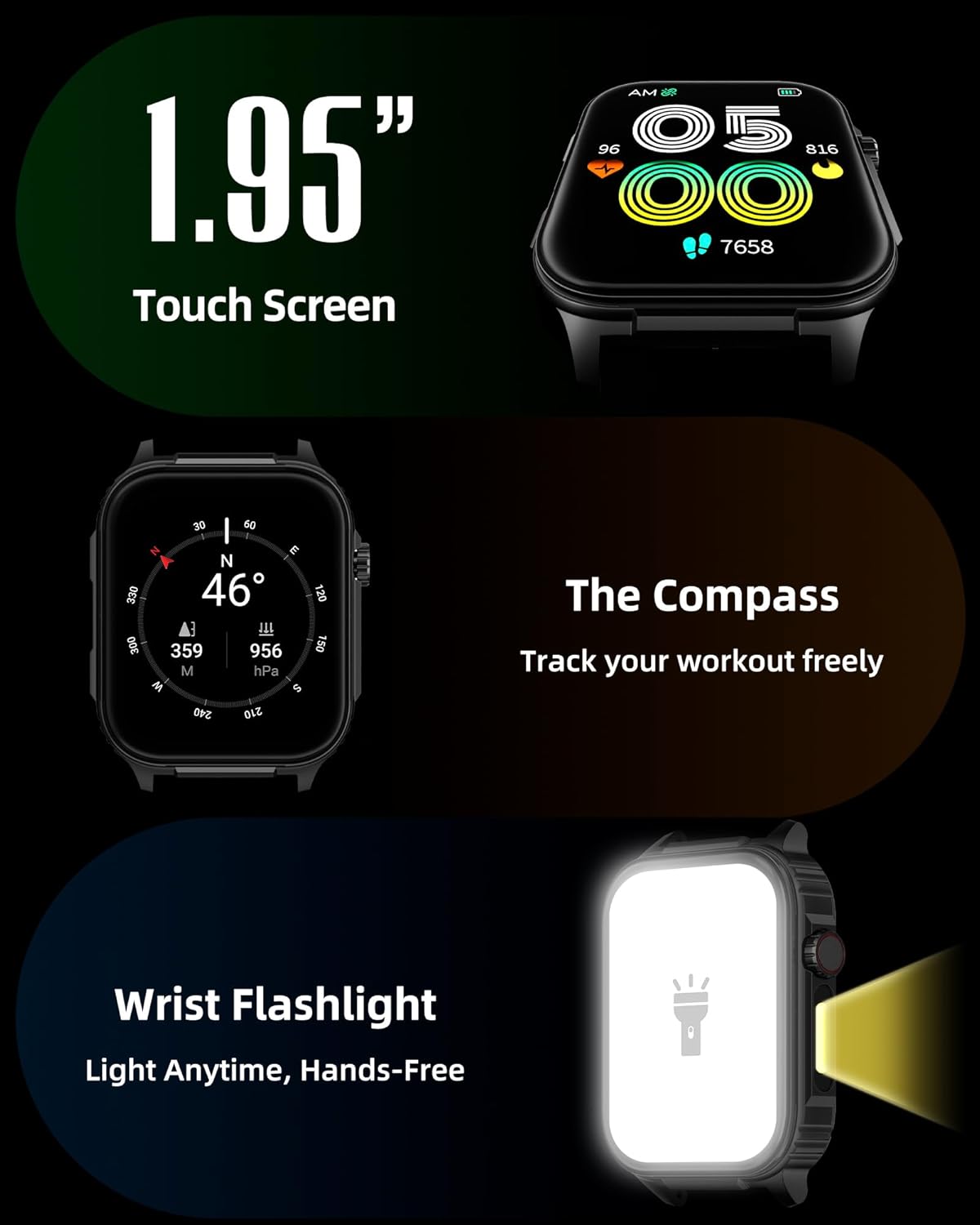
ຮູບພາບ: A ລາຍລະອຽດ view of the smartwatch screen, illustrating its 1.95-inch size, along with icons for compass and flashlight functions.
4.2 Bluetooth Calls and Smart Notifications
Stay connected by making and receiving calls directly from your wrist and receiving instant notifications.
- ໂທອອກ: Once paired via Bluetooth 5.3, access the call function on your watch to dial numbers or select contacts.
- ຮັບສາຍ: Incoming calls will display on the watch screen, allowing you to answer or reject them.
- ການແຈ້ງເຕືອນ: The watch provides vibration alerts for SMS, WhatsApp, Facebook, and other app notifications. Note: Direct replies from the watch are not supported.

Image: A man on a mountain trail interacting with his Parsonver G01 Smart Watch to manage a Bluetooth call, with notification icons floating above.

Image: The smartwatch screen showing incoming messages and app notifications, demonstrating its smart notification feature.
4.3 ໜ້າໂມງ
ປັບແຕ່ງໂມງຂອງທ່ານດ້ວຍໜ້າໂມງທີ່ມີໃຫ້ຫຼາຍກວ່າ 400 ແບບ ຫຼື ສ້າງການອອກແບບແບບກຳນົດເອງຂອງທ່ານເອງ.
- Access the watch face market through the "Glory Fit" app.
- Browse and download various styles, from classic to modern.
- Use the DIY function to upload custom photos and create unique watch faces.

ຮູບພາບ: ໜ້າຈໍສະແດງໂມງອັດສະລິຍະasing a variety of watch face designs, illustrating the customization options.
4.4 Built-in GPS and Compass
Track your outdoor activities and navigate with precision, even without your phone.
- GPS ຕິດຕາມ: The built-in GPS accurately records your route, distance, and pace during outdoor workouts like running, hiking, and cycling. Ensure you are in an open area for optimal GPS signal acquisition.
- ເຂັມທິດ: Utilize the integrated compass for navigation and orientation during your adventures.

Image: A cyclist wearing the Parsonver G01 Smart Watch, with the watch display showing GPS tracking data and a map.

Image: Hikers on a mountain trail, with the smartwatch displaying compass and GPS navigation features.
ໄຟສາຍໄຟ LED 4.5 ໜ່ວຍ
The integrated LED flashlight provides convenient illumination when needed.
- Access the flashlight function from the quick settings menu or a dedicated shortcut.
- The flashlight provides hands-free lighting for various situations.

Image: The smartwatch with its LED flashlight illuminated, demonstrating its utility in dark environments.
4.6 ໂໝດກິລາ
The watch supports over 100 built-in sports modes to track your physical activities.
- Select your desired sport from the activity menu.
- The watch will track metrics such as calories burned, steps, distance, and heart rate in real-time.
- Examples include running, cycling, yoga, hiking, football, and more.

Image: An athlete tying shoelaces, with the smartwatch displaying various sports tracking metrics like steps, calories, distance, and heart rate.

Image: A visual representation of the smartwatch's extensive range of over 100 built-in sports modes, including running, football, and cycling.
4.7 ການຕິດຕາມສຸຂະພາບ
The Parsonver G01 provides comprehensive health monitoring features to help you maintain a healthy lifestyle.
- ການກວດສອບອັດຕາການເຕັ້ນຫົວໃຈ: ຕິດຕາມອັດຕາການເຕັ້ນຂອງຫົວໃຈຢ່າງຕໍ່ເນື່ອງ 24/7.
- ການຕິດຕາມອົກຊີເຈນໃນເລືອດ (SpO2): Track your blood oxygen levels in real-time.
- ການຕິດຕາມການນອນ: ວິເຄາະນອນ stages (deep, light, awake) to provide insights into your sleep quality.
- Stress and Mood Monitoring: ຊ່ວຍໃຫ້ທ່ານເຂົ້າໃຈແລະຈັດການລະດັບຄວາມກົດດັນຂອງທ່ານ.
- ເຕືອນປະຈຳຕົວ: ກະຕຸ້ນໃຫ້ທ່ານຍ້າຍຫຼັງຈາກໄລຍະເວລາທີ່ບໍ່ມີການເຄື່ອນໄຫວ.
- ອອກກໍາລັງກາຍຫາຍໃຈ: Guided breathing sessions to help reduce stress.
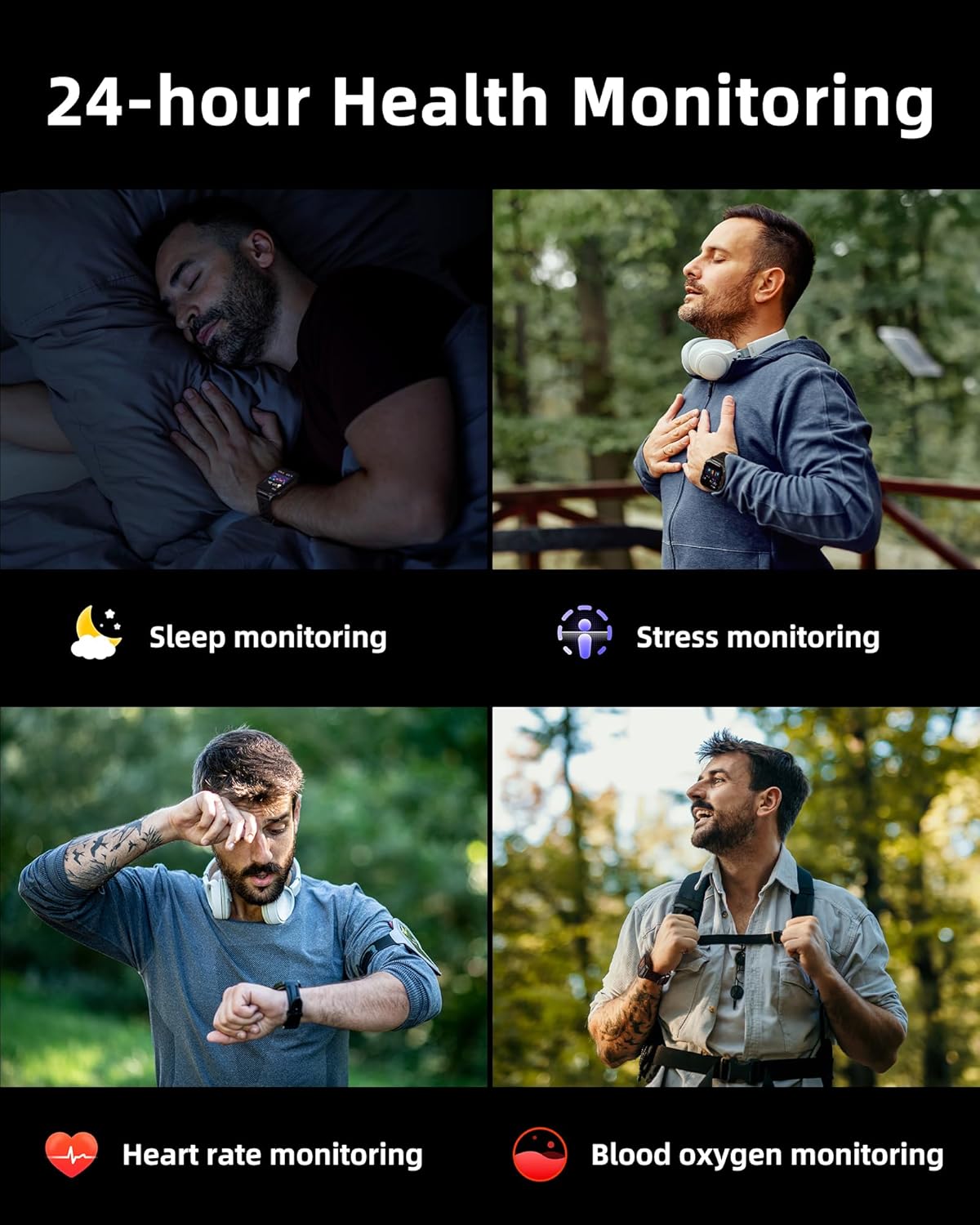
Image: A collage illustrating the smartwatch's 24-hour health monitoring capabilities, including sleep, stress, heart rate, and blood oxygen tracking.

Image: A man sleeping, with the smartwatch on his wrist, and a graphic showing detailed sleep analysis data.
4.8 ຫນ້າທີ່ປະຕິບັດອື່ນໆ
The Parsonver G01 includes a variety of additional features to assist with daily tasks:
- ໂມງປຸກ: ຕັ້ງໂມງປຸກຫຼາຍອັນ.
- ໂມງຈັບເວລາ ແລະໂມງຈັບເວລາ: ສຳລັບການກຳນົດເວລາທີ່ແນ່ນອນ.
- ເຄື່ອງຄິດໄລ່: ຟັງຊັນເລກຄະນິດພື້ນຖານ.
- ປະຕິທິນ: View ວັນທີ ແລະ ຕາຕະລາງເວລາ.
- ການຄວບຄຸມດົນຕີ: Play, pause, skip tracks on your connected phone.
- ພະຍາກອນອາກາດ: ຮັບການອັບເດດສະພາບອາກາດຕາມເວລາຈິງ.
- ຜູ້ຊ່ວຍສຽງ: ໂຕ້ຕອບກັບຜູ້ຊ່ວຍສຽງຂອງໂທລະສັບຂອງທ່ານ.
- ການຄວບຄຸມກ້ອງຖ່າຍຮູບທາງໄກ: ກະຕຸ້ນກ້ອງຖ່າຍຮູບໂທລະສັບຂອງທ່ານຈາກໄລຍະໄກ.
- ຊອກຫາໂທລະສັບ: ຊອກຫາສະມາດໂຟນຂອງທ່ານໃສ່ຜິດ.
- ຍົກຂຶ້ນເພື່ອປຸກ: Automatically activate the screen when you raise your wrist.

Image: A display of various practical functions on the smartwatch, including alarm, timer, stopwatch, calculator, calendar, music control, and weather.
5. ບໍາລຸງຮັກສາ
5.1 ການຕໍ່ຕ້ານນ້ໍາ
The Parsonver G01 Smart Watch has an IP68 waterproof rating, meaning it is resistant to dust and can withstand immersion in water up to 1.5 meters for 30 minutes. It is suitable for daily splashes, hand washing, and light rain.
ໝາຍເຫດສຳຄັນ:
- The IP68 rating does not make the watch suitable for swimming, showering, or sauna use. Exposure to hot water, steam, or high-pressure water jets may compromise the water resistance.
- ຫຼີກເວັ້ນການກົດປຸ່ມພາຍໃຕ້ນ້ໍາ.
- If the watch gets wet, dry it thoroughly before charging or using the touchscreen.

Image: A hand wearing the smartwatch under running water, illustrating its IP68 waterproof capabilities for everyday use.
5.2 ທໍາຄວາມສະອາດແລະດູແລ
- ເຮັດຄວາມສະອາດໂມງ ແລະ ສາຍເປັນປະຈຳດ້ວຍຜ້າອ່ອນ ແລະ ແຫ້ງ.
- ຖ້າຈໍາເປັນ, ໃຊ້ d ເລັກນ້ອຍamp ເຊັດດ້ວຍສະບູອ່ອນໆ, ຈາກນັ້ນລ້າງອອກ ແລະເຊັດໃຫ້ແຫ້ງ.
- ຫຼີກລ່ຽງການໃຊ້ສານເຄມີທີ່ຮຸນແຮງ, ເຄື່ອງຊັກຜ້າ, ຫຼືສານລະລາຍ, ເພາະວ່າສິ່ງເຫຼົ່ານີ້ສາມາດທໍາລາຍເຄື່ອງສໍາເລັດຮູບ ແລະອົງປະກອບຂອງໂມງໄດ້.
- Keep the charging contacts clean and free of debris to ensure proper charging.
6. ການແກ້ໄຂບັນຫາ
If you encounter issues with your Parsonver G01 Smart Watch, refer to the following common solutions:
- ໂມງບໍ່ເປີດ: ກວດໃຫ້ແນ່ໃຈວ່າໂມງຖືກສາກເຕັມແລ້ວ. ເຊື່ອມຕໍ່ມັນກັບເຄື່ອງສາກຢ່າງໜ້ອຍ 30 ນາທີ.
- ບໍ່ສາມາດຈັບຄູ່ກັບສະມາດໂຟນໄດ້:
- ກວດໃຫ້ແນ່ໃຈວ່າ Bluetooth ເປີດຢູ່ໃນໂທລະສັບ ແລະໂມງຂອງທ່ານ.
- ໃຫ້ແນ່ໃຈວ່າໂມງຢູ່ໃນຂອບເຂດ Bluetooth ຂອງໂທລະສັບຂອງທ່ານ.
- ຣີສະຕາດທັງໂມງ ແລະໂທລະສັບຂອງທ່ານ.
- Check if the "Glory Fit" app has necessary permissions on your phone.
- ຂໍ້ມູນ GPS ບໍ່ຖືກຕ້ອງ:
- ໃຫ້ແນ່ໃຈວ່າທ່ານຢູ່ໃນພື້ນທີ່ກາງແຈ້ງທີ່ມີຄວາມຊັດເຈນ view ຂອງທ້ອງຟ້າສໍາລັບການຮັບດາວທຽມທີ່ດີກວ່າ.
- Allow sufficient time for the watch to acquire a GPS signal before starting an activity.
- Screen lights up during sleep: This can be caused by wrist movements activating the raise-to-wake feature. You may be able to disable or adjust the sensitivity of the raise-to-wake feature in the watch settings or the companion app.
- ຊີວິດຫມໍ້ໄຟສັ້ນ:
- Frequent use of GPS, Bluetooth calls, and continuous health monitoring can consume more battery.
- Reduce screen brightness or shorten screen-on time.
- ປິດການແຈ້ງເຕືອນທີ່ບໍ່ຈໍາເປັນ.
- Compass inaccuracy: Calibrate the compass if available in the watch settings or app. Ensure no strong magnetic fields are nearby.
If the issue persists, consult the FAQ section within the "Glory Fit" app or contact customer support.
7. ຂໍ້ມູນຈໍາເພາະ
| ຄຸນສົມບັດ | ຂໍ້ມູນຈໍາເພາະ |
|---|---|
| ໝາຍເລກຕົວແບບ | G01 |
| ຂະໜາດໜ້າຈໍ | 1.95 ນິ້ວ |
| ປະເພດການສະແດງ | Full Touch Screen HD |
| ຄວາມອາດສາມາດຫມໍ້ໄຟ | 520 mAh Lithium Polymer |
| ການໃຊ້ງານປົກກະຕິຂອງແບັດເຕີຣີ | 7-10 ມື້ |
| ເວລາສະແຕນບາຍ | ສູງສຸດ 40 ມື້ |
| ເວລາສາກໄຟ | Approx. 2 Hours (Magnetic Fast Charging) |
| ການເຊື່ອມຕໍ່ | Bluetooth 5.3 |
| ຄວາມເຂົ້າກັນໄດ້ຂອງລະບົບປະຕິບັດການ | iOS 9.0 / Android 5.0 or above |
| ການຈັດອັນດັບຄວາມຕ້ານທານນ້ໍາ | IP68 |
| ຄຸນນະສົມບັດໃນຕົວ | GPS, Compass, LED Flashlight |
| ການຕິດຕາມສຸຂະພາບ | Heart Rate, Blood Oxygen, Sleep, Stress, Mood |
| ໂໝດກິລາ | 100+ |
| ນ້ໍາຫນັກລາຍການ | 47 ກຣາມ (1.66 ອອນສ໌) |
| ຄວາມອາດສາມາດເກັບຮັກສາຫນ່ວຍຄວາມຈໍາ | 256 MB |
8. ການຮັບປະກັນແລະການສະຫນັບສະຫນູນ
Parsonver is committed to providing reliable products and dedicated customer support. For any questions, technical assistance, or warranty inquiries, please refer to the contact information provided with your purchase or visit the official Parsonver webເວັບໄຊ.