1. ບົດແນະນຳ
The SCULPFUN iCube Pro is a compact desktop laser engraver and cutter designed for precision and ease of use. It features a 5000mW diode laser, an ultra-fine 0.06mm laser focus, and a built-in smoke filtration system. This manual provides essential information for safe and effective operation of your device.
Official product video demonstrating the SCULPFUN iCube Pro laser engraver's features and capabilities.

The SCULPFUN iCube Pro, a compact laser engraver, shown with various engraved items, highlighting its versatility.
2. ຂໍ້ມູນຄວາມປອດໄພ
This device is a Laser Class 4 product. Always adhere to safety guidelines to prevent injury.
- ການປົກປ້ອງຕາ: The device includes a detachable laser filter enclosure that allows direct observation of the laser without goggles. However, always wear the provided laser safety goggles when operating the machine, especially if the enclosure is removed or damaged.
- ສັນຍານເຕືອນຄວາມຮ້ອນເກີນ: An integrated temperature alarm system will sound and stop the machine if the internal temperature exceeds 45°C, preventing overheating.
- Smoke Filtration: The built-in smoke filtration system effectively filters smoke and odors during operation. Ensure the filter is clean and properly installed for optimal performance.
- ການກວດຈັບການອຽງ: The machine is equipped with a gyroscope that detects tilting beyond 15° or unexpected movement during operation, immediately stopping the laser for safety.
- ການຢຸດສຸກເສີນ: An emergency stop button is provided for immediate shutdown in case of any unforeseen incident.
- ການລະບາຍອາກາດ: Despite the smoke filtration system, ensure adequate ventilation in the work area.
- ວັດສະດຸທີ່ຕິດໄຟໄດ້: Do not engrave or cut highly flammable materials without proper precautions and supervision.

The laser filter enclosure and safety goggles provide eye protection during operation.

The overheat alarm system activates if the internal temperature exceeds 45°C.

The built-in smoke filtering system helps maintain a clean working environment.

Tilt detection automatically stops the laser if the machine is moved or tilted excessively.
3. ຕັ້ງຄ່າ
The SCULPFUN iCube Pro is designed for immediate use with no assembly required.
- ການຫຸ້ມຫໍ່: Carefully remove the engraver from its packaging.
- ການຈັດວາງ: Place the engraver on a stable, level surface. Ensure adequate space around the device for ventilation.
- ການເຊື່ອມຕໍ່ພະລັງງານ: ເຊື່ອມຕໍ່ອະແດບເຕີໄຟຟ້າກັບເຄື່ອງແກະສະຫຼັກແລະຫຼັງຈາກນັ້ນໄປຫາປລັກສຽບໄຟທີ່ເຫມາະສົມ.
- ການຕິດຕັ້ງຊອບແວ: Download the official SCULPFUN mobile App or connect to a computer via Bluetooth or Type-C data cable. Compatible software includes LightBurn and LaserGRBL.

The iCube Pro requires no assembly, offering a plug-and-play experience.

The device is ready to use right out of the box.
4. ຄໍາແນະນໍາການດໍາເນີນງານ
4.1 Material Placement and Focusing
- ວັດສະດຸສະຖານທີ່: Position the material to be engraved or cut within the designated engraving area (125x125mm).
- Quick Focusing: Use the built-in focus knob to adjust the distance between the laser module and the material until the laser spot is at its smallest point. This ensures optimal engraving and cutting precision.
- Detachable Hood: For engraving larger objects that do not fit inside the machine, the laser filter hood can be detached. This allows the machine to be placed directly on the surface of the object.

Adjust the focus using the built-in knob for precise results.

The detachable hood enables engraving on objects larger than the internal work area.
4.2 ການຄວບຄຸມຊອບແວ
Control the iCube Pro using either the SCULPFUN mobile App or computer software (LightBurn, LaserGRBL).
- ແອັບຯມືຖື: The SCULPFUN App offers a user-friendly interface for beginners to quickly start engraving projects.
- ຊອບແວຄອມພິວເຕີ: Connect via Bluetooth or Type-C data cable to use LightBurn or LaserGRBL for more advanced control and design capabilities.

The iCube Pro supports control via smartphone app or computer software.
4.3 Engraving and Cutting Materials
The iCube Pro can engrave on a wide range of materials and cut specific ones:
- ວັດສະດຸທີ່ສາມາດແກະສະຫຼັກໄດ້: Wood, leather, bamboo, ceramics, stainless steel, acrylic, cardboard, food, fabric, rubber, coated metal, glass.
- ວັດສະດຸທີ່ສາມາດຕັດໄດ້: Soft wood (up to 10mm thick), black acrylic (up to 6mm thick).
- Note for Reflective Materials: For materials like metal, glass, or ceramics, it is recommended to blacken the surface first to improve laser absorption and achieve better engraving results. Do not attempt to cut hard materials such as metal, ceramic, and glass.
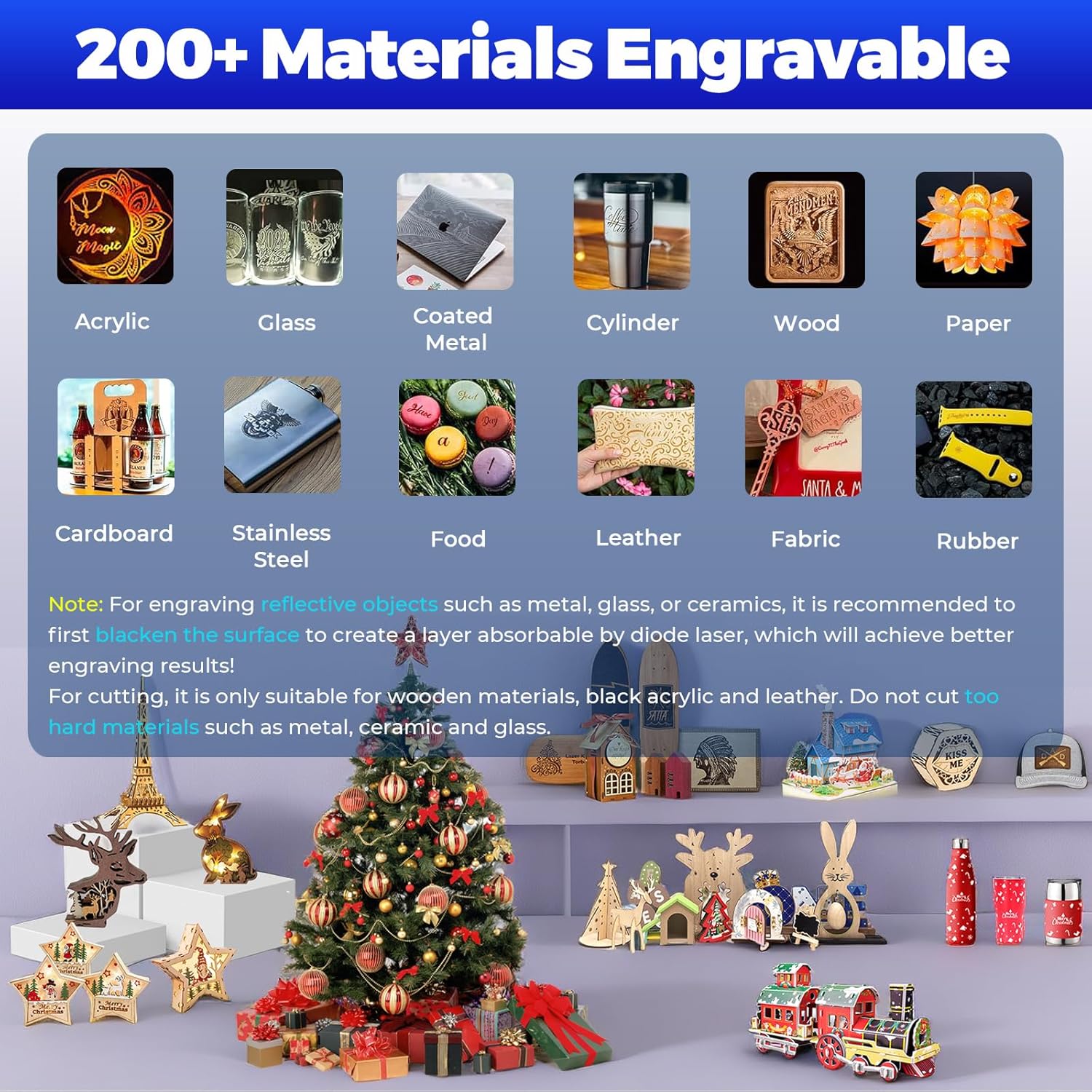
The iCube Pro supports engraving on over 200 types of materials.

The 5W laser can cut soft wood up to 10mm and black acrylic up to 6mm.
5. ບໍາລຸງຮັກສາ
Regular maintenance ensures optimal performance and longevity of your SCULPFUN iCube Pro.
- ທໍາຄວາມສະອາດ: Regularly clean the engraving area and the laser module to remove dust and debris. Use a soft, dry cloth.
- Smoke Filter: Inspect and clean or replace the smoke filter as needed. A clogged filter can reduce filtration efficiency.
- ການອະນາໄມເລນ: Periodically clean the laser lens with a specialized lens cleaning solution and cloth to maintain engraving precision.
6. ການແກ້ໄຂບັນຫາ
If you encounter issues with your iCube Pro, refer to the following common solutions:
- ອຸປະກອນບໍ່ເປີດ: Ensure the power adapter is securely connected to both the engraver and the power outlet. Check the power switch.
- ເລເຊີບໍ່ຍິງ: Verify that the device is properly connected to the control software/app and that the safety features (e.g., overheat alarm, tilt detection) are not activated. Ensure the material is correctly placed and focused.
- ຄຸນນະພາບການແກະສະຫລັກ / ຕັດບໍ່ດີ: Check the laser focus. Ensure the material is clean and flat. Adjust power and speed settings in the software according to the material type. For reflective materials, ensure the surface is blackened if necessary.
- Overheat Alarm Activation: If the temperature alarm sounds, allow the machine to cool down. Ensure the ventilation vents are not obstructed.
- Unexpected Stops: If the machine stops unexpectedly, check for tilt detection activation (due to movement) or if the emergency stop button was pressed.
- ບັນຫາການເຊື່ອມຕໍ່: For Bluetooth connections, ensure the device is discoverable and within range. For Type-C, check the cable and port integrity.
7. ຂໍ້ມູນຈໍາເພາະ
| ຄຸນສົມບັດ | ຂໍ້ມູນຈໍາເພາະ |
|---|---|
| ໝາຍເລກຕົວແບບ | iCube Pro |
| ພະລັງງານເລເຊີ | 5000mW (5W) Diode Laser |
| Laser Focus | 0.06ມມ |
| ຄວາມໄວການແກະສະຫຼັກ | ສູງເຖິງ 10000 ມມ/ນາທີ |
| ພື້ນທີ່ແກະສະຫຼັກ | 125mm x 125mm |
| Max. Cutting Thickness (Soft Wood) | 10ມມ |
| Max. Cutting Thickness (Black Acrylic) | 6ມມ |
| ຂະໜາດສິນຄ້າ | 10.31 x 11.81 x 8.89 ນິ້ວ |
| ນ້ໍາຫນັກລາຍການ | 7.05 ປອນ |
| ຜູ້ຜະລິດ | SCULPFUN Technology Co., Ltd. |
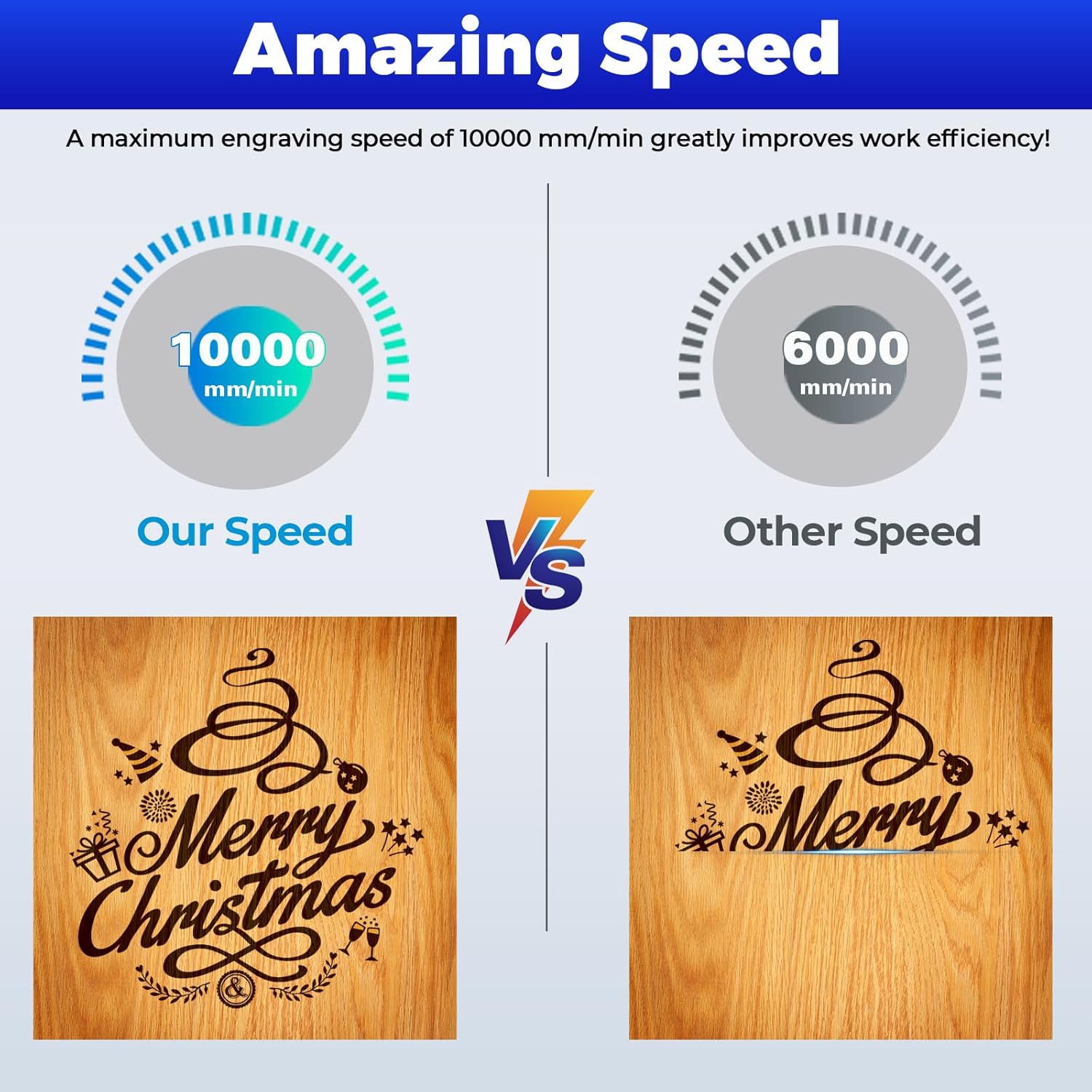
The iCube Pro offers an engraving speed of up to 10000 mm/min.
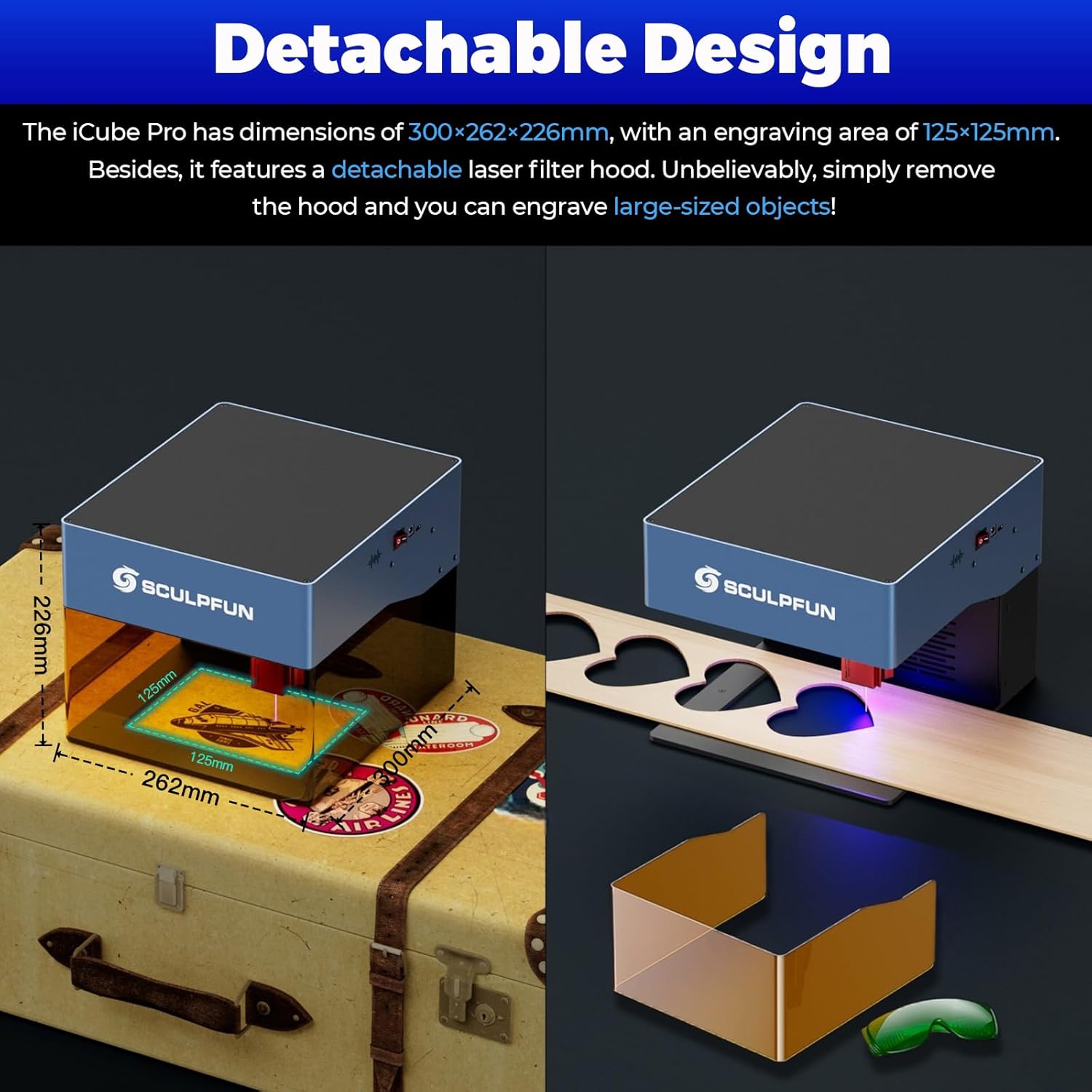
The compact design (262x300x226mm) and detachable hood offer versatility.
8. ການຮັບປະກັນແລະການສະຫນັບສະຫນູນ
For warranty information and technical support, please refer to the official SCULPFUN webເວັບໄຊ ຫຼືຕິດຕໍ່ບໍລິການລູກຄ້າຂອງເຂົາເຈົ້າໂດຍກົງ. ຮັກສາໃບຮັບເງິນການຊື້ຂອງທ່ານໄວ້ເປັນຫຼັກຖານການຊື້ສໍາລັບການຮ້ອງຂໍການຮັບປະກັນ.
ຊັບພະຍາກອນອອນໄລນ໌:
- Visit the official SCULPFUN webເວັບໄຊສຳລັບຄຳຖາມທີ່ຖາມເລື້ອຍໆ, ອັບເດດຊອບແວ ແລະຊັບພະຍາກອນເພີ່ມເຕີມ.
- Consult the SCULPFUN App for in-app support and tutorials.