
ແນະນຳ
Thank you for choosing the Greadio CD03P Portable Bluetooth CD Player. This manual provides essential information for the safe and efficient operation of your device. Please read it thoroughly before use and retain it for future reference.
The Greadio CD03P is a versatile audio device featuring CD playback, Bluetooth 5.3 connectivity, dual wireless karaoke microphones, dynamic LED lights, and multiple input options including USB, TF card, and AUX. It is powered by a 4000mAh rechargeable battery, offering portability for various environments.
ສິນຄ້າເກີນview
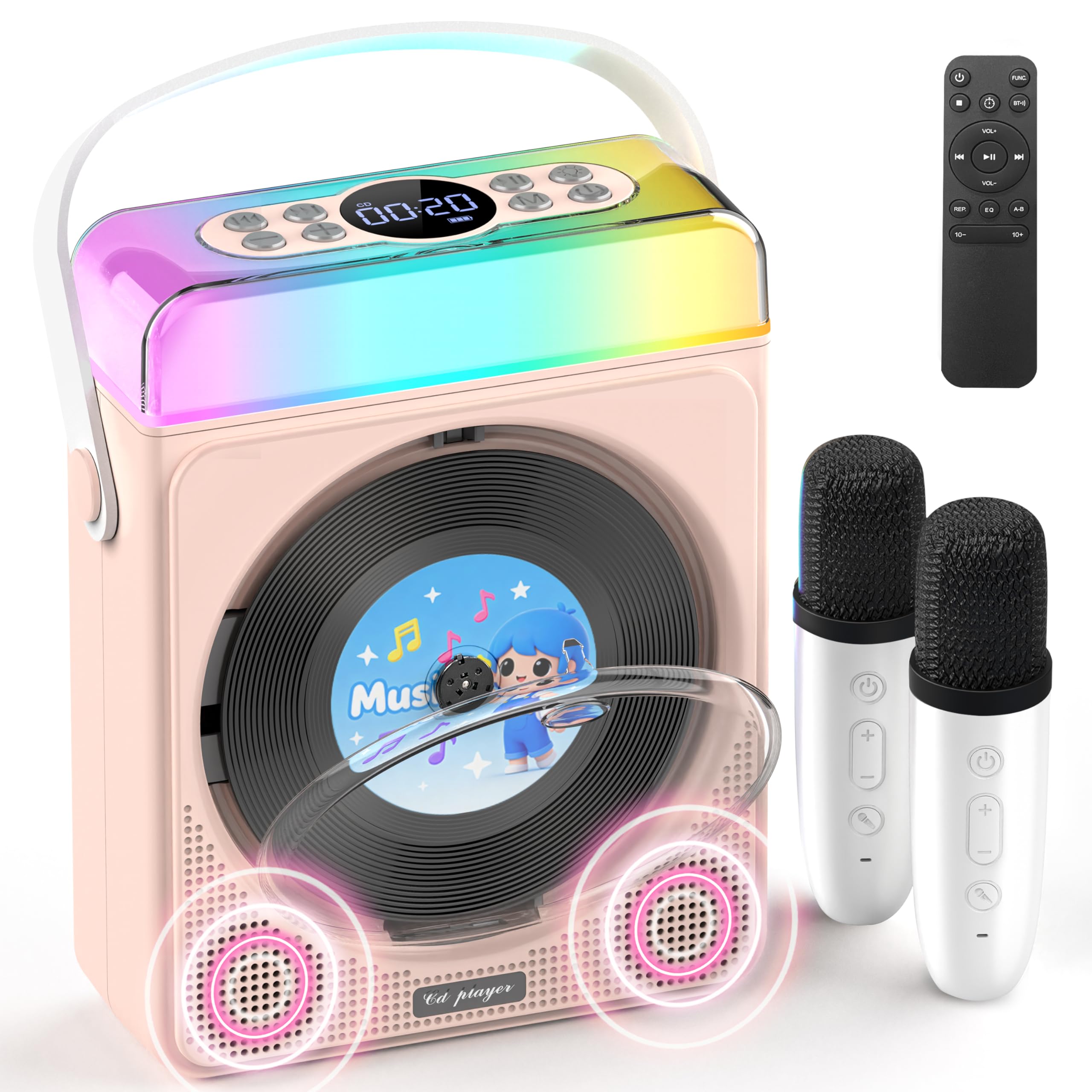
ຮູບທີ 1: Greadio CD03P Portable Bluetooth CD Player with two microphones and LED lights.

ຮູບທີ 2: ເທິງ view of the CD03P showing control buttons and LED light bar.
ເນື້ອໃນຊຸດ:
- Portable CD Player x 1
- ໄມໂຄຣໂຟນຄາລາໂອເກະ x 2
- ສາຍສາກ Type-C x 1
- ການຄວບຄຸມໄລຍະໄກ x 1
- ສາຍໄຟ AUX x 1
ຕັ້ງຄ່າ
ກຳລັງສາກອຸປະກອນ:
Before first use, fully charge the CD player using the provided Type-C charging cable. Connect the cable to the Type-C port on the device and a compatible 5V/2A power adapter (not included). The battery indicator on the display will show charging status.
ການສາກໄມໂຄຣໂຟນ:
The two wireless microphones are rechargeable. Connect them to a power source using their respective charging cables (if provided, or compatible USB cables). Each microphone offers over 30 hours of playtime on a full charge.
ຄໍາແນະນໍາການດໍາເນີນງານ
1. ເປີດ/ປິດ:
ກົດປຸ່ມເປີດປິດຄ້າງໄວ້ (⏻) on the device or remote control to turn the unit on or off.
2. ການເລືອກໂໝດ:
ກົດ M (Mode) button on the device or the FUNC. button on the remote control to cycle through available modes: CD, Bluetooth, USB, TF Card, and AUX.
3. ການຫຼິ້ນ CD:
- Press the release button to open the CD compartment cover.
- Carefully insert a CD (compatible with CD/CD-R/CD-RW/MP3/WMA formats) with the label side facing up.
- ປິດຝາປິດຊ່ອງ CD ຢ່າງປອດໄພ.
- Select "CD" mode using the Mode/FUNC. button. The device will begin loading and playing the CD.
- ໃຊ້ |< ແລະ >| buttons for track navigation (short press) or fast forward/rewind (long press).
- ກົດ ▶|| ປຸ່ມເພື່ອຫຼິ້ນ ຫຼືຢຸດຊົ່ວຄາວ.
ລາຍລະອຽດວິດີໂອ: This video demonstrates how to play CDs, USB, and TF cards on the Greadio CD03P. It shows inserting a CD, selecting the CD mode, and using playback controls.
4. Bluetooth Connectivity (Receiving Mode):
- ກົດ M (Mode) button until "Bluetooth" mode is selected. The display will show "BLUE" and a blinking Bluetooth icon.
- On your mobile device, enable Bluetooth and search for "CD03P".
- Select "CD03P" to pair. A confirmation tone will sound upon successful connection.
- Play audio from your mobile device, and it will stream through the Greadio CD03P speakers.
ລາຍລະອຽດວິດີໂອ: This video illustrates the Bluetooth receiving mode, showing how to connect a mobile phone to the Greadio CD03P for audio playback.
5. Bluetooth Connectivity (Transmitting Mode):
The CD03P can transmit audio to external Bluetooth speakers or headphones when in CD, USB, TF, or AUX mode (not in Bluetooth receiving mode).
- Ensure the CD03P is in CD, USB, TF, or AUX mode.
- ກົດສັ້ນ BT button on the remote control. The Bluetooth icon on the display will blink.
- ເຮັດໃຫ້ລຳໂພງ Bluetooth ພາຍນອກ ຫຼື ຫູຟັງຂອງທ່ານເຂົ້າສູ່ໂໝດຈັບຄູ່.
- Once connected, the Bluetooth icon on the CD03P will stop blinking. Audio will now play through the external Bluetooth device.
- To disconnect, short press the BT ປຸ່ມອີກເທື່ອຫນຶ່ງ.
ລາຍລະອຽດວິດີໂອ: This video demonstrates the Bluetooth transmitting mode, showing how to connect the Greadio CD03P to external Bluetooth speakers or headphones.
6. ການຫຼິ້ນບັດ USB/TF:
- Insert a USB flash drive into the USB port or a TF card into the TF card slot on the back of the device.
- ກົດ M (ໂໝດ) ປຸ່ມ ຫຼື FUNC. button on the remote to select "USB" or "TF" mode.
- ອຸປະກອນຈະກວດຫາ ແລະ ຫຼິ້ນສຽງທີ່ເຂົ້າກັນໄດ້ໂດຍອັດຕະໂນມັດ file(MP3/WMA/WAV/APE/FLAC).
- ໃຊ້ |< ແລະ >| buttons for track navigation (short press) or fast forward/rewind (long press).
- ກົດ ▶|| ປຸ່ມເພື່ອຫຼິ້ນ ຫຼືຢຸດຊົ່ວຄາວ.
Note: For best performance with USB/TF cards, use 64GB or less. Reformat 128GB cards to FAT32 if needed.
7. AUX Input:
- Connect an external audio device (e.g., smartphone, MP3 player) to the AUX port on the back of the CD03P using the provided AUX cable.
- ກົດ M (ໂໝດ) ປຸ່ມ ຫຼື FUNC. button on the remote to select "AUX" mode.
- Play audio from your external device. The sound will be output through the CD03P speakers.
8. Karaoke Microphones:
- Turn on the microphones by pressing their power buttons. They will automatically connect to the CD03P.
- ໃຊ້ +/- buttons on the microphone to adjust microphone volume.
- ກົດ MIC button on the microphone to cycle through five voice effects: Female, Monster, Baby, Original, and KTV mode.
- ກົດ ພະລັງງານ button on the microphone to switch between microphone modes (e.g., adjust background music, microphone volume, reverb).
ລາຍລະອຽດວິດີໂອ: This video demonstrates how to connect and use the wireless microphones with the Greadio CD03P, including switching voice effects and adjusting settings.
9. ໄຟ LED:
- The RGB light (LED1) turns on automatically when the device is powered on.
- ກົດສັ້ນ ແສງສະຫວ່າງ button on the device or remote to cycle through various light effects: breathing light (red, purple, blue, cyan, green, yellow, orange) and solid colors.
- ກົດຄ້າງໄວ້ ແສງສະຫວ່າງ button to turn the LED lights off.
ລາຍລະອຽດວິດີໂອ: This video showcases the dynamic LED light features of the Greadio CD03P, demonstrating how to cycle through different light modes and colors.
10. ການຄວບຄຸມປະລິມານ:
ໃຊ້ VOL+ ແລະ VOL- buttons on the device or remote control to adjust the main speaker volume.
11. ໂໝດ EQ:
ກົດສັ້ນ EQ button on the remote control to switch between different equalizer modes (e.g., Pop, Jazz, Classic, Bass, Flat, Rock).
12. ໂມງຈັບເວລານອນ:
The CD03P can function as a night light with a sleep timer. Refer to the full user manual for detailed instructions on setting the sleep timer.
ບໍາລຸງຮັກສາ
- ຮັກສາອຸປະກອນໃຫ້ຫ່າງຈາກນ້ໍາແລະຄວາມຊຸ່ມ.
- ເຮັດຄວາມສະອາດອຸປະກອນດ້ວຍຜ້າອ່ອນໆ, ແຫ້ງ. ຢ່າໃຊ້ເຄື່ອງເຮັດຄວາມສະອາດຂັດຫຼືສານລະລາຍ.
- ຫຼີກເວັ້ນການເປີດເຜີຍອຸປະກອນກັບອຸນຫະພູມທີ່ຮຸນແຮງຫຼືແສງແດດໂດຍກົງ.
- Do not press the CD base directly.
- ເມື່ອບໍ່ໄດ້ໃຊ້ເປັນເວລາດົນ, ໃຫ້ເກັບຮັກສາອຸປະກອນໄວ້ໃນບ່ອນທີ່ເຢັນ, ແຫ້ງ.
ການແກ້ໄຂບັນຫາ
| ບັນຫາ | ສາເຫດທີ່ເປັນໄປໄດ້ | ການແກ້ໄຂ |
|---|---|---|
| ອຸປະກອນບໍ່ເປີດ. | ບັນຫາແບັດເຕີຣີ ຫຼື ພະລັງງານຕໍ່າ. | ສາກອຸປະກອນໃຫ້ເຕັມ. ໃຫ້ແນ່ໃຈວ່າສາຍສາກໄຟໄດ້ເຊື່ອມຕໍ່ຢ່າງຖືກຕ້ອງ. |
| CD ບໍ່ຫຼິ້ນ ຫຼືຂ້າມ. | ແຜ່ນຊີດີເປື້ອນ, ມີຮອຍຂີດຂ່ວນ, ຫຼື ໃສ່ບໍ່ຖືກຕ້ອງ. | Clean the CD with a soft cloth. Ensure the CD is inserted correctly with the label side up. Try a different CD. |
| ການຈັບຄູ່ Bluetooth ລົ້ມເຫລວ. | Device is not in Bluetooth mode or too far from the paired device. | Ensure the CD03P is in Bluetooth receiving mode. Move devices closer. Disconnect from other Bluetooth devices. |
| ໄມໂຄຣໂຟນບໍ່ເຮັດວຽກ. | Microphone is off, uncharged, or out of range. | Turn on the microphone. Charge the microphone. Ensure it is within range of the CD03P. |
| ບໍ່ມີສຽງ. | ລະດັບສຽງຕໍ່າເກີນໄປ ຫຼືຖືກປິດສຽງ. ເລືອກໂໝດບໍ່ຖືກຕ້ອງ. | Increase volume. Check if the device is muted. Ensure the correct input mode (CD, Bluetooth, USB, TF, AUX) is selected. |
| ອຸປະກອນບໍ່ຕອບສະໜອງ. | ຄວາມຜິດພາດຂອງຊອບແວຊົ່ວຄາວ. | Use a thin object to press the ຣີເຊັດ button on the back of the device. |
ຂໍ້ມູນຈໍາເພາະ
| ຄຸນສົມບັດ | ລາຍລະອຽດ |
|---|---|
| ໝາຍເລກຕົວແບບ | CD03P |
| ຂະໜາດສິນຄ້າ | 6.81 x 2.52 x 8.15 ນິ້ວ |
| ນ້ໍາຫນັກລາຍການ | 1.97 ປອນ |
| ຄວາມອາດສາມາດຫມໍ້ໄຟ | 4000mAh (ສາມາດສາກໄຟໄດ້) |
| ການເຊື່ອມຕໍ່ | ບລູທູດ 5.3, USB, ບັດ TF, AUX |
| ຄວາມເຂົ້າກັນໄດ້ຂອງ CD | CD/CD-R/CD-RW/MP3/WMA |
| ອົງປະກອບລວມ | Portable CD Player, 2 Karaoke Microphones, Type-C Charging Cable, Remote Control, AUX Cable |
ການຮັບປະກັນແລະການສະຫນັບສະຫນູນ
Greadio products come with a full year of coverage. For any issues or support needs, please contact Greadio customer service. Refer to the official Greadio webເວັບໄຊ ຫຼືເອກະສານການຊື້ຂອງເຈົ້າສຳລັບລາຍລະອຽດການຕິດຕໍ່.
Note: This device is designed for personal and recreational use. Any unauthorized modifications or misuse may void the warranty.