
1. ບົດແນະນຳ
The NZXT H2 Flow (CI-H21FB-01) is a compact vertical Mini-ITX PC case designed to maximize airflow and save space while accommodating high-performance components. It features smart cable management, tool-less access, and includes dual top fans and a premium PCIe 5.0 riser cable for a streamlined building experience.
ຄຸນນະສົມບັດທີ່ສໍາຄັນ:
- Hybrid Glass-and-Mesh Side Panel: Showcases your build while supporting up to a 280 mm radiator for efficient cooling.
- ການອອກແບບກະທັດຮັດ: A 20.7 L volume fits most GPUs up to 331 mm, offering high-end power in a small footprint.
- High Airflow Panels: Ultra-fine mesh panels on multiple sides maximize fresh air intake and filter dust, keeping components cooler and cleaner.
- Effortless Building: Tool-less panels, integrated cable routing Velcro straps, and intuitive wire management channels simplify installation.
- Pre-Installed Performance: Includes a premium PCIe 5.0 riser cable for vertical GPU mounting and dual F120Q CV fans for immediate exhaust cooling.
2. ຂໍ້ມູນຄວາມປອດໄພ
WARNING: Always disconnect power from your PC before performing any installation, maintenance, or troubleshooting. Failure to do so may result in personal injury or damage to components.
- ອ່ານຄໍາແນະນໍາທັງຫມົດຢ່າງລະອຽດກ່ອນທີ່ຈະຕິດຕັ້ງ.
- ໃສ່ສາຍແຂນຕ້ານການສະຖິດ ຫຼື ແຕະວັດຖຸໂລຫະທີ່ມີພື້ນດິນເລື້ອຍໆເພື່ອປ້ອງກັນຄວາມເສຍຫາຍຂອງໄຟຟ້າສະຖິດ (ESD) ຕໍ່ອົງປະກອບ.
- Handle components with care. Avoid touching pins or exposed circuitry.
- ເກັບຮັກສາຊິ້ນສ່ວນນ້ອຍໆ ແລະວັດສະດຸຫຸ້ມຫໍ່ໃຫ້ຫ່າງຈາກເດັກນ້ອຍ.
- ຮັບປະກັນການລະບາຍອາກາດທີ່ເໝາະສົມອ້ອມຮອບເຄສຄອມພິວເຕີເພື່ອປ້ອງກັນການຮ້ອນເກີນໄປ.
3. ເນື້ອໃນຊຸດ
Verify that all items are present in your NZXT H2 Flow package:
- NZXT H2 Flow Mini-ITX PC Case
- 2 x 120mm F120Q CV Top Fans (pre-installed)
- Premium PCIe 5.0 Riser Cable (pre-installed)
- ກ່ອງອຸປະກອນເສີມ (ມີສະກູ, ສາຍຮັດ, ແລະ ຊິ້ນສ່ວນຂະໜາດນ້ອຍອື່ນໆ)
4. ຄວາມເຂົ້າກັນໄດ້ຂອງອົງປະກອບ
The NZXT H2 Flow case is designed to accommodate specific component sizes for optimal performance and fit:
- ເມນບອດ: Mini ITX
- ບັດກາຟິກ (GPU): Up to 331 mm in length
- Radiator: Up to 280 mm (for liquid cooling solutions)
- ການສະຫນອງພະລັງງານ (PSU): SFX/SFXL form factor is recommended for best compatibility and cable management.
- ແຟນໆ: Includes 2 x 120mm top fans. Additional fan mounting options may be available depending on other component choices.
5. ການຕິດຕັ້ງ & ການຕິດຕັ້ງ
Follow these steps to assemble your PC within the NZXT H2 Flow case. Refer to your individual component manuals for specific installation details.
5.1. Case Overview ແລະຂະຫນາດ
The NZXT H2 Flow is a compact vertical Mini-ITX case. Understanding its dimensions is crucial for planning your build.

5.2. Accessing the Case Interior
The H2 Flow features tool-less panels for easy access to the interior.

5.3. Motherboard and CPU Installation
Install your Mini-ITX motherboard and CPU (with cooler) before placing it into the chassis.
5.4. ການຕິດຕັ້ງຫນ່ວຍບໍລິການສະຫນອງພະລັງງານ (PSU).
The case supports SFX/SFXL power supplies. Mount the PSU in its designated area, typically at the bottom of the case.

5.5. ການຄຸ້ມຄອງສາຍໄຟ
Utilize the integrated cable routing channels and Velcro straps for a clean and organized interior.
5.6. ການຕິດຕັ້ງບັດກາຟິກ (GPU).
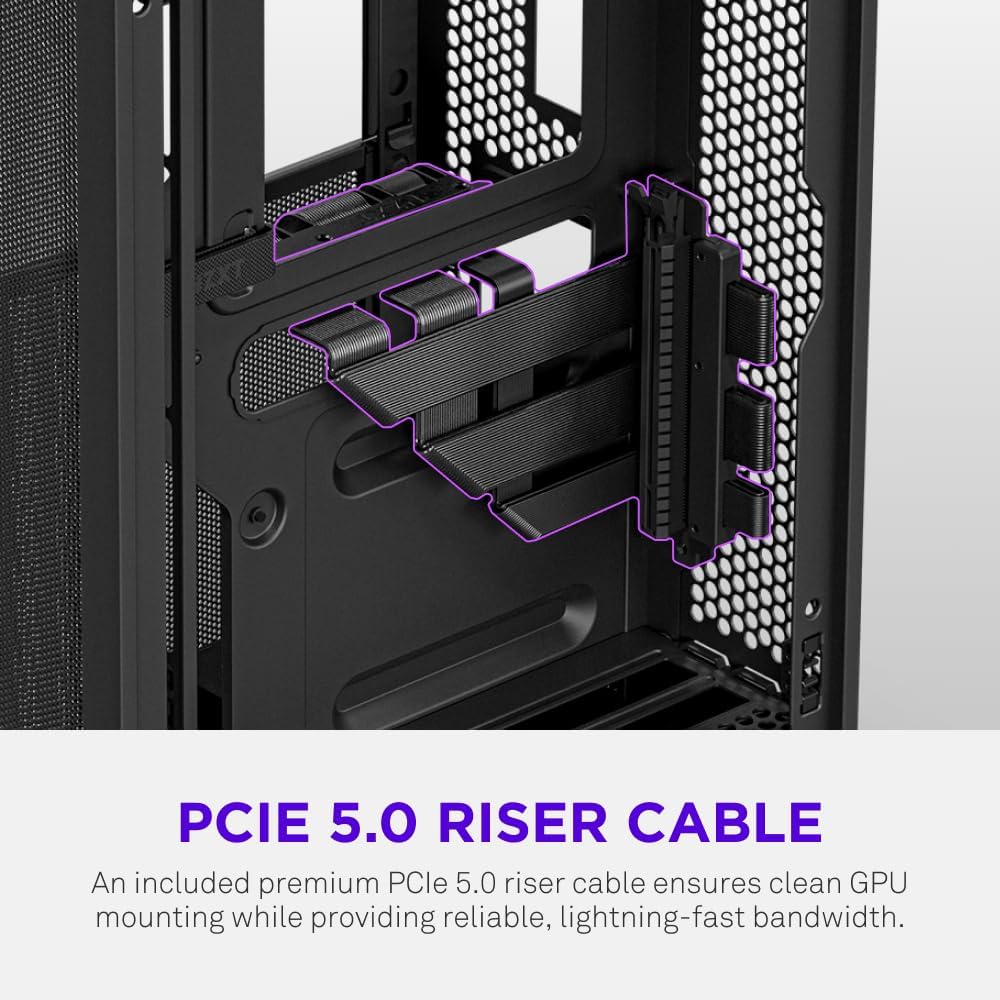
The H2 Flow supports GPUs up to 331 mm in length and includes a premium PCIe 5.0 riser cable for vertical mounting.

5.7. ລະບົບເຮັດຄວາມເຢັນ
The case comes with two pre-installed 120mm F120Q CV fans at the top for exhaust. It also supports up to a 280mm radiator for liquid cooling.


5.8. ຜະລິດຕະພັນເກີນview ວິດີໂອ
ເບິ່ງວິດີໂອຢ່າງເປັນທາງການນີ້ສຳລັບພາບລວມview of the NZXT H2 Flow Mini-ITX PC Gaming Case.
6. ຄໍາແນະນໍາການດໍາເນີນງານ
6.1. ເປີດ/ປິດ
Press the power button located on the front I/O panel to turn your PC on or off.
6.2. ພອດ I/O ທາງໜ້າ
The front I/O panel provides convenient access to:
- ພອດ USB 3.0
- ພອດ USB-C
- Audio Jack (if applicable)
Connect your peripherals such as keyboards, mice, and headsets to these ports.
7. ບໍາລຸງຮັກສາ
7.1. Cleaning Dust Filters
The NZXT H2 Flow features ultra-fine mesh panels that act as dust filters. Regularly clean these panels to maintain optimal airflow and prevent dust buildup inside your PC.
- Gently remove the mesh panels from the case.
- ໃຊ້ລົມອັດ ຫຼື ແປງອ່ອນໆເພື່ອກຳຈັດຝຸ່ນທີ່ສະສົມໄວ້.
- ຕິດແຜງຄືນໃຫ້ແໜ້ນ.
7.2. ທໍາຄວາມສະອາດທົ່ວໄປ
ໃຊ້ອ່ອນ, ງamp cloth to wipe down the exterior of the case. Avoid abrasive cleaners or solvents.
8. ການແກ້ໄຂບັນຫາ
ຖ້າທ່ານພົບບັນຫາກັບການສ້າງຄອມພິວເຕີຂອງທ່ານ, ໃຫ້ພິຈາລະນາຂັ້ນຕອນການແກ້ໄຂບັນຫາທົ່ວໄປຕໍ່ໄປນີ້:
- ບໍ່ມີພະລັງງານ: Ensure all power cables (PSU to wall, PSU to motherboard, CPU, GPU) are securely connected. Check the power switch on the PSU.
- ບໍ່ມີການສະແດງຜົນ: Verify that your monitor is connected to the graphics card (not the motherboard I/O unless using integrated graphics) and that the GPU has proper power connections. Reseat the GPU and RAM.
- ຄວາມຮ້ອນເກີນ: Check fan connections and orientation. Ensure mesh panels are clean and not obstructed. Verify CPU cooler installation and thermal paste application.
- ກວດບໍ່ພົບອົງປະກອບ: Reseat the component (GPU, RAM, storage drives). Check power and data connections.
For more complex issues, consult your individual component manuals or NZXT customer support.
9. ຂໍ້ມູນຈໍາເພາະ
| ຄຸນສົມບັດ | ລາຍລະອຽດ |
|---|---|
| ຍີ່ຫໍ້ | NZXT |
| ຊື່ຕົວແບບ | NZXT H2 Flow |
| ປະເພດກໍລະນີ | Mini-Tower |
| ຄວາມເຂົ້າກັນໄດ້ຂອງເມນບອດ | Mini ITX |
| ຮອງຮັບຄວາມຍາວ GPU | ເຖິງ 331 ມມ |
| ສະຫນັບສະຫນູນ radiator | ເຖິງ 280 ມມ |
| ຮວມມີແຟນໆ | 2 x 120mm F120Q CV Top Fans |
| Included Riser Cable | Premium PCIe 5.0 |
| ປະເພດການຕິດຕັ້ງການສະຫນອງພະລັງງານ | Bottom Mount (SFX/SFXL recommended) |
| ວິທີການເຮັດຄວາມເຢັນ | Air, Liquid |
| ສີ | ດຳ |
| ວັດສະດຸ | ແກ້ວ, ໂລຫະ |
| ນ້ໍາຫນັກລາຍການ | 4.55 ກິໂລກຣາມ |
| Total USB 3.0 Ports | 1 |
| Other Special Features | Tool-less Installation, Integrated Cable Management |
10. ການຮັບປະກັນແລະການສະ ໜັບ ສະ ໜູນ
10.1. ຂໍ້ມູນການຮັບປະກັນ
The NZXT H2 Flow Mini-ITX PC Case comes with a ການຮັບປະກັນຜູ້ຜະລິດ 2 ປີ. ກະລຸນາຮັກສາຫຼັກຖານການຊື້ຂອງທ່ານສໍາລັບການຮຽກຮ້ອງການຮັບປະກັນ.
10.2. ການຊ່ວຍເຫຼືອລູກຄ້າ
For technical assistance, troubleshooting, or warranty inquiries, please visit the official NZXT support webເວັບໄຊ ຫຼືຕິດຕໍ່ທີມງານບໍລິການລູກຄ້າຂອງເຂົາເຈົ້າ.
NZXT Store: Visit the NZXT Store on Amazon