
1. ບົດແນະນຳ
ຂອບໃຈສໍາລັບການຊື້asing the Moukey MAMP3 2.0 Channel Stereo Amplifier. This manual provides essential information for the safe and efficient operation of your device. Please read it thoroughly before use and retain it for future reference.
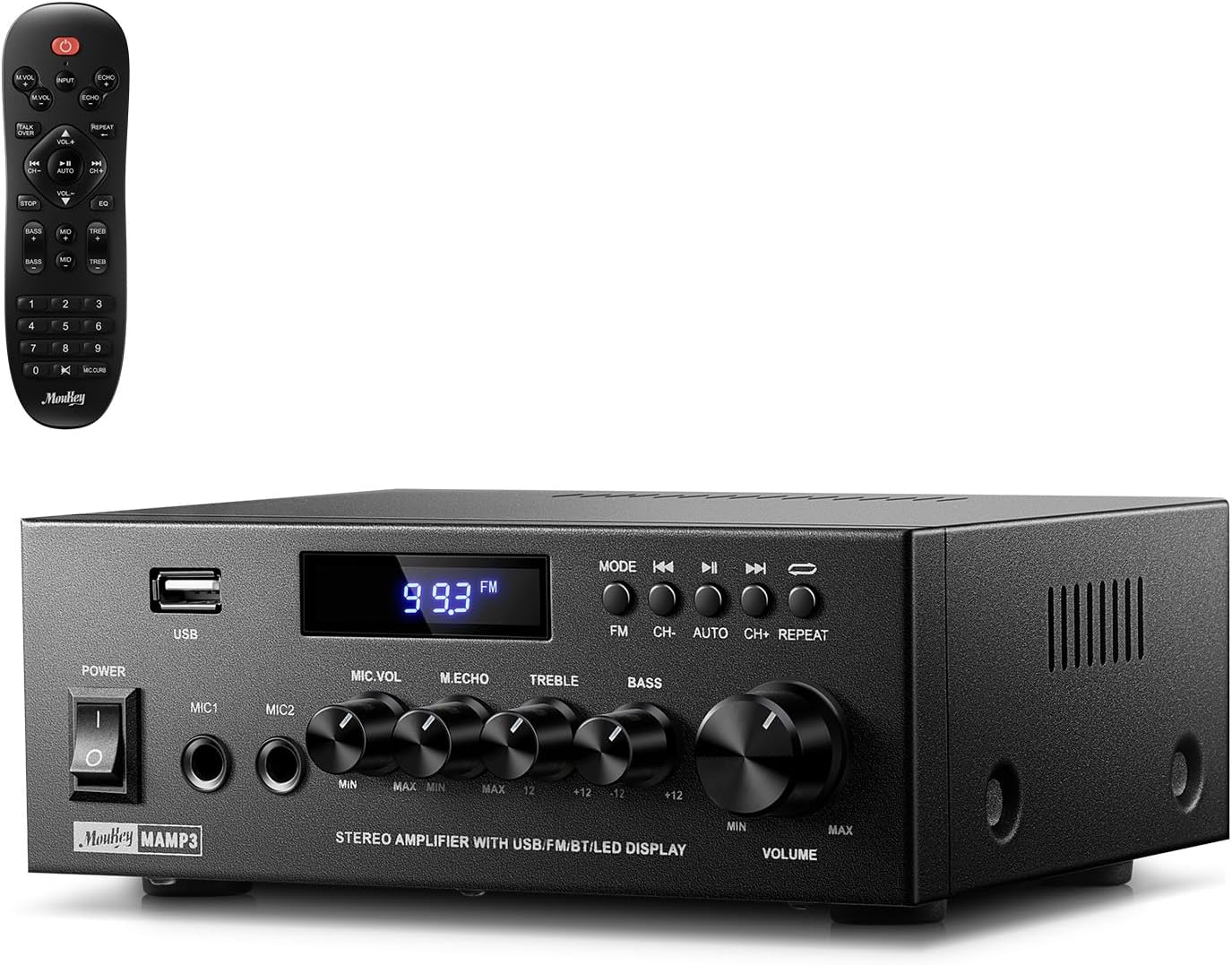
Image 1.1: The Moukey MAMP3 amplifier and its remote control.
2. ຄໍາແນະນໍາຄວາມປອດໄພ
- ອ່ານ ຄຳ ແນະ ນຳ ທັງ ໝົດ ກ່ອນທີ່ຈະ ດຳ ເນີນງານ ampມີຊີວິດຊີວາ.
- ຮັກສາ amplifier away from water, moisture, and extreme temperatures.
- Do not block ventilation openings. Ensure proper airflow around the unit.
- ໃຊ້ພຽງແຕ່ອະແດບເຕີໄຟທີ່ໃຫ້ມາກັບເຄື່ອງ.
- ຢ່າພະຍາຍາມສ້ອມແປງຫຼືດັດແປງເຄື່ອງດ້ວຍຕົນເອງ. ອ້າງອີງການບໍລິການທັງໝົດໃຫ້ກັບບຸກຄະລາກອນທີ່ມີຄຸນວຸດທິ.
- Disconnect the power cord from the outlet if the unit will be unused for extended periods.
3. ຜະລິດຕະພັນເກີນview
3.1 ລັກສະນະທີ່ສໍາຄັນ
- 2.0 Channel Stereo Audio Output
- Bluetooth 5.3 ສຳລັບການເຊື່ອມຕໍ່ໄຮ້ສາຍທີ່ໝັ້ນຄົງ
- Multiple Audio Inputs: RCA, USB, FM Radio, 2 Microphone Inputs
- Full-function Remote Control with EQ adjustments
- Customizable Treble, Midrange, and Bass controls
- Memory function for mode, volume, and EQ settings
- 300 Watts Peak Power Output
3.2 ແຜງຄວບຄຸມດ້ານໜ້າ ແລະຕົວຊີ້ບອກ

ຮູບພາບ 3.1: ຮູບແບບແຜງດ້ານໜ້າ
- ສັບປ່ຽນພະລັງງານ: ເປີດ ຫຼືປິດເຄື່ອງ.
- MIC1/2: ຊ່ອງສຽບໄມໂຄຣໂຟນ 6.35 ມມ.
- ປຸ່ມປັບລະດັບສຽງໄມໂຄຣໂຟນ: ປັບລະດັບສຽງຂອງໄມໂຄຣໂຟນທີ່ເຊື່ອມຕໍ່.
- Echo Knob: ປັບເອັບເຟັກສຽງສະທ້ອນສຳລັບໄມໂຄຣໂຟນ.
- ປຸ່ມ Treble: ປັບສຽງອອກຄວາມຖີ່ສູງ.
- ບິດເບດ: ປັບສຽງອອກຄວາມຖີ່ຕໍ່າ.
- ປຸ່ມສຽງດົນຕີ: Main volume control for all audio sources.
- ຊ່ອງສຽບ USB: ສໍາລັບການເຊື່ອມຕໍ່ອຸປະກອນເກັບຮັກສາ USB ສໍາລັບການຫຼິ້ນສຽງ.
- ຈໍສະແດງຜົນ LED: ສະແດງຮູບແບບປະຈຸບັນ, ຂໍ້ມູນຕິດຕາມ, ຫຼືຄວາມຖີ່ FM.
- ປຸ່ມ MODE: Switches between input sources (BT, Aux, CD, USB, FM).
- ປຸ່ມກ່ອນ ໜ້າ: Skips to the previous track (USB/BT) or FM station.
- ປຸ່ມຫຼິ້ນ/ຢຸດຊົ່ວຄາວ: Plays or pauses audio (USB/BT).
- ປຸ່ມຕໍ່ໄປ: Skips to the next track (USB/BT) or FM station.
- ປຸ່ມຊ້ຳ: Repeats current track or all tracks (USB).
3.3 ການເຊື່ອມຕໍ່ແຜງດ້ານຫລັງ

Image 3.2: Rear Panel Connections
- FM Antenna Input: ເຊື່ອມຕໍ່ເສົາອາກາດ FM ທີ່ມີໃຫ້ສຳລັບການຮັບວິທະຍຸ.
- AUDIO INPUT (RCA): Connect external audio sources like CD/DVD players using RCA cables.
- AUDIO OUTPUT (Speaker Terminals): Connect passive speakers. Ensure correct polarity (+ to + and - to -).
- POWER AC INPUT: ເຊື່ອມຕໍ່ສາຍໄຟກັບສາຍໄຟ AC.
4. ຕັ້ງຄ່າ
4.1 ການຫຸ້ມຫໍ່
ລະມັດລະວັງເອົາ amplifier and all accessories from the packaging. Verify that all items listed in the 'What's in the Box' section are present.
4.2 ເຊື່ອມຕໍ່ລໍາໂພງ
ມAMP3 amplifier supports two passive speakers. Connect your speakers to the ໂອດUDອບ OUTPUT terminals on the rear panel. Ensure that the positive (+) terminal on the amplifier ເຊື່ອມຕໍ່ກັບ terminal ບວກ (+) ໃນລໍາໂພງຂອງທ່ານ, ແລະ terminal ລົບ (-) ຢູ່ໃນ. amplifier connects to the negative (-) terminal on your speaker. Incorrect polarity can affect sound quality.

Image 4.1: Speaker Connection Diagram
4.3 ການເຊື່ອມຕໍ່ແຫຼ່ງສຽງ
ໄດ້ amplifier ສະເໜີຕົວເລືອກການປ້ອນຂໍ້ມູນຫຼາຍຢ່າງ:
- ການປ້ອນຂໍ້ມູນ RCA: Use RCA cables to connect devices such as CD players, DVD players, or other audio equipment to the ການເຂົ້າເຖິງ AUDIO jacks ຢູ່ແຜງດ້ານຫຼັງ.
- ການປ້ອນຂໍ້ມູນ USB: ໃສ່ USB flash drive ເຂົ້າໄປໃນ ຊ່ອງ USB on the front panel for direct audio playback.
- Bluetooth: ຈັບຄູ່ອຸປະກອນທີ່ເປີດໃຊ້ Bluetooth ຂອງທ່ານ (ໂທລະສັບສະຫຼາດ, ແທັບເລັດ, ແລັບທັອບ) ແບບໄຮ້ສາຍ.
- ວິທະຍຸ FM: Connect the included FM antenna to the FM Antenna Input on the rear panel for radio reception. Extend the antenna for optimal signal.
- ການປ້ອນຂໍ້ມູນໄມໂຄຣໂຟນ: ເຊື່ອມຕໍ່ໄມໂຄຣໂຟນໄດ້ສູງສຸດສອງອັນເຂົ້າກັບ MIC1/2 jacks on the front panel for karaoke or public address.

Image 4.2: Available Signal Inputs
4.4 ການເຊື່ອມຕໍ່ພະລັງງານ
ເຊື່ອມຕໍ່ສາຍໄຟກັບເຄື່ອງ POWER AC INPUT on the rear panel and then plug it into a standard AC power outlet.
5. ຄໍາແນະນໍາການດໍາເນີນງານ
5.1 ເປີດ/ປິດ
ກົດ ສະວິດໄຟ ຢູ່ແຜງດ້ານໜ້າເພື່ອໝຸນ ampເປີດ ຫຼື ປິດເຄື່ອງ. ຈໍສະແດງຜົນ LED ຈະສະຫວ່າງຂຶ້ນເມື່ອເຄື່ອງເປີດ.
5.2 ການຄັດເລືອກການປ້ອນຂໍ້ມູນ
ກົດ ໂໝດ button on the front panel or the remote control to cycle through the available input sources: Bluetooth (BT), Auxiliary (Aux), CD, USB, and FM radio. The selected mode will be shown on the LED display.
5.3 ການຄວບຄຸມປະລິມານ
ຫມຸນຂະຫນາດໃຫຍ່ Music Volume Knob on the front panel clockwise to increase volume and counter-clockwise to decrease it. Volume can also be adjusted using the remote control.
5.4 Equalizer (EQ) Adjustment
Adjust the sound characteristics using the Knble Treble ແລະ ປຸ່ມ Bass on the front panel. The remote control also provides dedicated buttons for Treble, Midrange, and Bass adjustments. The amplifier will automatically save your preferred EQ settings.
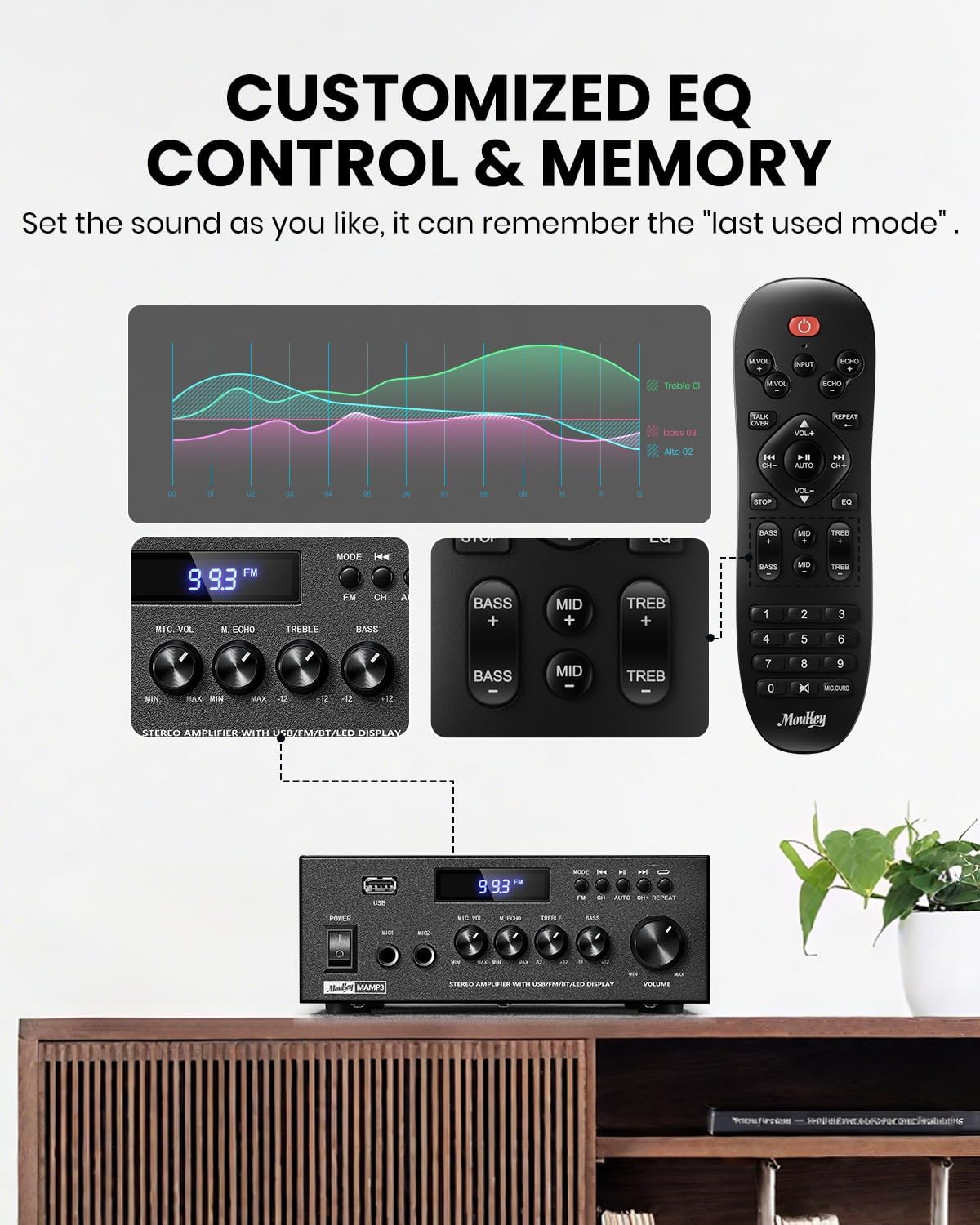
Image 5.1: Customizable EQ Control
5.5 ການຄວບຄຸມໄມໂຄຣໂຟນ
If microphones are connected, use the ປະລິມານໄມໂຄຣໂຟນ to adjust their output level and the ປຸ່ມ Echo to add an echo effect. The remote control also features a 'Talkover' function.
5.6 ການດໍາເນີນງານ Bluetooth
- ກົດ ໂໝດ button until "BT" appears on the LED display. The amplifier is now in Bluetooth pairing mode.
- On your mobile device, enable Bluetooth and search for "Moukey MAMP3".
- Select "Moukey MAMP3" to pair. Once connected, you will hear a confirmation tone.
- ໃນປັດຈຸບັນທ່ານສາມາດຫຼິ້ນສຽງຈາກອຸປະກອນຂອງທ່ານໂດຍຜ່ານ ampມີຊີວິດຊີວາ.

Image 5.2: Bluetooth Pairing
5.7 ການດໍາເນີນງານວິທະຍຸ FM
- ກົດ ໂໝດ ກົດປຸ່ມຈົນກວ່າ "FM" ຈະປາກົດຢູ່ເທິງຈໍສະແດງຜົນ LED.
- ສະແກນອັດຕະໂນມັດ: Press the "AUTO" button on the remote to automatically scan and save available FM stations.
- ຄູ່ມືການປບັຄູ່ມື: Use the number pad on the remote control to directly enter the desired FM frequency (e.g., for 101.1 MHz, enter 1011).
- ໃຊ້ ທີ່ຜ່ານມາ ແລະ ຕໍ່ໄປ buttons to navigate between saved stations or fine-tune frequencies.
5.8 ການຫຼິ້ນ USB
ໃສ່ USB flash drive ທີ່ບັນຈຸສຽງ MP3 ຫຼື WAV files ເຂົ້າໄປໃນ ຊ່ອງ USB. ໄດ້ ampຕົວເປີດຈະປ່ຽນໄປໃຊ້ໂໝດ USB ໂດຍອັດຕະໂນມັດ ແລະ ເລີ່ມການຫຼິ້ນຄືນ. ໃຊ້ ທີ່ຜ່ານມາ, ຫຼິ້ນ/ຢຸດຊົ່ວຄາວ, ແລະ ຕໍ່ໄປ buttons to control playback. The ເຮັດຊ້ຳ button allows you to repeat the current track or all tracks.
5.9 ການຄວບຄຸມໄລຍະໄກ
The included full-function remote control allows for convenient operation from a distance. It provides control over input selection, volume, EQ settings (treble, midrange, bass), microphone echo, and talkover functions across all input modes.

Image 5.3: Upgraded Remote Control Functionality
6. ບໍາລຸງຮັກສາ
- ທໍາຄວາມສະອາດ: ໃຊ້ຜ້າແຫ້ງທີ່ອ່ອນໆເພື່ອເຮັດຄວາມສະອາດພາຍນອກ ampຕົວຊີ້ບອກ. ຢ່າໃຊ້ນໍ້າສະອາດ ຫຼືສານລະລາຍ.
- ການລະບາຍອາກາດ: Ensure that the ventilation openings are free from dust and debris to prevent overheating.
- ການເກັບຮັກສາ: ເມື່ອບໍ່ໄດ້ໃຊ້ເປັນໄລຍະເວລາ, ໃຫ້ເກັບຮັກສາໄວ້ ampເກັບຮັກສາເຄື່ອງໃຊ້ໄວ້ໃນບ່ອນທີ່ເຢັນ, ແຫ້ງ, ຫ່າງຈາກແສງແດດໂດຍກົງ ແລະ ອຸນຫະພູມສູງສຸດ.
7. ການແກ້ໄຂບັນຫາ
| ບັນຫາ | ສາເຫດທີ່ເປັນໄປໄດ້ | ການແກ້ໄຂ |
|---|---|---|
| ບໍ່ມີພະລັງງານ | ສາຍໄຟບໍ່ໄດ້ເຊື່ອມຕໍ່; ປ່ຽງໄຟຟ້າຜິດພາດ; ປິດໄຟ. | Ensure power cord is securely connected; Test outlet with another device; Turn power switch on. |
| ບໍ່ມີສຽງອອກ | Volume too low; Incorrect input selected; Speaker wires loose/incorrectly connected; Audio source issue. | Increase volume; Select correct input mode; Check speaker wire connections and polarity; Verify audio source is playing. |
| Bluetooth ບໍ່ເຊື່ອມຕໍ່ | Amplifier not in BT mode; Device too far; Device already connected to another unit; Interference. | ສະຫຼັບ amplifier to BT mode; Move device closer; Disconnect from other devices; Reduce interference. |
| ການຮັບ FM ບໍ່ດີ | ເສົາອາກາດບໍ່ໄດ້ເຊື່ອມຕໍ່ຫຼືຢູ່ໃນຕໍາແຫນ່ງທີ່ບໍ່ດີ; ສັນຍານອ່ອນ. | Connect and adjust FM antenna position; Try auto-scan or manual tuning for stronger stations. |
| ບັນຫາການຫຼິ້ນ USB | ບໍ່ຮອງຮັບ file format; USB drive not formatted correctly; USB drive capacity too large. | ຮັບປະກັນ files are MP3/WAV; Format USB drive to FAT32; Use USB drives 32GB or less. |
8. ຂໍ້ມູນຈໍາເພາະ
| ຄຸນສົມບັດ | ຂໍ້ມູນຈໍາເພາະ |
|---|---|
| ໝາຍເລກຕົວແບບ | MAMP3 |
| ພະລັງງານຜົນຜະລິດ | 300 ວັດ (ສູງສຸດ) |
| ຊ່ອງ | 2.0 ສະເຕຣິໂອ |
| ເຕັກໂນໂລຊີການເຊື່ອມຕໍ່ | Auxiliary, Bluetooth 5.3, FM, USB |
| ອຸປະກອນທີ່ເຂົ້າກັນໄດ້ | Smartphone, Tablet, Laptop, Computer, Speakers, CD/DVD Player |
| ປະເພດຕົວເຊື່ອມຕໍ່ | RCA, USB, 2 Mic input |
| ຮູບແບບການອອກສຽງ | ສະເຕຣິໂອ |
| ຂະໜາດສິນຄ້າ | 6.1"D x 7.1"W x 2.8"H (15.5 x 18.0 x 7.1 cm) |
| ນ້ໍາຫນັກລາຍການ | 2.14 ປອນ (0.97 ກິໂລ) |
| ສີ | ດຳ |
8.1 ສິ່ງທີ່ຢູ່ໃນກ່ອງ
- Moukey MAMP3 Ampມີຊີວິດຊີວາ
- ຄວບຄຸມໄລຍະໄກ
- ເສົາອາກາດ FM
- ຄູ່ມືຜູ້ໃຊ້
- Power Adapter
9. ການຮັບປະກັນແລະການສະຫນັບສະຫນູນ
9.1 ຂໍ້ມູນການຮັບປະກັນ
Moukey products are designed and manufactured to the highest quality standards. This product is covered by a limited warranty against defects in materials and workmanship. Please refer to the warranty card included with your purchase for specific terms and conditions, or visit the official Moukey webເວັບໄຊທ for ສໍາລັບຂໍ້ມູນການຮັບປະກັນລະອຽດ.
9.2 ສະຫນັບສະຫນູນລູກຄ້າ
If you encounter any issues or have questions regarding your Moukey MAMP3 amplifier, please contact our customer support team. You can find contact information on the official Moukey webເວັບໄຊທ໌ຫຼືຜ່ານເວທີການຊື້ຂອງທ່ານ.
Webເວັບໄຊ: www.moukey.com (ຕ. ຢample link, please refer to actual product documentation)
ອີເມວ: support@moukey.com (ຕ. ຢampອີເມວ, ກະລຸນາອ້າງອີງເຖິງເອກະສານຜະລິດຕະພັນຕົວຈິງ)