
1. ບົດແນະນຳ
This manual provides detailed instructions for the installation, operation, and maintenance of your KEPEAK 10-inch Mirror Dash Cam. Please read this manual thoroughly before using the product to ensure proper function and safety. Keep this manual for future reference.
2. ຜະລິດຕະພັນເກີນview
ເນື້ອໃນຊຸດ
- 10-inch Mirror Dash Cam (Front Camera Integrated)
- ກ້ອງຫຼັງ 1080P View ກ້ອງຖ່າຍຮູບ
- ສາຍກ້ອງຫຼັງ (18ft)
- ເຄື່ອງສາກລົດ
- Mounting Straps/Rubber Clips
- ກາດໜ່ວຍຄວາມຈຳ 32GB
- ຄູ່ມືຜູ້ໃຊ້
ຄຸນນະສົມບັດທີ່ສໍາຄັນ
- ລະບົບກ້ອງຄູ່: 4K Ultra HD front camera and IP68 waterproof 1080P rear camera.
- ໜ້າຈໍ IPS ຂະໜາດ 10 ນິ້ວ: ສະຫນອງພາກສະຫນາມກ້ວາງຂອງ view and intuitive control.
- ຊ່ວງໄດນາມິກກວ້າງ (WDR): Enhances video clarity in varying light conditions, especially at night.
- Smart Parking Assistance: Automatic display of rear view with parking assist lines when reversing.
- ການບັນທຶກວົງ: Automatically overwrites oldest files ເມື່ອກາດຫນ່ວຍຄວາມຈໍາເຕັມ.
- G-ເຊັນເຊີ: Detects collisions and locks video footage ເພື່ອປ້ອງກັນການຂຽນທັບ.
- Parking Surveillance Mode: Records events when an impact is detected while parked (requires built-in battery power).
- ເລນມຸມກວ້າງ 170°: ຈັບພາບກວ້າງ view ຂອງຖະຫນົນຫົນທາງ.
- ຮອງຮັບກາດຫນ່ວຍຄວາມຈໍາ: Includes a 32GB card, supports up to 64GB.

Image: The KEPEAK 10-inch Mirror Dash Cam with its front camera, rear camera, 32GB memory card, car charger, and mounting straps.
3. ຄູ່ມືການຕິດຕັ້ງ
Follow these steps to properly install your dash cam system.
3.1 ການຕິດຕັ້ງກ້ອງວົງຈອນປິດລົດ
- Secure the mirror dash cam to your vehicle's original rearview mirror using the provided rubber clips/straps. Ensure it is firmly attached and does not obstruct your view.
- ປັບມຸມຂອງເລນກ້ອງໜ້າເພື່ອຖ່າຍພາບທີ່ຕ້ອງການ view ຂອງເສັ້ນທາງຂ້າງຫນ້າ.
3.2 ການຕິດຕັ້ງກ້ອງຫຼັງ
- Mount the rear camera at the back of your vehicle, typically above the license plate or on the rear window. Ensure it has a clear view and is securely fastened.
- Route the 18ft rear camera cable from the rear camera to the main mirror dash cam unit. It is recommended to route the cable along the vehicle's headliner and trim for a neat installation.
- Connect the rear camera cable to the designated port on the mirror dash cam.
3.3 ການເຊື່ອມຕໍ່ພະລັງງານ
- Insert the provided 32GB memory card into the dash cam's memory card slot.
- Connect the car charger to the dash cam's power input port.
- ສຽບສາຍສາກລົດໃສ່ປລັກສຽບໄຟ 12V ຂອງລົດເຈົ້າ (ປລັກສຽບໄຟໃສ່ຢາສູບ).
- ເລີ່ມຍານພາຫະນະຂອງທ່ານ. ກ້ອງ dash ຄວນເປີດອັດຕະໂນມັດ ແລະເລີ່ມການບັນທຶກ.

Image: Visual guide for power wiring methods, including securing the dashcam, routing wires along the headliner, opening the A-pillar side panel, and plugging in the car charger.
4. ຄໍາແນະນໍາການດໍາເນີນງານ
The KEPEAK Mirror Dash Cam features a user-friendly touch screen interface.
4.1 ຫນ້າທີ່ພື້ນຖານ
- ເປີດ/ປິດ: The device automatically powers on/off with your vehicle's ignition. You can also manually power it on/off by pressing and holding the power button.
- ການບັນທຶກ: Recording starts automatically when the device powers on. A red dot or similar indicator on the screen confirms recording is active.
- ສະຫຼັບ Views: Slide your finger left or right across the touch screen to switch between front camera view, ກ້ອງຫຼັງ view, or a split-screen display.
- Adjusting Angles: Slide your finger up or down on the screen to adjust the vertical viewing angle of the displayed camera.

Image: The 10-inch IPS touch screen displaying a vibrant interface, highlighting its responsive touch functionality.
4.2 ຄຸນສົມບັດຂັ້ນສູງ
- ການຊ່ວຍເຫຼືອບ່ອນຈອດລົດ: When your vehicle is in reverse gear, the dash cam automatically displays the full-screen rear view with dynamic parking assist lines. You can manually adjust the display range (up/down) for optimal visibility.
- ການບັນທຶກວົງ: The dash cam continuously records. When the memory card is full, it automatically overwrites the oldest unlocked files.
- ເຊັນເຊີ G (ການກວດຈັບການປະທະ): In the event of a sudden impact or collision, the built-in G-Sensor automatically detects the event and locks the current video file, ປ້ອງກັນບໍ່ໃຫ້ມັນຖືກຂຽນທັບໂດຍການບັນທຶກວົນຊ້ຳໆ.
- Parking Surveillance Mode: When the engine is off, the dash cam uses its internal battery to enter standby monitoring. If an impact is detected, it will automatically turn on and record the event. A fully charged internal battery can provide up to 2 weeks of standby monitoring. For continuous 24/7 monitoring, hardwiring the dash cam to your car's battery is required (hardwire kit sold separately).

Image: The dash cam screen showing a full-screen rear view with green, yellow, and red parking assist lines, indicating safe reversing.

Image: An illustration depicting cars in a parking lot, with a lock icon indicating the G-Sensor's auto-lock function for collision events.
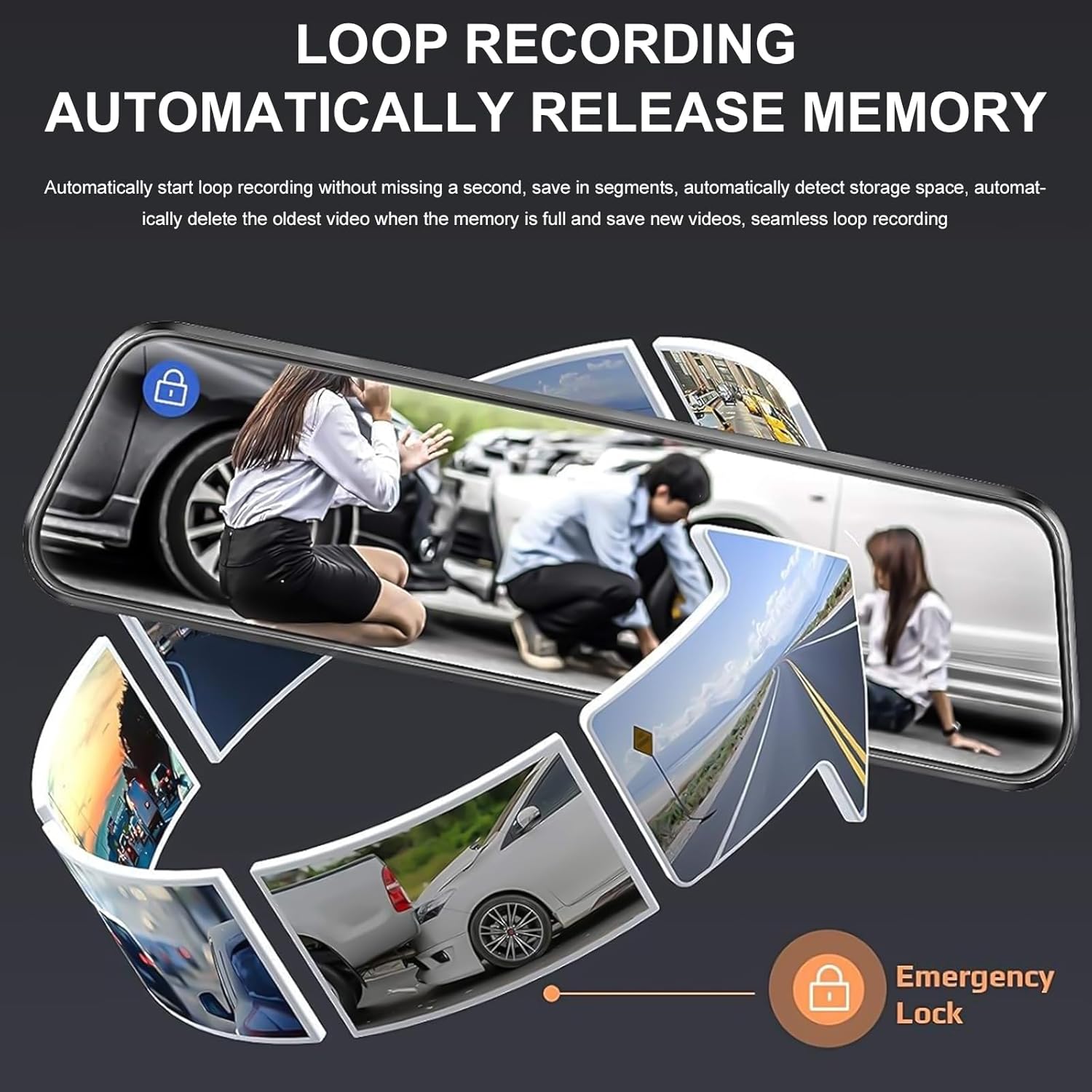
Image: A circular flow diagram illustrating loop recording, where new video segments replace older ones, with an emergency lock icon for protected footage.

Image: A car parked at night with a '24 HOUR' clock icon, symbolizing the 24-hour parking monitoring feature for vehicle protection.
5. ການຕັ້ງຄ່າ ແລະ ໜ້າທີ່ຕ່າງໆ
Access the menu by tapping the screen. Here you can adjust various settings:
- ຄວາມລະອຽດວິດີໂອ: Select desired resolution for front and rear cameras (e.g., 4K/1080P).
- ໄລຍະເວລາການບັນທຶກ Loop: Set the length of video segments (e.g., 1, 3, 5 minutes).
- ຄວາມອ່ອນໄຫວ G-Sensor: Adjust the sensitivity of the collision detection.
- ບ່ອນຈອດລົດຕິດຕາມກວດກາ (Parking Monitor): Enable or disable parking surveillance mode.
- ການສຳຜັດເຊື້ອ: Adjust video brightness.
- ວັນທີ/ເວລາ: ກໍານົດວັນທີແລະເວລາທີ່ຖືກຕ້ອງສໍາລັບເວລາທີ່ຖືກຕ້ອງamps ໃນການບັນທຶກ.
- ເຄື່ອງປະຫຍັດ ໜ້າ ຈໍ: Set the screen to turn off after a period of inactivity to avoid distraction.
- ພາສາ: ເລືອກພາສາທີ່ທ່ານຕ້ອງການ.
6. ບໍາລຸງຮັກສາ
- ທໍາຄວາມສະອາດ: ໃຊ້ຜ້າອ່ອນໆແຫ້ງເພື່ອທຳຄວາມສະອາດໜ້າຈໍກ້ອງວົງຈອນປິດ ແລະ ເລນ. ຫຼີກລ່ຽງນ້ຳຢາທຳຄວາມສະອາດທີ່ມີສີຂັດ ຫຼື ຕົວລະລາຍ.
- ກາດຫນ່ວຍຄວາມຈໍາ: Regularly format the memory card (at least once a month) to ensure optimal performance and prevent data corruption. Back up any important footage before formatting. Replace the memory card if it shows signs of degradation or errors.
- ອຸນຫະພູມ: ຫຼີກລ່ຽງການເອົາກ້ອງວົງຈອນປິດໄປໄວ້ໃນອຸນຫະພູມທີ່ຮຸນແຮງເປັນເວລາດົນ ເພາະສິ່ງນີ້ອາດຈະສົ່ງຜົນກະທົບຕໍ່ອາຍຸການໃຊ້ງານຂອງແບັດເຕີຣີ ແລະ ປະສິດທິພາບຂອງອຸປະກອນ.
7. ການແກ້ໄຂບັນຫາ
ຖ້າທ່ານພົບບັນຫາກັບກ້ອງວົງຈອນປິດຂອງທ່ານ, ໃຫ້ອ້າງອີງເຖິງວິທີແກ້ໄຂທົ່ວໄປຕໍ່ໄປນີ້:
| ບັນຫາ | ການແກ້ໄຂທີ່ເປັນໄປໄດ້ |
|---|---|
| Dash cam ບໍ່ເປີດ. | Check if the car charger is properly connected to both the dash cam and the vehicle's 12V outlet. Ensure the vehicle's ignition is on. Test the charger in another port or with another device if possible. |
| ການບັນທຶກຢຸດ ຫຼືຢຸດ. | Format the memory card. Ensure the memory card is a high-speed Class 10 or U3 card. Replace the memory card if issues persist. Check power connection stability. |
| ຄຸນນະພາບວິດີໂອບໍ່ດີ. | Clean the camera lenses. Ensure the protective film has been removed from the lenses. Check video resolution settings. Adjust WDR settings if applicable. |
| ກ້ອງຫຼັງບໍ່ສະແດງ. | Check the connection of the rear camera cable to both the rear camera and the main unit. Ensure the cable is not damaged. |
| Parking assist lines not appearing. | Ensure the rear camera is properly connected and the vehicle is in reverse gear. Check settings for parking assistance. |
| ການຕິດຕາມກວດກາບ່ອນຈອດລົດບໍ່ໄດ້ເຮັດວຽກ. | Ensure the parking surveillance mode is enabled in settings. Check the dash cam's internal battery charge level. For 24/7 monitoring, hardwiring is required. |
8. ຂໍ້ມູນຈໍາເພາະ
- ຍີ່ຫໍ້: KEPEAK
- ຕົວແບບ: B0FHJS1HZS
- ຂະໜາດໜ້າຈໍ: 10 ນິ້ວ
- ຄວາມລະອຽດກ້ອງໜ້າ: 4K Ultra HD
- ຄວາມລະອຽດກ້ອງຫຼັງ: 1080P ຄວາມລະອຽດ Full HD
- ພາກສະຫນາມຂອງ View: 170 ອົງສາ
- ຄຸນນະສົມບັດພິເສດ: G-Sensor, Night Vision (WDR), Touch Screen, Loop Recording, Parking Assistance, Parking Surveillance
- ເຕັກໂນໂລຍີການເຊື່ອມຕໍ່: USB
- ຮອງຮັບກາດຫນ່ວຍຄວາມຈໍາ: ສູງສຸດ 64GB (ລວມ 32GB)
- ຂະໜາດຜະລິດຕະພັນ: 8 x 5 x 4 ນິ້ວ
- ນ້ໍາຫນັກລາຍການ: 1.7 ປອນ
- ສີ: ດຳ
- ປະເພດບໍລິການຍານພາຫະນະ: ລົດ, ລົດບັນທຸກ
9. ການຮັບປະກັນແລະການສະຫນັບສະຫນູນ
KEPEAK is committed to providing reliable products and customer satisfaction. If you encounter any issues with your mirror dash cam, our customer support team is available to provide fast and effective assistance within 24 hours.
Please contact us through the retailer's platform or refer to the contact information provided with your purchase for support.