
Raycon RBO715
ຫູຟັງ Raycon Essential ແບບເປີດ
ຄູ່ມືຜູ້ໃຊ້
ຮຸ່ນ: RBO715 | ຍີ່ຫໍ້: Raycon
1. ບົດແນະນຳ
Welcome to the user manual for your Raycon Essential Open Earbuds. These true wireless Bluetooth 6.0 headphones are designed for comfort and awareness, featuring an ultra-lightweight, open-ear design with comfort hooks and IPX5 water resistance. This manual provides detailed instructions to help you get the most out of your new earbuds.

Image: Raycon Essential Open Earbuds (Blue)
2. ສິ່ງທີ່ຢູ່ໃນກ່ອງ
Your Raycon Essential Open Earbuds package includes the following items:
- ຫູຟັງ Raycon Essential ແບບເປີດ (ຊ້າຍ ແລະ ຂວາ)
- ກ່ອງສາກ
- ສາຍສາກ USB
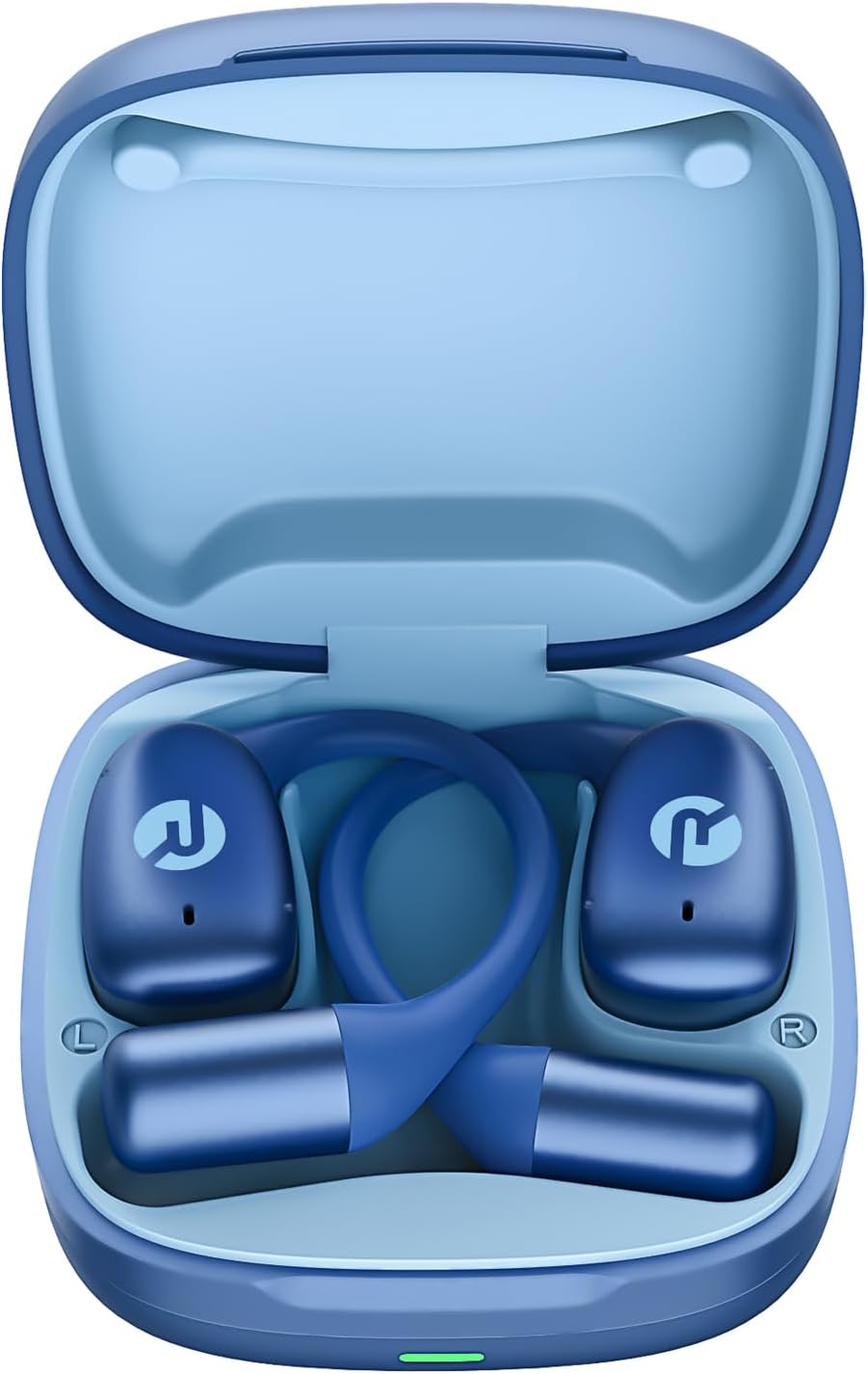
Image: Raycon Essential Open Earbuds in Charging Case
3. ຄຸນນະສົມບັດທີ່ສໍາຄັນ
The Raycon Essential Open Earbuds are packed with features designed for an optimal listening experience:
- ການອອກແບບເປີດຫູ: Experience clear audio while maintaining full awareness of your surroundings. This design is ideal for activities where situational awareness is crucial, such as workouts or outdoor runs.
- ຄວາມພໍດີຂອງແສງຂົນນົກ: Designed to be ultra-lightweight (approximately 13.3g per earbud) and comfortable, ensuring a secure fit that remains stable during movement without causing discomfort.
- Built for On-The-Go: These earbuds are sweat-resistant and designed for active lifestyles, making them suitable for gym sessions, cycling, and daily commutes. Their portable size ensures easy transport.
- ຊີວິດຫມໍ້ໄຟຍາວ: Enjoy up to 8 hours of continuous playback on a single charge, with an additional 28 hours provided by the charging case, totaling up to 36 hours of battery life.
- ກັນນໍ້າ IPX5: Engineered to withstand sweat and light splashes, making them durable for various environments and activities.
- ຕະຂໍຫູທີ່ຍືດຫຍຸ່ນໄດ້: The ergonomic ear hook is designed to bend and conform to the shape of any ear, ensuring a comfortable and secure fit for all users.
- ການເຊື່ອມຕໍ່ຫຼາຍຈຸດ: Seamlessly connect to two devices simultaneously and switch between them without manual re-pairing.

Image: Open-Ear Design Illustration

Image: Ultra-Lightweight Design

Image: Compact Design

Image: 36 Hours of Battery Life

Image: IPX5 Water Resistant

Image: Flexible Ear Hook

ຮູບພາບ: ການເຊື່ອມຕໍ່ຫຼາຍຈຸດ
4. ຕັ້ງຄ່າ
4.1 ກຳລັງສາກຫູຟັງຂອງທ່ານ
Before first use, fully charge your Raycon Essential Open Earbuds and their charging case. The charging case provides additional battery life for on-the-go power.
- Place both earbuds into the charging case, ensuring they are properly seated.
- ເຊື່ອມຕໍ່ສາຍສາກ USB ທີ່ໃຫ້ມາເຂົ້າກັບພອດສາກໄຟໃນເຄສ ແລະ ສຽບອີກສົ້ນໜຶ່ງເຂົ້າກັບແຫຼ່ງພະລັງງານ USB (ເຊັ່ນ: ອະແດບເຕີຕິດຝາ, ພອດ USB ຂອງຄອມພິວເຕີ).
- ແສງຊີ້ບອກກ່ຽວກັບກໍລະນີການສາກໄຟຈະສະແດງສະຖານະການສາກໄຟ. ເມື່ອສາກເຕັມແລ້ວ, ໄຟຈະປ່ຽນ ຫຼືປິດ.
4.2 ການຈັບຄູ່ເບື້ອງຕົ້ນ
Follow these steps to pair your earbuds with your device for the first time:
- ກວດໃຫ້ແນ່ໃຈວ່າໄດ້ສາກຫູຟັງຫູຟັງ ແລະຢູ່ພາຍໃນກ່ອງສາກ.
- ເປີດກ່ອງສາກໄຟ. ຫູຟັງເອຍບັດຈະເຂົ້າສູ່ໂໝດການຈັບຄູ່ໂດຍອັດຕະໂນມັດ, ສະແດງໂດຍໄຟກະພິບຢູ່ຫູຟັງ.
- ໃນອຸປະກອນຂອງທ່ານ (ໂທລະສັບສະຫຼາດ, ແທັບເລັດ, ແລັບທັອບ), ໄປທີ່ການຕັ້ງຄ່າ Bluetooth.
- ຊອກຫາ available devices and select "Raycon Essential Open Earbuds" from the list.
- ເມື່ອເຊື່ອມຕໍ່ແລ້ວ, ໄຟສະແດງຫູຟັງຫູຟັງຈະຢຸດກະພິບ, ແລະທ່ານຈະໄດ້ຍິນສຽງຢືນຢັນ.
Video: Essential Open Earbuds - Our Most Compact Open Audio Yet. This short video demonstrates the compact design and ease of use of the earbuds.
5. ຄໍາແນະນໍາການດໍາເນີນງານ
5.1 ການໃສ່ຫູຟັງ
The Essential Open Earbuds feature a comfort hook design for a secure and comfortable fit. Gently place the earbud over your ear, ensuring the hook rests comfortably behind your ear and the speaker portion is positioned near your ear canal without blocking it, allowing for open-ear listening.
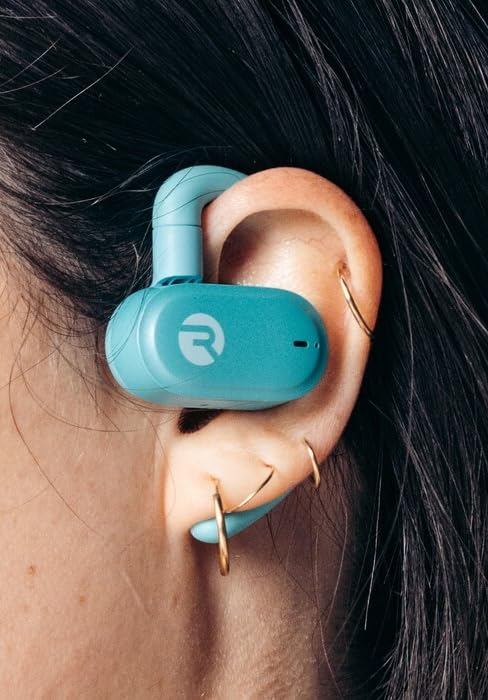
Image: Earbud worn on ear (Mint)
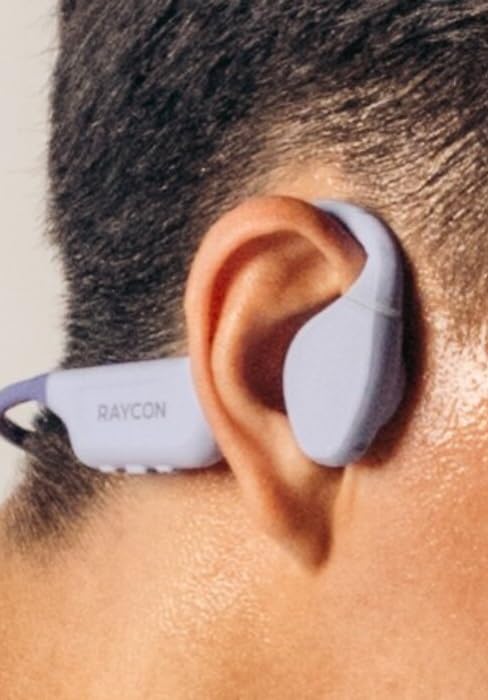
Image: Earbud worn on ear (Purple)
5.2 ແຕະການຄວບຄຸມ
ຫູຟັງມີການຄວບຄຸມແບບສຳຜັດທີ່ເຂົ້າໃຈງ່າຍສຳລັບການຈັດການສຽງ ແລະ ການໂທຂອງທ່ານ:
| ການປະຕິບັດ | ການຄວບຄຸມ |
|---|---|
| ຫຼິ້ນ/ຢຸດຊົ່ວຄາວ | ແຕະເທື່ອດຽວໃສ່ຫູຟັງຫູຟັງ |
| ຕິດຕາມຕໍ່ໄປ | ແຕະສອງເທື່ອໃສ່ຫູຟັງເບື້ອງຂວາ |
| ເພງກ່ອນໜ້າ | ແຕະສອງເທື່ອໃສ່ຫູຟັງທາງຊ້າຍ |
| ປະລິມານຂຶ້ນ | ແຕະສາມເທື່ອຢູ່ຫູຟັງເບື້ອງຂວາ |
| ປະລິມານລົງ | ແຕະສາມເທື່ອຢູ່ຫູຟັງທາງຊ້າຍ |
| ຕອບ/ວາງສາຍ | ແຕະຄັ້ງດຽວທີ່ຫູຟັງຂ້າງໃດກໍໄດ້ໃນລະຫວ່າງການໂທ |
| ປະຕິເສດການໂທ | ກົດຫູຟັງອັນໃດອັນໜຶ່ງຄ້າງໄວ້ 2 ວິນາທີ |
| ເປີດໃຊ້ຜູ້ຊ່ວຍສຽງ | ກົດຫູຟັງອັນໃດອັນໜຶ່ງຄ້າງໄວ້ 3 ວິນາທີ |
6. ບໍາລຸງຮັກສາ
Proper care and maintenance will extend the lifespan of your Raycon Essential Open Earbuds.
- ທໍາຄວາມສະອາດ: ເຊັດຫູຟັງຫູຟັງ ແລະ ກະເປົ໋າສາກໄຟເປັນປະຈຳດ້ວຍຜ້າອ່ອນໆ, ແຫ້ງ, ບໍ່ມີຜ້າປູ. ຢ່າໃຊ້ສານເຄມີທີ່ຮຸນແຮງຫຼືວັດສະດຸຂັດ.
- ຄວາມຕ້ານທານນ້ໍາ: The earbuds are IPX5 water resistant, meaning they can withstand sweat and light splashes. Do not submerge them in water or expose them to strong jets of water. Ensure they are dry before placing them back in the charging case.
- ການເກັບຮັກສາ: ເມື່ອບໍ່ໄດ້ໃຊ້, ໃຫ້ເກັບຮັກສາຫູຟັງໃສ່ໃນກະເປົ໋າສາກໄຟເພື່ອປົກປ້ອງພວກມັນຈາກຝຸ່ນ ແລະຄວາມເສຍຫາຍ. ເກັບຮັກສາໄວ້ໃນບ່ອນທີ່ເຢັນ, ແຫ້ງ, ຫ່າງຈາກອຸນຫະພູມທີ່ສຸດ.
7. ການແກ້ໄຂບັນຫາ
ຖ້າທ່ານພົບບັນຫາກັບຫູຟັງເອຍບັດຂອງທ່ານ, ລອງໃຊ້ວິທີແກ້ໄຂຕໍ່ໄປນີ້:
| ບັນຫາ | ການແກ້ໄຂ |
|---|---|
| ຫູຟັງບໍ່ຈັບຄູ່ | ກວດໃຫ້ແນ່ໃຈວ່າໄດ້ສາກຫູຟັງຫູຟັງແລ້ວ. ປິດ ແລະເປີດ Bluetooth ຂອງອຸປະກອນຂອງທ່ານ. ລືມອຸປະກອນໃນການຕັ້ງຄ່າ Bluetooth ແລະຈັບຄູ່ຄືນໃໝ່. |
| ບໍ່ມີສຽງຈາກຫູຟັງອັນໜຶ່ງ | Place both earbuds back in the case, close it, then open it again. Check device's audio output settings. |
| ປະລິມານຕ່ໍາ | Increase volume on both the earbuds (triple tap right) and your connected device. |
| ບັນຫາການສາກໄຟ | ໃຫ້ແນ່ໃຈວ່າສາຍສາກໄດ້ເຊື່ອມຕໍ່ຢ່າງປອດໄພ. ລອງໃຊ້ພອດ USB ຫຼືຕົວແປງໄຟອື່ນ. ເຮັດຄວາມສະອາດລາຍຊື່ຜູ້ຕິດຕໍ່ໃນຫູຟັງຫູຟັງ ແລະເຄສ. |
| ຫູຟັງຕົກອອກ | Adjust the flexible ear hook to better fit your ear shape. Ensure proper placement as described in the 'Wearing the Earbuds' section. |
8. ຂໍ້ມູນຈໍາເພາະ
Detailed technical specifications for the Raycon Essential Open Earbuds:
| ຄຸນສົມບັດ | ລາຍລະອຽດ |
|---|---|
| ຊື່ຕົວແບບ | ຫູຟັງ Raycon Essential ແບບເປີດ |
| ໝາຍເລກຕົວແບບ | RBO715 |
| ເຕັກໂນໂລຊີການເຊື່ອມຕໍ່ | ໄຮ້ສາຍ |
| ເຕັກໂນໂລຊີການສື່ສານໄຮ້ສາຍ | Bluetooth |
| ລຸ້ນ Bluetooth | 6.0 |
| ອົງປະກອບລວມ | ສາຍ |
| ວັດສະດຸ | ພາດສະຕິກ, ຊິລິໂຄນ |
| ການນໍາໃຊ້ສະເພາະສໍາລັບຜະລິດຕະພັນ | ກິລາ |
| ອຸປະກອນທີ່ເຂົ້າກັນໄດ້ | ໂທລະສັບສະຫຼາດ, ແລັບທັອບ, ແທັບເລັດ, ລໍາໂພງອັດສະລິຍະ |
| ປະເພດການຄວບຄຸມ | ແຕະການຄວບຄຸມ |
| ລະດັບຄວາມຕ້ານທານນ້ໍາ | ກັນນໍ້າ IPX5 |
| ຊ່ວງຄວາມຖີ່ | 20 Hz - 20,000 Hz |
| ປະເພດໄດເວີສຽງ | ຄົນຂັບແຂນທີ່ສົມດຸນ |
| ຮູບຮ່າງຫູຫູ | ຮູ |
| ການຈັດວາງຫູ | ເປີດຫູ |
| ນ້ໍາຫນັກລາຍການ | 4.6 ອອນ |
| UPC | 811162032996 |
| ຜູ້ຜະລິດ | Raycon ທົ່ວໂລກ |
| ອາຍຸແບັດເຕີຣີ (ຫູຟັງ) | ສູງສຸດ 8 ຊົ່ວໂມງ |
| ອາຍຸແບັດເຕີຣີທັງໝົດ (ພ້ອມກ່ອງ) | ສູງສຸດ 36 ຊົ່ວໂມງ |
9. ການຮັບປະກັນແລະການສະຫນັບສະຫນູນ
For detailed warranty information, product registration, and customer support, please visit the official Raycon webເວັບໄຊ ຫຼືຕິດຕໍ່ບໍລິການລູກຄ້າຂອງເຂົາເຈົ້າໂດຍກົງ. ຮັກສາຫຼັກຖານການຊື້ຂອງທ່ານສໍາລັບການຮຽກຮ້ອງການຮັບປະກັນໃດໆ.
Raycon Official Webເວັບໄຊ: www.rayconglobal.com
Ask a question about this manual
Ask about setup, troubleshooting, compatibility, parts, safety, or missing instructions. Manuals+ will review the question and use this page’s manual context to help answer it.