
ແນະນຳ
This manual provides essential information for setting up, operating, maintaining, and troubleshooting your HP OMEN 16L TG03 Gaming Desktop. This high-performance system is equipped with an Intel Core Ultra 7 265F processor, NVIDIA GeForce RTX 5060 graphics, 64GB DDR5 RAM, and a 2TB SSD, designed for demanding gaming and creative tasks. It also includes a Thunderobot KG3089R Gaming Keyboard.
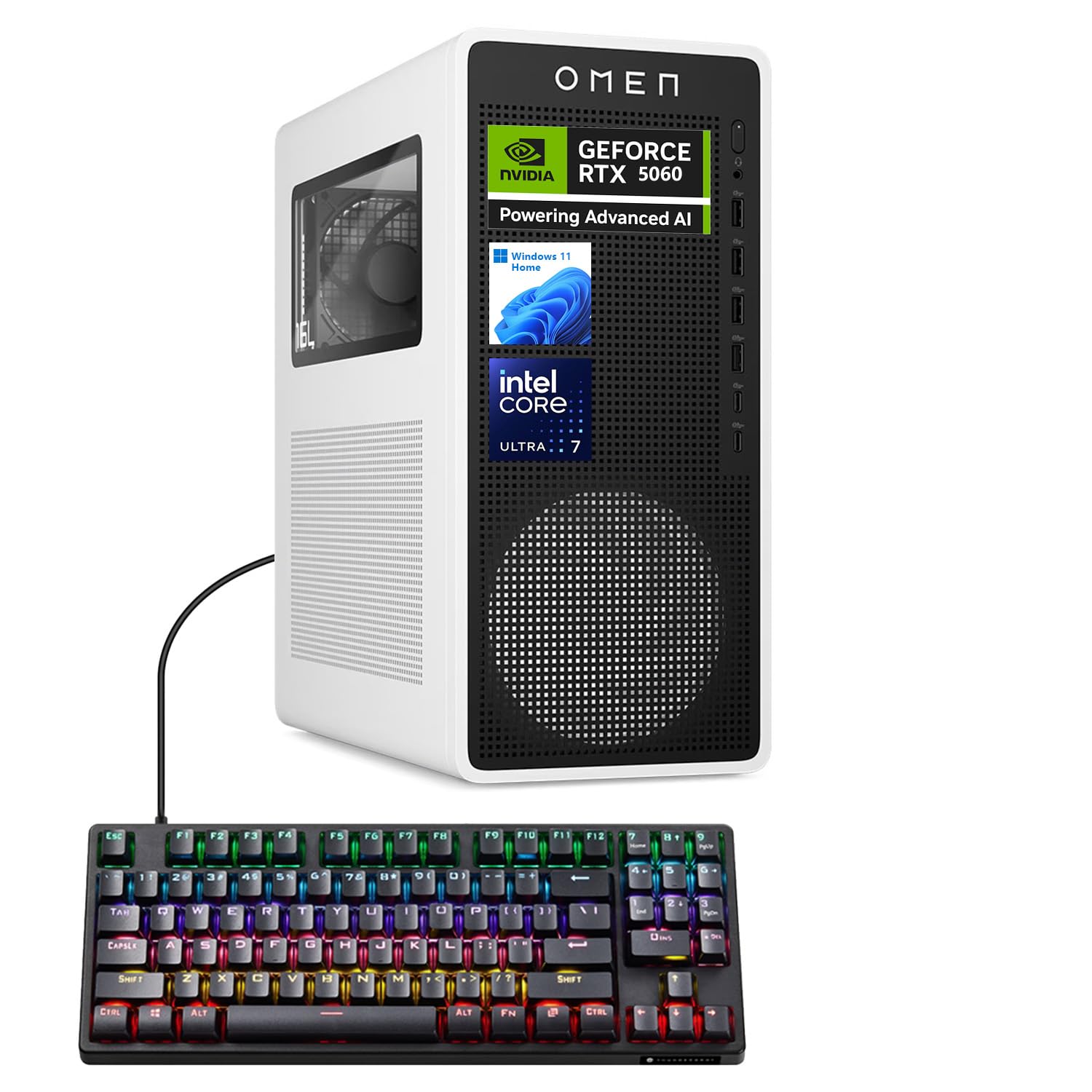
Figure 1: HP OMEN 16L TG03 Gaming Desktop with included Thunderobot Keyboard.
1. ຄູ່ມືການຕິດຕັ້ງ
1.1 Unboxing ແລະການຈັດວາງ
- Carefully remove all components from the packaging. Ensure all accessories, including the Thunderobot keyboard, are present.
- Place the desktop on a stable, flat surface with adequate ventilation. Avoid blocking air vents.
1.2 ການເຊື່ອມຕໍ່ອຸປະກອນຕໍ່
- ຈໍພາບ: Connect your monitor to the graphics card's HDMI or DisplayPort outputs. The NVIDIA GeForce RTX 5060 supports multiple displays.
- ແປ້ນພິມແລະຫນູ: Connect the Thunderobot KG3089R Gaming Keyboard and your mouse to any available USB Type-A ports.
- ພະລັງງານ: Connect the power cable to the desktop's power supply and then to a grounded electrical outlet.
- ເຄືອຂ່າຍ: For wired internet, connect an Ethernet cable to the RJ-45 port. For wireless, ensure Wi-Fi antennas are properly connected (if external).
- ສຽງ: Connect speakers or headphones to the audio ports.

ຮູບ 2: ດ້ານຫລັງ view of the HP OMEN 16L TG03 Desktop showing various ports for connectivity.

Figure 3: HP OMEN 16L TG03 Desktop connected to a monitor, showcasing the OMEN Gaming Hub interface.
1.3 ການເປີດເຄື່ອງເບື້ອງຕົ້ນ
- ກົດປຸ່ມເປີດປິດທີ່ຕັ້ງຢູ່ດ້ານຫນ້າຂອງ desktop.
- Follow the on-screen instructions to complete the Windows 11 Home operating system setup. This typically involves setting up user accounts, network connections, and privacy settings.
2. ຄໍາແນະນໍາການດໍາເນີນງານ
2.1 ການດໍາເນີນງານພື້ນຖານ
- ເປີດ/ປິດ: Press the power button to turn on. To shut down, use the Windows Start menu (Start > Power > Shut down).
- ຣີສະຕາດ: Use the Windows Start menu (Start > Power > Restart).
- ຮູບແບບການນອນ: Use the Windows Start menu (Start > Power > Sleep).
2.2 Gaming and Performance Features
- OMEN Gaming Hub: This pre-installed software allows you to monitor system performance, customize RGB lighting, optimize game settings, and access OMEN AI features.
- NVIDIA GeForce RTX 5060: Leverage the dedicated graphics card for high-fidelity gaming and demanding creative applications. Ensure graphics drivers are up to date for optimal performance.
- AI-Ready Capabilities: The Intel Core Ultra 7 processor and NVIDIA RTX 5060 GPU provide advanced AI processing capabilities for enhanced gaming, content creation, and productivity.

ຮູບ 4: ເກີນview of NVIDIA RTX 50 Series graphics card features, including DLSS 4 and AI-Powered Creativity.
2.3 Thunderobot KG3089R Keyboard Shortcuts
The included Thunderobot KG3089R Gaming Keyboard features several shortcut key combinations:
- FN + F9: ສະຫຼັບຜົນກະທົບແສງສະຫວ່າງ.
- FN + Win: Lock the Windows key to prevent accidental presses during gaming.
- Refer to the keyboard's dedicated manual for a complete list of functions.

Figure 5: Thunderobot KG3089R Gaming Keyboard highlighting FN key combinations for lighting and Windows key lock.
3. ບໍາລຸງຮັກສາ
3.1 ການທໍາຄວາມສະອາດ
- ພາຍນອກ: ໃຊ້ອ່ອນ, ງamp ຜ້າເພື່ອເຮັດຄວາມສະອາດດ້ານນອກ. ຫຼີກລ້ຽງການເຮັດຄວາມສະອາດຂັດ.
- ຮູ: Regularly check and clean dust from the air vents using compressed air to ensure proper airflow and prevent overheating.
- ແປ້ນພິມ: Use compressed air to remove debris from under the keycaps.
3.2 ການປັບປຸງຊອບແວ
- ອັບເດດ Windows: Regularly check for and install Windows 11 updates to ensure system stability and security. (Settings > Windows Update).
- ອັບເດດໄດເວີ: Keep your graphics drivers (NVIDIA GeForce Experience) and other hardware drivers updated for optimal performance and compatibility.
- OMEN Gaming Hub: Ensure the OMEN Gaming Hub software is updated to access the latest features and optimizations.
3.3 ການສໍາຮອງລະບົບ
- ສຳຮອງຂໍ້ມູນທີ່ສຳຄັນໄປໃສ່ໄດຣຟ໌ພາຍນອກ ຫຼືບ່ອນເກັບຂໍ້ມູນຄລາວເປັນປະຈຳເພື່ອປ້ອງກັນການສູນເສຍຂໍ້ມູນ.
- Consider creating a system restore point before major software changes.
4. ການແກ້ໄຂບັນຫາ
4.1 ບັນຫາທົ່ວໄປ ແລະການແກ້ໄຂ
- ບໍ່ມີພະລັງງານ:
- ໃຫ້ແນ່ໃຈວ່າສາຍໄຟໄດ້ເຊື່ອມຕໍ່ກັບທັງຄອມພິວເຕີຕັ້ງໂຕະ ແລະ ປລັກໄຟຟ້າຢ່າງແໜ້ນໜາແລ້ວ.
- ກວດສອບວ່າປ່ຽງໄຟແມ່ນເຮັດວຽກໄດ້.
- ບໍ່ມີການສະແດງຜົນ:
- Check that the monitor is powered on and the video cable is securely connected to the graphics card output, not the motherboard's integrated graphics port.
- ລອງສາຍວິດີໂອອື່ນ ຫຼືຈໍພາບຖ້າມີ.
- ລະບົບຊ້າ:
- ປິດແອັບພລິເຄຊັນທີ່ບໍ່ຈໍາເປັນທີ່ເຮັດວຽກຢູ່ໃນພື້ນຫຼັງ.
- ກວດເບິ່ງ malware ຫຼືໄວຣັສ.
- ຮັບປະກັນພື້ນທີ່ຫວ່າງພຽງພໍໃນ SSD 2TB.
- Verify system temperatures using OMEN Gaming Hub to rule out overheating.
- ແປ້ນພິມບໍ່ຕອບສະໜອງ:
- Ensure the keyboard cable is securely connected to a USB port.
- ລອງເຊື່ອມຕໍ່ແປ້ນພິມກັບພອດ USB ອື່ນ.
- If the Windows key is locked (FN + Win), unlock it.
4.2 ຕິດຕໍ່ສະຫນັບສະຫນູນ
If you encounter issues that cannot be resolved with the above steps, please refer to the official HP support website or contact their customer service for assistance. Have your product model (OMEN 16L TG03) and serial number ready.
5. ຂໍ້ມູນຈໍາເພາະ
| ຄຸນສົມບັດ | ລາຍລະອຽດ |
|---|---|
| ຍີ່ຫໍ້ | HP |
| ຊື່ຕົວແບບ | OMEN 16L TG03 (HSC-F007MT) |
| ລະບົບປະຕິບັດການ | ໜ້າຫຼັກ Windows 11 |
| ໂຮງງານຜະລິດ | Intel Core Ultra 7 265F (20 Cores, up to 5.30GHz) |
| ບັດກາຟິກ | NVIDIA GeForce RTX 5060 (8GB GDDR7) |
| RAM | 64GB DDR5 (4800 MHz) |
| ການເກັບຮັກສາ | 2TB PCIe NVMe M.2 SSD |
| ທ່າເຮືອທາງໜ້າ | Headphone/MIC combo jack, 4x SuperSpeed USB Type-A (5Gbps), 2x USB Type-C (10Gbps) |
| Ports ຫລັງ | 3x Headphone/MIC combo jack, HDMI Out, 4x USB 2.0 Type-A, RJ-45, 3x DisplayPort |
| ການເຊື່ອມຕໍ່ໄຮ້ສາຍ | Wi-Fi 6, Bluetooth |
| ຂະໜາດ (H x W x D) | 13.26 x 6.1 x 12.12 ນິ້ວ |
| ນ້ຳໜັກ | 13.91 ປອນ |
| ລວມອຸປະກອນເສີມ | Thunderobot KG3089R Gaming Keyboard |
6. ຂໍ້ມູນການຮັບປະກັນ
Your HP OMEN 16L TG03 Gaming Desktop is covered by a manufacturer's warranty. The specific terms and duration of the warranty may vary by region and purchase date. Please refer to the warranty documentation included with your product or visit the official HP support webເວັບໄຊສໍາລັບຂໍ້ມູນລະອຽດ. ຮັກສາຫຼັກຖານການຊື້ຂອງທ່ານສໍາລັບການຮ້ອງຂໍການຮັບປະກັນ.
7. ການຊ່ວຍເຫຼືອລູກຄ້າ
ສຳລັບການຊ່ວຍເຫຼືອເພີ່ມເຕີມ, ການສະໜັບສະໜູນດ້ານວິຊາການ, ຫຼື ເພື່ອດາວໂຫຼດໄດຣເວີ ແລະ ຊອບແວລ່າສຸດ, ກະລຸນາເຂົ້າໄປທີ່ຝ່າຍສະໜັບສະໜູນຢ່າງເປັນທາງການຂອງ HP webເວັບໄຊ: support.hp.com. You may also find helpful resources and community forums on the OMEN Gaming Hub application.