
ແນະນຳ
Thank you for choosing the LUMINTOP F01 Pro EDC Flashlight. This compact and versatile flashlight is designed for everyday carry, offering multiple lighting modes, convenient Type-C charging, and a magnetic base for hands-free use. Please read this manual carefully to ensure proper operation and maintenance of your device.
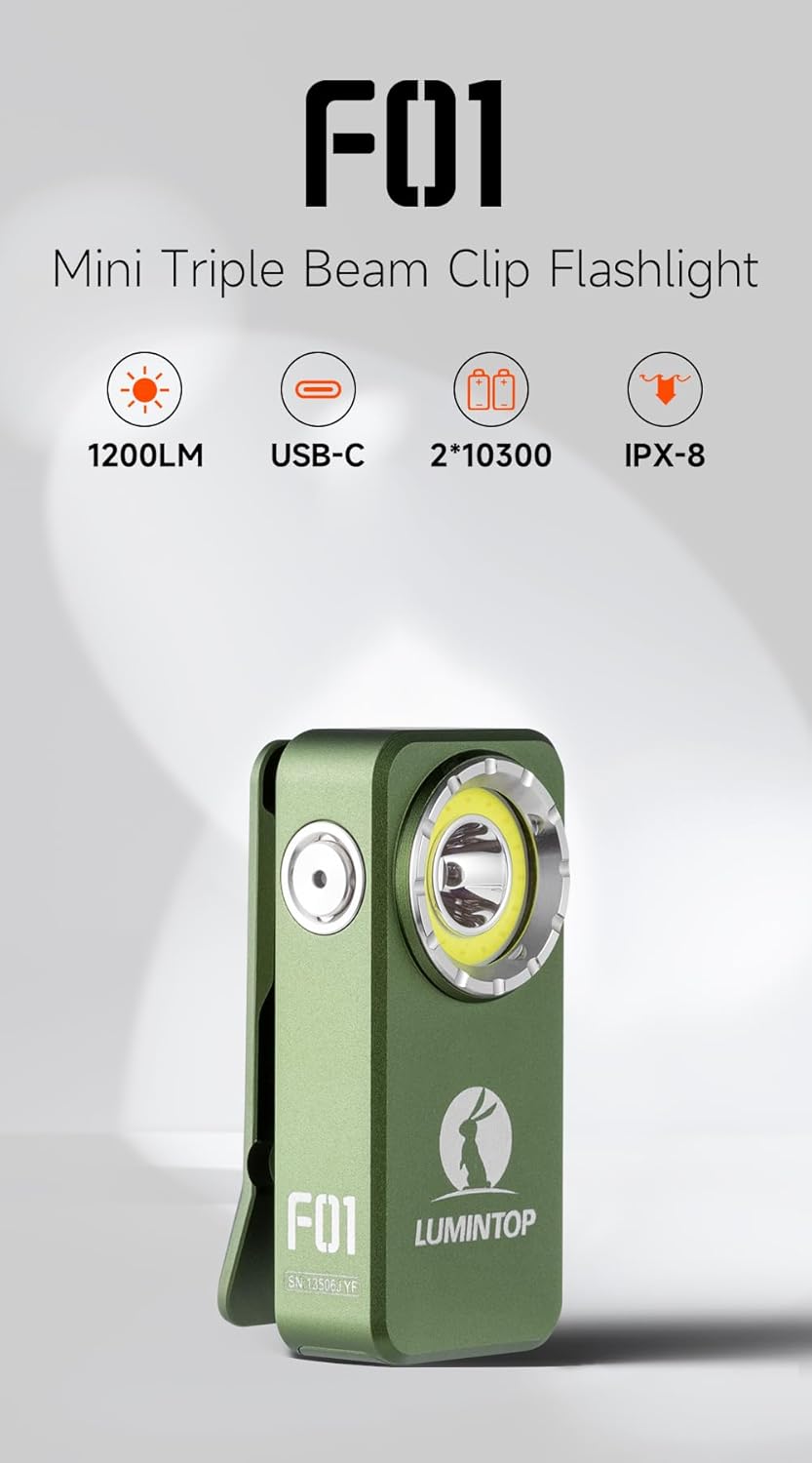
Image: LUMINTOP F01 Pro EDC Flashlight, highlighting its compact form factor.
ເນື້ອໃນຊຸດ
- LUMINTOP F01 Pro EDC Flashlight
- ແບດເຕີລີ່ Lithium Ion ໃນຕົວ
- ສາຍສາກໄຟ USB Type-C
- ຄູ່ມືຜູ້ໃຊ້ (ເອກະສານນີ້)
ຕັ້ງຄ່າ
1. Initial Use & Unlocking
For first-time use, the flashlight is in a locked state to prevent accidental activation during shipping. To unlock the device, press the side button 5 ເທື່ອ rapidly. The indicator light will confirm the unlock status.
2. ການສາກແບັດເຕີຣີ
The F01 Pro features a built-in rechargeable Lithium Ion battery and supports Type-C charging.
- Locate the USB Type-C charging port on the side of the flashlight.
- ເປີດຝາປິດປ້ອງກັນຂອງຜອດສາກໄຟ.
- Connect the provided USB Type-C cable to the flashlight and a compatible USB power source (e.g., wall adapter, computer USB port).
- ໄຟສັນຍານຈະສະແດງສະຖານະການສາກໄຟ (ຕົວຢ່າງ: ສີແດງສຳລັບການສາກໄຟ, ສີຂຽວສຳລັບການສາກໄຟເຕັມແລ້ວ).
- ເມື່ອການສາກໄຟສຳເລັດແລ້ວ, ໃຫ້ຖອດສາຍອອກ ແລະ ປິດຝາປິດໃຫ້ແໜ້ນເພື່ອຮັກສາຄວາມກັນນ້ຳ.

ຮູບພາບ: ຂ້າງ view of the flashlight, illustrating the side button and USB-C charging port.
ຄໍາແນະນໍາການດໍາເນີນງານ
The LUMINTOP F01 Pro utilizes a single side-mounted stainless steel switch for all operations.
ການດໍາເນີນງານພື້ນຖານ:
- 1x Click (from OFF): Turns the flashlight ON.
- 1x Click (from ON): Turns the flashlight OFF.
- Press & Hold (from ON): Cycles through Flood modes (Eco, Low, High) or switches between Flood and Red light modes. The flashlight has mode memory for the last used Flood mode.
ໂໝດຂັ້ນສູງ:
- 2x Click (from ON): Toggles between Spot Light and Flood Light modes.
- 3x Click (from ON/OFF): Activates Strobe mode.
- 4x Click (from ON/OFF): Activates Combo Light mode (Flood and Spot simultaneously).
- 5x Click (from ON/OFF): Locks or Unlocks the flashlight. (As mentioned in Setup, 5 clicks unlocks for first use).
- 7x Click (from ON/OFF): Toggles the Indicator Light ON/OFF.
ຮູບພາບ: ລາຍລະອຽດ view of the side button, illustrating its functions.
ຄຸນສົມບັດ
- Triple Beam System: Offers a 500lm floodlight, a 120-meter spotlight, and dual-mode red light (40/6lm) for various applications.
- Durable Pocket Clip: Allows secure attachment to pockets, straps, or other gear for flexible everyday carry. Features anti-slip texture and an integrated lanyard hole.
- ຖານແມ່ເຫຼັກ: Provides hands-free lighting by attaching to metallic surfaces.
- USB Type-C ສາມາດສາກໄດ້: ການສາກໄຟສະດວກ ແລະໄວ.
- ກັນນໍ້າ (IPX8): Designed to withstand immersion in water up to 2 meters.
- ການກໍ່ສ້າງທີ່ເຂັ້ມແຂງ: Machined from high-strength aluminum alloy for durability.

Image: Floodlight beam for wide-angle illumination.

Image: Pocket clip and lanyard hole for secure carrying.
ບໍາລຸງຮັກສາ
- ທໍາຄວາມສະອາດ: ທຳຄວາມສະອາດຕົວໄຟສາຍເປັນປະຈຳດ້ວຍຜ້າທີ່ອ່ອນນຸ້ມ, ຖູ.amp cloth. Keep the lens free of dust and debris for optimal light output.
- ຊ່ອງສາກໄຟ: Ensure the Type-C charging port is clean and dry before charging. Always close the protective cover after charging to prevent water and dust ingress.
- ແບັດເຕີຣີ: The F01 Pro uses a built-in Lithium Ion battery. While accessible for replacement if needed, it is generally not user-serviceable. If battery issues arise, contact customer support.
- ການເກັບຮັກສາ: Store the flashlight in a cool, dry place when not in use for extended periods. Charge the battery every 3-6 months to maintain its lifespan.
ການແກ້ໄຂບັນຫາ
- Flashlight not turning ON:
- Ensure the flashlight is unlocked (press 5 times rapidly).
- ກວດສອບລະດັບການສາກແບັດເຕີຣີ. ສາກໄຟຄືນໃໝ່ຖ້າຈຳເປັນ.
- ຜົນຜະລິດແສງສະຫວ່າງມືດມົວ:
- Battery may be low. Recharge the flashlight.
- Lens may be dirty. Clean the lens carefully.
- ບັນຫາການສາກໄຟ:
- ໃຫ້ແນ່ໃຈວ່າສາຍ USB Type-C ຖືກເຊື່ອມຕໍ່ຢ່າງຖືກຕ້ອງ.
- ລອງໃຊ້ແຫຼ່ງໄຟ ຫຼືສາຍ USB ອື່ນ.
- Check if the charging port is clean and free of obstructions.
- Flashlight gets warm during use:
- This is normal, especially on higher brightness modes, due to thermal regulation. The flashlight may automatically reduce brightness to prevent overheating.
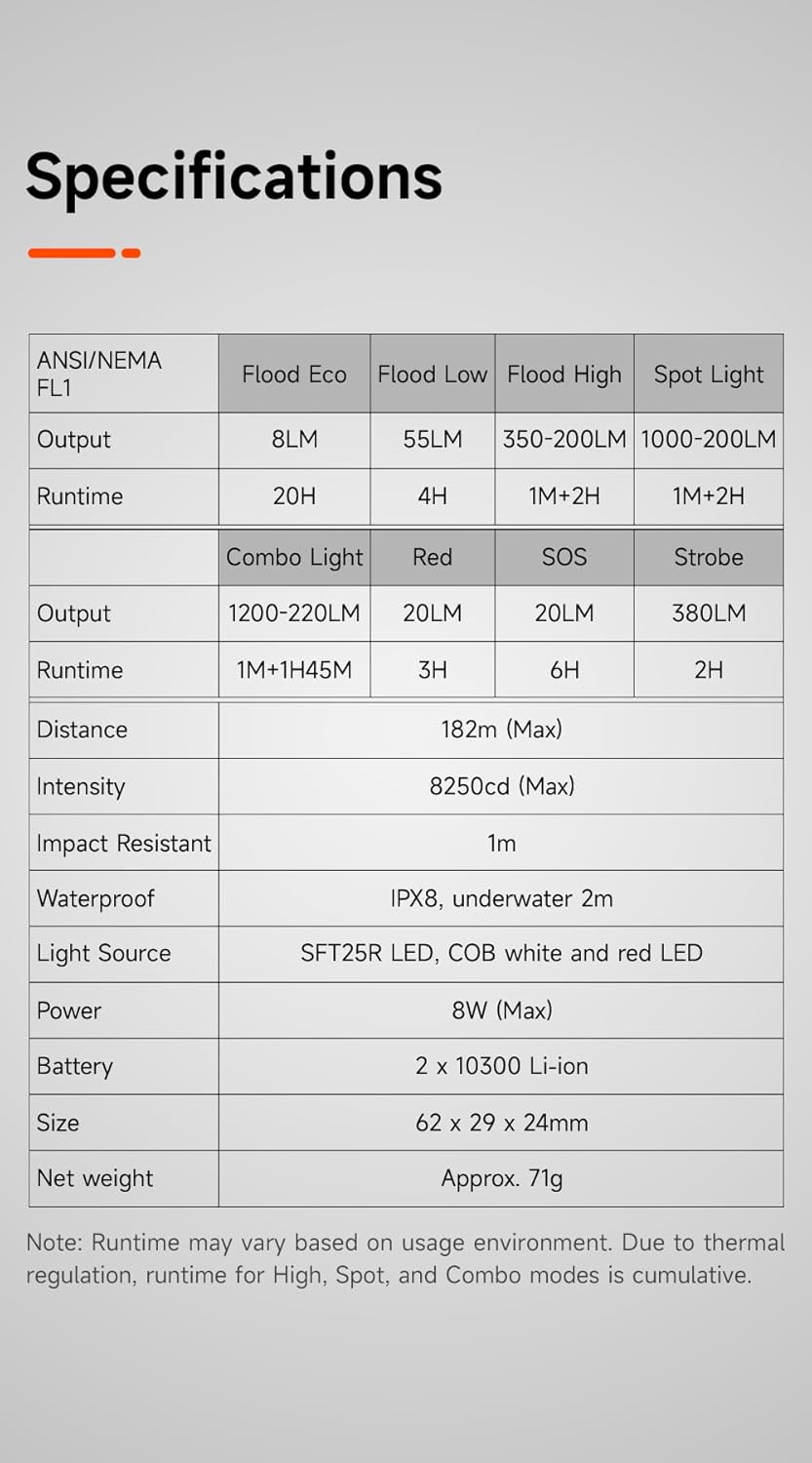
ຂໍ້ມູນຈໍາເພາະ
| ຄຸນສົມບັດ | ລາຍລະອຽດ |
|---|---|
| ຕົວແບບ | F01 Pro (G1) |
| ຍີ່ຫໍ້ | LUMINTOP |
| ແຫຼ່ງແສງ | SFT25R LED, COB white and red LED |
| Flood Light Output | Eco: 8LM, Low: 55LM, High: 350-200LM |
| Spot Light Output | 1000-200LM |
| Combo Light Output | 1200-220LM |
| Red Light Output | 20LM (High), 6LM (Low) |
| Strobe Output | 380LM |
| SOS Output | 20LM |
| ໄລຍະຫ່າງສູງສຸດຂອງ Beam | 182ມ |
| ແຫຼ່ງພະລັງງານ | Built-in 2 x 10300 Lithium Ion Battery |
| ກຳລັງສາກໄຟ | USB Type-C |
| ວັດສະດຸ | Aluminum Alloy (Anodized Finish) |
| ຂະໜາດ | 62 x 29 x 24 mm (2.44"D x 1.14"W x 0.94"H) |
| ນ້ຳໜັກ | ປະມານ. 71g (0.32 ອອນສ໌) |
| ການຕໍ່ຕ້ານນ້ໍາ | IPX8 (Underwater 2m) |
| ຄວາມຕ້ານທານຜົນກະທົບ | 1m |
| ອົງປະກອບລວມ | ແບັດເຕີຣີ |
Image: Detailed specifications table for the F01 Pro flashlight.
ການຮັບປະກັນແລະການສະຫນັບສະຫນູນ
For warranty information, technical support, or service inquiries, please refer to the warranty card included with your product or visit the official LUMINTOP webເວັບໄຊ. ຮັກສາໃບຮັບເງິນການຊື້ຂອງທ່ານໄວ້ເປັນຫຼັກຖານການຊື້.
ຜູ້ຜະລິດ: LUMINTOP