
ARZOPA Z1C
ຄູ່ມືຜູ້ໃຊ້ຈໍພາບພົກພາ ARZOPA Z1C ຂະໜາດ 16.1 ນິ້ວ
Model: Z1C | Brand: ARZOPA
ແນະນຳ
This manual provides essential information for setting up, operating, and maintaining your ARZOPA 16.1-inch Z1C Portable Monitor. Please read it thoroughly before use to ensure optimal performance and longevity of your device.
ແມ່ນຫຍັງຢູ່ໃນກ່ອງ
- 1 x ARZOPA 16.1" Portable Monitor
- 1 x ສາຍ USB-C ຫາ USB-C
- 1 x ສາຍ Mini HDMI ຫາ HDMI
- 1 x ຄູ່ມືຜູ້ໃຊ້ (ເອກະສານນີ້)

Figure 1: Included accessories with the ARZOPA Z1C Portable Monitor.
ຄຸນສົມບັດຜະລິດຕະພັນ
- 16.1" FHD 1080P Display: Experience clear picture quality with 1920x1080 resolution and 100% sRGB color gamut for vibrant visuals.
- Dual-Orientation & Stable Kickstand: Easily switch between horizontal and vertical display modes. The integrated 80° adjustable kickstand provides stable support on various surfaces.
- ຄວາມເຂົ້າກັນໄດ້ທົ່ວໂລກ: Connects instantly to laptops, PCs, Macs, smartphones (with full-function USB-C), Xbox/PS5/Switch consoles, and more via USB-C or HDMI.
- ການອອກແບບ Ultra-Portable: Weighing just 1.7lbs with a 0.3-inch slim profile, the monitor is designed for easy transport in backpacks or briefcases.

Figure 2: The ARZOPA Z1C Portable Monitor showcasing ຄວາມສາມາດໃນການສະແດງຂອງມັນ.
ຕັ້ງຄ່າ
1. ການຫຸ້ມຫໍ່ແລະການກວດກາເບື້ອງຕົ້ນ
Carefully remove all components from the packaging. Inspect the monitor and accessories for any signs of damage. Retain the packaging for future transport or storage.
2. ການເຊື່ອມຕໍ່ກັບອຸປະກອນຂອງທ່ານ
The ARZOPA Z1C supports multiple connection methods:
- USB-C (ໜ້າທີ່ເຕັມຮູບແບບ): Use the provided USB-C to USB-C cable to connect the monitor to a compatible laptop, smartphone, or tablet. This single cable can transmit both video signal and power.
- HDMI & USB-A: Use the provided Mini HDMI to HDMI cable for video signal and a USB-A to USB-C cable (not explicitly listed in "What's in the Box" but implied by "Rich Cables Boost Compatibility" image) for power if your device does not support full-function USB-C.

Figure 3: Connection options for the ARZOPA Z1C Portable Monitor.
Ensure your device's USB-C port supports video output (DisplayPort Alternate Mode) and power delivery for single-cable operation. If not, external power via USB-A is required.
Video 1: A user demonstrates connecting the ARZOPA portable monitor to a laptop via USB-C, highlighting its ease of use and slim design.
ຄໍາແນະນໍາການດໍາເນີນງານ
1. ເປີດ/ປິດ
The monitor will typically power on automatically when connected to a powered device. To manually power on/off or access the On-Screen Display (OSD) menu, use the buttons located on the side of the monitor.

ຮູບ 4: ເກີນview of the monitor's ports and control buttons.
2. ໂໝດສະແດງຜົນ
Once connected, your operating system should detect the monitor. You can configure display modes (Duplicate, Extend, Second Screen Only) through your device's display settings.
- Horizontal/Vertical Orientation: The monitor supports both landscape and portrait modes. Adjust the physical orientation and then change the display settings on your connected device accordingly.
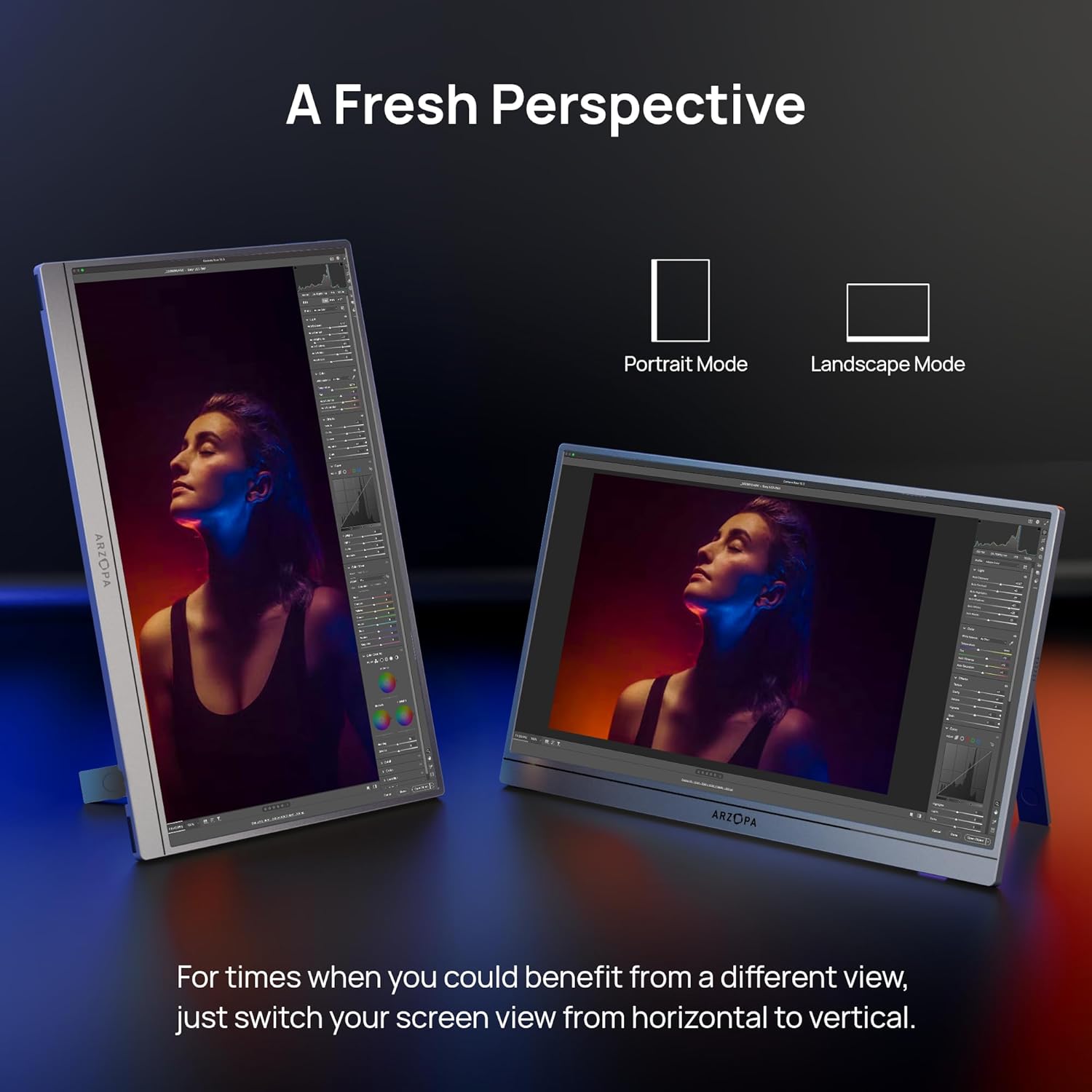
Figure 5: The ARZOPA Z1C monitor supports both portrait and landscape orientations.
3. ເມນູການສະແດງເທິງໜ້າຈໍ (OSD).
Use the OSD menu button and adjustment controls to fine-tune settings such as brightness, contrast, color temperature, input source, and more.
ບໍາລຸງຮັກສາ
- ທໍາຄວາມສະອາດ: Use a soft, lint-free cloth to gently wipe the screen and exterior. Avoid harsh chemicals or abrasive materials.
- ການເກັບຮັກສາ: When not in use, store the monitor in a cool, dry place, ideally in its original packaging or a protective sleeve to prevent scratches.
- ການຈັດການ: ຫຼີກລ່ຽງການໃຊ້ແຮງກົດດັນໃສ່ໜ້າຈໍຫຼາຍເກີນໄປ ຫຼື ເຮັດອຸປະກອນຕົກ.
ການແກ້ໄຂບັນຫາ
- ບໍ່ມີສັນຍານ:
- Ensure cables are securely connected to both the monitor and the source device.
- Verify the input source selected on the monitor matches the connected port (e.g., USB-C, HDMI).
- Check if your device's USB-C port supports video output.
- ໜ້າຈໍກະພິບ:
- Ensure the monitor is receiving sufficient power. If using a single USB-C cable, try connecting an additional power source to the monitor's second USB-C port or using a dedicated power adapter.
- ຫຼຸດຄວາມສະຫວ່າງຂອງໜ້າຈໍຖ້າຍັງມີອາການກະພິບຢູ່.
- ບໍ່ມີສຽງ:
- ກວດເບິ່ງການຕັ້ງຄ່າປະລິມານຂອງຈໍສະແດງຜົນຢູ່ໃນເມນູ OSD.
- Verify your device's audio output is directed to the portable monitor.
ຂໍ້ມູນຈໍາເພາະ
| ຂະໜາດໜ້າຈໍ | 16.1 ນິ້ວ |
| ຄວາມລະອຽດ | FHD 1080p (1920 x 1080 ພິກເຊວ) |
| ອັດຕາສ່ວນ | 16:9 |
| ຫນ້າຈໍ | Matte |
| ນ້ໍາຫນັກລາຍການ | 1.7 ປອນ |
| ຂະໜາດສິນຄ້າ | 14.37 x 11.02 x 0.39 ນິ້ວ |
| ພອດ USB ທັງໝົດ | 2 (USB-C) |
| ສະບັບtage | 220 ໂວນ (ອິນພຸດ) |
| ຜູ້ຜະລິດ | ARZOPA |
| ໝາຍເລກຕົວແບບ | Z1C |
ການຮັບປະກັນແລະການສະຫນັບສະຫນູນ
ARZOPA offers 24-month after-service support. For any inquiries or issues, please contact the dedicated customer support team. This ensures prompt responses and hassle-free solutions from purchase to long-term use.
ແຜນການປົກປ້ອງເພີ່ມເຕີມແມ່ນມີໃຫ້ສໍາລັບການຊື້:
- ແຜນການປົກປ້ອງ 3 ປີ
- ແຜນການປົກປ້ອງ 4 ປີ
- ການປົກປ້ອງຄົບຖ້ວນ: ແຜນດຽວກວມເອົາການຊື້ໃນອະດີດ ແລະອະນາຄົດທີ່ມີສິດທັງໝົດ (ໃບບິນລາຍເດືອນ)
Ask a question about this manual
Ask about setup, troubleshooting, compatibility, parts, safety, or missing instructions. Manuals+ will review the question and use this page’s manual context to help answer it.