
1. ຜະລິດຕະພັນເກີນview
The KESHIDE Digital Alarm Clock Model 210 is a battery-operated alarm clock featuring a large LCD display, indoor temperature reading, night light, and snooze function. It is designed for ease of use in various settings such as bedrooms, offices, and during travel.

ຮູບ 1: ດ້ານຫນ້າ view of the KESHIDE Digital Alarm Clock Model 210.
ຄຸນນະສົມບັດທີ່ສໍາຄັນ:
- Large LCD display with time, date, and indoor temperature.
- 12/24 hour format selection.
- Daily alarm with 5-minute snooze function.
- Night light with a 5-second illumination or glow-in-the-dark function.
- Temperature display in Celsius (℃) or Fahrenheit (℉).
- Battery operated (3 AAA batteries, not included).
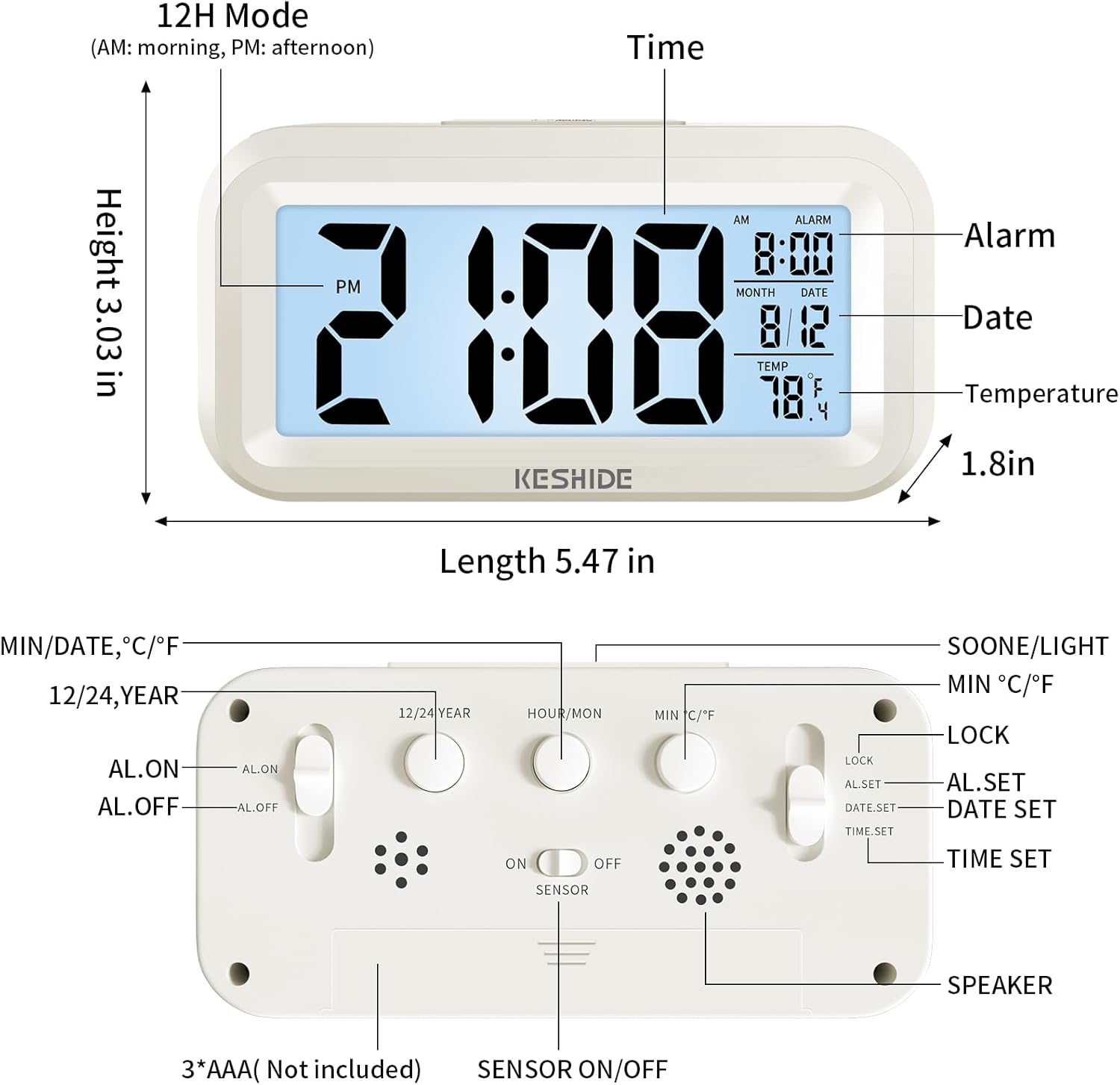
Figure 2: Labeled diagram of the alarm clock, showing display elements and dimensions.
2. ຕັ້ງຄ່າ
2.1 ການຕິດຕັ້ງຫມໍ້ໄຟ
- ຊອກຫາຊ່ອງໃສ່ຫມໍ້ໄຟຢູ່ດ້ານຫຼັງຂອງໂມງ.
- ເປີດຝາປິດຊ່ອງໃສ່ຫມໍ້ໄຟ.
- Insert 3 new AAA batteries (not provided), ensuring correct polarity (+/-).
- ປິດຝາປິດຊ່ອງໃສ່ຫມໍ້ໄຟຢ່າງປອດໄພ.

Figure 3: Back panel controls and battery compartment.
3. ຄໍາແນະນໍາການດໍາເນີນງານ
3.1 ການກຳນົດເວລາ ແລະ ວັນທີ
- ເລື່ອນໄດ້ LOCK/AL.SET/DATE.SET/TIME.SET switch on the back to TIME.SET.
- ກົດ HOUR/MON ປຸ່ມເພື່ອປັບຊົ່ວໂມງ.
- ກົດ MIN/DATE ປຸ່ມເພື່ອປັບນາທີ.
- To set the year, press the 12/24 YEAR ປຸ່ມ.
- To set the month, slide the switch to DATE.SET ແລະກົດ HOUR/MON.
- To set the day, slide the switch to DATE.SET ແລະກົດ MIN/DATE.
- Once time and date are set, slide the switch back to ລັອກ ເພື່ອບັນທຶກການຕັ້ງຄ່າ.
3.2 ການເລືອກຮູບແບບ 12/24 ຊົ່ວໂມງ
While in normal time display mode (switch set to ລັອກ) , ກົດ 12/24 YEAR ປຸ່ມເພື່ອສະຫຼັບລະຫວ່າງຮູບແບບ 12 ຊົ່ວໂມງ (AM/PM) ແລະ 24 ຊົ່ວໂມງ.

Figure 4: Switching between 12-hour and 24-hour time display.
3.3 ການຕັ້ງໂມງປຸກ
- ເລື່ອນໄດ້ LOCK/AL.SET/DATE.SET/TIME.SET switch on the back to AL.SET.
- ກົດ HOUR/MON ປຸ່ມເພື່ອປັບໂມງປຸກ.
- ກົດ MIN/DATE ປຸ່ມເພື່ອປັບນາທີປຸກ.
- Once the alarm time is set, slide the switch back to ລັອກ.
- To activate or deactivate the alarm, use the AL.ON/AL.OFF switch on the back. When set to AL.ON, an alarm icon will appear on the display.
3.4 Snooze ຟັງຊັນ
ເມື່ອສຽງປຸກດັງຂຶ້ນ, ກົດປຸ່ມໃຫຍ່ ແສງ SNOOZE / LIGHT button on the top of the clock. The alarm will temporarily stop and sound again after approximately five minutes. To turn off the alarm completely, press any button on the back of the clock, or the alarm will automatically stop after 60 seconds if no action is taken.
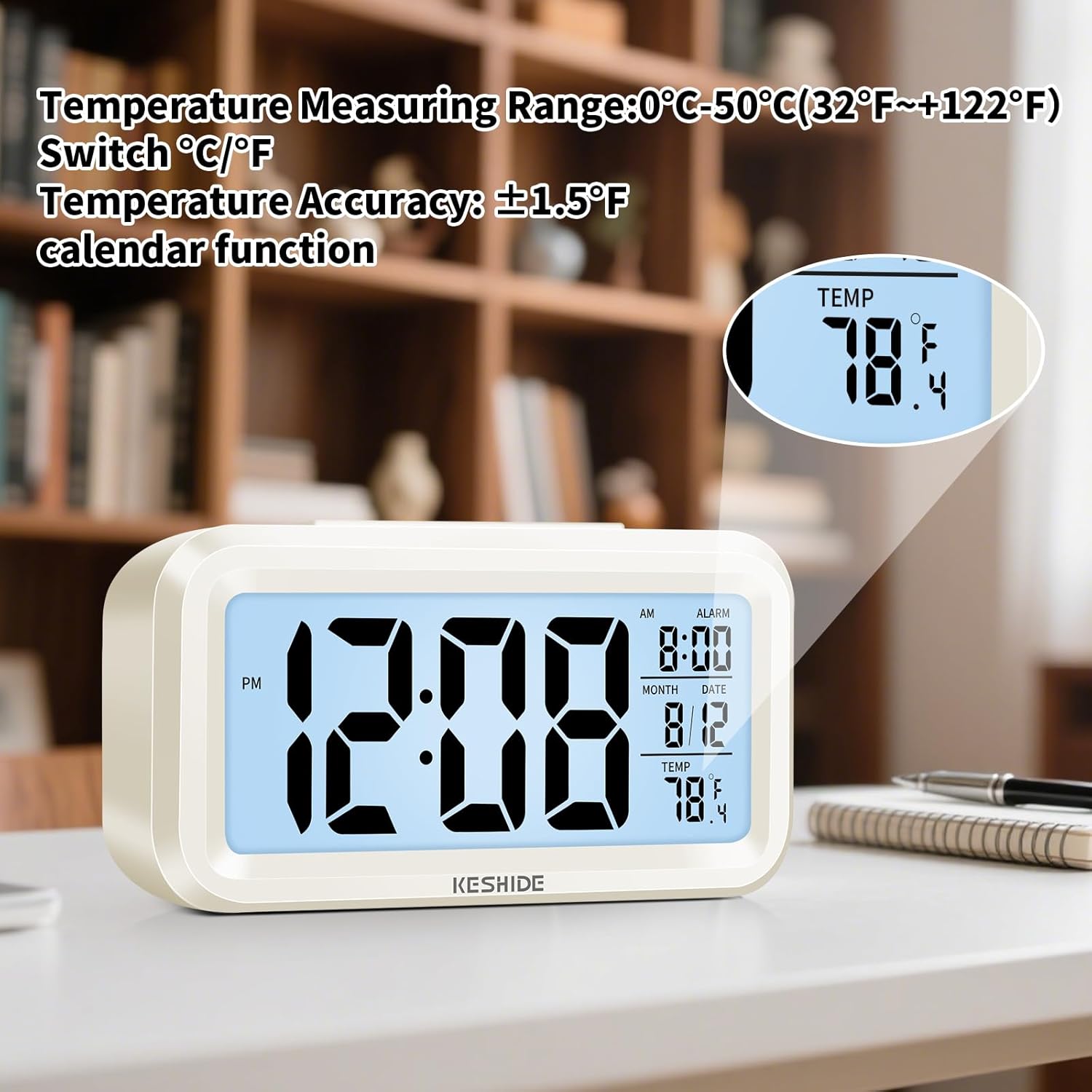
Figure 5: Activating the snooze function.
3.5 Night Light and Backlight
- Temporary Backlight: ກົດ ແສງ SNOOZE / LIGHT button on the top to illuminate the screen for five seconds.
- Automatic Glow-in-the-Dark: The clock features a photosensitive sensor. Slide the ເຊັນເຊີເປີດ/ປິດ switch on the back to ON. In dark environments, the screen will emit a soft glow, allowing you to see the time without pressing any buttons. Slide the switch to ປິດ ເພື່ອປິດຄຸນສົມບັດນີ້.

Figure 6: Automatic screen standby during the day and soft glow at night.
3.6 ການສະແດງອຸນຫະພູມ
The clock displays the indoor temperature. To switch between Celsius (℃) and Fahrenheit (℉), press the MIN ℃/℉ button on the back of the clock. The temperature range is 0℃~50℃ (32℉~122℉).

Figure 7: Indoor temperature display.
4. ບໍາລຸງຮັກສາ
4.1 ການທົດແທນຫມໍ້ໄຟ
When the display dims or functions become erratic, it is time to replace the batteries. Follow the steps in Section 2.1 for battery installation.
4.2 ການທໍາຄວາມສະອາດ
Wipe the clock with a soft, dry cloth. Do not use abrasive cleaners or immerse the clock in water.
5. ການແກ້ໄຂບັນຫາ
- ຈໍສະແດງຜົນຫວ່າງເປົ່າ ຫຼືມືດ:
Ensure batteries are correctly installed and not depleted. Replace with fresh AAA batteries. - ໂມງປຸກບໍ່ມີສຽງ:
ກວດເບິ່ງວ່າ AL.ON/AL.OFF ສະຫຼັບຖືກຕັ້ງເປັນ AL.ON. Verify that the alarm time is correctly set. - Night light/backlight not working:
For temporary backlight, ensure the ແສງ SNOOZE / LIGHT button is pressed firmly. For automatic glow, ensure the ເຊັນເຊີເປີດ/ປິດ ສະຫຼັບຖືກຕັ້ງເປັນ ON and the environment is sufficiently dark. - ການອ່ານອຸນຫະພູມບໍ່ຖືກຕ້ອງ:
The clock measures ambient indoor temperature. Ensure it is not placed near heat sources or air conditioning vents that could affect readings.
6. ຂໍ້ມູນຈໍາເພາະ
| ຄຸນສົມບັດ | ລາຍລະອຽດ |
|---|---|
| ຍີ່ຫໍ້ | KESHIDE |
| ໝາຍເລກຕົວແບບ | 210 |
| ປະເພດການສະແດງ | ຈໍ LCD |
| ແຫຼ່ງພະລັງງານ | 3 x ຫມໍ້ໄຟ AAA (ບໍ່ລວມ) |
| ຂະໜາດສິນຄ້າ | 6.7"W x 3"H |
| ນ້ໍາຫນັກລາຍການ | 5.6 ອອນ |
| ຊ່ວງອຸນຫະພູມ | 0℃~50℃ (32℉~122℉) |
| ວັດສະດຸ | ພາດສະຕິກ |
| ປະເພດການຕິດຕັ້ງ | ໂຕະ |
7. ການຮັບປະກັນແລະການສະຫນັບສະຫນູນ
KESHIDE is committed to providing quality products and customer satisfaction. If you encounter any issues or have concerns regarding your product, please contact KESHIDE customer service via the Amazon Platform. We are dedicated to addressing your problems even if the standard return window has closed, ensuring you receive appropriate support.