
1. ການແນະນໍາ ແລະຫຼາຍກວ່າview
Thank you for choosing the OHAYO A7 Clip-On Open Ear Headphones. These headphones are designed to provide a comfortable and immersive audio experience while keeping you aware of your surroundings. Featuring Bluetooth 5.4 connectivity, a lightweight clip-on design, and extended battery life, the A7 is suitable for various activities, from daily commutes to workouts.
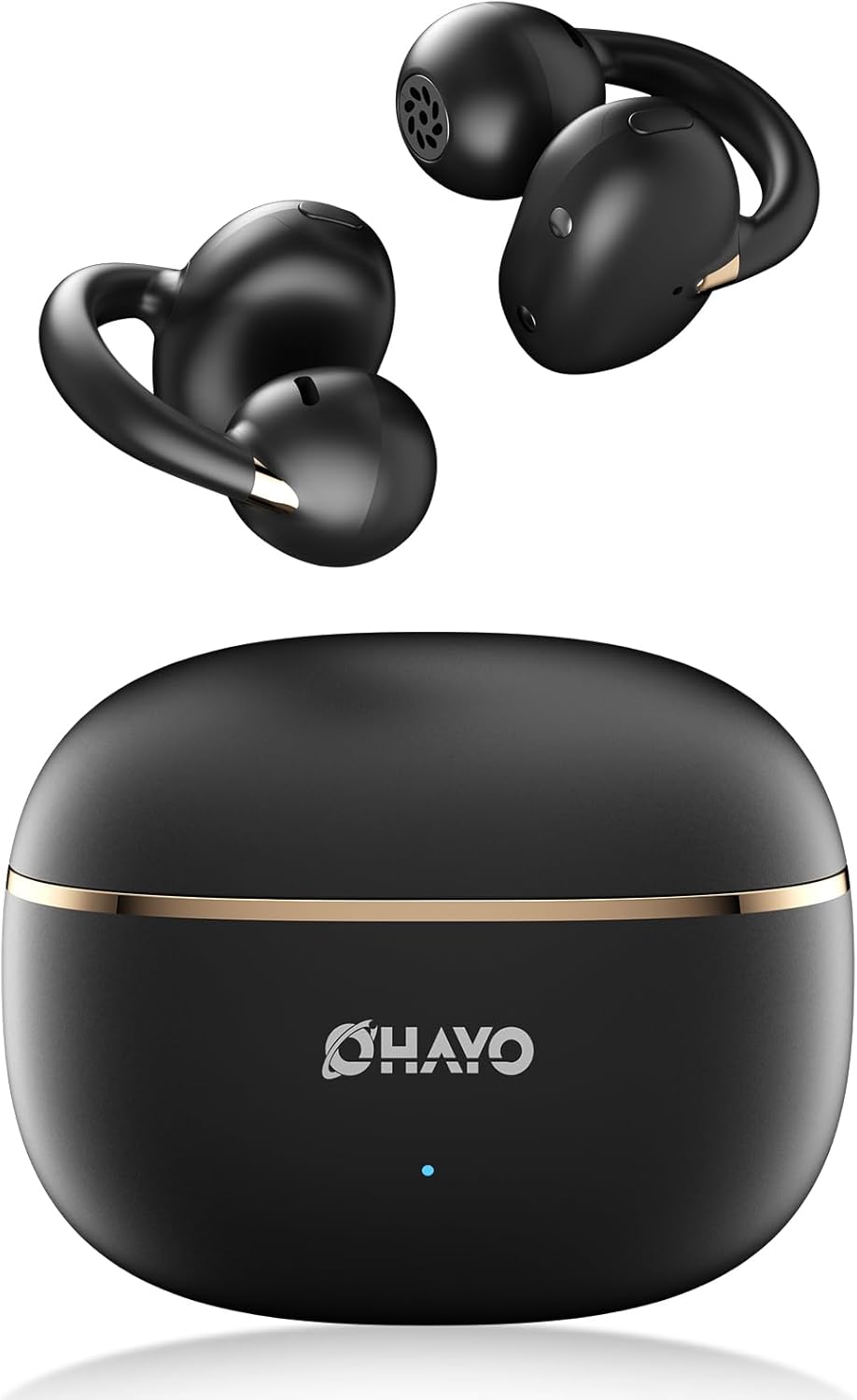
Image 1.1: The OHAYO A7 Clip-On Open Ear Headphones and their charging case. The earbuds feature a black finish with gold accents, designed for an open-ear fit. The compact charging case is also black with a gold stripe and the OHAYO logo.
ຄຸນນະສົມບັດທີ່ສໍາຄັນປະກອບມີ:
- ການອອກແບບເປີດຫູ: Allows you to hear your audio while remaining aware of ambient sounds.
- ນ້ຳໜັກເບົາສຸດພິເສດ: Each earbud weighs approximately 4.7g for comfortable, extended wear.
- Bluetooth 5.4: Provides stable and efficient wireless connectivity with low latency.
- 12mm Dynamic Drivers: Delivers clear audio with enhanced bass.
- ຂະຫຍາຍເວລາຫຼິ້ນ: ໃຊ້ໄດ້ດົນເຖິງ 6.5 ຊົ່ວໂມງຕໍ່ການສາກໄຟຄັ້ງໜຶ່ງ, ລວມທັງໝົດ 40 ຊົ່ວໂມງໃນການໃຊ້ກັບກ່ອງສາກໄຟ.
- IPX6 ກັນນ້ໍາ: Protects against sweat and splashes, suitable for active use.
2. ສິ່ງທີ່ຢູ່ໃນກ່ອງ
ກະລຸນາກວດສອບເນື້ອໃນຂອງຊຸດເພື່ອໃຫ້ແນ່ໃຈວ່າລາຍການທັງຫມົດມີຢູ່:
- OHAYO A7 Clip-On Open Ear Headphones (Left and Right)
- ກໍລະນີສາກໄຟໄຮ້ສາຍ
- ສາຍສາກ USB-C
- ຄູ່ມືຜູ້ໃຊ້

Image 2.1: The package contents for the OHAYO A7 headphones, including the earbuds, charging case, USB-C cable, and user manual.
3. ແຜນວາດຜະລິດຕະພັນ
Familiarize yourself with the components of your OHAYO A7 headphones:

ຮູບພາບທີ 3.1: ເປັນການປິດ view of a single OHAYO A7 earbud, highlighting its clip-on design and speaker grille.

Image 3.2: The OHAYO A7 earbuds placed inside their open charging case, showing the charging contacts and the compact design.
4. ຕັ້ງຄ່າ
4.1 ການສາກຫູຟັງ
ກ່ອນນຳໃຊ້ຄັ້ງທຳອິດ, ໃຫ້ສາກຫູຟັງ ແລະ ຊ່ອງສາກໃຫ້ເຕັມ.
- Connect the provided USB-C charging cable to the charging port on the case and to a USB power source.
- ໄຟສັນຍານຢູ່ເທິງເຄສຈະສະແດງສະຖານະການສາກໄຟ. ການສາກໄຟໃຫ້ເຕັມສຳລັບເຄສໃຊ້ເວລາປະມານ 1.5 ຊົ່ວໂມງ.
- ວາງຫູຟັງໃສ່ກະເປົ໋າສາກໄຟ. ພວກເຂົາຈະເລີ່ມສາກໄຟໂດຍອັດຕະໂນມັດ.

Image 4.1: The OHAYO A7 charging case with a USB-C cable inserted, indicating the charging process. The image also shows the earbuds and charging times.
ການສາກໄວ 10 ນາທີສາມາດໃຫ້ເວລາຫຼິ້ນໄດ້ເຖິງ 2 ຊົ່ວໂມງ.
4.2 ການຈັບຄູ່ Bluetooth
To connect your OHAYO A7 headphones to a device:
- ກວດໃຫ້ແນ່ໃຈວ່າໄດ້ສາກຫູຟັງເອຍບັດແລ້ວ ແລະວາງໃສ່ກ່ອງສາກ.
- Open the charging case. The earbuds will automatically enter pairing mode, indicated by a flashing LED light (if applicable).
- ໃນອຸປະກອນຂອງທ່ານ (ໂທລະສັບສະຫຼາດ, ແທັບເລັດ, ແລັບທັອບ), ໄປທີ່ການຕັ້ງຄ່າ Bluetooth ແລະເປີດ Bluetooth.
- ຊອກຫາ available devices and select "OHAYO A7" from the list.
- Once connected, the LED indicator on the earbuds will turn off or show a solid light, and you will hear a confirmation tone.

Image 4.2: A smartphone screen displaying Bluetooth settings, with "OHAYO A7" listed as an available device for pairing.
The OHAYO A7 uses Bluetooth 5.4 for a stable connection up to 20 meters.
5. ຄໍາແນະນໍາກ່ຽວກັບການໃສ່
ເພື່ອຄຸນນະພາບສຽງທີ່ດີທີ່ສຸດ ແລະຄວາມສະດວກສະບາຍ, ໃຫ້ແນ່ໃຈວ່າໃສ່ຫູຟັງເອຍບັດຢ່າງຖືກຕ້ອງ.
- ລະບຸຫູຟັງຊ້າຍ (L) ແລະຂວາ (R).
- Gently clip each earbud onto the corresponding ear, positioning the open-ring joint horizontally.
- Adjust the earbud slightly until it feels secure and comfortable, ensuring the speaker is aligned with your ear canal for the best sound delivery.

Image 5.1: A visual guide demonstrating the correct way to wear the OHAYO A7 clip-on earbuds, contrasting it with unstable, misaligned, and reversed fits.
The ergonomic C-shaped design and lightweight construction (4.7g per earbud) are engineered for comfort and stability, even for users with glasses or sensitive ears.
6. Operating Instructions (Button Controls)
The OHAYO A7 headphones feature physical buttons for easy control of various functions:

Image 6.1: A detailed diagram illustrating the various button controls on the OHAYO A7 earbuds for music playback, calls, and other functions.
| ການປະຕິບັດ | ຟັງຊັນ |
|---|---|
| Single tap (L or R) | ຫຼິ້ນ/ຢຸດເພງ, ຮັບສາຍ/ວາງສາຍ |
| Press and hold 1.5s (L) | ເພງກ່ອນໜ້າ |
| Press and hold 1.5s (R) | ຕິດຕາມຕໍ່ໄປ |
| ແຕະສອງເທື່ອ (L) | ປະລິມານ - |
| ແຕະສອງເທື່ອ (R) | ປະລິມານ + |
| Triple tap (R) | ເປີດໃຊ້ຜູ້ຊ່ວຍສຽງ |
| Triple tap (L) | ໂໝດເກມເປີດ/ປິດ |
| Press and hold (L or R) during incoming call | ປະຕິເສດການໂທ |
7. ຂໍ້ມູນຈໍາເພາະ
Detailed technical specifications for the OHAYO A7 Clip-On Open Ear Headphones:
| ຄຸນສົມບັດ | ລາຍລະອຽດ |
|---|---|
| ຊື່ຕົວແບບ | A7 |
| ເຕັກໂນໂລຊີການເຊື່ອມຕໍ່ | ໄຮ້ສາຍ (Bluetooth 5.4) |
| ຊ່ວງ Bluetooth | ເຖິງ 20 ແມັດ |
| ຂະໜາດໄດເວີສຽງ | ໄດເວີແບບເຄື່ອນໄຫວຂະ ໜາດ 12 mm |
| ການຕອບສະໜອງຄວາມຖີ່ | 20 KHz (Upper limit provided) |
| ຄວາມອ່ອນໄຫວ | 85 dB |
| impedance | 32 ໂອມ |
| ຄວາມຍືດຍຸ່ນສຽງ | 6 Milliseconds (35ms in pro-gaming mode) |
| ການຄວບຄຸມສິ່ງລົບກວນ | ການຍົກເລີກສິ່ງລົບກວນແບບປັບຕົວ (ENC ສໍາລັບການໂທ) |
| ເວລາຫຼິ້ນຫູຟັງ | 6.5 - 8 Hours (single charge) |
| ເວລາຫຼິ້ນທັງໝົດ (ພ້ອມກໍລະນີ) | ສູງສຸດ 40 ຊົ່ວໂມງ |
| ເວລາສາກໄຟ (ກໍລະນີ) | 1.5 ຊົ່ວໂມງ |
| ຄວາມອາດສາມາດສາກໄຟໄດ້ | 500 mAh |
| ການຕໍ່ຕ້ານນ້ໍາ | IPX6 (ກັນນ້ຳ/ກັນເຫື່ອ) |
| ນ້ ຳ ໜັກ ຕຸ້ມຫູ | 4.7 ກຣາມ (ແຕ່ລະອັນ) |
| ຂະໜາດຂອງກໍລະນີ | 2.4 x 1.96 x 1.18 ນິ້ວ |
| ວັດສະດຸ | ABS, ພາດສະຕິກ |
| ອຸປະກອນທີ່ເຂົ້າກັນໄດ້ | ໂທລະສັບມືຖື, ຄອມພິວເຕີຕັ້ງໂຕະ, ແລັບທັອບ |
8. ບໍາລຸງຮັກສາ
Proper care will extend the lifespan of your OHAYO A7 headphones:
- ທໍາຄວາມສະອາດ: ເຊັດຫູຟັງຫູຟັງ ແລະ ກະເປົ໋າສາກໄຟເປັນປະຈຳດ້ວຍຜ້າອ່ອນໆ, ແຫ້ງ, ບໍ່ມີຜ້າປູ. ຫຼີກເວັ້ນການນໍາໃຊ້ວັດສະດຸຂັດຫຼືສານເຄມີທີ່ຮຸນແຮງ.
- ການເກັບຮັກສາ: ເມື່ອບໍ່ໄດ້ໃຊ້, ໃຫ້ເກັບຮັກສາຫູຟັງໃສ່ໃນກະເປົ໋າສາກໄຟເພື່ອປົກປ້ອງພວກມັນຈາກຝຸ່ນ ແລະຄວາມເສຍຫາຍ.
- ການເປີດເຜີຍນ້ໍາ: While the headphones are IPX6 water-resistant, avoid submerging them in water. Dry them thoroughly if they get wet from sweat or splashes before placing them back in the charging case.

Image 8.1: The OHAYO A7 earbuds shown with water droplets, demonstrating their IPX6 waterproof and splashproof capabilities.
9. ການແກ້ໄຂບັນຫາ
If you encounter issues with your OHAYO A7 headphones, refer to the following common solutions:
- ບໍ່ມີສຽງ:
- ກວດໃຫ້ແນ່ໃຈວ່າໄດ້ຈັບຄູ່ຫູຟັງຢ່າງຖືກຕ້ອງ ແລະເຊື່ອມຕໍ່ກັບອຸປະກອນຂອງທ່ານ.
- ກວດເບິ່ງລະດັບສຽງໃນທັງຫູຟັງ ແລະອຸປະກອນທີ່ເຊື່ອມຕໍ່ຂອງທ່ານ.
- Make sure the earbuds are correctly seated in your ears.
- ບໍ່ສາມາດຈັບຄູ່ໄດ້:
- ໃຫ້ແນ່ໃຈວ່າ Bluetooth ຖືກເປີດໃຊ້ຢູ່ໃນອຸປະກອນຂອງທ່ານ.
- Place the earbuds back in the charging case, close the lid, wait a few seconds, then open it again to re-enter pairing mode.
- Try forgetting "OHAYO A7" from your device's Bluetooth list and re-pairing.
- ກວດໃຫ້ແນ່ໃຈວ່າໄດ້ສາກຫູຟັງແລ້ວ.
- ບັນຫາການສາກໄຟ:
- ກວດສອບວ່າສາຍສາກໄດ້ເຊື່ອມຕໍ່ຢ່າງປອດໄພກັບທັງກໍລະນີ ແລະແຫຼ່ງໄຟ.
- ກວດໃຫ້ແນ່ໃຈວ່າຕົວຕິດຕໍ່ການສາກໄຟຢູ່ຫູຟັງເອຍບັດ ແລະ ພາຍໃນເຄສນັ້ນສະອາດ ແລະ ບໍ່ມີສິ່ງເສດເຫຼືອ.
- ລອງໃຊ້ສາຍ USB-C ອື່ນ ຫຼືອະແດັບເຕີໄຟ.
- ການເຊື່ອມຕໍ່ແບບບໍ່ຢຸດຢັ້ງ:
- ຫຼຸດໄລຍະຫ່າງລະຫວ່າງຫູຟັງ ແລະ ອຸປະກອນຂອງທ່ານ.
- ຫຼີກລ່ຽງສະພາບແວດລ້ອມທີ່ມີການລົບກວນໄຮ້ສາຍທີ່ສຳຄັນ (ເຊັ່ນ: ໃກ້ກັບເຣົາເຕີ Wi-Fi, ເຕົາໄມໂຄເວຟ).
- ໃຫ້ແນ່ໃຈວ່າບໍ່ມີສິ່ງກີດຂວາງທາງກາຍະພາບລະຫວ່າງຫູຟັງ ແລະ ອຸປະກອນຂອງທ່ານ.
10. ການຮັບປະກັນແລະການສະຫນັບສະຫນູນ
OHAYO provides a 1-Year Care Plan for your A7 Clip-On Open Ear Headphones. This includes:
- Industry-leading 24/7 customer support.
- Lifetime technical updates.
For warranty claims, technical assistance, or any other inquiries, please contact OHAYO customer support through the official channels provided at the time of purchase or on the OHAYO webເວັບໄຊ.
Image 10.1: An illustration highlighting the 1-Year Care Plan offered by OHAYO, alongside the product packaging and accessories.