
1. ບົດແນະນຳ
This manual provides comprehensive instructions for the safe and effective use of the AMPBANK H128 Handheld Thermal Camera. The H128 is designed for precise temperature measurement and thermal imaging, suitable for various applications including electrical inspections, HVAC diagnostics, building energy audits, and automotive maintenance. Please read this manual thoroughly before operating the device and retain it for future reference.

ຮູບທີ 1.1: The AMPBANK H128 Handheld Thermal Camera, showcasing its ergonomic design and integrated display.
2. ຂໍ້ມູນຄວາມປອດໄພ
Always observe the following safety precautions to prevent injury and damage to the device.
- Do not point the camera directly at extremely high-intensity energy sources, such as the sun or lasers, as this may damage the infrared detector.
- Avoid dropping the device or subjecting it to severe impact, despite its robust design.
- Do not immerse the device in water or other liquids. While it has an IP65 rating for dust and water jet protection, it is not designed for submersion.
- Use only the specified charging cable (USB-C) and power adapter to charge the device.
- ຢ່າພະຍາຍາມຖອດປະກອບ ຫຼື ດັດແປງກ້ອງຖ່າຍຮູບ. ການສ້ອມແປງຄວນປະຕິບັດໂດຍພະນັກງານບໍລິການທີ່ໄດ້ຮັບອະນຸຍາດເທົ່ານັ້ນ.
- Keep the lens clean and free from dust and debris. Use a soft, lint-free cloth for cleaning.
- Operate the device within the specified environmental conditions (temperature and humidity).
3. ຜະລິດຕະພັນເກີນview
3.1. ສ່ວນປະກອບ
ໄດ້ AMPBANK H128 thermal camera includes the following main components:
- ເລນອິນຟາເຣດ: Captures thermal radiation.
- ຈໍສະແດງຜົນ: Shows thermal images, temperature readings, and menu options.
- ປຸ່ມຄວບຄຸມ: For navigation and selection (OK, Up, Down, Return/Power).
- ປຸ່ມກະຕຸ້ນ: To capture images.
- ຜອດ USB-C: ສໍາລັບການສາກໄຟແລະການໂອນຂໍ້ມູນ.
- Tripod Mount: Standard 1/4-inch thread for stable positioning.
3.2. ຄຸນນະສົມບັດທີ່ສໍາຄັນ
The H128 thermal camera offers a range of advanced features for efficient and accurate thermal inspections:
- Enhanced Clarity with TISR Resolution: The camera utilizes TISR (Thermal Image Super Resolution) technology to achieve an effective display resolution of 240x240 pixels from a 128x128 infrared sensor, providing clearer thermal images.
- ຂະຫຍາຍອາຍຸແບັດເຕີຣີ 24 ຊົ່ວໂມງ: Equipped with a built-in 2900mAh rechargeable battery, the H128 provides up to 24 hours of continuous operation, minimizing downtime during extended inspections.
- Precise Temperature Measurement: The device offers high accuracy with a temperature resolution of 0.1°C and readings within ±3%, covering a wide temperature range from -4°F to 842°F (-20°C to 450°C). Users can adjust emissivity for various materials to improve accuracy.
- Temperature Alarm for Anomaly Detection: A built-in alarm system quickly identifies abnormal heat sources, automatically tracking and displaying maximum, minimum, and center temperatures on the screen.
- Durable and Robust Design: The H128 is built to withstand demanding environments, featuring a 6.56-foot (2-meter) drop protection and an IP65 ingress protection rating against dust and water jets.
- ອັດຕາເຟຣມສູງ: A 25Hz frame rate ensures smooth, real-time thermal imagery, crucial for dynamic inspections.
- Multiple Thermal Palettes: Choose from 5 different color palettes (Iron Red, Black Hot, Rainbow, White Hot, Red Hot) to best visualize temperature differences for specific applications.

Figure 3.1: Comparison of thermal image clarity with and without TISR technology, demonstrating the enhanced 240x240 resolution.

Figure 3.2: Illustration of the H128's long-lasting 24-hour battery life and Type-C charging port.

Figure 3.3: The H128 in use, demonstrating its capability for accurate temperature measurement in an electrical panel.

Figure 3.4: The H128 display highlighting hot, center, and cold spots with an integrated high/low temperature alarm.
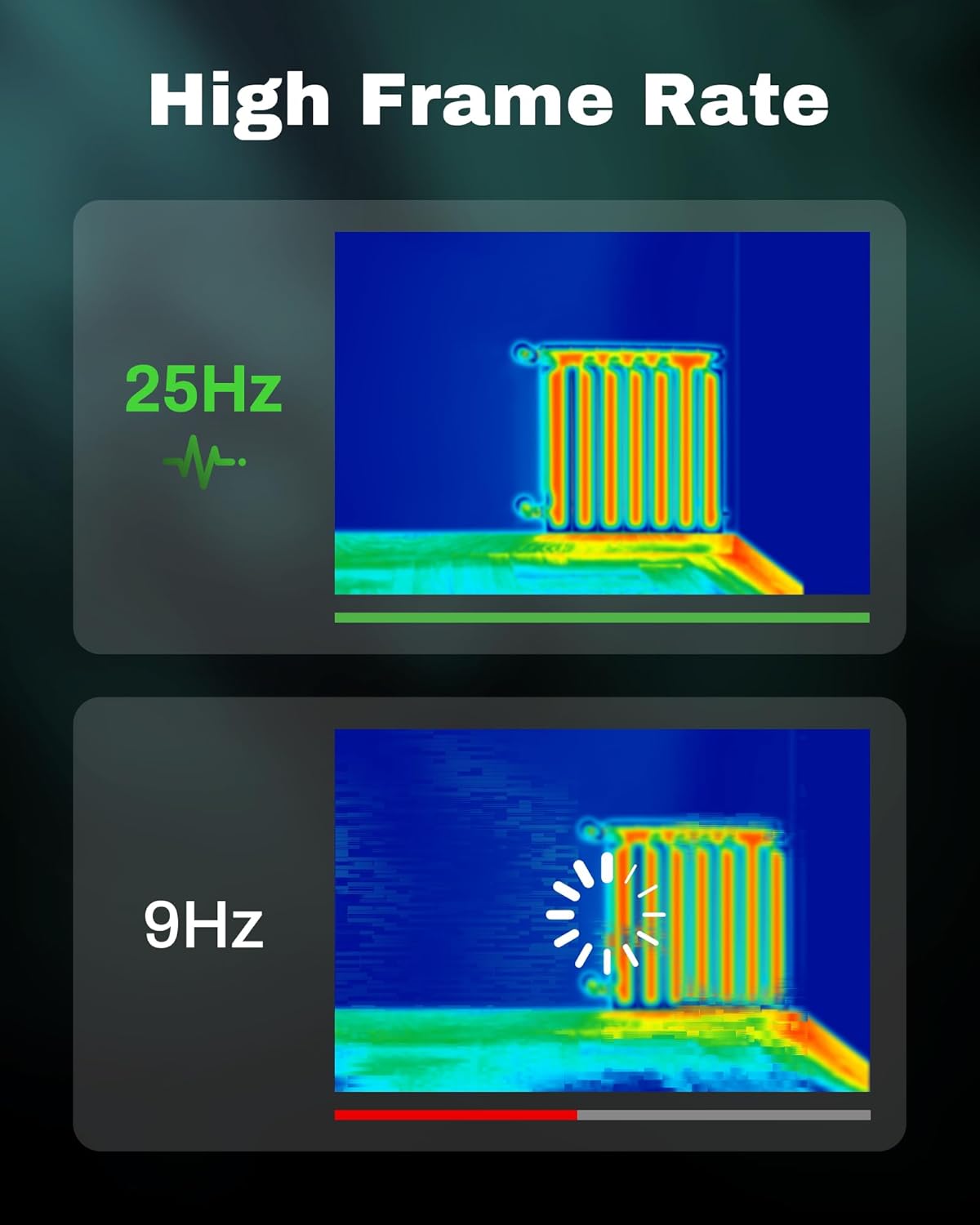
Figure 3.5: Visual comparison of thermal image fluidity at 25Hz versus 9Hz frame rates.

Figure 3.6: Display of the five available thermal color palettes for varied visualization of heat signatures.
4. ຕັ້ງຄ່າ
4.1. ການຫຸ້ມຫໍ່
ເອົາລາຍການທັງຫມົດອອກຈາກການຫຸ້ມຫໍ່ຢ່າງລະມັດລະວັງ. ກ່ອງຄວນປະກອບດ້ວຍ:
- AMPBANK H128 Thermal Imaging Camera
- ສາຍ USB-C
Inspect the camera for any signs of damage. If any components are missing or damaged, contact customer support immediately.
4.2. ການສາກແບັດເຕີຣີ
Before first use, fully charge the camera's built-in battery.
- Connect the supplied USB-C cable to the USB-C port on the top of the camera.
- ເຊື່ອມຕໍ່ອີກສົ້ນຂອງສາຍ USB-C ກັບອະແດັບເຕີໄຟ USB ທີ່ເຂົ້າກັນໄດ້ (ບໍ່ລວມ) ຫຼືພອດ USB ຂອງຄອມພິວເຕີ.
- The charging indicator on the screen will show the charging status. A full charge typically takes several hours.
- ເມື່ອສາກເຕັມແລ້ວ, ໃຫ້ຖອດສາຍອອກ.
4.3. ການເປີດເຄື່ອງເບື້ອງຕົ້ນ ແລະການຕັ້ງຄ່າພື້ນຖານ
- ເປີດ: Press and hold the power button (often integrated with the Return button) for approximately 8 seconds until the screen illuminates.
- ການເລືອກພາສາ: Upon first power-on, you may be prompted to select your preferred language. Use the Up/Down buttons to navigate and the OK button to confirm.
- ວັນທີ ແລະເວລາ: ກໍານົດວັນທີແລະເວລາທີ່ຖືກຕ້ອງສໍາລັບເວລາທີ່ຖືກຕ້ອງamping of captured images. Navigate to the settings menu using the OK button, then find the Date/Time option.
5. ການດໍາເນີນງານ
5.1. ການດໍາເນີນງານພື້ນຖານ
- ເປີດ/ປິດ: Press and hold the power button for 8 seconds to turn on. Press and release the power button to turn off or enter sleep mode.
- ເມນູນຳທາງ: ໃຊ້ OK button to enter the menu. Use the Up ແລະ ລົງ ປຸ່ມລູກສອນເພື່ອເລື່ອນຜ່ານທາງເລືອກ. ກົດ OK to select an option. Press the ກັບຄືນ button to exit a menu or go back.
- ບັນທຶກຮູບພາບ: Aim the camera at the target. Press the trigger button (located on the handle) to capture a thermal image. Images are saved internally.
5.2. Measurement Modes and Settings
- Temperature Spot Measurement: The H128 automatically displays the maximum, minimum, and center temperatures on the screen.
- ການປັບຄ່າ emissivity: For accurate temperature readings, adjust the emissivity setting based on the material being inspected. Access this setting through the menu. Common emissivity values can be found in reference tables.
- ການຕັ້ງຄ່າໄລຍະທາງ: Inputting the approximate distance to the target can further refine temperature accuracy.
- Thermal Palettes: Change the color scheme of the thermal image to highlight temperature differences more effectively. Navigate to the palette settings in the menu and choose from Iron Red, Black Hot, Rainbow, White Hot, or Red Hot.
5.3. ການຄຸ້ມຄອງຂໍ້ມູນ
The H128 can store over 8000 images internally. To transfer images to a computer:
- Connect the camera to your computer using the supplied USB-C cable.
- ກ້ອງຖ່າຍຮູບຈະປາກົດເປັນອຸປະກອນເກັບຂໍ້ມູນທີ່ສາມາດຖອດອອກໄດ້.
- Browse to the image folder and copy the desired files ກັບຄອມພິວເຕີຂອງທ່ານ.

Figure 5.1: Connecting the H128 thermal camera to a laptop via USB-C for image transfer.
6. ບໍາລຸງຮັກສາ
6.1. ທໍາຄວາມສະອາດ
- ຮ່າງກາຍກ້ອງຖ່າຍຮູບ: ເຊັດຕົວກ້ອງຖ່າຍຮູບດ້ວຍເຄື່ອງອ່ອນ, ງamp ຜ້າ. ຢ່າໃຊ້ເຄື່ອງເຮັດຄວາມສະອາດຂັດຫຼືສານລະລາຍ.
- ເລນອິນຟາເຣດ: The infrared lens is a delicate optical component. Use a lens cleaning cloth or a soft, lint-free cloth specifically designed for optics. Gently wipe the lens to remove dust or smudges. Do not apply excessive pressure or use harsh chemicals.
6.2. ການເກັບຮັກສາ
When not in use, store the H128 in a cool, dry place, away from direct sunlight and extreme temperatures. Ensure the battery is partially charged (around 50%) before long-term storage to preserve battery health.
6.3. ການດູແລຫມໍ້ໄຟ
ເພື່ອເພີ່ມອາຍຸແບັດເຕີຣີໃຫ້ສູງສຸດ:
- ຫຼີກລ້ຽງການປະຈຸຫມໍ້ໄຟຢ່າງເຕັມທີ່ເລື້ອຍໆ.
- ຫຼີກເວັ້ນການປະໄວ້ແບັດເຕີຣີເຕັມທີ່ເປັນເວລາດົນ.
- ໄລ່ຫມໍ້ໄຟຢູ່ໃນອຸນຫະພູມຫ້ອງ.
7. ການແກ້ໄຂບັນຫາ
| ບັນຫາ | ສາເຫດທີ່ເປັນໄປໄດ້ | ການແກ້ໄຂ |
|---|---|---|
| ກ້ອງຖ່າຍຮູບບໍ່ເປີດ. | ແບັດເຕີຣີໝົດ. | ສາກແບັດເຕີຣີໂດຍໃຊ້ສາຍ USB-C. |
| ຮູບພາບມົວຫຼືບໍ່ຈະແຈ້ງ. | Lens is dirty. / Incorrect focus (if applicable). | Clean the infrared lens with a soft, lint-free cloth. The H128 has fixed focus, ensure you are within the optimal measurement distance. |
| ການອ່ານອຸນຫະພູມເບິ່ງຄືວ່າບໍ່ຖືກຕ້ອງ. | Incorrect emissivity setting. / Distance to target is too far. | Adjust the emissivity setting in the menu to match the material being measured. Ensure you are within the recommended measurement distance. |
| ບໍ່ສາມາດໂອນຮູບພາບກັບຄອມພິວເຕີ. | Loose USB-C connection. / Driver issue. | Ensure the USB-C cable is securely connected to both the camera and the computer. Try a different USB port or cable. Restart both devices. |
| ຊີວິດຫມໍ້ໄຟແມ່ນສັ້ນກວ່າທີ່ຄາດໄວ້. | Frequent use of high-brightness settings. / Battery degradation over time. | Reduce screen brightness if possible. Ensure proper charging and storage practices. If battery life significantly degrades, contact support. |
ຖ້າບັນຫາຍັງຄົງຢູ່ຫຼັງຈາກລອງໃຊ້ວິທີແກ້ໄຂເຫຼົ່ານີ້ແລ້ວ, ກະລຸນາຕິດຕໍ່ AMPBANK customer support.
8. ຂໍ້ມູນຈໍາເພາະ
| ພາລາມິເຕີ | ມູນຄ່າ |
|---|---|
| ຕົວແບບ | H128 |
| ຄວາມລະອຽດອິນຟາເລດ | 128x128 ພິກເຊລ |
| TISR Display Resolution | 240x240 ພິກເຊລ |
| ຊ່ວງອຸນຫະພູມ | -4°F ຫາ 842°F (-20°C ຫາ 450°C) |
| ຄວາມຖືກຕ້ອງ | ±3% or ±3°C (whichever is greater) |
| ຄວາມອ່ອນໄຫວດ້ານຄວາມຮ້ອນ (NETD) | 40 ມກ |
| ອັດຕາເຟຣມ | 25Hz |
| ປະເພດຫມໍ້ໄຟ | Built-in Rechargeable Lithium Ion (2900mAh) |
| ຊີວິດຫມໍ້ໄຟ | ໃຊ້ຕໍ່ເນື່ອງໄດ້ເຖິງ 24 ຊົ່ວໂມງ |
| ພອດສາກໄຟ | USB-C |
| ການປົກປ້ອງການຫຼຸດລົງ | 6.56 ຟຸດ (2 ແມັດ) |
| ການຈັດອັນດັບ IP | IP65 |
| ຄວາມອາດສາມາດເກັບຮັກສາ | 8000+ images |
| ຂະໜາດ | 9.33 x 4.76 x 3.86 ນິ້ວ (ໂດຍປະມານ) |
| ນ້ຳໜັກ | 1.06 ປອນ (ໂດຍປະມານ) |
9. ການຮັບປະກັນແລະການສະ ໜັບ ສະ ໜູນ
ສໍາລັບຂໍ້ມູນການຮັບປະກັນລາຍລະອຽດ, ກະລຸນາເບິ່ງບັດຮັບປະກັນທີ່ລວມຢູ່ໃນຜະລິດຕະພັນຂອງທ່ານຫຼືໄປຢ້ຽມຢາມຢ່າງເປັນທາງການ AMPທະນາຄານ webເວັບໄຊ. ຂໍ້ກໍານົດແລະເງື່ອນໄຂການຮັບປະກັນອາດຈະແຕກຕ່າງກັນໄປຕາມພາກພື້ນແລະຜະລິດຕະພັນ.
If you require technical assistance, have questions about your product, or need to initiate a warranty claim, please contact AMPBANK customer support through their official channels:
- ຜູ້ຜະລິດ: AMPທະນາຄານ
- ຮ້ານ Online: ຢ້ຽມຢາມ AMPBANK Store on Amazon
- ກະລຸນາອ້າງອີງເຖິງທາງການ AMPທະນາຄານ website or product packaging for the most current contact information (email, phone, service centers).