
1. ຜະລິດຕະພັນເກີນview
This manual provides essential information for setting up, operating, maintaining, and troubleshooting your HP OMEN 16L Gaming Desktop. This high-performance desktop is equipped with an Intel Core i7-14700F processor, NVIDIA GeForce RTX 4060 graphics, 64GB DDR5 RAM, and a 2TB PCIe NVMe M.2 Solid State Drive, running on Windows 11 Pro.
The HP OMEN 16L is designed for demanding gaming and computing tasks, offering robust performance and efficient cooling. It comes bundled with a Thunderobot KG3089R Gaming Keyboard to enhance your experience.

ຮູບພາບ 1.1: ດ້ານຫນ້າ view of the HP OMEN 16L Gaming Desktop.
2. ຄູ່ມືການຕິດຕັ້ງ
2.1 Unboxing ແລະການຈັດວາງເບື້ອງຕົ້ນ
- Carefully remove the desktop and all accessories from the packaging. Retain packaging for future transport or service.
- ວາງຄອມພິວເຕີຕັ້ງໂຕະໄວ້ເທິງໜ້າດິນທີ່ໝັ້ນຄົງ ແລະ ຮາບພຽງ ພ້ອມດ້ວຍລະບາຍອາກາດພຽງພໍທຸກດ້ານ. ຮັບປະກັນວ່າບໍ່ມີຊ່ອງລະບາຍອາກາດໃດໆອຸດຕັນ.
2.2 ການເຊື່ອມຕໍ່ອຸປະກອນຕໍ່
Connect your monitor, keyboard, mouse, and other peripherals to the appropriate ports on the desktop. Refer to the 'Ports' section for a detailed diagram.
- ຈໍພາບ: Connect your monitor using a DisplayPort or HDMI cable to the dedicated graphics card ports.
- ແປ້ນພິມ ແລະເມົາສ໌: Connect the Thunderobot KG3089R Gaming Keyboard and your mouse to any available USB Type-A ports.
- ພະລັງງານ: Connect the power cable to the desktop's power supply port and then to a grounded electrical outlet.
- ເຄືອຂ່າຍ: For wired internet, connect an Ethernet cable to the RJ-45 port. For wireless, ensure Wi-Fi 6 is enabled after initial setup.

ຮູບພາບ 2.1: ຕົວຢ່າງample of a complete desktop setup with peripherals connected.
2.3 ການບູດເຄື່ອງຄັ້ງທຳອິດ ແລະ ການຕັ້ງຄ່າ Windows 11 Pro
- ກົດປຸ່ມເປີດປິດຢູ່ດ້ານຫນ້າຂອງ desktop.
- ປະຕິບັດຕາມຄໍາແນະນໍາໃນຫນ້າຈໍເພື່ອເຮັດສໍາເລັດການຕິດຕັ້ງເບື້ອງຕົ້ນ Windows 11 Pro, ລວມທັງພາສາ, ພາກພື້ນ, ການເຊື່ອມຕໍ່ເຄືອຂ່າຍ, ແລະການສ້າງບັນຊີຜູ້ໃຊ້.
- Ensure all drivers are up-to-date after Windows setup for optimal performance.
3. ຄໍາແນະນໍາການດໍາເນີນງານ
3.1 ເປີດ/ປິດ
- ເປີດ: ກົດປຸ່ມເປີດປິດທີ່ຕັ້ງຢູ່ດ້ານຫນ້າຂອງ desktop.
- ປິດພະລັງງານ: Click the Start button in Windows, then select Power > Shut down. Avoid direct power-offs unless necessary to prevent data loss.
3.2 ການເຊື່ອມຕໍ່ເຄືອຂ່າຍ
- ມີສາຍ (ອີເທີເນັດ): Connect an Ethernet cable to the RJ-45 port on the rear of the desktop. The connection should be automatically detected.
- Wireless (Wi-Fi 6): ໃນ Windows, ຄລິກໄອຄອນເຄືອຂ່າຍໃນແຖບວຽກ, ເລືອກເຄືອຂ່າຍ Wi-Fi ຂອງທ່ານ, ໃສ່ລະຫັດຜ່ານ ແລະເຊື່ອມຕໍ່.
3.3 Using Ports and Connections
The desktop offers a variety of ports for connecting external devices:
- ທ່າເຮືອທາງໜ້າ: 3 x Superspeed USB Type-A (5Gbps signaling rate), 1 x Superspeed USB Type-C (10Gbps signaling rate), 1 x Headphone/Microphone combo.
- ພອດຫລັງ: 4 x USB Type-A 2.0, 1 x RJ-45 (Ethernet), 1 x HDMI, 3 x DisplayPort, 2 x Audio Port.

Image 3.1: Front panel ports for easy access.
3.4 ການຫຼິ້ນເກມ ແລະ ປະສິດທິພາບ
The HP OMEN 16L is optimized for gaming. Utilize the pre-installed OMEN Gaming Hub software to monitor system performance, customize RGB lighting, and optimize game settings. Ensure your graphics drivers are regularly updated for the best gaming experience.

Image 3.2: The HP OMEN 16L desktop in a gaming environment.
4. ບໍາລຸງຮັກສາ
4.1 ການທໍາຄວາມສະອາດ
- ພາຍນອກ: ໃຊ້ອ່ອນ, ງamp ຜ້າເພື່ອເຮັດຄວາມສະອາດດ້ານນອກ. ຫຼີກເວັ້ນການສານເຄມີທີ່ຮຸນແຮງ.
- ຮູ: Periodically use compressed air to clear dust from the intake and exhaust vents to maintain optimal airflow and cooling. Ensure the system is powered off before cleaning vents.
4.2 ການປັບປຸງຊອບແວ
- Regularly check for and install Windows updates through the Windows Settings.
- Update graphics drivers (NVIDIA GeForce RTX 4060) directly from the NVIDIA website or through the GeForce Experience application.
- Update HP-specific drivers and firmware using the HP Support Assistant or OMEN Gaming Hub.
4.3 ການສໍາຮອງຂໍ້ມູນ
ສຳຮອງຂໍ້ມູນສຳຄັນຂອງເຈົ້າໃສ່ໄດຣຟ໌ພາຍນອກ ຫຼືບ່ອນເກັບຂໍ້ມູນຄລາວເປັນປະຈຳເພື່ອປ້ອງກັນການສູນເສຍຂໍ້ມູນໃນກໍລະນີທີ່ລະບົບລົ້ມເຫລວ.
5. ການແກ້ໄຂບັນຫາ
ພາກສ່ວນນີ້ແກ້ໄຂບັນຫາທົ່ວໄປທີ່ທ່ານອາດຈະພົບ.
5.1 ບໍ່ມີພະລັງງານ
- ໃຫ້ແນ່ໃຈວ່າສາຍໄຟໄດ້ເຊື່ອມຕໍ່ກັບທັງຄອມພິວເຕີຕັ້ງໂຕະ ແລະ ປລັກໄຟຟ້າຢ່າງແໜ້ນໜາແລ້ວ.
- ກວດສອບວ່າປ່ຽງໄຟໃຊ້ໄດ້ໂດຍການສຽບອຸປະກອນອື່ນ.
5.2 ບໍ່ມີຈໍສະແດງຜົນ
- Check that the monitor is powered on and the video cable (DisplayPort/HDMI) is securely connected to both the desktop's graphics card and the monitor.
- ໃຫ້ແນ່ໃຈວ່າເລືອກແຫຼ່ງປ້ອນທີ່ຖືກຕ້ອງຢູ່ໃນຈໍພາບຂອງທ່ານ.
- If using multiple monitors, test with a single monitor.
5.3 ການຊ້າລົງຂອງລະບົບ ຫຼື ການແຊ່ແຂງ
- ປິດແອັບພລິເຄຊັນທີ່ບໍ່ຈໍາເປັນທີ່ເຮັດວຽກຢູ່ໃນພື້ນຫຼັງ.
- ກວດສອບ Task Manager (Ctrl+Shift+Esc) ສຳລັບຂະບວນການທີ່ໃຊ້ CPU, RAM ຫຼື ຊັບພະຍາກອນແຜ່ນສູງ.
- Ensure the system has adequate ventilation and is not overheating. Clean vents if necessary.
- ດໍາເນີນການສະແກນລະບົບເຕັມສໍາລັບ malware ຫຼືໄວຣັສ.
5.4 ບັນຫາການເຊື່ອມຕໍ່ເຄືອຂ່າຍ
- Wired: Check the Ethernet cable connection and router status.
- ໄຮ້ສາຍ: Restart your router/modem. Ensure Wi-Fi is enabled in Windows and try reconnecting to the network.
6. ຂໍ້ມູນຈໍາເພາະ
Detailed technical specifications for the HP OMEN 16L Gaming Desktop (Model TG03).
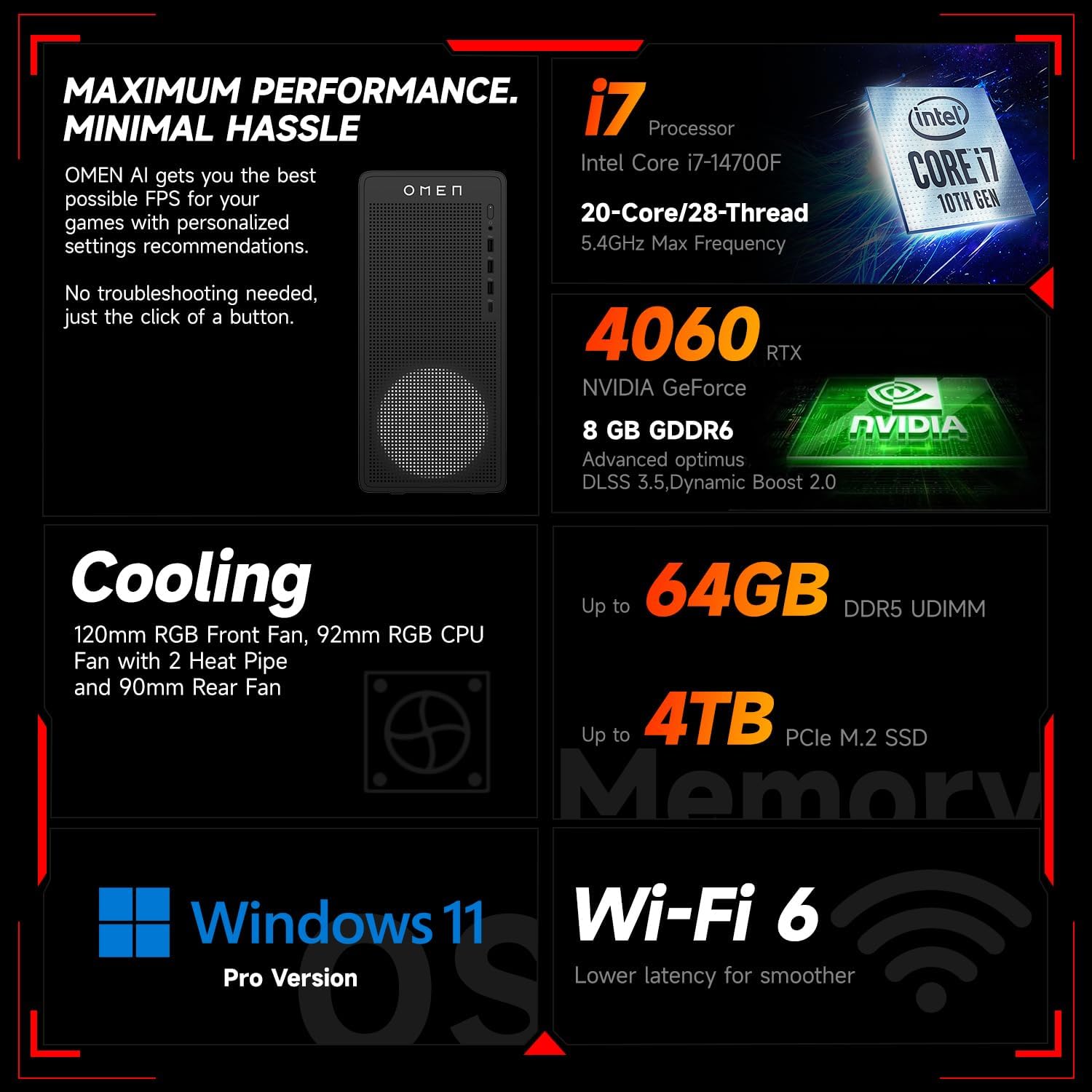
ຮູບພາບ 6.1: ຫຼາຍກວ່າview of key performance and cooling specifications.
| ອົງປະກອບ | ຂໍ້ມູນຈໍາເພາະ |
|---|---|
| ຍີ່ຫໍ້ | HP |
| ໝາຍເລກຕົວແບບ | TG03 |
| ລະບົບປະຕິບັດການ | Windows 11 Pro |
| ຕົວແບບ CPU | Intel Core i7-14700F (20 ຄໍ, 28 ຫົວຂໍ້, ສູງສຸດ 5.4 GHz) |
| Graphics Coprocessor | NVIDIA GeForce RTX 4060 (8GB GDDR6) |
| RAM ຂະຫນາດທີ່ຕິດຕັ້ງ | RAM 64 GB DDR5 |
| ຄວາມອາດສາມາດເກັບຮັກສາຫນ່ວຍຄວາມຈໍາ | 2 TB PCIe NVMe M.2 Solid State Drive |
| ການເຊື່ອມຕໍ່ໄຮ້ສາຍ | Wi-Fi 6, Bluetooth |
| ທ່າເຮືອທາງໜ້າ | 3x USB Type-A (5Gbps), 1x USB Type-C (10Gbps), Headphone/Mic Combo |
| Ports ຫລັງ | 4x USB Type-A 2.0, 1x RJ-45, 1x HDMI, 3x DisplayPort, 2x Audio Port |
| ຂະໜາດ (L x W x H) | 13.26 x 6.1 x 12.12 ນິ້ວ |
| ນ້ໍາຫນັກລາຍການ | 13.14 ປອນ |
| ສີ | ດຳ |
| Bundled Accessory | Thunderobot KG3089R Gaming Keyboard |

Image 6.2: Details of the Intel Core i7-14700F processor.

Image 6.3: Information on the NVIDIA GeForce RTX 4060 graphics card.
7. ຂໍ້ມູນການຮັບປະກັນ
Your HP OMEN 16L Gaming Desktop comes with a standard manufacturer's warranty. The specific terms and duration of the warranty are provided with your purchase documentation and are subject to HP's official warranty policy.
ໝາຍເຫດສຳຄັນ: Modifications to the system, such as upgrading components (e.g., RAM) with non-HP certified parts or by unauthorized personnel, may void the manufacturer's warranty. Always consult HP's official support or authorized service providers before making any internal hardware changes.
The Thunderobot KG3089R Gaming Keyboard bundled with this desktop may have a separate warranty provided by its manufacturer. Please refer to the documentation included with the keyboard for its specific warranty terms.
8. ສະຫນັບສະຫນູນ
For further assistance, technical support, or warranty claims, please contact HP Customer Support through the following channels:
- ສະຫນັບສະຫນູນ HP Webເວັບໄຊ: ຢ້ຽມຢາມ www.hp.com/support ສໍາລັບຄົນຂັບ, ຄູ່ມື, ແລະຄູ່ມືການແກ້ໄຂບັນຫາ.
- ຜູ້ຊ່ວຍສະ ໜັບ ສະ ໜູນ HP: Use the pre-installed HP Support Assistant software on your desktop for diagnostics, updates, and direct access to support.
- ໂທລະສັບສະຫນັບສະຫນູນ: Refer to your product documentation or the HP support webສະຖານທີ່ສໍາລັບເບີໂທລະສັບຕິດຕໍ່ພາກພື້ນ.