
ແນະນຳ
Thank you for choosing the Fisher Pro Active Noise Cancelling Headphones. This manual provides essential information for setting up, operating, and maintaining your headphones. Please read it thoroughly to ensure optimal performance and longevity of your device.
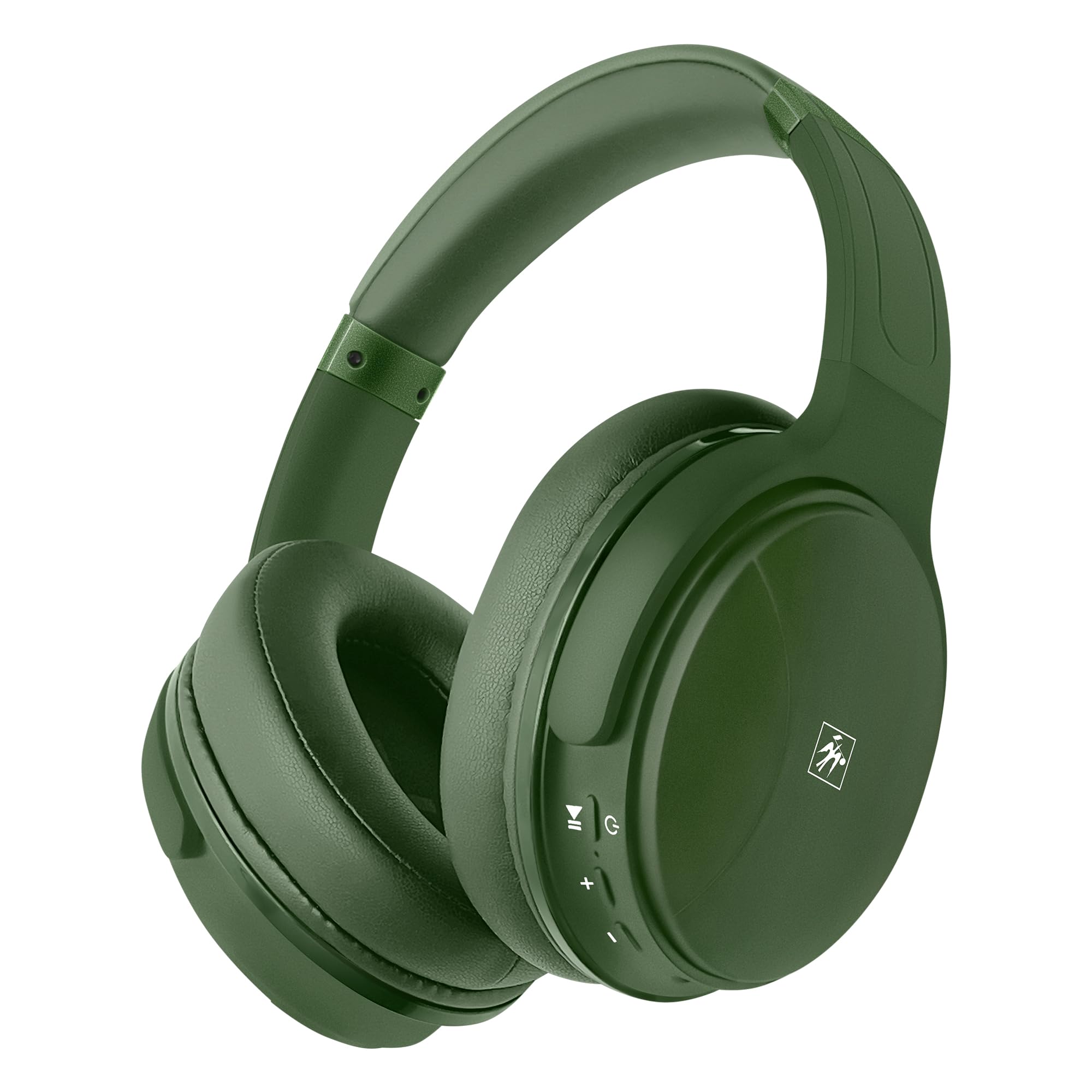
ຮູບພາບ: ທາງຫນ້າ view of the Fisher Pro Active Noise Cancelling Headphones in dark green.
ເນື້ອໃນຊຸດ
ໃຫ້ແນ່ໃຈວ່າທຸກລາຍການຢູ່ໃນຊຸດ:
- Fisher Pro Active Noise Cancelling Headphones
- ສາຍສາກ USB-C
- 3.5mm Stereo AUX Cable
- ຄູ່ມືຜູ້ໃຊ້ (ເອກະສານນີ້)
- ບັດຮັບປະກັນ
ການຄວບຄຸມແລະຄຸນສົມບັດ
Familiarize yourself with the headphone controls and key features:

Image: Right earcup showing control buttons for power, volume, and ANC.
- ປຸ່ມເປີດປິດ: ກົດຄ້າງໄວ້ເພື່ອເປີດ/ປິດ.
- ເພີ່ມລະດັບສຽງຂຶ້ນ/ເພງຕໍ່ໄປ: ກົດສັ້ນເພື່ອປະລິມານຂຶ້ນ, ກົດຄ້າງໄວ້ສຳລັບເພງຕໍ່ໄປ.
- ຫຼຸດສຽງລົງ/ເພງກ່ອນ ໜ້າ: ກົດສັ້ນເພື່ອປະລິມານລົງ, ກົດຄ້າງໄວ້ສຳລັບເພງກ່ອນໜ້າ.
- ປຸ່ມຫຼາຍຟັງຊັນ (MFB): ຫຼິ້ນ/ຢຸດເພງ, ຮັບສາຍ/ວາງສາຍ, ເປີດໃຊ້ຜູ້ຊ່ວຍສຽງ.
- ປຸ່ມ ANC: ເປີດ/ປິດ ການຕັດສຽງລົບກວນແບບໃຊ້ງານ.
- ຜອດ USB-C: ສໍາລັບການສາກໄຟຫູຟັງ.
- Jack ສຽງ 3.5mm: ສໍາລັບການເຊື່ອມຕໍ່ສາຍ.
- ໄມໂຄຣໂຟນ: ສຳລັບການໂທແບບແຮນຟຣີ.

ຮູບພາບ: ຫຼາຍກວ່າview of headphone features including Active Noise Cancellation, 16-hour battery life, voice assistant support, premium sound, device compatibility, foldable design, adjustable headband, easy-access buttons, hands-free microphone, and comfort cushions.
ຕັ້ງຄ່າ
1. ການສາກຫູຟັງ
ກ່ອນການນຳໃຊ້ຄັ້ງທຳອິດ, ໃຫ້ສາກຫູຟັງໃຫ້ເຕັມກ່ອນ.
- Connect the provided USB-C charging cable to the headphone's USB-C port.
- ເຊື່ອມຕໍ່ປາຍອື່ນໆຂອງສາຍກັບແຫຼ່ງພະລັງງານ USB (ເຊັ່ນ: ອະແດບເຕີຝາ, ພອດ USB ຄອມພິວເຕີ).
- ຕົວຊີ້ວັດ LED ຈະສະແດງສະຖານະການສາກໄຟ (ເຊັ່ນ: ສີແດງສໍາລັບການສາກໄຟ, ສີຟ້າສໍາລັບການສາກເຕັມ).
A full charge provides up to 16 hours of playback. Quick charging is supported.

Image: Visual representation of the 16-hour battery life feature.
2. ເປີດ/ປິດ
- ເພື່ອເປີດເຄື່ອງ: ກົດປຸ່ມເປີດປິດຄ້າງໄວ້ປະມານ 3 ວິນາທີ ຈົນກວ່າໄຟ LED ຈະກະພິບເປັນສີຟ້າ.
- ປິດເຄື່ອງ: ກົດປຸ່ມເປີດປິດຄ້າງໄວ້ປະມານ 3 ວິນາທີຈົນກວ່າຕົວຊີ້ LED ຈະປິດ.
3. ການຈັບຄູ່ Bluetooth
Pair your headphones with a Bluetooth-enabled device:
- ກວດໃຫ້ແນ່ໃຈວ່າປິດຫູຟັງແລ້ວ.
- ກົດປຸ່ມເປີດປິດຄ້າງໄວ້ 5-7 ວິນາທີ ຈົນກວ່າໄຟ LED ຈະກະພິບສີແດງ ແລະສີຟ້າສະລັບກັນ, ສະແດງເຖິງໂໝດການຈັບຄູ່.
- ໃນອຸປະກອນຂອງທ່ານ (ໂທລະສັບສະຫຼາດ, ແລັບທັອບ, ແທັບເລັດ), ເປີດໃຊ້ Bluetooth ແລະ ຄົ້ນຫາອຸປະກອນທີ່ມີຢູ່.
- Select "Fisher Pro" from the list of devices.
- ເມື່ອເຊື່ອມຕໍ່ແລ້ວ, ຕົວຊີ້ວັດ LED ຈະກະພິບເປັນສີຟ້າຊ້າ slowly.
ຫູຟັງຈະພະຍາຍາມເຊື່ອມຕໍ່ໃໝ່ກັບອຸປະກອນທີ່ຈັບຄູ່ສຸດທ້າຍໂດຍອັດຕະໂນມັດເມື່ອເປີດເຄື່ອງ.

Image: Illustration showing the headphones' compatibility with various devices via Bluetooth 5.3.
4. ການເຊື່ອມຕໍ່ແບບມີສາຍ (ໂໝດ AUX)
Use the included 3.5mm AUX cable for a wired connection:
- Plug one end of the 3.5mm AUX cable into the headphone's audio jack.
- Plug the other end into your audio source's 3.5mm audio output.
- The headphones will automatically switch to AUX mode. Bluetooth functionality is disabled in this mode.
ຄໍາແນະນໍາການດໍາເນີນງານ
1. Active Noise Cancellation (ANC)
The Fisher Pro headphones feature Active Noise Cancellation to reduce ambient sounds.
- To Activate/Deactivate ANC: Press the dedicated ANC button. The LED indicator for ANC will illuminate when active.

Image: Diagram illustrating how Active Noise Cancellation works by generating anti-phase sound waves to cancel ambient noise.
2. ການຫຼິ້ນເພງ
- ຫຼິ້ນ/ຢຸດ: ກົດ MFB ຫນຶ່ງຄັ້ງ.
- ເພງຕໍ່ໄປ: ກົດປຸ່ມເພີ່ມສຽງຄ້າງໄວ້.
- ຕິດຕາມກ່ອນ ໜ້າ ນີ້: ກົດປຸ່ມ Volume Down ຄ້າງໄວ້.
- ປະລິມານຂຶ້ນ: ກົດສັ້ນກົດປຸ່ມເພີ່ມສຽງ.
- ປະລິມານລົງ: ກົດສັ້ນ ປຸ່ມປະລິມານລົງ.
3. ການຄຸ້ມຄອງການໂທ
- ຮັບ/ສາຍໂທ: ກົດ MFB ຫນຶ່ງຄັ້ງ.
- ປະຕິເສດການໂທ: ກົດ MFB ຄ້າງໄວ້ 2 ວິນາທີ.
- ໂທຫາເບີສຸດທ້າຍ: ກົດສອງຄັ້ງ MFB.

Image: Icon indicating the presence of a hands-free microphone for calls.
4. ຜູ້ຊ່ວຍສຽງ
Activate your device's voice assistant (Siri, Google Assistant, etc.):
- ກະຕຸ້ນຜູ້ຊ່ວຍສຽງ: Triple-press the MFB.
ບໍາລຸງຮັກສາ
ເພື່ອຮັບປະກັນອາຍຸການໃຊ້ງານທີ່ຍາວນານ ແລະ ປະສິດທິພາບທີ່ດີທີ່ສຸດຂອງຫູຟັງຂອງທ່ານ, ໃຫ້ປະຕິບັດຕາມຄຳແນະນຳກ່ຽວກັບການບຳລຸງຮັກສາເຫຼົ່ານີ້:
- ທໍາຄວາມສະອາດ: ໃຊ້ຜ້າອ່ອນ, ແຫ້ງເພື່ອເຮັດຄວາມສະອາດຫູຟັງ. ຢ່າໃຊ້ເຄື່ອງເຮັດຄວາມສະອາດຂັດຫຼືສານລະລາຍ.
- ການເກັບຮັກສາ: ເມື່ອບໍ່ໃຊ້, ໃຫ້ເກັບຮັກສາຫູຟັງໄວ້ໃນບ່ອນເຢັນ, ແຫ້ງ, ຫ່າງຈາກແສງແດດໂດຍກົງ ແລະ ອຸນຫະພູມທີ່ຮ້າຍກາດ. ການອອກແບບທີ່ສາມາດພັບໄດ້ຊ່ວຍໃຫ້ມີການເກັບຮັກສາທີ່ຫນາແຫນ້ນ.
- ຫຼີກເວັ້ນຄວາມຊຸ່ມ: ຢ່າປ່ອຍໃຫ້ຫູຟັງຖືກນ້ຳ ຫຼື ມີຄວາມຊຸ່ມເກີນ.
- ຈັດການດ້ວຍຄວາມລະມັດລະວັງ: ຫຼີກເວັ້ນການລຸດລົງ ຫຼື ວາງຫູຟັງໃຫ້ຖືກຜົນກະທົບຢ່າງແຮງ.

Image: Detail of the earcup, showing the comfortable memory foam cushions and foldable design for easy storage.
ການແກ້ໄຂບັນຫາ
ຖ້າທ່ານພົບບັນຫາກັບຫູຟັງຂອງທ່ານ, ໃຫ້ອ້າງອີງເຖິງວິທີແກ້ໄຂທົ່ວໄປຕໍ່ໄປນີ້:
| ບັນຫາ | ການແກ້ໄຂທີ່ເປັນໄປໄດ້ |
|---|---|
| ຫູຟັງຈະບໍ່ເປີດ. | ກວດໃຫ້ແນ່ໃຈວ່າຫູຟັງຖືກສາກເຕັມແລ້ວ. ເຊື່ອມຕໍ່ຫາແຫຼ່ງພະລັງງານໂດຍໃຊ້ສາຍ USB-C. |
| ບໍ່ສາມາດຈັບຄູ່ຜ່ານ Bluetooth ໄດ້. | Ensure headphones are in pairing mode (flashing red/blue). Turn off and on Bluetooth on your device. Move closer to the device. |
| ບໍ່ມີສຽງ ຫຼືສຽງຕໍ່າ. | ກວດສອບລະດັບສຽງໃນຫູຟັງທັງສອງ ແລະ ອຸປະກອນທີ່ເຊື່ອມຕໍ່. ໃຫ້ແນ່ໃຈວ່າຫູຟັງຖືກຈັບຄູ່ຢ່າງຖືກຕ້ອງ ຫຼື ສາຍ AUX ຖືກສຽບເຂົ້າກັນດີແລ້ວ. |
| ANC ບໍ່ເຮັດວຽກຢ່າງມີປະສິດທິພາບ. | Ensure ANC is activated via the ANC button. Adjust headphone fit to ensure a good seal around your ears. |
| ໄມໂຄຣໂຟນບໍ່ເຮັດວຽກ. | Ensure headphones are connected via Bluetooth (microphone functionality is not available in AUX mode). Check device settings for microphone input. |
ຂໍ້ມູນຈໍາເພາະ
| ຄຸນສົມບັດ | ລາຍລະອຽດ |
|---|---|
| ຊື່ຕົວແບບ | SBHP550ADG |
| ເຕັກໂນໂລຊີການເຊື່ອມຕໍ່ | ໄຮ້ສາຍ (Bluetooth 5.3), ມີສາຍ (3.5 ມມ AUX) |
| ລຸ້ນ Bluetooth | 5.3 |
| ການຄວບຄຸມສິ່ງລົບກວນ | ການຍົກເລີກສິ່ງລົບກວນທີ່ໃຊ້ວຽກ (ANC) |
| ປະເພດໄດເວີສຽງ | ໄດຣເວີໄດນາມິກ, 40 ມມ |
| ການຕອບສະໜອງຄວາມຖີ່ | 15Hz – 20kHz |
| impedance | 32 ໂອມ |
| ຊີວິດຫມໍ້ໄຟ | ສູງສຸດ 16 ຊົ່ວໂມງ |
| ພອດສາກໄຟ | USB-C |
| ໄມໂຄຣໂຟນ | ໃນຕົວສຳລັບການໂທແບບແຮນຟຣີ |
| ວິທີການຄວບຄຸມ | ແຕະ/ປຸ່ມ |
| ຮູບຮ່າງຫູຫູ | ຫູເກີນ |
| ຂະໜາດ | 8.1 x 7.5 x 3.15 ນິ້ວ |
| ນ້ໍາຫນັກລາຍການ | 6.6 ອອນ |
| ວັດສະດຸ | ພາດສະຕິກ |

ຮູບພາບ: ລາຍລະອຽດ view of the 40mm Hi-Res Audio driver, responsible for clear and immersive sound.
ການຮັບປະກັນແລະການສະຫນັບສະຫນູນ
ຂໍ້ມູນການຮັບປະກັນ
Your Fisher Pro Active Noise Cancelling Headphones come with a limited warranty. Please refer to the included Warranty Card for detailed terms and conditions, including coverage period and how to make a claim.
ການຊ່ວຍເຫຼືອລູກຄ້າ
For technical assistance, troubleshooting beyond this manual, or warranty inquiries, please contact Fisher customer support. Contact details can be found on the Warranty Card or the official Fisher webເວັບໄຊ.