
ແນະນຳ
ຂອບໃຈສໍາລັບການຊື້asing the Fisher Portable Bluetooth Speaker SBT294. This manual provides important information regarding the setup, operation, and maintenance of your speaker. Please read it thoroughly before use and retain it for future reference.
The Fisher SBT294 is a compact, IPX5 waterproof and dustproof portable speaker featuring Bluetooth 5.3 connectivity, 10W peak power, and an integrated FM radio. It is designed for versatile use, both indoors and outdoors.
ແມ່ນຫຍັງຢູ່ໃນກ່ອງ
ກວດສອບວ່າລາຍການທັງຫມົດແມ່ນມີຢູ່ໃນຊຸດ:
- Fisher Portable Bluetooth Speaker SBT294
- ສາຍສາກ USB-C
- ຄູ່ມືຜູ້ໃຊ້ (ເອກະສານນີ້)
- ບັດຮັບປະກັນ

Image: Contents of the product packaging.
ສິນຄ້າເກີນview
ເຮັດຄວາມຄຸ້ນເຄີຍກັບອົງປະກອບ ແລະການຄວບຄຸມຂອງລຳໂພງ.
ອົງປະກອບຂອງລໍາໂພງ
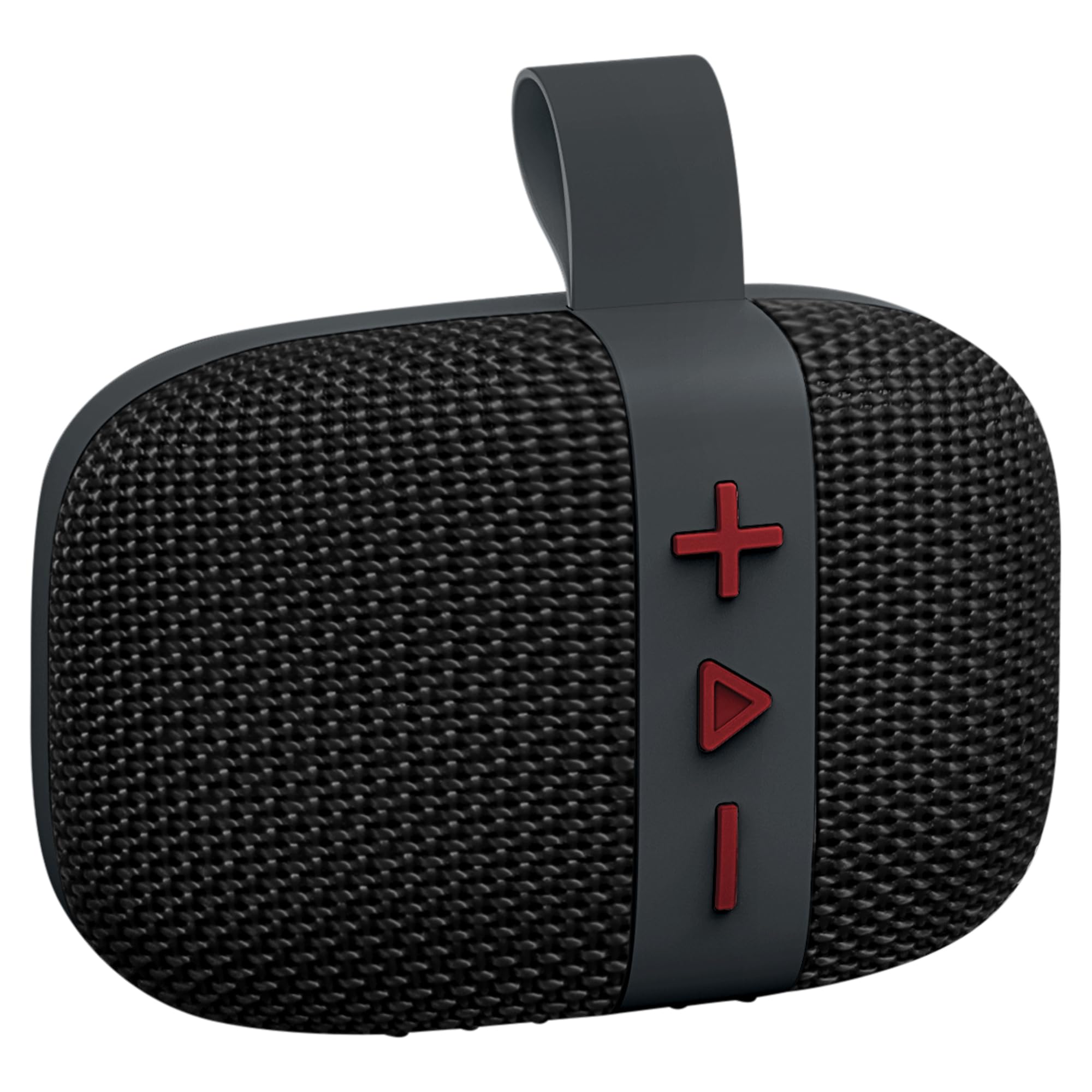
ຮູບພາບ: ທາງຫນ້າ view of the Fisher SBT294 speaker.
- Grille ລໍາໂພງ: Protects the internal speaker driver.
- ປຸ່ມຄວບຄຸມ: For power, volume, track control, and mode selection.
- ສາຍສາກ: ເພື່ອຄວາມສະດວກໃນການພົກພາ ແລະ ຕິດຕັ້ງ.
- ຜອດ USB-C: ສໍາລັບການສາກໄຟລໍາໂພງ.
ປຸ່ມຄວບຄຸມ

ຮູບພາບ: ລາຍລະອຽດ view ປຸ່ມຄວບຄຸມຂອງລຳໂພງ.
- ປຸ່ມ '+': ກົດສັ້ນສຳລັບເພງຕໍ່ໄປ, ກົດຄ້າງໄວ້ເພື່ອເພີ່ມລະດັບສຽງ.
- 'Play/Pause' Button: Short press to play/pause, long press for power on/off. Short press to answer/end calls. Double press to switch modes (Bluetooth/FM).
- '-' ປຸ່ມ: ກົດສັ້ນສຳລັບເພງກ່ອນໜ້ານີ້, ກົດຄ້າງໄວ້ເພື່ອຫຼຸດລະດັບສຽງ.
ຕັ້ງຄ່າ
1. ການສາກໄຟ ລຳ ໂພງ
ກ່ອນການນຳໃຊ້ຄັ້ງທຳອິດ, ໃຫ້ສາກໄຟລຳໂພງໃຫ້ເຕັມ. ການສາກໄຟໃຫ້ເຕັມໃຊ້ເວລາປະມານ 2 ຊົ່ວໂມງ.
- ເຊື່ອມຕໍ່ສາຍສາກໄຟ USB-C ທີ່ໃຫ້ມາເຂົ້າກັບພອດ USB-C ຂອງລຳໂພງ.
- ເຊື່ອມຕໍ່ອີກສົ້ນຂອງສາຍກັບອະແດັບເຕີໄຟ USB (ບໍ່ລວມ) ຫຼືພອດ USB ຂອງຄອມພິວເຕີ.
- ໄຟສະແດງການສາກຈະສະຫວ່າງຂຶ້ນໃນລະຫວ່າງການສາກ ແລະ ຈະດັບລົງເມື່ອສາກເຕັມ.

Image: Speaker connected to a USB-C charging cable.
2. ເປີດ/ປິດ
- ເພື່ອເປີດເຄື່ອງ: Long press the 'Play/Pause' button until you hear a power-on tone.
- ປິດເຄື່ອງ: Long press the 'Play/Pause' button until you hear a power-off tone.
3. ການຈັບຄູ່ Bluetooth
Pair your speaker with a Bluetooth-enabled device.
- Ensure the speaker is powered on and in Bluetooth pairing mode (indicated by a flashing LED). If not, double press the 'Play/Pause' button to switch modes.
- ໃນອຸປະກອນຂອງທ່ານ (ໂທລະສັບສະຫຼາດ, ແທັບເລັດ, ແລັບທັອບ), ເປີດໃຊ້ Bluetooth ແລະຊອກຫາອຸປະກອນທີ່ມີຢູ່.
- Select "SBT294" from the list of devices.
- Once paired, the speaker will emit a confirmation tone, and the LED will stop flashing.

Image: Bluetooth pairing with a smartphone.
4. True Wireless Stereo (TWS) ການຈັບຄູ່
For an enhanced stereo experience, you can pair two SBT294 speakers together.
- Ensure both SBT294 speakers are powered on and not connected to any other Bluetooth device.
- On one speaker (this will be the primary speaker), long press the 'Play/Pause' button until you hear a TWS pairing tone. The speaker will search for another SBT294.
- ລຳໂພງສອງຕົວຈະເຊື່ອມຕໍ່ກັນໂດຍອັດຕະໂນມັດ. ສຽງຢືນຢັນຈະດັງຂຶ້ນເມື່ອເຊື່ອມຕໍ່ແລ້ວ.
- ດຽວນີ້, ເຊື່ອມຕໍ່ອຸປະກອນຂອງທ່ານກັບລຳໂພງຫຼັກຜ່ານ Bluetooth ຕາມທີ່ອະທິບາຍໄວ້ໃນຂັ້ນຕອນທີ 3. ລຳໂພງທັງສອງຈະຫຼິ້ນສຽງໃນສະເຕຣິໂອ.

Image: Two speakers paired for True Wireless Stereo with a laptop.
ຄໍາແນະນໍາການດໍາເນີນງານ
ເພັງ Playback
- ຫຼິ້ນ/ຢຸດ: ກົດປຸ່ມ 'ຫຼິ້ນ/ຢຸດຊົ່ວຄາວ' ສັ້ນໆ.
- ເພງຕໍ່ໄປ: ກົດປຸ່ມ '+' ສັ້ນ.
- ຕິດຕາມກ່ອນ ໜ້າ ນີ້: ກົດປຸ່ມສັ້ນ '-'.
- ປະລິມານຂຶ້ນ: ກົດປຸ່ມ '+' ຄ້າງໄວ້.
- ປະລິມານລົງ: ກົດປຸ່ມ '-' ຄ້າງໄວ້.
ໂຫມດວິທະຍຸ FM
ເພື່ອປ່ຽນເປັນໂໝດວິທະຍຸ FM:
- Double press the 'Play/Pause' button to cycle through modes until you hear the FM radio prompt.
- In FM mode, short press the 'Play/Pause' button to auto-scan and save available stations.
- ໃຊ້ປຸ່ມ '+' ແລະ '-' ເພື່ອນຳທາງລະຫວ່າງສະຖານີທີ່ບັນທຶກໄວ້.
ໂທຟຣີ
ເມື່ອເຊື່ອມຕໍ່ກັບສະມາດໂຟນຜ່ານ Bluetooth:
- ຮັບສາຍ: Short press the 'Play/Pause' button when an incoming call rings.
- ສິ້ນສຸດການໂທ: Short press the 'Play/Pause' button during a call.
- ປະຕິເສດການໂທ: Long press the 'Play/Pause' button when an incoming call rings.
ບໍາລຸງຮັກສາ
- ທໍາຄວາມສະອາດ: ເຊັດລໍາໂພງດ້ວຍສຽງອ່ອນ, ງamp ຜ້າ. ຢ່າໃຊ້ເຄື່ອງເຮັດຄວາມສະອາດຂັດຫຼືສານລະລາຍ.
- ຄວາມຕ້ານທານນ້ໍາ: The speaker is IPX5 waterproof, meaning it can resist a sustained, low-pressure water jet spray. Do not submerge the speaker in water. Ensure the charging port cover is securely closed before exposure to water.
- ການເກັບຮັກສາ: ເກັບຮັກສາລໍາໂພງໄວ້ໃນບ່ອນທີ່ເຢັນ, ແຫ້ງ, ຫ່າງຈາກອຸນຫະພູມສູງສຸດແລະແສງແດດໂດຍກົງ.
- ການດູແລຫມໍ້ໄຟ: ເພື່ອຍືດອາຍຸການໃຊ້ງານຂອງແບັດເຕີຣີ, ໃຫ້ສາກໄຟລຳໂພງເປັນປະຈຳ, ເຖິງແມ່ນວ່າຈະບໍ່ໄດ້ໃຊ້ງານເປັນເວລາດົນກໍຕາມ. ຫຼີກລ່ຽງການສາກແບັດເຕີຣີຈົນໝົດເລື້ອຍໆ.

Image: Speaker in an outdoor, poolside environment, highlighting its waterproof design.
ການແກ້ໄຂບັນຫາ
| ບັນຫາ | ການແກ້ໄຂທີ່ເປັນໄປໄດ້ |
|---|---|
| ລຳໂພງບໍ່ເປີດ. | ໃຫ້ແນ່ໃຈວ່າລຳໂພງໄດ້ສາກໄຟແລ້ວ. ເຊື່ອມຕໍ່ມັນກັບແຫຼ່ງພະລັງງານໂດຍໃຊ້ສາຍ USB-C. |
| ບໍ່ສາມາດຈັບຄູ່ຜ່ານ Bluetooth ໄດ້. |
|
| ບໍ່ມີສຽງ ຫຼືສຽງຕໍ່າ. |
|
| ການຮັບວິທະຍຸ FM ແມ່ນບໍ່ດີ. |
|
| ການຈັບຄູ່ TWS ລົ້ມເຫລວ. |
|
ຂໍ້ມູນຈໍາເພາະ
| ຄຸນສົມບັດ | ລາຍລະອຽດ |
|---|---|
| ໝາຍເລກຕົວແບບ | SBT294 |
| ຍີ່ຫໍ້ | Fisher |
| ເຕັກໂນໂລຊີການເຊື່ອມຕໍ່ | Bluetooth 5.3, USB |
| ລຳໂພງກຳລັງອອກ | 5W RMS, ສູງສຸດ 10W |
| ຂະໜາດໄດເວີສຽງ | 45 ມມ |
| ການຕອບສະໜອງຄວາມຖີ່ | 13 KHz |
| ການປະເມີນກັນນ້ໍາ | IPX5 |
| ຄວາມອາດສາມາດຫມໍ້ໄຟ | 1200 mAh |
| ຊີວິດຫມໍ້ໄຟ | ສູງສຸດ 5-6 ຊົ່ວໂມງ (ທີ່ລະດັບສຽງ 50%) |
| ເວລາສາກໄຟ | ປະມານ 2 ຊົ່ວໂມງ |
| ຊ່ວງ Bluetooth | ສູງເຖິງ 33 ຟຸດ (10 ແມັດ) |
| ຂະໜາດ (ກວ້າງ x ສູງ x ຍາວ) | 4.44" x 3.04" x 1.76" |
| ນ້ຳໜັກ | 0.55 lbs |
| ຄຸນສົມບັດເພີ່ມເຕີມ | FM Radio, True Wireless Stereo (TWS) Pairing |
ຂໍ້ມູນຄວາມປອດໄພ
- ຢ່າໃຫ້ລຳໂພງຖືກອຸນຫະພູມສູງ, ແສງແດດໂດຍກົງ ຫຼື ແປວໄຟ.
- ຢ່າພະຍາຍາມຖອດປະກອບ ຫຼືດັດແປງລຳໂພງ. ນີ້ຈະເປັນການຍົກເລີກການຮັບປະກັນ ແລະອາດຈະເຮັດໃຫ້ເກີດຄວາມເສຍຫາຍ.
- ຮັກສາລໍາໂພງໃຫ້ຫ່າງຈາກສະຫນາມແມ່ເຫຼັກທີ່ເຂັ້ມແຂງ.
- ໃຊ້ພຽງແຕ່ສາຍ USB-C ທີ່ໃຫ້ມາສຳລັບການສາກໄຟ.
- ຫຼີກລ່ຽງການຟັງໃນປະລິມານທີ່ສູງເປັນເວລາດົນເພື່ອປ້ອງກັນຄວາມເສຍຫາຍຂອງການໄດ້ຍິນ.
- ກຳຈັດລຳໂພງ ແລະ ແບັດເຕີຣີຂອງມັນຢ່າງມີຄວາມຮັບຜິດຊອບຕາມລະບຽບຂອງທ້ອງຖິ່ນ.
ການຮັບປະກັນແລະການສະຫນັບສະຫນູນ
This product comes with a limited warranty. Please refer to the included Warranty Card for details regarding coverage and terms.
For technical support or customer service, please contact the manufacturer, Migear Intl, LLC, or refer to the contact information provided on your warranty card or the official Fisher webເວັບໄຊ.
ຜູ້ຜະລິດ: ບໍລິສັດສາກົນ Migear
ປະເພດການຮັບປະກັນ: ຈຳກັດ