
1. ການແນະນໍາແລະຜະລິດຕະພັນຫຼາຍກວ່າview
This manual provides detailed instructions for the installation, operation, and maintenance of your WALI Vertical Dual Monitor Wall Mount, Model 012ARMV-49. This mount is designed to support two monitors in a stacked configuration, optimizing desk space and providing ergonomic viewມຸມ.
The mount supports displays from 17 to 49 inches, with a maximum weight capacity of 44 lbs (20 kg) per arm. It is compatible with VESA 75x75mm and 100x100mm mounting patterns. Key features include flexible tilt, swivel, and height adjustments, along with 360-degree rotation for versatile screen positioning.
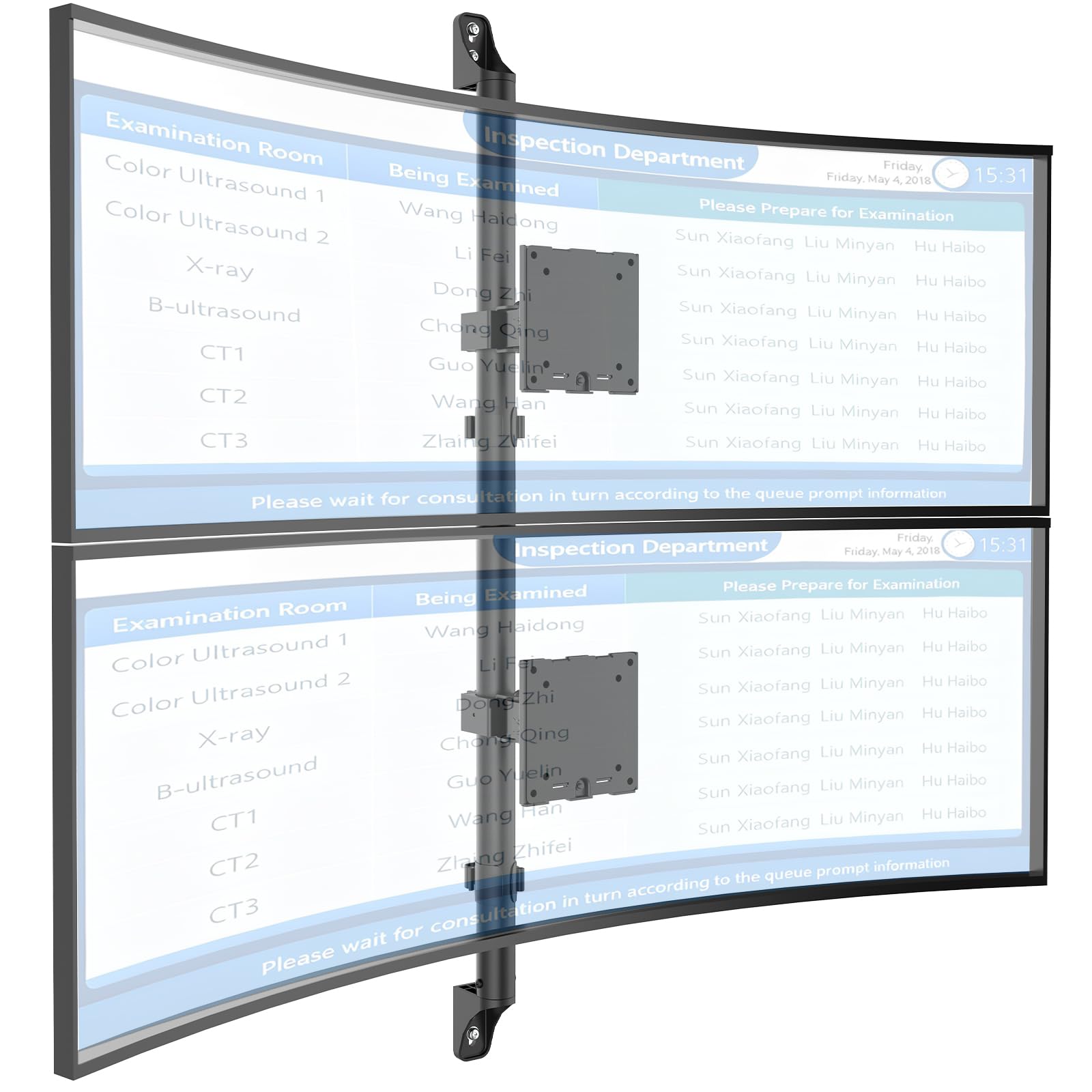
Figure 1: WALI Vertical Dual Monitor Wall Mount with two curved monitors.
2. ຂໍ້ມູນຄວາມປອດໄພ
Please read and understand all instructions before installation and use. Failure to do so may result in personal injury or property damage. Keep this manual for future reference.
- ຄວາມອາດສາມາດນ້ໍາຫນັກ: Do not exceed the maximum weight capacity of 44 lbs (20 kg) per monitor. Exceeding this limit can result in serious injury or product failure.
- ຂະໜາດຈໍພາບ: Ensure your monitors are within the supported size range of 17-49 inches.
- ຄວາມເຂົ້າກັນໄດ້ກັບ VESA: Verify your monitor's VESA mounting pattern (75x75mm or 100x100mm) before installation.
- ປະເພດຝາ: This mount is designed for installation on concrete/brick walls or wooden studs. Do not install on drywall alone.
- ການຕິດຕັ້ງແບບມືອາຊີບ: If you are unsure about the installation process or wall type, consult a qualified professional.
- ຊິ້ນສ່ວນເຄື່ອນທີ່: ຮັກສາມື ແລະ ນິ້ວມືໃຫ້ຫ່າງຈາກຊິ້ນສ່ວນທີ່ເຄື່ອນທີ່ໃນລະຫວ່າງການປັບເພື່ອປ້ອງກັນການບີບ.
- ເດັກນ້ອຍ: ເກັບຮັກສາຊິ້ນສ່ວນນ້ອຍໆ ແລະອຸປະກອນການຫຸ້ມຫໍ່ໃຫ້ຫ່າງຈາກເດັກນ້ອຍ, ເພາະວ່າພວກມັນອາດເຮັດໃຫ້ເກີດອັນຕະລາຍຕໍ່ການຫາຍໃຈ.
3. ເນື້ອໃນຊຸດ
Verify that all components are present and undamaged. If any parts are missing or damaged, contact WALI customer support.
- 1 x WALI Vertical Dual Monitor Wall Mount (Black)
- Mounting Hardware Kit (includes screws, washers, wall anchors for masonry, and self-tapping screws for wood)
- ຄູ່ມືຜູ້ໃຊ້
4. ຂໍ້ມູນຈໍາເພາະ
| ຄຸນສົມບັດ | ຂໍ້ມູນຈໍາເພາະ |
|---|---|
| ປະເພດການຕິດຕັ້ງ | ຕິດຝາ |
| ປະເພດການເຄື່ອນໄຫວ | ປະສາດ |
| ຍີ່ຫໍ້ | ວໍລີ |
| ວັດສະດຸ | Dual aerospace-grade aluminum mounting brackets, High-strength steel pole |
| ສີ | ດຳ |
| ອຸປະກອນທີ່ເຂົ້າກັນໄດ້ | ຈໍພາບ, ໂທລະພາບ |
| ມຸມອຽງສູງສຸດ | 20 ອົງສາ |
| Minimum Supported Screen Size | 17 ນິ້ວ |
| Maximum Supported Screen Size | 49 ນິ້ວ |
| ໝາຍເລກຕົວແບບ | 012ARMV-49 |
| ຄວາມເຂົ້າກັນໄດ້ຂອງ VESA | 75x75mm, 100x100mm |
| ຄວາມອາດສາມາດນ້ໍາຫນັກ | 44 lbs (20 ກິໂລ) ຕໍ່ແຂນ |
5. ການຕິດຕັ້ງແລະການຕິດຕັ້ງ
Follow these steps carefully to install your WALI Vertical Dual Monitor Wall Mount.
5.1 ການກະກຽມຝາຜະໜັງ
- ລະບຸປະເພດຝາ: This mount is suitable for wooden studs, solid concrete walls, and brick walls.
- Locate Studs (for wood walls): Use a stud finder to locate the center of a wooden stud. Mark the drilling locations.
- ສະຖານທີ່ຂຸດເຈາະ Mark: Hold the wall plate against the wall at your desired height and mark the screw holes. Ensure it is level.

Figure 2: Wall compatibility for installation.
5.2 Attaching the Wall Plate
- Drill Pilot Holes: Drill pilot holes at the marked locations. The size of the drill bit will depend on your wall type and the provided hardware.
- ແຜ່ນຕິດຝາທີ່ປອດໄພ: Attach the wall plate to the wall using the appropriate screws and anchors for your wall type. Ensure it is firmly secured.

Figure 3: Securing the wall mount plate.
5.3 Attaching VESA Plates to Monitors
- Remove Original Stand: Carefully remove the original stand from your monitors.
- ຕິດແຜ່ນ VESA: Align the VESA plate with the mounting holes on the back of your monitor. Use the provided screws to secure the plate. Ensure the plate is oriented correctly for vertical stacking.
5.4 Mounting Monitors to the Arm
- Slide Arm onto Wall Base: Carefully slide the monitor arm assembly onto the secured wall base.
- Attach Monitors: With assistance, carefully lift each monitor and slide its VESA plate onto the corresponding arm bracket. Ensure it clicks securely into place.
- Secure Monitors: Use the safety screws or clips to prevent accidental dislodgement of the monitors from the arms.

Figure 4: Monitor arm assembly and attachment points.
5.5 ການຈັດການສາຍ
- ສາຍທາງ: Utilize the integrated cable management system to route monitor cables neatly along the arm and down the wall pole.
- ສາຍທີ່ປອດໄພ: Use the provided clips or ties to secure the cables, preventing clutter and ensuring a clean setup.

Figure 5: Integrated cable management system.
6. ຄໍາແນະນໍາການດໍາເນີນງານ (ການປັບຕົວ)
The WALI Vertical Dual Monitor Wall Mount offers various adjustments for optimal viewສະດວກສະບາຍ.
- ການປັບຄວາມສູງ: The monitors can be adjusted vertically along the main pole. Loosen the adjustment screws on the arm brackets, slide the monitors to the desired height, and then re-tighten the screws. The maximum height adjustment is 28.74 inches.
- ການປັບຕົວອຽງ: Tilt the monitors up to +50 degrees or down to -20 degrees to reduce glare and find your preferred viewມຸມ ing.
- ການປັບການຫມຸນ: Swivel the monitors up to +/-90 degrees horizontally for collaborative work or to adjust the viewທິດທາງ.
- ໝຸນ: Rotate the monitors 360 degrees to switch between landscape and portrait orientations.

Figure 6: Tilt, Swivel, and Rotation adjustments.

Figure 7: Full motion adjustment range and dimensions.
7. ບໍາລຸງຮັກສາ
ການບຳລຸງຮັກສາເປັນປະຈຳຮັບປະກັນອາຍຸການໃຊ້ງານທີ່ຍາວນານ ແລະ ປອດໄພຂອງຕົວຍຶດຈໍພາບຂອງທ່ານ.
- ທໍາຄວາມສະອາດ: ເຊັດ mount ກັບອ່ອນ, damp ຜ້າ. ຫຼີກລ້ຽງການເຮັດຄວາມສະອາດຂັດຫຼືສານລະລາຍ.
- ກວດສອບຄວາມແຫນ້ນຫນາ: ກວດສອບສະກູ ແລະ ຈຸດເຊື່ອມຕໍ່ທັງໝົດເປັນໄລຍະເພື່ອຮັບປະກັນວ່າພວກມັນແໜ້ນ ແລະ ແໜ້ນດີ. ຂັນຄືນຖ້າຈຳເປັນ.
- ກວດສອບການເສຍຫາຍ: Regularly inspect the mount for any signs of wear, damage, or corrosion. Discontinue use and contact support if any issues are found.
8. ການແກ້ໄຂບັນຫາ
If you encounter issues with your WALI Vertical Dual Monitor Wall Mount, refer to the following common problems and solutions:
- Monitor Sags or Does Not Hold Position:
- Ensure the monitor weight is within the 44 lbs (20 kg) per arm limit.
- Tighten the tension adjustment screws on the arm joints using the included tool.
- ພູເຂົາຮູ້ສຶກບໍ່ໝັ້ນຄົງ:
- Verify that the wall plate is securely fastened to the wall with appropriate anchors for your wall type.
- Check that all connections between the arm and the VESA plates are tight.
- Difficulty Adjusting Monitor Position:
- Loosen the tension adjustment screws slightly if the movement is too stiff.
- Ensure no cables are obstructing the movement of the arms.
9. ການຮັບປະກັນແລະການສະຫນັບສະຫນູນ
Your WALI Vertical Dual Monitor Wall Mount comes with a ຮັບປະກັນ 10 ປີ, ກວມເອົາຂໍ້ບົກພ່ອງຂອງວັດສະດຸແລະການເຮັດວຽກພາຍໃຕ້ການນໍາໃຊ້ປົກກະຕິ.
For technical assistance, missing parts, or warranty claims, please contact WALI customer support. Our experienced and friendly US-based customer support team is available to assist you 7 days a week.
ຂໍ້ມູນຕິດຕໍ່: Refer to the WALI webສະຖານທີ່ຫຼືການຫຸ້ມຫໍ່ຜະລິດຕະພັນສໍາລັບລາຍລະອຽດການຕິດຕໍ່ໃນປະຈຸບັນຫຼາຍທີ່ສຸດ.