
1. ບົດແນະນຳ
This manual provides detailed instructions for the installation, operation, and maintenance of your PHORUS 48-inch Tropical Palm Leaf Ceiling Fan. Please read this manual thoroughly before installation and retain it for future reference. This ceiling fan is designed for both indoor and outdoor covered areas, offering a unique tropical aesthetic with modern functionality.
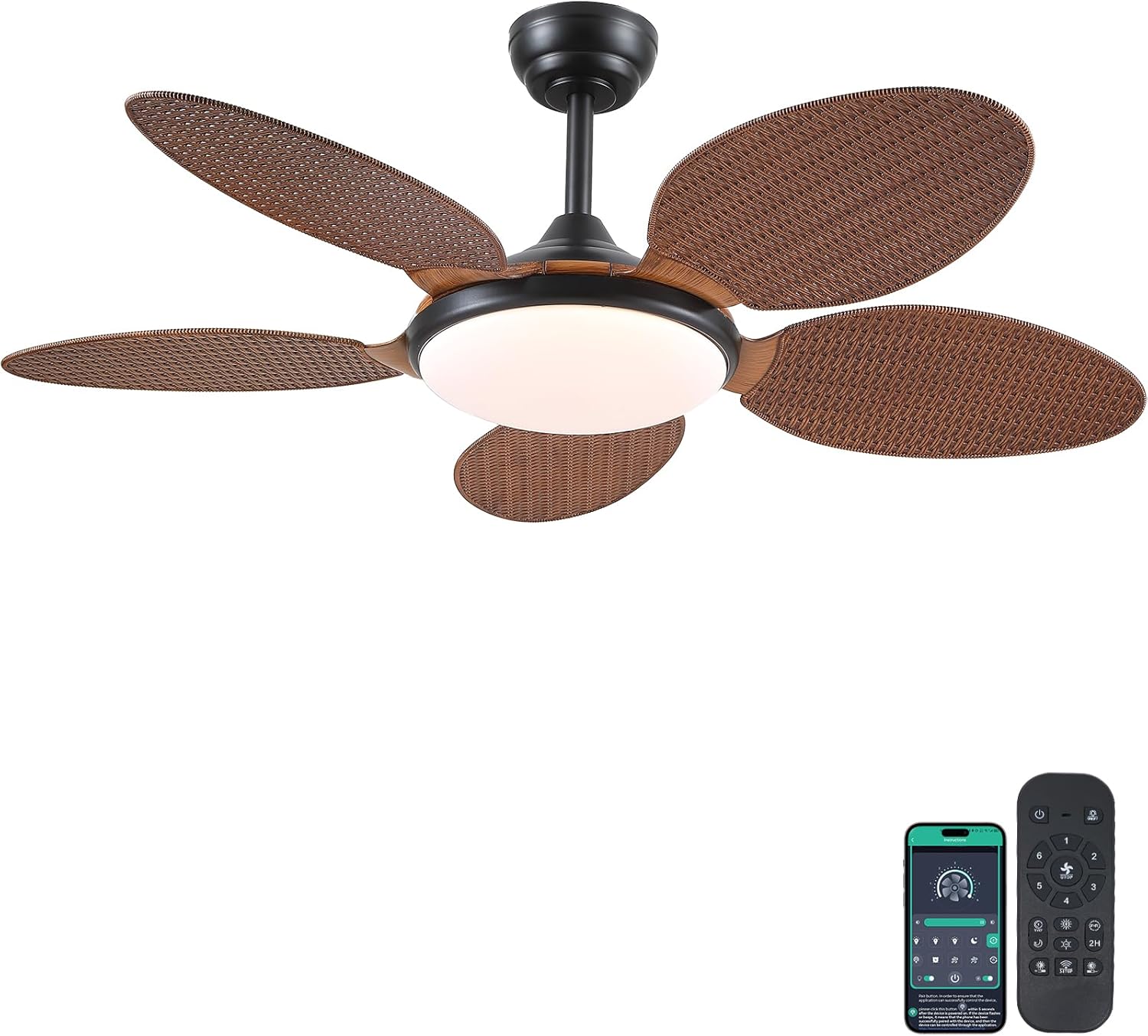
Image 1.1: PHORUS 48-inch Tropical Palm Leaf Ceiling Fan.
2. ຂໍ້ມູນຄວາມປອດໄພ
- ໃຫ້ແນ່ໃຈວ່າແຫຼ່ງພະລັງງານຫຼັກໄດ້ຖືກຕັດການເຊື່ອມຕໍ່ກ່ອນການຕິດຕັ້ງ, ການບຳລຸງຮັກສາ ຫຼື ການທຳຄວາມສະອາດ.
- All electrical connections must comply with local codes and ordinances, as well as national electrical codes. If you are unfamiliar with electrical wiring, consult a qualified electrician.
- The mounting structure must be capable of supporting the weight of the fan (approximately 12.58 pounds) plus the dynamic load during operation.
- ຢ່າງໍຕົວຍຶດແຜ່ນໃນລະຫວ່າງການຕິດຕັ້ງຫຼືເຮັດຄວາມສະອາດ.
- Ensure there is adequate clearance between the fan blades and any obstacles.
- This fan is suitable for use in damp locations but should not be directly exposed to water.
3. ເນື້ອໃນຊຸດ
ກວດສອບວ່າອົງປະກອບທັງໝົດທີ່ລະບຸໄວ້ຂ້າງລຸ່ມນີ້ແມ່ນລວມຢູ່ໃນຊຸດຂອງທ່ານ. ຖ້າພາກສ່ວນໃດຂາດຫາຍໄປຫຼືເສຍຫາຍ, ກະລຸນາຕິດຕໍ່ຝ່າຍຊ່ວຍເຫຼືອລູກຄ້າ.

ຮູບພາບ 3.1: ຫຼາຍກວ່າview of included components and fan dimensions.
- ສະພານຮ່າງກາຍພັດລົມ
- 5 Palm Leaf Blades
- ເຮືອນຍອດ
- Downrods (ທາງເລືອກ 4 ນິ້ວແລະ 8 ນິ້ວ)
- Lamp ຮົ່ມ
- ການຄວບຄຸມໄລຍະໄກ
- ເຄື່ອງຮັບໄລຍະໄກ
- ວົງເລັບຕິດຕັ້ງ
- ຊຸດຮາດແວ (ສະກູ, ແກ່ນສາຍ, ແລະອື່ນໆ)
- ຄູ່ມືການສອນ
4. ການຕິດຕັ້ງແລະການຕິດຕັ້ງ
Follow these steps carefully for proper installation. For a visual guide, please refer to the installation video provided below.
4.1. ວິດີໂອແນະນຳການຕິດຕັ້ງ
Video 4.1: Detailed installation guide for the PHORUS 48-inch Palm Leaf Ceiling Fan with lights.
4.2. ການຕິດຕັ້ງແບບເທື່ອລະຂັ້ນຕອນ
- Prepare the Fan Body: Attach the LED light board to the fan body assembly using the provided screws.
- ຕິດແຜ່ນພັດລົມ: Secure each of the five palm leaf blades to the fan body. Ensure the correct side of the blade is facing upwards as indicated in the video.
- ປະກອບ Downrod: Insert the downrod through the canopy and secure it to the fan body. Feed the electrical wires through the downrod.
- ຕິດຕັ້ງຕົວຍຶດຕິດ: Secure the mounting bracket to your ceiling junction box. Ensure it is firmly attached and can support the fan's weight.
- ການເຊື່ອມຕໍ່ສາຍໄຟ: Connect the fan's electrical wires to your household wiring. Typically, this involves connecting the black live wire, white neutral wire, and yellow ground wire. Refer to the wiring diagram in the installation video for precise connections.
- ວາງພັດລົມ: ຍົກພັດລົມຢ່າງລະມັດລະວັງແລະແຂວນມັນໃສ່ຕົວຍຶດ.
- ຕິດຕັ້ງເຄື່ອງຮັບໄລຍະໄກ: Place the remote receiver within the canopy, ensuring wires are not pinched. Connect the receiver to the fan and household wiring as per the diagram.
- ເຮືອນຍອດທີ່ປອດໄພ: ເລື່ອນຫຼັງຄາຂຶ້ນໄປຫາເພດານ ແລະຍຶດມັນໃສ່ຕົວຍຶດດ້ວຍສະກູ.
- ຕິດຕັ້ງ Lamp ຮົ່ມ: ຄັດຕິດ lamp shade to the bottom of the fan body.
The fan is equipped with 4-inch and 8-inch downrods to accommodate various ceiling heights. It can also be used with sloped ceilings up to 15 degrees.
5. ຄໍາແນະນໍາການດໍາເນີນງານ
Your PHORUS ceiling fan can be controlled via the included remote control or a smart application on your mobile device.
5.1. ການປະຕິບັດການຄວບຄຸມໄລຍະໄກ

Image 5.1: Remote control layout with function descriptions.
The remote control allows you to adjust the following settings:
- ເປີດ/ປິດ: ເປີດ ຫຼື ປິດພັດລົມ ແລະ ໄຟ.
- ຄວາມໄວພັດລົມ: Select from 6 wind speeds (1-6).
- ແສງເປີດ/ປິດ: Control the integrated LED light independently.
- ອຸນຫະພູມສີ: Adjust between 3 light colors: 3000K (Warm Light), 4500K (Natural Light), and 6000K (White Light).
- ການປັບຄວາມສະຫວ່າງ: ຫຼຸດແສງລົງ ຫຼື ເພີ່ມຄວາມສະຫວ່າງຂຶ້ນຈາກ 10% ຫາ 100%.
- ຟັງຊັນປີ້ນກັບກັນ: Change the direction of the fan blades for summer (downdraft) or winter (updraft) modes. Press the F\R key and wait 5-8 seconds for the fan to stop completely and then automatically reverse.
- ໂມງຈັບເວລາ: Set a 2-hour timer for automatic shutdown.
Remote Code Pairing:
If your remote control is not responding, you may need to pair it with the fan. Follow these steps:
- Turn off the main power supply to the fan for one minute.
- Turn on the main power supply and simultaneously long-press the code key on the remote control for 3-5 seconds.
- The fan light will blink 2-3 times to indicate successful code matching.
Video 5.2: Instructions for remote code pairing.
5.2. ການຄວບຄຸມແອັບອັດສະລິຍະ
The fan supports control via a smart application. Scan the QR code in Image 5.1 or visit https://www.jasonghost.com/fanlamppro/ to download the "Fan Lamp Pro" app.
Video 5.3: Guide for setting up and using the smart app control.
The app provides comprehensive control over fan speeds, light settings (color temperature and brightness), and the reverse function, similar to the remote control. All settings will be remembered after power cycling.

Image 5.4: Customizable light effects and dimming range.

Image 5.5: Fan airflow modes (summer/winter) and 6-speed settings.
6. ບໍາລຸງຮັກສາ
ການບໍາລຸງຮັກສາເປັນປົກກະຕິຮັບປະກັນປະສິດທິພາບທີ່ດີທີ່ສຸດແລະອາຍຸຍືນຂອງພັດລົມເພດານຂອງທ່ານ.
- ທໍາຄວາມສະອາດ: Periodically clean the fan blades and light cover with a soft, damp ຜ້າ. ຢ່າໃຊ້ນໍ້າຢາທໍາຄວາມສະອາດທີ່ມີສີຂັດ ຫຼື ຕົວລະລາຍທີ່ອາດຈະທໍາລາຍສີໄດ້.
- Tighten fasteners: Check all screws and fasteners on the fan body and mounting bracket annually. Tighten any loose connections to prevent wobbling or noise.
- ຂີຸ້່ນ: Dust the fan motor housing and canopy regularly to prevent dust buildup, which can affect performance.
7. ການແກ້ໄຂບັນຫາ
ຖ້າເຈົ້າພົບບັນຫາກັບພັດລົມຂອງເຈົ້າ, ໃຫ້ອ້າງອີງເຖິງບັນຫາທົ່ວໄປ ແລະວິທີແກ້ໄຂບັນຫາຕໍ່ໄປນີ້:
| ບັນຫາ | ສາເຫດທີ່ເປັນໄປໄດ້ | ການແກ້ໄຂ |
|---|---|---|
| ພັດລົມບໍ່ເລີ່ມຕົ້ນ | No power supply; Loose wire connections; Remote not paired. | Check circuit breaker/wall switch; Verify all wire connections are secure; Perform remote code pairing (refer to Section 5.1). |
| ແສງສະຫວ່າງບໍ່ເຮັດວຽກ | Loose wire connection; LED driver issue. | Check light wiring connections; Contact customer support if LED driver is suspected. |
| ພັດລົມສັ່ນ | ໃບມີດທີ່ວ່າງ ຫຼື ອຸປະກອນຕິດຕັ້ງ; ໃບມີດບໍ່ສົມດຸນ. | Ensure all blade screws and mounting bracket screws are tight; Use a balancing kit (not included) if necessary. |
| ການຄວບຄຸມໄລຍະໄກບໍ່ຕອບສະຫນອງ | ແບັດເຕີຣີອ່ອນ; ບໍ່ໄດ້ຈັບຄູ່ຣີໂໝດ. | Replace AAA batteries (2 required, included); Perform remote code pairing (refer to Section 5.1). |
| ສຽງດັງເກີນໄປ | Loose screws; Motor issue. | Check and tighten all screws; Ensure blades are securely attached. If noise persists, contact customer support. |
8. ຂໍ້ມູນຈໍາເພາະ
- ຍີ່ຫໍ້: ຟໍຣັສ
- ຕົວແບບ: B0FC1SY1B2
- ສີ: 48" Dark Brown
- ວັດສະດຸ: ອະຄິລິກ, ພາດສະຕິກ
- ຮູບແບບ: ເຂດຮ້ອນ
- ປະເພດຫ້ອງ: Bedroom, Dining Room, Garage, Kids Room, Kitchen
- ການນໍາໃຊ້ພາຍໃນ / ນອກ: ພາຍໃນອາຄານ (ເໝາະສົມສຳລັບ damp ສະຖານທີ່)
- ແຫຼ່ງພະລັງງານ: DC
- ຄຸນນະສົມບັດພິເສດ: ແອັບສາມາດໃຊ້ງານໄດ້, ໄຟ LED, ເຮັດວຽກງຽບ, ຄວບຄຸມໄລຍະໄກ, ຈັບເວລາ
- ວິທີການຄວບຄຸມ: ແອັບ, ໄລຍະໄກ
- ຈຳນວນແຫຼ່ງແສງ: 1
- ອົງປະກອບລວມ: Light Kit, Remote Control
- ນ້ໍາຫນັກລາຍການ: 12.58 ປອນ
- ຈໍານວນລາຍການ: 1
- ວັດtage: 60 ວັດ
- ປະເພດຄວບຄຸມ: ການຄວບຄຸມແອັບ, ການຄວບຄຸມໄລຍະໄກ
- ຈຳນວນຫົວໜ່ວຍ: 1.0 ນັບ
- ປະເພດການຕິດຕັ້ງ: ເພດານ Mount
- ສະພາແຫ່ງທີ່ຕ້ອງການ: ແມ່ນແລ້ວ
- ຂະໜາດ: Medium (48 inches)
- ການນໍາໃຊ້ທີ່ແນະນໍາສໍາລັບຜະລິດຕະພັນ: ການໄຫຼວຽນຂອງອາກາດ
- ຂະໜາດຜະລິດຕະພັນ: 48 x 48 x 15.15 ນິ້ວ
- ແບັດເຕີຣີ: ຕ້ອງໃຊ້ແບັດເຕີຣີ AAA 2 ອັນ (ລວມ)
9. ການຮັບປະກັນແລະການສະຫນັບສະຫນູນ
PHORUS provides a one-year quality warranty for this product. We also offer free replacement service for any damage and quality problems encountered during the warranty period. If you have any questions or require assistance, please contact PHORUS customer support for a satisfactory answer within 24 hours.