
ແນະນຳ
This manual provides comprehensive instructions for the ARCCTV C3 Solar Security Camera. This device is designed for outdoor surveillance, featuring a built-in solar panel for continuous power, 4MP resolution, PIR motion detection, and dual-band Wi-Fi connectivity. Please read this manual thoroughly before installation and operation to ensure proper use and optimal performance.
ສິນຄ້າເກີນview
ເນື້ອໃນຊຸດ
- ARCCTV C3 Solar Security Camera (Quantity may vary based on pack size)
- ວົງເລັບຕິດຕັ້ງ
- ຫັນນັອດກຽວແລະWallາ
- ສາຍສາກ USB
- ຄູ່ມືຜູ້ໃຊ້
ສ່ວນປະກອບຂອງກ້ອງຖ່າຍຮູບ
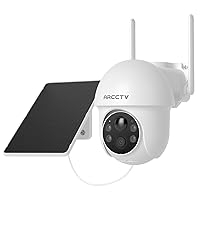
Familiarize yourself with the main components of your ARCCTV C3 camera:

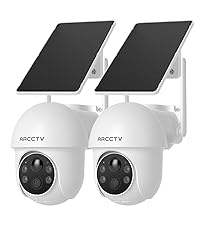
Image showing two ARCCTV C3 Solar Security Cameras, highlighting the integrated solar panel, camera lens, and motion sensor.

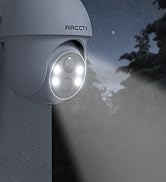
ໃກ້ຊິດ view of the camera's front, detailing the 4MP lens, LED lights for night vision, and the PIR motion sensor.
- ແຜງແສງອາທິດ: Integrated on top for continuous battery charging.
- ເລນກ້ອງຖ່າຍຮູບ: 4MP resolution for clear video capture.
- PIR Motion ເຊັນເຊີ: Detects human and animal movement.
- LEDs ອິນຟາເລດ: ສໍາລັບການວິໄສທັດໃນຕອນກາງຄືນສີດໍາແລະສີຂາວ.
- ຈຸດເດັ່ນ: ສຳລັບການເບິ່ງເຫັນສີໃນຕອນກາງຄືນ ແລະ ການສະກັດກັ້ນ.
- ໄມໂຄຣໂຟນ: ສໍາລັບການປ້ອນຂໍ້ມູນສຽງ.
- ລໍາໂພງ: ສຳລັບການສື່ສານທາງສຽງສອງທາງ ແລະ ໄຊເຣນ.
- ພອດສາກໄຟ USB: For initial charging or manual charging.
- ຊ່ອງສຽບກາດ MicroSD: ສຳລັບບ່ອນເກັບຂໍ້ມູນວິດີໂອໃນທ້ອງຖິ່ນ (ບໍ່ລວມບັດ).
ຄໍາແນະນໍາການຕິດຕັ້ງ
1. ການສາກໄຟເບື້ອງຕົ້ນ
Before first use, fully charge the camera battery using the provided USB charging cable. Connect the cable to the camera's USB port and a standard 5V/1A USB power adapter (not included). The charging indicator will show the battery status. The integrated solar panel will maintain the charge after installation, but an initial full charge ensures optimal performance.
2. ການຕິດຕັ້ງແອັບ ແລະການສ້າງບັນຊີ
ດາວນ໌ໂຫລດ ARCCTV mobile application from your smartphone's app store (available for iOS and Android). Follow the on-screen prompts within the app to create a new user account and log in.
3. ການຈັບຄູ່ອຸປະກອນ
A smartphone screen displaying the ARCCTV app's Wi-Fi setup interface, prompting for network name and password.
- Open the ARCCTV app and tap 'Add Device' or the '+' icon.
- ເລືອກຮຸ່ນກ້ອງຖ່າຍຮູບຂອງທ່ານຈາກລາຍການ.
- Follow the in-app instructions to connect the camera to your Wi-Fi network. Ensure your smartphone is connected to the same Wi-Fi network (supports both 2.4GHz and 5GHz bands).
- The camera will automatically select the optimal Wi-Fi band for connection.
- ເມື່ອເຊື່ອມຕໍ່ແລ້ວ, ທ່ານສາມາດຕັ້ງຊື່ກ້ອງຖ່າຍຮູບຂອງທ່ານ ແລະ ເຮັດສຳເລັດຂັ້ນຕອນການຕັ້ງຄ່າໄດ້.
4. ການຕິດຕັ້ງກ້ອງຖ່າຍຮູບ

A person installing the ARCCTV C3 camera on an outdoor wall, demonstrating the ease of installation.
- ການເລືອກສະຖານທີ່: Choose a suitable outdoor location with good Wi-Fi signal strength and direct sunlight exposure for the solar panel. Avoid areas with heavy shade.
- ການຕິດຕັ້ງ: Use the provided mounting bracket, screws, and wall plugs to securely attach the camera to a wall, fence, or pole.
- ຕຳແໜ່ງ: Adjust the camera angle to cover the desired surveillance area. Ensure the PIR motion sensor has a clear line of sight to the area you wish to monitor.
ຄໍາແນະນໍາການດໍາເນີນງານ
ດໍາລົງຊີວິດ View ແລະການບັນທຶກ
Access the live video feed of your camera through the ARCCTV app. The camera records in 4MP (2560x1440p) resolution. Recordings are primarily triggered by motion detection events.
ວິໄສທັດກາງຄືນ

A split image demonstrating the camera's day vision (left) and enhanced night vision (right) capabilities, showing clear visibility in low light.
The camera features advanced IR night vision, providing clear black and white video up to 33 feet in complete darkness. An optional color night mode, activated by the built-in spotlights, delivers vivid nighttime images when sufficient light is available or motion is detected.
ກວດຈັບການເຄື່ອນໄຫວ ແລະການແຈ້ງເຕືອນ

An image depicting a security camera detecting a person, illustrating the instant alert feature with siren warning and two-way audio.
The integrated PIR motion sensor detects human and animal activity, sending instant push notifications to your smartphone. You can customize motion detection zones and sensitivity settings within the ARCCTV app to minimize false alerts.
ສຽງສອງທາງ

A person using a tablet to communicate via the camera's two-way audio feature, showing a live video call interface.
Utilize the two-way audio feature via the ARCCTV app to communicate with individuals near the camera. This allows for direct interaction, such as speaking to delivery personnel or deterring unwanted visitors.
ຕົວເລືອກການເກັບຮັກສາ
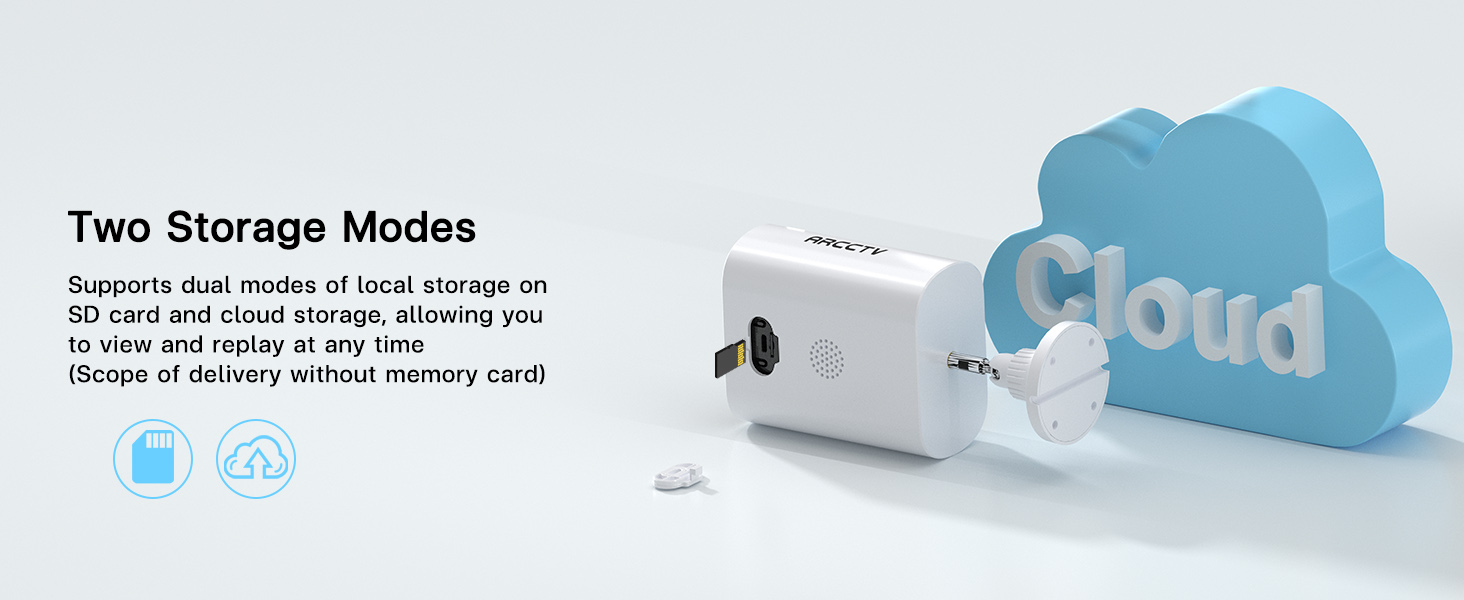
A close-up of the camera's side, showing the slot for a microSD card, indicating local storage capability.
An illustration showing the camera connected to a cloud icon, representing the cloud storage option for recorded footage.
The camera supports two storage modes:
- ການເກັບຮັກສາທ້ອງຖິ່ນ: Insert a microSD card (up to 128GB, not included) into the designated slot for local recording.
- Cloud Storage: An optional cloud storage service is available via subscription for secure, off-site storage of your footage.
ແບ່ງປັນການເຂົ້າເຖິງ
A smartphone screen displaying live camera footage, surrounded by icons representing multiple users, indicating shared access functionality.
You can share camera access with family members or trusted individuals through the ARCCTV app, allowing multiple users to view live feeds and recorded surveillance simultaneously.
ບໍາລຸງຮັກສາ
ການດູແລແຜງແສງອາທິດ
Periodically clean the surface of the integrated solar panel to ensure maximum charging efficiency. Remove any dust, dirt, leaves, or debris that may obstruct sunlight. Use a soft, damp ຜ້າສໍາລັບການທໍາຄວາມສະອາດ.
ການຄຸ້ມຄອງຫມໍ້ໄຟ
While the solar panel provides continuous power, prolonged periods of low sunlight, heavy cloud cover, or high motion activity may lead to battery depletion. Monitor battery levels through the ARCCTV app. If the battery level becomes critically low, manually charge the camera using the USB port.
ທົນທານຕໍ່ສະພາບອາກາດ

A split image showing the camera in rainy and sunny conditions, illustrating its weatherproof design and ability to withstand extreme temperatures.
The camera is designed with weatherproof construction to withstand outdoor conditions, including temperatures from -4°F to 122°F. Ensure all covers and seals are securely closed after accessing ports (e.g., USB, microSD slot) to maintain water resistance.
ການແກ້ໄຂບັນຫາ
Camera Not Charging
- Ensure the solar panel is exposed to direct sunlight for several hours daily.
- Clean the solar panel surface if it is dirty or obstructed.
- If the issue persists, charge the camera manually using the USB cable.
ບັນຫາການເຊື່ອມຕໍ່ Wi-Fi
- Verify your Wi-Fi network is operational and the camera is within range of your router.
- Ensure you are connecting to a 2.4GHz or 5GHz network.
- ຣີສະຕາດເລົາເຕີ Wi-Fi ແລະກ້ອງຖ່າຍຮູບຂອງທ່ານ, ຈາກນັ້ນພະຍາຍາມເຊື່ອມຕໍ່ຄືນໃໝ່.
- If necessary, reset the camera and re-pair it with the app.
ການກວດຈັບການເຄື່ອນໄຫວບໍ່ເຮັດວຽກ
- Check the motion detection settings in the ARCCTV app; ensure it is enabled and sensitivity is adjusted appropriately.
- Ensure there are no physical obstructions blocking the PIR sensor.
- Test the detection by walking in front of the camera.
ຄຸນນະພາບວິດີໂອບໍ່ດີ
- ເຮັດຄວາມສະອາດເລນກ້ອງຖ່າຍຮູບດ້ວຍຜ້າທີ່ອ່ອນໆ, ບໍ່ມີເສັ້ນດ່າງ.
- Check your Wi-Fi signal strength in the app; a weak signal can affect streaming quality.
- For night vision, ensure no strong light sources are directly facing the camera, as this can cause glare.
ຂໍ້ມູນຈໍາເພາະ
| ຄຸນສົມບັດ | ຂໍ້ມູນຈໍາເພາະ |
|---|---|
| ຊື່ຕົວແບບ | C3 |
| ການນຳໃຊ້ພາຍໃນ/ນອກ | ກາງແຈ້ງ |
| ແຫຼ່ງພະລັງງານ | Battery Powered & Solar Powered |
| ອະນຸສັນຍາການເຊື່ອມຕໍ່ | Wi-Fi (2.4GHz & 5GHz Dual Band) |
| ຄວາມລະອຽດການຖ່າຍວິດີໂອ | 1440p (4MP) |
| Viewໃນມຸມ | 130 ອົງສາ |
| ຂະໜາດລາຍການ (L x W x H) | 7.8 x 6.2 x 4.3 ນິ້ວ |
| ນ້ໍາຫນັກລາຍການ | 2.05 ປອນ (0.93 ກິໂລກຣາມ) |
| Flash Memory ຮອງຮັບຂະໜາດສູງສຸດ | 128 GB (MicroSD card) |
| ຄວາມສາມາດໃນການບັນທຶກສຽງ ແລະ ພາບ | ສຽງ & ວິດີໂອ |
| ຄຸນນະສົມບັດພິເສດ | ສຽງ 2 ທາງ |
| ໝໍ້ໄຟ | 1 ຫມໍ້ໄຟທີ່ຕ້ອງການ (ລວມ) |
| ຊ່ວງອຸນຫະພູມປະຕິບັດການ | -4°F ຫາ 122°F |
ການຮັບປະກັນແລະການສະຫນັບສະຫນູນ
For detailed warranty information, technical assistance, and customer support, please visit the official ARCCTV website or contact customer service directly through the ARCCTV mobile application. Please retain your purchase receipt for warranty claims.