
Tzone TempU02
ຄູ່ມືການໃຊ້ງານເຄື່ອງບັນທຶກອຸນຫະພູມ USB Tzone TempU02
Model: TempU02
1. ບົດແນະນຳ
The Tzone TempU02 is a single-use USB temperature data logger designed for reliable temperature monitoring during cold chain transportation, food storage, and other temperature-sensitive applications. It generates an automatic PDF report without requiring special software, simplifying data retrieval.
ຄຸນນະສົມບັດທີ່ສໍາຄັນປະກອບມີ:
- Automatic PDF report generation upon USB connection.
- LED indicators for normal temperature and alarm conditions.
- IP67 waterproof rating (when packaging is intact).
- ການອອກແບບທີ່ກະທັດຮັດເພື່ອຄວາມສະດວກໃນການຈັດວາງ.
- Up to 60 days of continuous temperature recording.

Figure 1: Tzone TempU02 USB Temperature Data Logger.
2. ຕັ້ງຄ່າ ແລະເປີດໃຊ້ງານ
To begin temperature recording, activate the device as follows:
- Locate the "PRESS START STOP" button on the front of the logger.
- Press and hold the button for approximately 5 seconds until the "OK" LED indicator flashes, confirming activation.
- The device will initiate a 30-minute start-up protection delay before beginning actual temperature recording. This delay helps improve measurement accuracy by allowing the device to stabilize in its environment.

Figure 2: Device components and activation button. The device ID is TZ2024101960.
3. Operation and Status Indicators
The TempU02 data logger provides visual feedback through its LED indicators:
- "OK" LED Indicator: This light flashes every 10 seconds when the ambient temperature is within the normal, pre-defined range.
- "ALARM" LED Indicator: This light flashes every 10 seconds when the temperature has exceeded or fallen below the pre-defined alarm thresholds. This indicates an abnormal temperature condition.
Regularly check these indicators to monitor the temperature status of your goods during transit or storage.
4. Data Retrieval and Report Generation
The TempU02 simplifies data retrieval by generating a PDF report directly:
- Once the monitoring period is complete, connect the USB port of the data logger directly to a computer.
- The device will automatically generate a PDF report containing all recorded temperature data. No special software installation is required.
- ໝາຍເຫດສຳຄັນ: Once the logger is plugged into a USB port, it will stop recording and cannot be reactivated for further use. This device is designed for single-use applications.

Figure 3: The data logger connected to a laptop, illustrating the automatic PDF report generation. The device ID is TZ2024101960.

Figure 4: The compact data logger being used in a cold chain environment. The device ID is TZ2024101960.
5. ການບໍາລຸງຮັກສາແລະການດູແລ
The TempU02 data logger is designed for durability and ease of use:
- IP67 ລະດັບກັນນ້ໍາ: The device is protected against moisture and dust when its original packaging is intact. To maintain the IP67 waterproof rating, do not tear the protective packaging before downloading data.
- ການເກັບຮັກສາ: Store the logger in a cool, dry place away from direct sunlight and extreme temperatures before activation.
- ທໍາຄວາມສະອາດ: If necessary, gently wipe the exterior with a dry, soft cloth. Do not use harsh chemicals or abrasive cleaners.

Figure 5: The data logger submerged in water, illustrating its IP67 waterproof capability when sealed.
6. ການແກ້ໄຂບັນຫາ
- Device not starting: Ensure you press and hold the "PRESS START STOP" button for the full 5 seconds until the "OK" LED flashes.
- No PDF report generated:
- Confirm the logger is fully inserted into the USB port.
- Ensure the logger has completed its recording cycle.
- Verify that the logger has not been previously connected to a USB port, as this deactivates the device.
- "ALARM" LED flashing: This indicates that the recorded temperature has gone outside the pre-set temperature limits. Refer to the generated PDF report for detailed temperature data and alarm events.
- Device not recording after USB connection: As a single-use device, the TempU02 permanently deactivates once it is plugged into a USB port for data download. It cannot be reused.
7. ຂໍ້ມູນຈໍາເພາະ
| ຄຸນສົມບັດ | ລາຍລະອຽດ |
|---|---|
| ຕົວແບບ | TempU02 |
| ໄລຍະການວັດແທກ | -30°C ຫາ 70°C (-22°F ຫາ 158°F) |
| ຄວາມຖືກຕ້ອງ | ±0.5°C (-20°C to 40°C); ±1°C (others) |
| Temperature Alarm Thresholds | Low: <2°C (35.6°F), High: >8°C (46.4°F) |
| ຄວາມສາມາດໃນການເກັບຂໍ້ມູນ | 17281 ບັນທຶກ |
| ໄລຍະຫ່າງ Log | 5 ນາທີ |
| ເລີ່ມຊັກຊ້າ | 30 ນາທີ |
| ໄລຍະເວລາບັນທຶກ | ສູງສຸດ 60 ມື້ |
| ການເຊື່ອມຕໍ່ | USB 2.0 |
| ການປະເມີນກັນນ້ໍາ | IP67 (with intact packaging) |
| ການຢັ້ງຢືນ | EN12830, CE, RoHS, FDA |
| ແບັດເຕີຣີ | 1 CR2032 (ລວມ) |
| ຂະໜາດ | ປະມານ 3.15 x 1.57 x 0.39 ນິ້ວ |
| ນ້ຳໜັກ | ປະມານ 0.35 ອອນສ໌ |
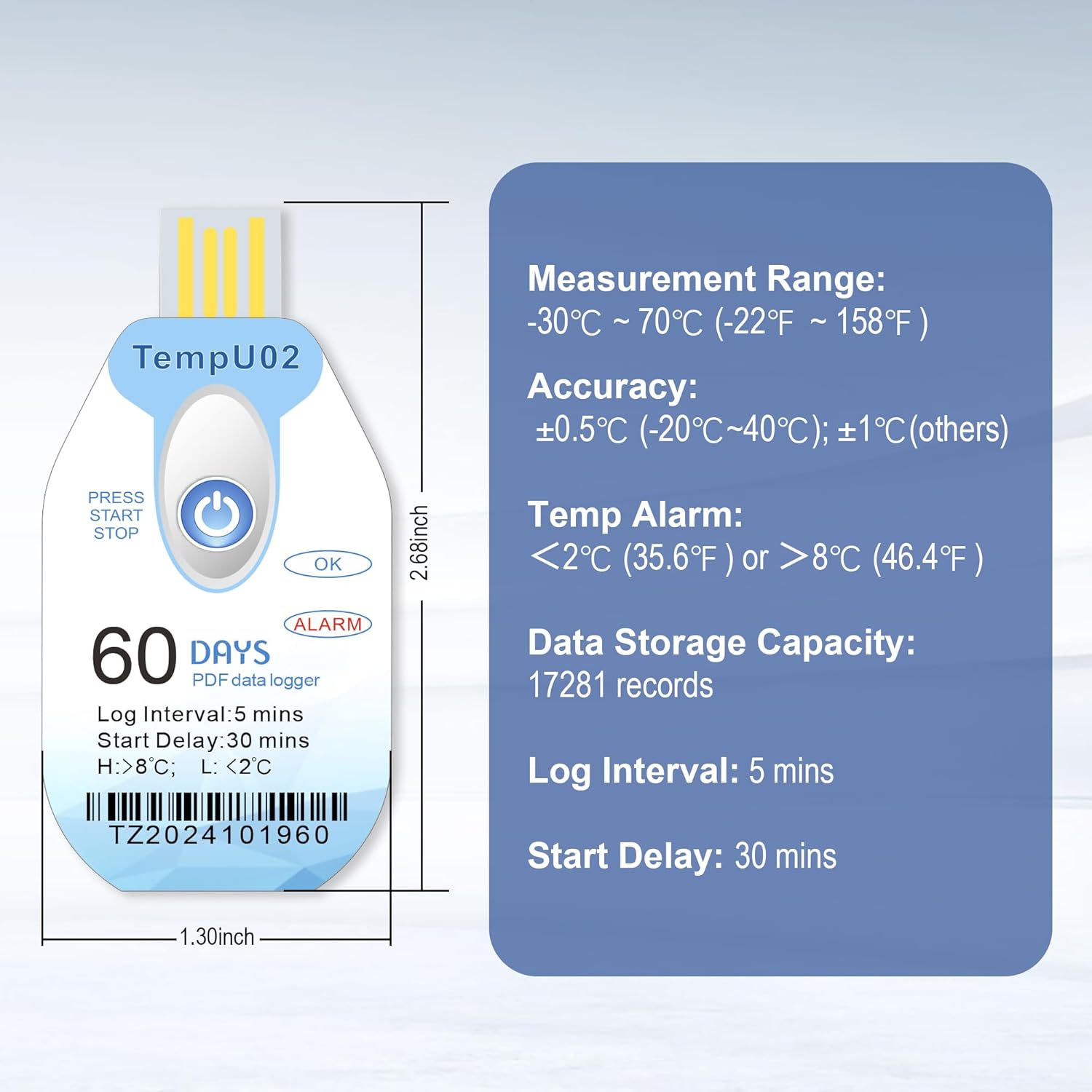
Figure 6: Visual representation of the TempU02 data logger with its key specifications. The device ID is TZ2024101960.
8. ການຮັບປະກັນແລະການສະຫນັບສະຫນູນ
Each Tzone TempU02 data logger comes with a calibration certificate, ensuring its accuracy and compliance with industry standards.
For any technical assistance, questions, or support regarding the Tzone TempU02 data logger, please refer to the contact information provided with your purchase or visit the official Tzone webເວັບໄຊ.
9. ໝາຍ ເຫດ ສຳ ຄັນ
- The Tzone TempU02 is a single-use device. Once it is connected to a USB port for data download, it will permanently stop recording and cannot be restarted or reused.
- To maintain the IP67 waterproof rating, ensure the protective packaging remains intact until data download. Do not tear the packaging prematurely.
Ask a question about this manual
Ask about setup, troubleshooting, compatibility, parts, safety, or missing instructions. Manuals+ will review the question and use this page’s manual context to help answer it.