
Divoom D-Ditoo5M
Divoom Ditoo 5M Portable Karaoke Speaker User Manual
Model: D-Ditoo5M
1. ບົດແນະນຳ
ຂອບໃຈສໍາລັບການຊື້asing the Divoom Ditoo 5M Portable Karaoke Speaker. This all-in-one sound system combines a portable speaker with a wireless microphone, FM radio, Bluetooth, MicroSD, and USB playback capabilities. It is designed for versatile use in various environments, including home, travel, and parties. Please read this manual carefully to ensure proper operation and to maximize your product experience.
ວິດີໂອ: ຫຼາຍກວ່າview of the Divoom Ditoo 5M Portable Karaoke Speaker's features and usage scenarios.
2. ສິ່ງທີ່ຢູ່ໃນກ່ອງ
ກວດສອບວ່າອົງປະກອບທັງໝົດມີຢູ່ໃນຊຸດ:
- Divoom Ditoo 5M Portable Karaoke Speaker
- ໄມໂຄຣໂຟນໄຮ້ສາຍ
- ສາຍ USB-C
- ຄູ່ມືຜູ້ໃຊ້ (ເອກະສານນີ້)

Image: The Divoom Ditoo 5M speaker, wireless microphone, USB-C cable, and user manual as included components.
3. ຜະລິດຕະພັນເກີນview
The Divoom Ditoo 5M features a retro computer design with a pixel art display and tactile mechanical keys. It includes a built-in speaker and a wireless microphone for karaoke functions.
ຄຸນນະສົມບັດທີ່ສໍາຄັນ:
- ສຽງທີ່ມີພະລັງ 15W: Equipped with 19-core 48mm speakers and dual passive membranes for immersive audio.
- Built-in Lossless Microphone: For clear vocal input during karaoke or recording.
- Pixel Art Display: Customizable display for pixel art, animations, and text.
- Multi-mode Audio Playback: Supports Bluetooth 5.0, FM Radio, USB, and MicroSD card.
- ຟັງຊັນເພີ່ມເຕີມ: Clock & Alarm, Sunset Sleep Aid, Sound Factory, Scoreboard & Timer, Pixel Mini Games.
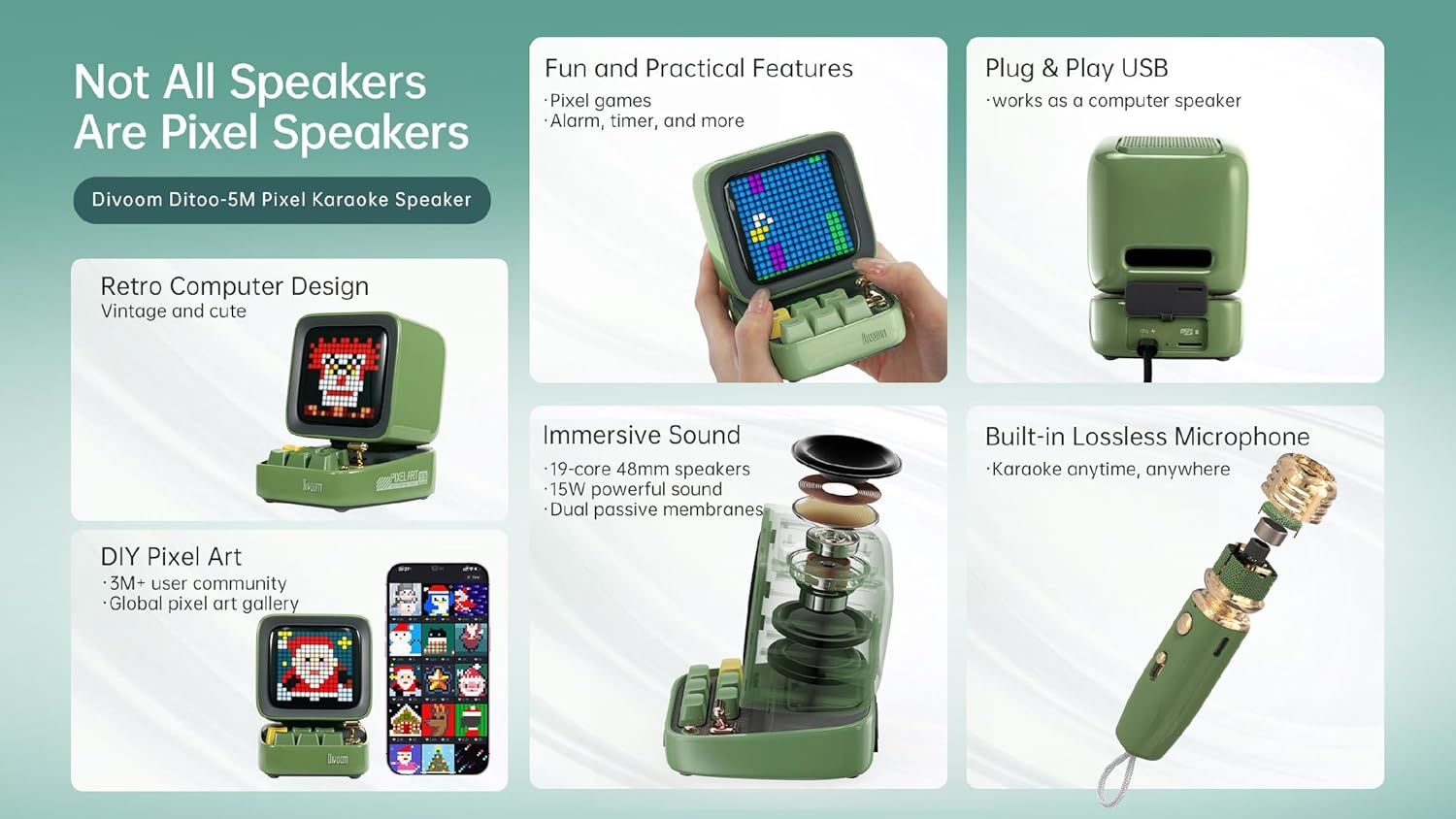
ຮູບພາບ: ລາຍລະອຽດ view of the Divoom Ditoo 5M speaker's internal sound components and the built-in microphone structure.
Craftsmanship Details:
- Piano Lacquer Finish: Provides a sleek and premium texture.
- ໄຟຕົວຊີ້ວັດແບັດເຕີຣີ: For clear visibility of battery life.
- Silicone Base: Ensures stable placement on surfaces.

ຮູບພາບ: ໃກ້ຊິດ views highlighting the piano lacquer finish, battery indicator, and silicone base of the Divoom Ditoo 5M speaker.
4. ຕັ້ງຄ່າ
4.1 ການສາກອຸປະກອນ
Before first use, fully charge the Divoom Ditoo 5M speaker and the wireless microphone using the provided USB-C cable. Connect the USB-C cable to the charging port on the device and a compatible USB power adapter (not included).
4.2 ການເປີດ/ປິດ
Press and hold the power button on the speaker to turn it on or off. The pixel display will illuminate upon powering on.
5. ຄໍາແນະນໍາການດໍາເນີນງານ
5.1 ການເຊື່ອມຕໍ່ Bluetooth
- ກວດໃຫ້ແນ່ໃຈວ່າໄດ້ເປີດລຳໂພງແລ້ວ.
- ເປີດໃຊ້ Bluetooth ໃນໂທລະສັບສະຫຼາດ, ແທັບເລັດ, ຫຼືອຸປະກອນອື່ນໆທີ່ເຂົ້າກັນໄດ້ຂອງທ່ານ.
- ຊອກຫາ "Divoom Ditoo 5M" in the list of available Bluetooth devices.
- ເລືອກອຸປະກອນເພື່ອຈັບຄູ່. ສຽງຢືນຢັນຈະສະແດງເຖິງການເຊື່ອມຕໍ່ທີ່ປະສົບຜົນສໍາເລັດ.
5.2 ການດໍາເນີນງານວິທະຍຸ FM
- Switch the speaker to FM radio mode (refer to the device's controls for mode selection).
- Use the navigation buttons to scan for available radio stations.
- Adjust the volume using the dedicated controls.
5.3 MicroSD & USB Playback
- Insert a MicroSD card into the TF card slot or a USB drive into the USB port.
- The speaker will automatically detect and begin playing audio files ຈາກອຸປະກອນເກັບຮັກສາ.
- Use the speaker's controls to navigate tracks and adjust volume.
ຟັງຊັນຄາລາໂອເກະ 5.4 ພ້ອມໄມໂຄຣໂຟນໄຮ້ສາຍ
The Ditoo 5M offers an integrated karaoke experience with its wireless microphone.
- Ensure both the speaker and wireless microphone are charged and powered on.
- ໄມໂຄຣໂຟນຄວນຈະຈັບຄູ່ກັບລຳໂພງໂດຍອັດຕະໂນມັດ.
- Select a karaoke mode (e.g., Singer, Studio, Pop Song, Child, Robot, Host, Original) using the speaker's controls or the Divoom app.
- Adjust the microphone volume to your preference.

Image: The Divoom Ditoo 5M speaker and microphone, illustrating the available karaoke modes and microphone volume adjustment.
5.5 Pixel Art Creation
Customize the speaker's display with your own pixel art, animations, or text using the dedicated Divoom mobile application.
- ດາວໂຫລດແລະຕິດຕັ້ງແອັບຯ Divoom ໃນໂທລະສັບສະຫຼາດຂອງທ່ານ.
- Connect the speaker to the app via Bluetooth.
- Access the pixel art creation tools within the app to design and display custom visuals.

Image: A user interacting with the Divoom app to create and display pixel art on the Ditoo 5M speaker.
5.6 Pixel Mini Games
The Ditoo 5M includes 15 engaging mini-games for entertainment.
- Navigate to the games section on the speaker's interface or through the Divoom app.
- Select a game (e.g., Pixel Bee, Starfighter, Gomoku, Magic 8-Ball, Dice, Snake, Flying Bird, Frogger, Pixel Racer, Bouncing Ball).
- Use the speaker's keys for game controls.

Image: The Divoom Ditoo 5M speaker showcasing its pixel mini-games feature.
5.7 PC Speaker Functionality
The Ditoo 5M can function as a PC speaker and its microphone can be used for recording.
- Connect the speaker to your PC using an OTG USB cable (not included).
- Select the Ditoo 5M as the audio output device in your computer's sound settings.
- The integrated microphone can also be selected as an input device for communication or recording.

Image: The Divoom Ditoo 5M speaker connected to a computer, demonstrating its use as a PC speaker.
5.8 ຄຸນສົມບັດເພີ່ມເຕີມ
- Clock & Alarm: Set alarms and display time.
- Sunset Sleep Aid: Features soothing nature and animal sounds to assist with sleep.
- Sound Factory: Includes 23 instruments and 96 sound effects for an immersive audio experience.
- Scoreboard & Timer: Practical tools for various activities.

Image: The Divoom Ditoo 5M speaker demonstrating its additional features including clock, sleep aid, sound factory, and scoreboard.
6. ບໍາລຸງຮັກສາ
- ທໍາຄວາມສະອາດ: Use a soft, dry cloth to clean the speaker and microphone. Do not use abrasive cleaners or solvents.
- ການເກັບຮັກສາ: ເກັບຮັກສາອຸປະກອນໄວ້ໃນບ່ອນທີ່ເຢັນ, ແຫ້ງ, ຫ່າງຈາກແສງແດດໂດຍກົງ ແລະອຸນຫະພູມທີ່ຮ້າຍກາດ.
- ການດູແລຫມໍ້ໄຟ: ເພື່ອຍືດອາຍຸແບັດເຕີລີ, ຫຼີກເວັ້ນການຖອດແບດເຕີລີ່ເຕັມເລື້ອຍໆ. ສາກອຸປະກອນຢ່າງເປັນປົກກະຕິ, ເຖິງແມ່ນວ່າບໍ່ໄດ້ໃຊ້ເປັນໄລຍະເວລາທີ່ຍາວນານ.
7. ການແກ້ໄຂບັນຫາ
| ບັນຫາ | ການແກ້ໄຂທີ່ເປັນໄປໄດ້ |
|---|---|
| ອຸປະກອນບໍ່ເປີດ. | Ensure the device is fully charged. Connect to a power source using the USB-C cable. |
| ບໍ່ສາມາດເຊື່ອມຕໍ່ຜ່ານ Bluetooth ໄດ້. | Ensure Bluetooth is enabled on your device and the speaker is in pairing mode. Move closer to the speaker. Try restarting both devices. |
| ໄມໂຄຣໂຟນບໍ່ເຮັດວຽກ. | Ensure the microphone is charged and powered on. Check if it's paired with the speaker. Adjust microphone volume. |
| ບໍ່ມີສຽງຈາກລຳໂພງ. | Check volume levels on both the speaker and the connected device. Ensure the correct input source is selected. |
8. ຂໍ້ມູນຈໍາເພາະ
- ຍີ່ຫໍ້: Divoom
- ຕົວແບບ: D-Ditoo5M
- ການເຊື່ອມຕໍ່: Bluetooth 5.0, USB Port, MicroSD(TF) Card Slot, FM Radio, Wireless Microphone Link
- ແຫຼ່ງພະລັງງານ: ແບັດເຕີຣີ Lithium-Ion ສາມາດສາກໄດ້ໃນຕົວ
- ລຳໂພງ Output: 15W
- ອຸປະກອນທີ່ເຂົ້າກັນໄດ້: Smartphone, Tablet, USB devices
- ປະເພດສື່: Micro SD, USB
- ອົງປະກອບລວມ: Speaker, Wireless Microphone, USB-C Cable, User Manual
- ຄຸນນະສົມບັດພິເສດ: All-in-one karaoke system with FM radio and multiple playback options
9. ການຮັບປະກັນແລະການສະຫນັບສະຫນູນ
For warranty information and technical support, please refer to the official Divoom webຫຼື ຕິດຕໍ່ຕົວແທນຈຳໜ່າຍໃນທ້ອງຖິ່ນຂອງທ່ານ. ເກັບໃບຮັບເງິນຊື້ຂອງທ່ານໄວ້ເພື່ອການຮຽກຮ້ອງການຮັບປະກັນ.
ສະຫນັບສະຫນູນອອນໄລນ໌: ຢ້ຽມຢາມ www.divoom.com ສຳລັບຄຳຖາມທີ່ຖືກຖາມເລື້ອຍໆ, ການລົງທະບຽນຜະລິດຕະພັນ ແລະ ຂໍ້ມູນຕິດຕໍ່.
Ask a question about this manual
Ask about setup, troubleshooting, compatibility, parts, safety, or missing instructions. Manuals+ will review the question and use this page’s manual context to help answer it.