
1. ບົດແນະນຳ
This manual provides detailed instructions for the setup, operation, and maintenance of your HISTTON H4-T Industrial Mini PC. Please read this manual thoroughly before using the device to ensure proper functionality and safety.
2. ຂໍ້ມູນຄວາມປອດໄພ
- ຮັບປະກັນການສະຫນອງພະລັງງານ voltage ກົງກັບຄວາມຕ້ອງການອຸປະກອນ.
- ຢ່າເຮັດໃຫ້ອຸປະກອນຖືກຄວາມຊຸ່ມຊື່ນ, ອຸນຫະພູມສູງສຸດ, ຫຼືແສງແດດໂດຍກົງ.
- ຫຼີກເວັ້ນການຂັດຂວາງການເປີດລະບາຍອາກາດ.
- ຢ່າພະຍາຍາມເປີດຫຼືສ້ອມແປງອຸປະກອນດ້ວຍຕົນເອງ. ອ້າງອີງເຖິງພະນັກງານບໍລິການທີ່ມີຄຸນວຸດທິ.
- ຮັກສາອຸປະກອນໃຫ້ຫ່າງຈາກສະຫນາມແມ່ເຫຼັກທີ່ເຂັ້ມແຂງ.
3. ເນື້ອໃນຊຸດ
ກວດສອບວ່າລາຍການທັງຫມົດແມ່ນມີຢູ່ໃນຊຸດ:
- 1 x HISTTON Mini PC
- 1 x Power Adapter
- 1 x ຄູ່ມືຜູ້ໃຊ້ (ເອກະສານນີ້)
- 1 x ສາຍ HDMI
- Screws (for mounting/storage installation)
- ເສົາອາກາດ WiFi
- VESA Mount (if included with specific models)
- SATA Cable (for 2.5-inch drive installation)

4. ຜະລິດຕະພັນເກີນview
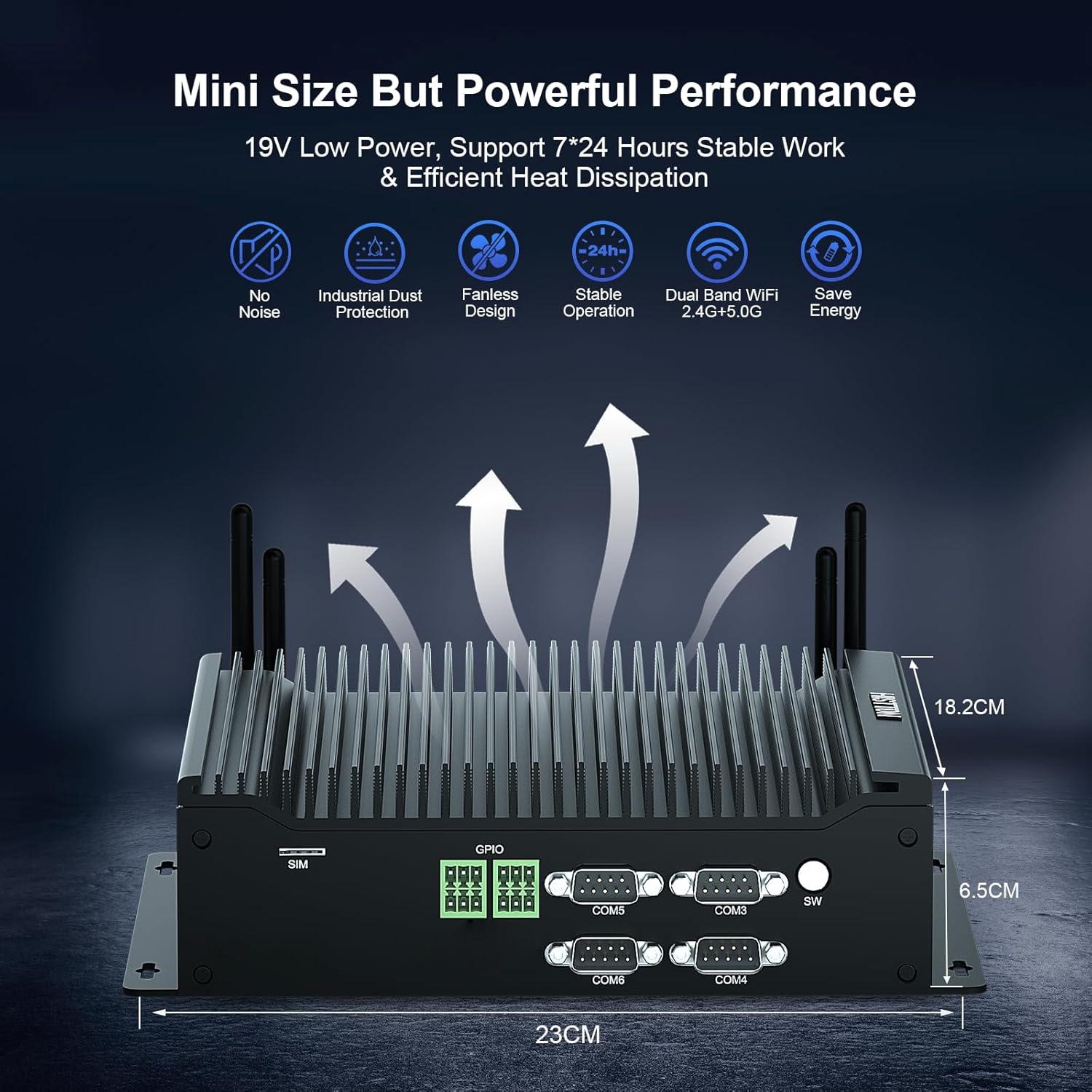
The HISTTON H4-T Mini PC is a compact, fanless industrial computer designed for various applications requiring stable performance and extensive connectivity. It features an Intel Core i7-10710U processor and supports multiple display outputs.
4.1 ແຜງດ້ານຫນ້າແລະຫລັງ

The device features a comprehensive set of ports for various industrial and general computing needs. These include multiple USB ports, LAN ports, COM ports, and video outputs.
4.2 ລັກສະນະທີ່ສໍາຄັນ
- ໜ່ວຍປະມວນຜົນ: Intel Core i7-10710U (10th Gen) with up to 4.70 GHz turbo frequency.
- ຮູບພາບ: Intel UHD Graphics for 10th Gen Processors, supporting 4K resolution.
- ໜ່ວຍຄວາມຈຳ: Dual DDR4 SO-DIMM slots, expandable up to 64GB.
- ການເກັບຮັກສາ: M.2 2280 NVME PCIe 3.0x4 / SATA 3 SSD slot and a 2.5-inch SATA HDD/SSD bay.
- ສະແດງຜົນອອກ: HD, DisplayPort (DP), and Type-C for triple 4K display support.
- ເຄືອຂ່າຍ: 2 x RJ45 Intel I210/211 Gigabit LAN, Dual-band WiFi 5 (2.4G+5.0G), Bluetooth 4.2.
- ການເຊື່ອມຕໍ່: 4 x USB 3.0, 4 x USB 2.0, 6 x DB9pin COM ports (configurable for RS232/RS422/RS485), 2 x 6pin GPIO, 1 x SIM card slot.
- ຄວາມເຢັນ: Fanless design for silent operation and industrial dust protection.
- ລະບົບປະຕິບັດການ: Pre-installed Windows 11 Pro (64-bit, activated) with support for Ubuntu.


5. ຄໍາແນະນໍາການຕິດຕັ້ງ
5.1 ການເຊື່ອມຕໍ່ອຸປະກອນຕໍ່
- ເຊື່ອມຕໍ່ຈໍສະແດງຜົນ: Use the provided HDMI cable or a DisplayPort/Type-C cable to connect your monitor(s) to the Mini PC. The device supports up to three 4K displays simultaneously.
- ເຊື່ອມຕໍ່ແປ້ນພິມ ແລະເມົາສ໌: Plug your USB keyboard and mouse into any available USB ports (USB 2.0 or USB 3.0).
- ເຊື່ອມຕໍ່ເຄືອຂ່າຍ: For a wired connection, connect an Ethernet cable to one of the RJ45 LAN ports. For wireless, attach the included WiFi antennas to the designated ports.
- ເຊື່ອມຕໍ່ສຽງ: If using external speakers or headphones, connect them to the SPK (speaker) port. A microphone can be connected to the MIC port.

5.2 ການເປີດເຄື່ອງ
- ເຊື່ອມຕໍ່ອະແດບເຕີໄຟຟ້າ: Plug the power adapter into the DC 19V 5A input port on the Mini PC, then plug the adapter into a power outlet.
- ປຸ່ມເປີດປິດ: Press the power button located on the front panel to turn on the Mini PC.
- The system will boot into Windows 11 Pro. Follow the on-screen instructions for initial setup if prompted.
6. ຄໍາແນະນໍາການດໍາເນີນງານ
6.1 ລະບົບປະຕິບັດການ
Your HISTTON H4-T Mini PC comes with Windows 11 Pro (64-bit) pre-installed and activated. It also supports other operating systems like Ubuntu, allowing for flexible deployment in various environments.
- Windows 11 Pro: Utilize standard Windows features for productivity, multimedia, and internet browsing.
- Ubuntu Support: For users preferring Linux-based systems, the hardware is compatible with Ubuntu installations. Refer to Ubuntu's official documentation for installation procedures.
6.2 ການເຊື່ອມຕໍ່ເຄືອຂ່າຍ
- ສາຍ LAN: The two Gigabit Ethernet ports provide stable and high-speed wired network access.
- Wireless (WiFi & Bluetooth): The dual-band WiFi 5 (2.4G+5.0G) and Bluetooth 4.2 modules enable wireless internet access and connection to Bluetooth peripherals. Ensure antennas are securely attached for optimal performance.

6.3 Industrial Features
The H4-T is designed for industrial applications, offering robust connectivity:
- ພອດ COM: Six DB9pin COM ports support RS232, with four of them configurable for RS422/RS485, suitable for connecting industrial control devices.
- GPIO: Two 6pin GPIO interfaces provide programmable input/output capabilities for custom applications.
- ຊ່ອງໃສ່ຊິມກາດ: Supports 4G/5G modules (module not included by default) for mobile network connectivity in remote locations.
7. ບໍາລຸງຮັກສາ
The fanless design of the HISTTON H4-T Mini PC significantly reduces maintenance requirements by eliminating moving parts and minimizing dust accumulation. However, regular care is still recommended.
- ທໍາຄວາມສະອາດ: Periodically wipe the exterior of the Mini PC with a soft, dry cloth. Avoid using liquid cleaners or solvents.
- ອັບເດດຊອບແວ: ຮັກສາລະບົບປະຕິບັດການ ແລະໄດເວີຂອງທ່ານອັບເດດເພື່ອຮັບປະກັນປະສິດທິພາບ ແລະຄວາມປອດໄພທີ່ດີທີ່ສຸດ.
- ເງື່ອນໄຂສິ່ງແວດລ້ອມ: Ensure the device is operated within recommended temperature and humidity ranges to prolong its lifespan.
- ການຂະຫຍາຍພື້ນທີ່ຈັດເກັບຂໍ້ມູນ: If installing additional storage (2.5-inch HDD/SSD or M.2 SSD), ensure the device is powered off and disconnected from power. Follow proper anti-static procedures.
8. ການແກ້ໄຂບັນຫາ
If you encounter issues with your HISTTON H4-T Mini PC, refer to the following common problems and solutions:
| ບັນຫາ | ສາເຫດທີ່ເປັນໄປໄດ້ | ການແກ້ໄຂ |
|---|---|---|
| ບໍ່ມີໄຟ / ອຸປະກອນເປີດບໍ່ໄດ້ | Power adapter not connected or faulty; Power outlet issue; Power button not pressed correctly. | Ensure power adapter is securely connected to both the PC and a working power outlet. Try a different outlet. Press the power button firmly. |
| ບໍ່ມີຈໍສະແດງຜົນ | Display cable loose or faulty; Incorrect input selected on monitor; Monitor off or faulty. | Check display cable connections. Ensure monitor is on and set to the correct input source (HDMI, DP, Type-C). Test with a different monitor or cable if possible. |
| ບໍ່ມີການເຊື່ອມຕໍ່ອິນເຕີເນັດ (ມີສາຍ) | Ethernet cable loose or faulty; Router/modem issue; Network driver issue. | Verify Ethernet cable is securely connected. Restart your router/modem. Check network adapter status in OS. |
| ບໍ່ມີການເຊື່ອມຕໍ່ອິນເຕີເນັດ (ໄຮ້ສາຍ) | WiFi antennas not connected; WiFi disabled; Incorrect WiFi password; Router issue. | Ensure WiFi antennas are attached. Check WiFi settings in OS. Verify WiFi password. Restart your router. |
| Peripherals (USB devices) not working | ການເຊື່ອມຕໍ່ວ່າງ; ບັນຫາໄດຣເວີ; ອຸປະກອນຕໍ່ພ່ວງຜິດປົກກະຕິ. | Try a different USB port. Reinstall or update drivers for the peripheral. Test the peripheral on another computer. |
9. ຂໍ້ມູນຈໍາເພາະ
| ຄຸນສົມບັດ | ລາຍລະອຽດ |
|---|---|
| ຊື່ຕົວແບບ | H4-T |
| ໂຮງງານຜະລິດ | Intel Core i7-10710U (10th Gen), 6 Cores, 12 Threads, 12M Cache, up to 4.70 GHz |
| Graphics Coprocessor | Intel UHD Graphics ສໍາລັບໂປເຊດເຊີ Intel ຮຸ່ນທີ 10 |
| RAM | 32GB DDR4 SO-DIMM (Expandable up to 64GB) |
| ຮາດດິດ | 512GB M.2 NVMe SSD (Supports M.2 2280 NVME PCIe 3.0x4 / SATA 3 SSD and 2.5 inch SATA HDD/SSD) |
| ລະບົບປະຕິບັດການ | Windows 11 Pro (64-bit, activated), Supports Ubuntu |
| ສະແດງຜົນອອກ | HD, DisplayPort (DP), Type-C (Supports Triple 4K Display) |
| LAN | 2 x RJ45 Intel I210/211 Gigabit LAN |
| ການເຊື່ອມຕໍ່ໄຮ້ສາຍ | Dual-band WiFi 5 (2.4G+5.0G), Bluetooth 4.2 |
| ພອດ USB | 4 x USB 3.0, 4 x USB 2.0 |
| ຜອດ COM | 6 x DB9pin (2 x RS232, 4 x RS422/RS485 configurable) |
| ອິນເຕີເຟດອື່ນໆ | 2 x 6pin GPIO, 1 x SIM card slot, 1 x SPK, 1 x MIC |
| ການສະຫນອງພະລັງງານ | DC19V 5A |
| ການບໍລິໂພກພະລັງງານ | 15W-20W |
| ຄວາມເຢັນ | ການອອກແບບພັດລົມ |
| ຂະໜາດ (LxWxH) | 9.06 x 7.17 x 2.56 ນິ້ວ (23 x 18.2 x 6.5 cm) |
| ນ້ໍາຫນັກລາຍການ | 6.38 ປອນ (ປະມານ 2.9 ກິໂລ) |
10. ຂໍ້ມູນການຮັບປະກັນ
HISTTON products are covered by a standard manufacturer's warranty. Please refer to the warranty card included with your product or visit the official HISTTON webເວັບໄຊສໍາລັບເງື່ອນໄຂການຮັບປະກັນລາຍລະອຽດ. ຮັກສາຫຼັກຖານການຊື້ຂອງທ່ານສໍາລັບການຮ້ອງຂໍການຮັບປະກັນ.
11. ການຊ່ວຍເຫຼືອລູກຄ້າ
For technical assistance, troubleshooting, or any questions regarding your HISTTON H4-T Mini PC, please contact HISTTON customer support. Contact information can typically be found on the official HISTTON webສະຖານທີ່ຫຼືອຸປະກອນການຫຸ້ມຫໍ່.
ຊັບພະຍາກອນອອນໄລນ໌: For additional support and driver downloads, visit the official HISTTON webເວັບໄຊ.