
1. ບົດແນະນຳ
Thank you for choosing the SnapFresh 4V Cordless Electric Scissors. This tool is designed for efficient cutting of various materials such as cardboard, fabric, carpet, and leather. Please read this manual thoroughly before operation to ensure safe and effective use. Keep this manual for future reference.
2. ຄໍາແນະນໍາຄວາມປອດໄພ
Always prioritize safety when operating any power tool. Failure to follow these instructions may result in electric shock, fire, and/or serious injury.
2.1 ຄວາມປອດໄພທົ່ວໄປ
- ຮັກສາພື້ນທີ່ເຮັດວຽກໃຫ້ສະອາດ ແລະ ມີແສງສະຫວ່າງດີ. ພື້ນທີ່ວຸ້ນວາຍ ຫຼືບ່ອນມືດພາໃຫ້ເກີດອຸປະຕິເຫດ.
- ຫ້າມໃຊ້ເຄື່ອງມືໄຟຟ້າໃນບັນຍາກາດທີ່ລະເບີດ, ເຊັ່ນໃນທີ່ປະທັບຂອງຂອງແຫຼວ, ອາຍແກັສ, ຫຼືຝຸ່ນ. ເຄື່ອງມືພະລັງງານສ້າງປະກາຍໄຟທີ່ອາດຈະຕິດເຊື້ອຂີ້ຝຸ່ນຫຼືຄວັນ.
- ຮັກສາເດັກນ້ອຍ ແລະຜູ້ຢືນຢູ່ຫ່າງໆ ໃນຂະນະທີ່ໃຊ້ເຄື່ອງມືໄຟຟ້າ. ສິ່ງລົບກວນສາມາດເຮັດໃຫ້ເຈົ້າສູນເສຍການຄວບຄຸມ.
- Always wear appropriate personal protective equipment, including safety glasses, gloves, and hearing protection if necessary.
2.2 ຄວາມປອດໄພທາງໄຟຟ້າ
- ຫຼີກເວັ້ນການສໍາຜັດກັບຮ່າງກາຍກັບພື້ນດິນຫຼືຫນ້າດິນເຊັ່ນ: ທໍ່, radiators, ຂອບເຂດ, ແລະຕູ້ເຢັນ. ມີຄວາມສ່ຽງສູງຕໍ່ການເກີດໄຟຟ້າຊັອດ ຖ້າຮ່າງກາຍຂອງເຈົ້າຖືກດິນ ຫຼືດິນ.
- ຫ້າມບໍ່ໃຫ້ເຄື່ອງໃຊ້ໄຟຟ້າຖືກຝົນ ຫຼືສະພາບທີ່ປຽກ. ນ້ໍາເຂົ້າໄປໃນເຄື່ອງມືໄຟຟ້າຈະເພີ່ມຄວາມສ່ຽງຕໍ່ການຊ໊ອກໄຟຟ້າ.
- ຢ່າໃຊ້ສາຍບື. ຫ້າມໃຊ້ສາຍເພື່ອຖື, ດຶງ, ຫຼືຖອດສາຍໄຟ. ຮັກສາສາຍໄຟໃຫ້ຫ່າງຈາກຄວາມຮ້ອນ, ນໍ້າມັນ, ແຄມແຫຼມ, ຫຼືພາກສ່ວນທີ່ເຄື່ອນຍ້າຍ. ສາຍບືທີ່ເສຍຫາຍ ຫຼື ສາຍບື ເພີ້ມຄວາມສ່ຽງຕໍ່ການເກີດໄຟຟ້າຊັອດ.
2.3 ຄວາມປອດໄພຂອງໃບມີດ
- Ensure the safety lock is engaged when the tool is not in use or when changing blades.
- Always use sharp, undamaged blades. Dull blades can bind and cause kickback.
- Keep hands and fingers away from the rotating blade during operation.
- Do not attempt to cut materials thicker than 1/4 inch (6.35 mm).
3. ເນື້ອໃນຊຸດ
ກວດສອບວ່າລາຍການທັງຫມົດແມ່ນມີຢູ່ໃນສະພາບທີ່ດີໃນເວລາທີ່ unpacking.
- 1 x Cordless Electric Scissors (SP5091)
- 1 x Extra SKS7 Alloy Blade
- 1 x ສາຍສາກ USB Type-C
- 1 x ຄູ່ມືຜູ້ໃຊ້
- 1 x ຖົງເກັບຮັກສາ

Image: The complete kit, showing the electric scissors, an extra blade, a USB charging cable, the user manual, and a storage bag.
4. ຜະລິດຕະພັນເກີນview
Familiarize yourself with the components of your SnapFresh Electric Scissors.

ຮູບພາບ: A ລາຍລະອຽດ view of the electric scissors, pointing out the SKS7 alloy blade, safety switch, LED status indicator, Type-C charging port, and built-in LED light.
- SKS7 Alloy Blade: Durable and self-sharpening for precise cuts.
- ສະວິດຄວາມປອດໄພ: ປ້ອງກັນການເປີດໃຊ້ງານໂດຍບັງເອີນ.
- ຕົວຊີ້ວັດສະຖານະພາບ LED: ສະແດງລະດັບການສາກແບັດເຕີຣີ.
- ຜອດສາກໄຟ Type-C: ສຳລັບການສາກໄຟຄືນໃໝ່ທີ່ສະດວກສະບາຍ.
- ໄຟ LED ໃນຕົວ: ສ່ອງແສງສະຫວ່າງໃສ່ພື້ນທີ່ຕັດເພື່ອການເບິ່ງເຫັນທີ່ດີຂຶ້ນ.
5. ຕັ້ງຄ່າ
5.1 ການສາກແບັດເຕີຣີ
The tool is powered by a 4V 2.0Ah rechargeable battery. Ensure the battery is fully charged before first use.
- Locate the Type-C charging port on the tool.
- Connect the provided USB Type-C charging cable to the tool and a compatible USB power adapter (not included).
- The LED status indicator will show the charging progress. A full charge is indicated when all LED lights are solid green.
- ຕັດເຊື່ອມຕໍ່ສາຍສາກເມື່ອສາກໄຟສຳເລັດ.

Image: The electric scissors being charged via its Type-C USB port.
5.2 Installing/Replacing the Blade
Always ensure the tool is turned off and the safety lock is engaged before handling the blade.
- Press the safety lock to prevent accidental activation.
- Using a screwdriver, unscrew the screw holding the blade in place.
- Carefully remove the old blade, holding it with pliers if necessary.
- Place the new SKS7 alloy blade onto the spindle, ensuring it aligns correctly.
- ມັດສະກູໃຫ້ແໜ້ນ.

Image: Visual instructions for replacing the cutting blade, detailing how to hold the blade, unscrew, remove, prepare, install, and tighten the new blade.
6. ຄໍາແນະນໍາການດໍາເນີນງານ
6.1 ການເປີດ/ປິດ
- To turn on: Press and hold the safety lock button, then pull the trigger. The blade will begin rotating.
- To turn off: Release the trigger. The blade will stop rotating.
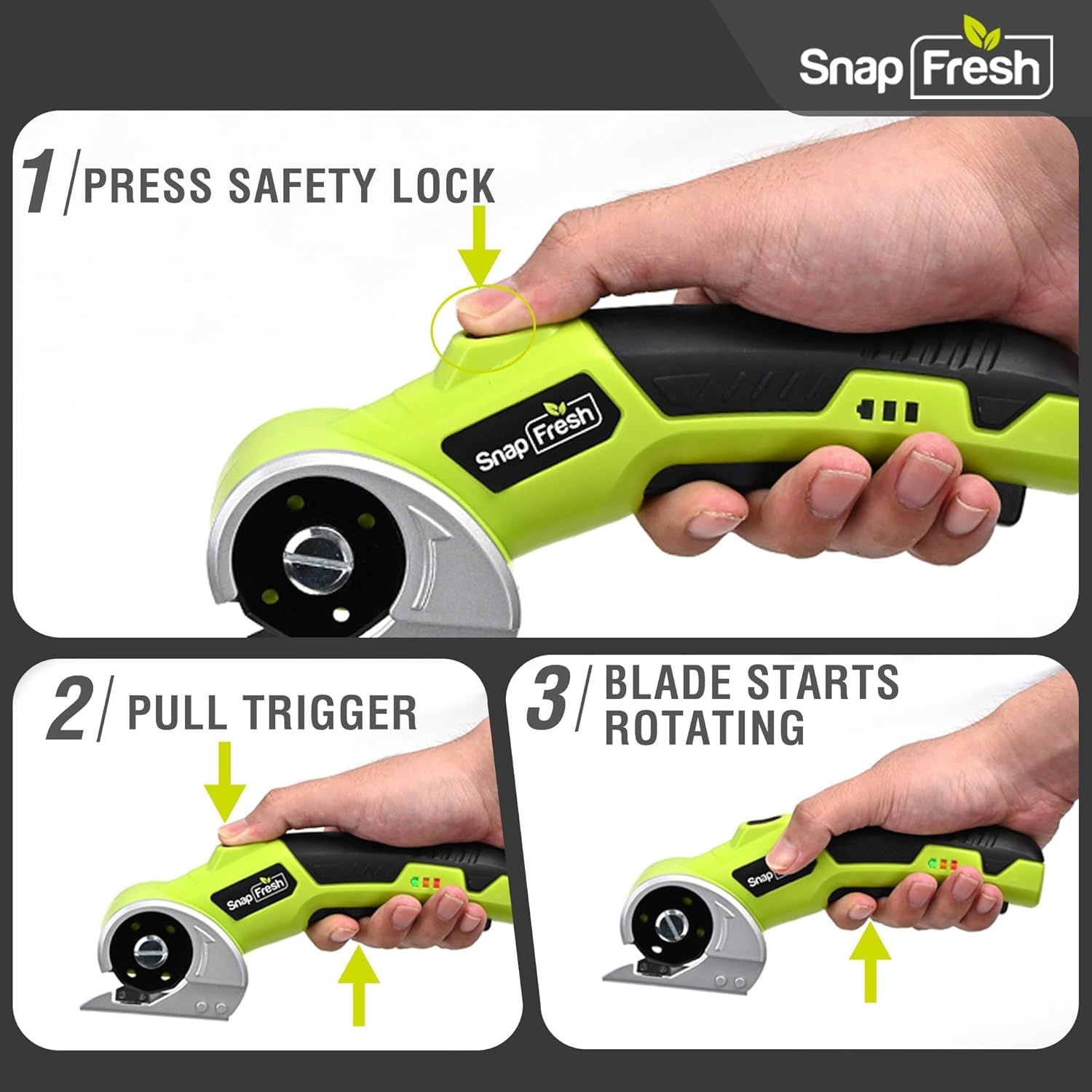
Image: A three-step visual guide demonstrating how to activate the electric scissors by pressing the safety lock and pulling the trigger.
6.2 Cutting Various Materials
The SnapFresh Electric Scissors are suitable for cutting materials up to 1/4 inch thick, including:
- ແຜ່ນເຈ້ຍ
- ຜ້າ
- ພົມ
- ຫນັງ
- ເຈ້ຍ
- ໂບ
- ຫຍ້າທຽມ
For best results, ensure the material is laid flat and stable. Guide the tool smoothly along the desired cutting line. The built-in LED light will illuminate your path.
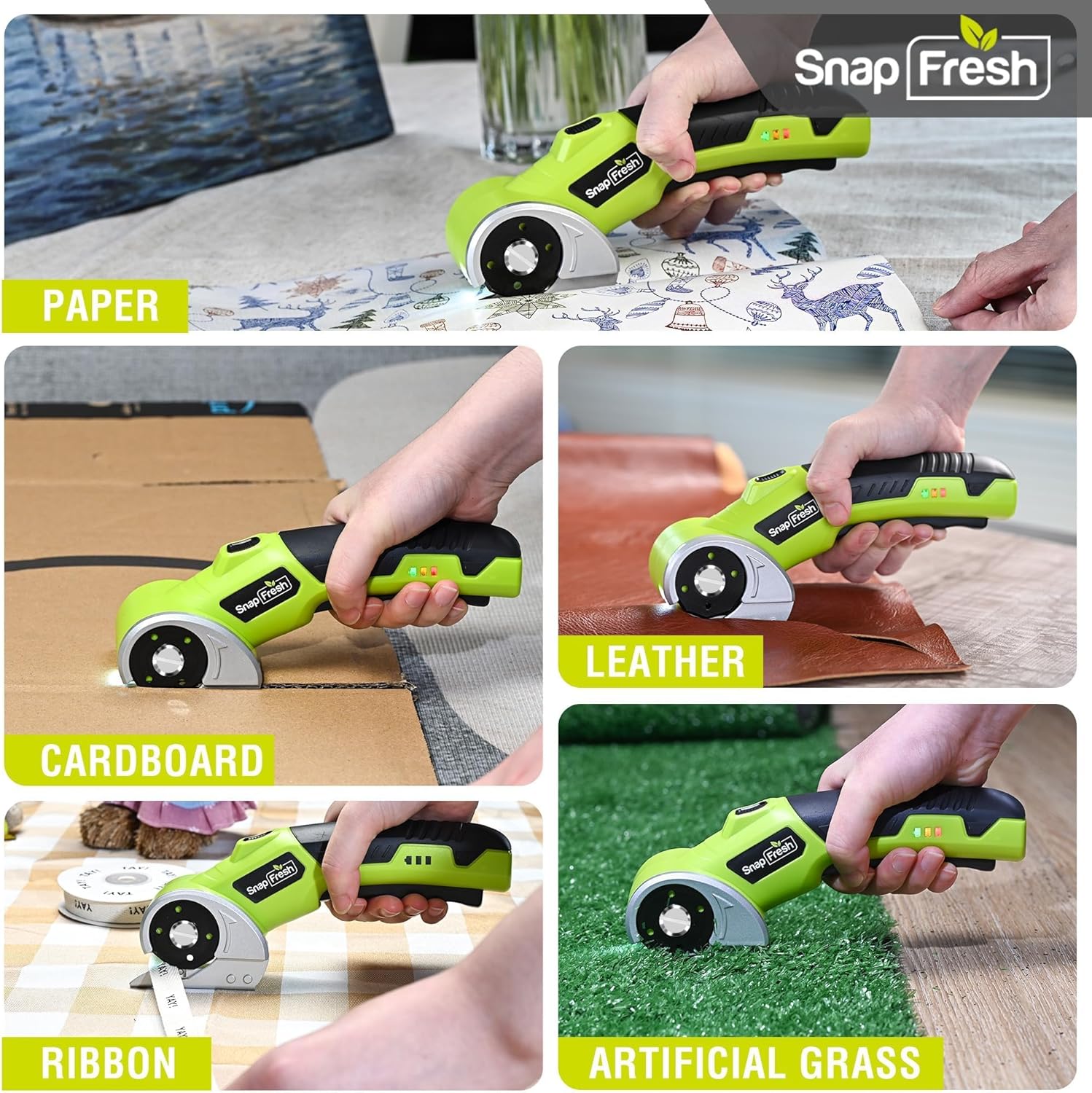
Image: The electric scissors demonstrating its capability to cut through various materials like paper, leather, cardboard, ribbon, and artificial grass.

Image: The electric scissors making both straight and curved cuts on a piece of leather, highlighting its precision.
Video: An official product video demonstrating the SnapFresh Electric Scissors cutting various materials like burlap, kraft paper, ribbon, and newspaper, showcasing its versatility for crafting and DIY projects.
7. ບໍາລຸງຮັກສາ
7.1 ການທໍາຄວາມສະອາດ
- After each use, ensure the tool is off and the safety lock is engaged.
- Use a dry cloth to wipe away any dust or debris from the blade and tool body.
- ຢ່າໃຊ້ສານເຄມີທີ່ຮຸນແຮງຫຼືນໍ້າຢາ ທຳ ຄວາມສະອາດທີ່ຫຍາບຄາຍ.
7.2 ການດູແລຫມໍ້ໄຟ
- Store the tool with a partially charged battery (around 50%) if not used for extended periods.
- ຫຼີກລ້ຽງການຖອດແບດເຕີລີ່ຢ່າງເຕັມທີ່ເລື້ອຍໆ, ເພາະວ່ານີ້ສາມາດຫຼຸດຜ່ອນອາຍຸຂອງມັນ.
- ຫ້າມເປີດແບັດໃນອຸນຫະພູມທີ່ຮຸນແຮງ.
7.3 ການເກັບຮັກສາ
Store the electric scissors and its accessories in the provided storage bag in a dry, secure place, out of reach of children.
8. ການແກ້ໄຂບັນຫາ
| ບັນຫາ | ສາເຫດທີ່ເປັນໄປໄດ້ | ການແກ້ໄຂ |
|---|---|---|
| ເຄື່ອງມືບໍ່ເປີດ | ແບັດເຕີຣີເຫຼືອໜ້ອຍ ຫຼືໝົດແລ້ວ Safety lock not disengaged | ສາກແບັດເຕີຣີໃຫ້ເຕັມ Ensure both safety lock and trigger are pressed simultaneously |
| ແຜ່ນໃບບໍ່ຖືກຕັດຢ່າງມີປະສິດທິພາບ | Blade is dull or damaged ວັດສະດຸ ໜາ ເກີນໄປ | ປ່ຽນແຜ່ນໃບ Do not attempt to cut materials thicker than 1/4 inch |
| ເຄື່ອງມືຢຸດໃນລະຫວ່າງການປະຕິບັດງານ | ແບັດເຕີຣີplົດ ເປີດໃຊ້ການປ້ອງກັນການໂຫຼດເກີນແລ້ວ | ສາກແບັດເຕີຣີຄືນໃໝ່ Reduce pressure or cut thinner material |
9. ຂໍ້ມູນຈໍາເພາະ
| ຄຸນສົມບັດ | ຂໍ້ມູນຈໍາເພາະ |
|---|---|
| ໝາຍເລກຕົວແບບ | SP5091 |
| ສະບັບtage | 4V |
| ຄວາມອາດສາມາດຫມໍ້ໄຟ | 2.0Ah Lithium Ion |
| ຄວາມໄວທີ່ບໍ່ມີການໂຫຼດ | 285 RPM |
| ຄວາມຫນາຕັດສູງສຸດ | ຂະ ໜາດ 1/4 ນິ້ວ (6.35 ມມ) |
| ວັດສະດຸແຜ່ນໃບ | SKS7 Alloy Steel |
| ພອດສາກໄຟ | USB Type-C |
| ນ້ໍາຫນັກລາຍການ | 0.81 ປອນ (370 ກຣາມ) |
| ຂະໜາດສິນຄ້າ | 7.9 x 2 x 3 ນິ້ວ |
10. ການຮັບປະກັນແລະການສະຫນັບສະຫນູນ
SnapFresh products are designed and manufactured to high-quality standards. This product comes with a standard manufacturer's warranty against defects in materials and workmanship. Please refer to the warranty card included in your package for specific terms and conditions.
For technical support, troubleshooting assistance, or to inquire about replacement parts, please contact SnapFresh customer service through the official webເວັບໄຊ ຫຼືຂໍ້ມູນການຕິດຕໍ່ທີ່ສະໜອງໃຫ້ຢູ່ໃນບັດຮັບປະກັນຂອງທ່ານ.
Webເວັບໄຊ: Visit the SnapFresh Store