
ແນະນຳ
The Surfans F28 is a high-fidelity portable music player designed to deliver an immersive audio experience. Featuring dual ESS9018 DACs, a 4.4mm balanced output, and comprehensive Bluetooth 5.2 support including LDAC and aptX HD, the F28 supports a wide range of lossless audio formats. This manual provides detailed instructions for setting up, operating, maintaining, and troubleshooting your device to ensure optimal performance and longevity.

ຮູບ 1: ດ້ານຫນ້າແລະດ້ານຫລັງ view of the Surfans F28 HiFi Music Player.
ເນື້ອໃນຊຸດ
ກະລຸນາກວດສອບວ່າລາຍການທັງໝົດທີ່ມີລາຍຊື່ລຸ່ມນີ້ຢູ່ໃນຊຸດຂອງທ່ານ:
- 1x Surfans F28 HiFi Music Player
- 1x ສາຍສາກ USB-C
- 1x 128GB Micro SD Card (pre-installed or included separately)
- 1x ຄູ່ມືຜູ້ໃຊ້ (ເອກະສານນີ້)

ຮູບທີ 2: ພາບປະກອບຂອງເນື້ອໃນຊຸດທົ່ວໄປ.
ສິນຄ້າເກີນview
Familiarize yourself with the various components and controls of your F28 music player.
ຄຸນນະສົມບັດທີ່ສໍາຄັນ:
- Dual ESS9018 DACs: For high-resolution audio decoding and minimal distortion.
- 4.4mm Balanced Output: Provides enhanced audio quality and power for demanding headphones.
- 3.5 ມມ ປາຍດຽວ Standard audio output for common headphones.
- Bidirectional Bluetooth 5.2: Supports LDAC and aptX HD for high-quality wireless audio transmission and reception.
- ໜ້າຈໍ IPS ຂະໜາດ 3.5 ນິ້ວ: ສຳລັບການນຳທາງ ແລະ ການຄວບຄຸມທີ່ງ່າຍດາຍ.
- ALPS Analog Volume Knob: For precise volume adjustments.
- ການເກັບຮັກສາທີ່ຂະຫຍາຍໄດ້: Supports Micro SD cards up to 512GB.
- ຜອດ USB-C: ສໍາລັບການສາກໄຟແລະການໂອນຂໍ້ມູນ.

Figure 3: The F28 player showcasing its display and audio capabilities.

Figure 4: The dual ESS9018K2M DAC chips, central to the F28's high-fidelity audio.

Figure 5: Top panel with 4.4mm balanced and 3.5mm single-ended audio outputs, and the ALPS analog volume knob.
ຕັ້ງຄ່າ
1. ການສາກອຸປະກອນ
Before first use, fully charge the F28. Connect the included USB-C cable to the player's USB-C port and the other end to a USB power adapter (5V/1A recommended) or a computer's USB port. The charging indicator will show the charging status. A full charge typically takes several hours.
2. ການໃສ່ Micro SD Card
The F28 supports Micro SD cards up to 512GB. Locate the Micro SD card slot on the bottom of the device. Gently insert the Micro SD card with the gold contacts facing down until it clicks into place. To remove, push the card in slightly until it springs out.

Figure 6: Inserting the Micro SD card and connecting via USB-C for data transfer.
3. ການຖ່າຍໂອນດົນຕີ Files
Connect the F28 to your computer using the USB-C cable. The player will appear as a removable storage device. You can then drag and drop your music files directly into the Micro SD card's folders. The F28 supports various lossless formats including DSD (DSF/DFF), FLAC/WAV (up to 384kHz), AIFF/APE, as well as MP3/AAC.

ຮູບທີ 7: ສຽງທີ່ຮອງຮັບ file formats for the F28 player.
ຄໍາແນະນໍາການດໍາເນີນງານ
1. ເປີດ/ປິດ
- ເປີດ: ກົດປຸ່ມເປີດປິດຄ້າງໄວ້ (ຢູ່ດ້ານຂ້າງ) ຈົນກວ່າໜ້າຈໍຈະສະຫວ່າງຂຶ້ນ.
- ປິດພະລັງງານ: Press and hold the power button until a power-off prompt appears, then confirm.
2. ການນໍາທາງພື້ນຖານ
The F28 features a 3.5-inch IPS touchscreen for primary navigation. Swipe gestures and taps are used to select options and move between menus. Physical buttons on the side provide additional control for playback (play/pause, next/previous track) and menu navigation.
3. ການຫຼິ້ນເພງ
From the main menu, select "My Music" or "Folder" to browse your audio files. Tap on a song to begin playback. The playback screen displays track information, progress, and playback controls.
4. ການຄວບຄຸມປະລິມານ
Adjust the volume using the gold-colored ALPS analog knob located on the top right of the device. Rotate clockwise to increase volume and counter-clockwise to decrease. The volume level will be displayed on the screen.
5. ການເຊື່ອມຕໍ່ Bluetooth
The F28 supports Bidirectional Bluetooth 5.2 with LDAC and aptX HD codecs for high-quality wireless audio. To pair with Bluetooth headphones or speakers:
- Go to "System Settings" and select "Bluetooth".
- ເປີດ Bluetooth.
- ເຄື່ອງຫຼິ້ນຈະສະແກນຫາອຸປະກອນທີ່ມີຢູ່. ເລືອກອຸປະກອນຂອງທ່ານຈາກລາຍຊື່ເພື່ອຈັບຄູ່.
The F28 can also act as a Bluetooth receiver, allowing you to stream audio from your phone or PC to the player.

Figure 8: The F28 features a Bluetooth 5.2 chip for stable and high-quality wireless connections.
6. ການຕັ້ງຄ່າຄວາມສະເໝີພາບ
The F28 includes an equalizer to customize your sound. Navigate to the "Equalizer" option in the settings. You can choose from various presets or create a custom sound profile by adjusting the frequency bands.
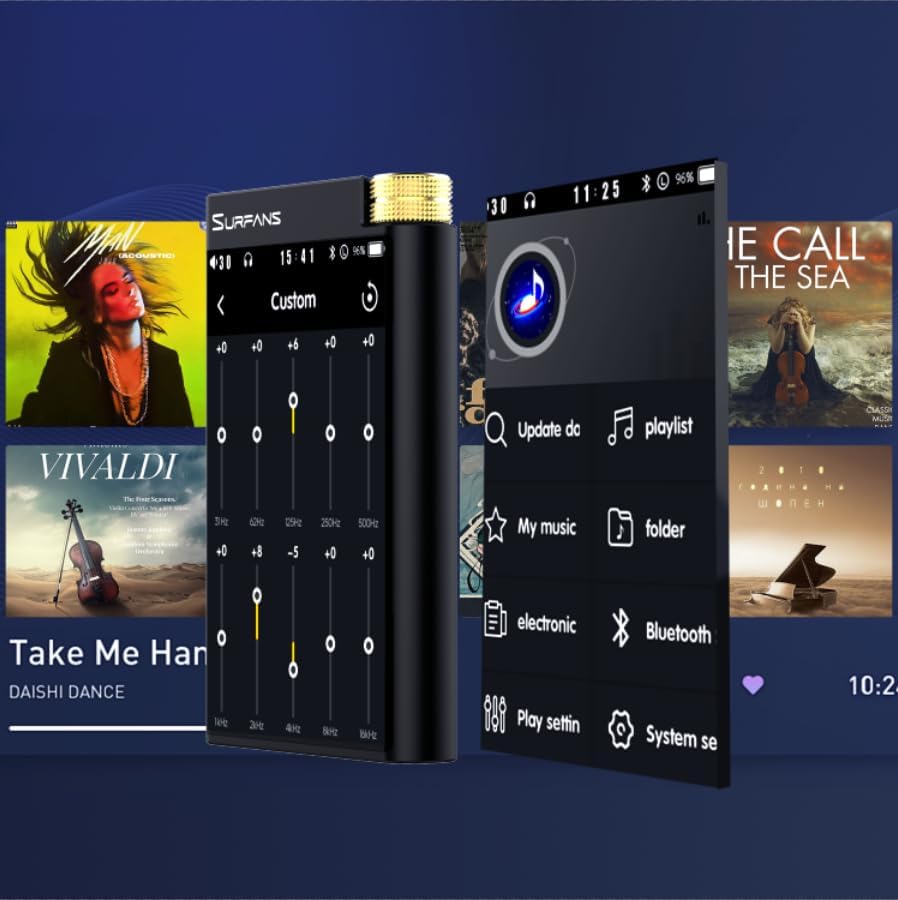
Figure 9: Customizing audio with the built-in equalizer.
7. ການເຊື່ອມຕໍ່ກັບອຸປະກອນພາຍນອກ
Use the 4.4mm balanced or 3.5mm single-ended output to connect to headphones, amplifiers, or speakers. The USB-C port also supports USB DAC functionality, allowing the F28 to act as an external sound card for your computer.

Figure 10: The F28 can be connected to various audio systems, including acting as a USB DAC for computers.
ບໍາລຸງຮັກສາ
- ທໍາຄວາມສະອາດ: ໃຊ້ຜ້າອ່ອນແລະແຫ້ງເພື່ອທຳຄວາມສະອາດອຸປະກອນ. ຫຼີກລ່ຽງການໃຊ້ນໍ້າຢາທຳຄວາມສະອາດທີ່ມີສານຂັດ ຫຼື ຕົວລະລາຍ.
- ການເກັບຮັກສາ: ເກັບຮັກສາເຄື່ອງຫຼີ້ນໄວ້ໃນບ່ອນທີ່ເຢັນ, ແຫ້ງ, ຫ່າງຈາກແສງແດດໂດຍກົງແລະອຸນຫະພູມທີ່ສຸດ.
- ການດູແລຫມໍ້ໄຟ: ເພື່ອຍືດອາຍຸການໃຊ້ງານຂອງແບັດເຕີຣີ, ໃຫ້ຫຼີກລ່ຽງການສາກແບັດເຕີຣີໃຫ້ໝົດເລື້ອຍໆ. ຖ້າເກັບຮັກສາໄວ້ເປັນເວລາດົນ, ໃຫ້ສາກແບັດເຕີຣີໃຫ້ປະມານ 50% ທຸກໆສອງສາມເດືອນ.
ການແກ້ໄຂບັນຫາ
| ບັນຫາ | ສາເຫດທີ່ເປັນໄປໄດ້ | ການແກ້ໄຂ |
|---|---|---|
| ອຸປະກອນບໍ່ເປີດ. | ຫມໍ້ໄຟຕ່ໍາ; ອຸປະກອນແຊ່ແຂງ. | Charge the device for at least 30 minutes. If still unresponsive, try holding the power button for 10-15 seconds for a hard reset. |
| ໜ້າຈໍສຳຜັດບໍ່ຕອບສະໜອງ ຫຼື ຊ້າ. | ຜິດພາດຊອບແວຊົ່ວຄາວ; ການແຊກແຊງປ້ອງກັນຫນ້າຈໍ. | Restart the device. Ensure the screen is clean and free of debris. If using a screen protector, ensure it is properly applied and not too thick. |
| ບັນຫາການຈັບຄູ່ Bluetooth. | Device not in pairing mode; distance; interference. | Ensure both devices are in pairing mode and within range. Turn off and on Bluetooth on both devices. Clear previous pairings if necessary. |
| Low volume via Bluetooth. | Volume settings on both devices; codec compatibility. | Increase volume on both the F28 and the connected Bluetooth device. Ensure optimal codec (LDAC/aptX HD) is selected if supported by the receiving device. |
| ດົນຕີ files not recognized or played in incorrect order. | ເສຍຫາຍ files; file system indexing issue. | ຮັບປະກັນ files are in supported formats. Re-scan the music library from the player's settings. If issues persist, try reformatting the Micro SD card (backup data first) and re-transferring files. Note: Some players may sort by filename alphabetically rather than track number metadata. |
ຂໍ້ມູນຈໍາເພາະ
| ຄຸນສົມບັດ | ລາຍລະອຽດ |
|---|---|
| ຊື່ຕົວແບບ | F28 128G |
| ຂະໜາດສິນຄ້າ | 0.7 x 2.6 x 4.7 ນິ້ວ |
| ນ້ໍາຫນັກລາຍການ | 9.6 ອອນ |
| ຊິບ DAC | Dual ESS9018K2M |
| ຮູບແບບສຽງທີ່ຮອງຮັບ | DSD (DSF/DFF), FLAC/WAV (up to 384kHz/32-bit), AIFF/APE, MP3/AAC, WMA Lossless |
| ລຸ້ນ Bluetooth | 5.2 (Bidirectional, supports LDAC/aptX HD) |
| ຂະໜາດໜ້າຈໍ | 3.5 Inches IPS Touchscreen |
| ການເກັບຮັກສາພາຍໃນ | 128GB (included Micro SD card) |
| ການເກັບຮັກສາທີ່ຂະຫຍາຍໄດ້ | Up to 512GB via Micro SD card |
| ແບັດເຕີຣີ | 1x 12V battery (included), approx. 12-hour playback |
| ພອດຂາອອກ | 4.4 ມມ ສົມດຸນ, 3.5 ມມ ປາຍດຽວ |
| ເຕັກໂນໂລຊີການເຊື່ອມຕໍ່ | Aux, Bluetooth 5.2, USB-C |
| ຄຸນນະສົມບັດພິເສດ | Equalizer |
ການຮັບປະກັນແລະການສະຫນັບສະຫນູນ
For warranty information and technical support, please refer to the official Surfans webເວັບໄຊ ຫຼືຕິດຕໍ່ບໍລິການລູກຄ້າຂອງເຂົາເຈົ້າໂດຍກົງ. ຮັກສາໃບຮັບເງິນການຊື້ຂອງທ່ານໄວ້ເປັນຫຼັກຖານການຊື້ສໍາລັບການຮ້ອງຂໍການຮັບປະກັນ.
You can visit the official Surfans Store on Amazon for more information and support: Surfans Audio Store