1. ບົດແນະນຳ
This manual provides essential information for the proper installation, operation, and maintenance of your Generic 25-foot High-Speed HDMI Cable with Ethernet. This cable is designed to deliver high-quality digital video and audio signals between compatible devices, supporting advanced features such as Ethernet data connectivity, Audio Return Channel (ARC), and 3D content.
2. ຄຸນສົມບັດ
- ການໂອນຂໍ້ມູນຄວາມໄວສູງ: Supports high bandwidth for resolutions up to 4K and beyond.
- Ethernet Data Connectivity: Allows for internet connection sharing among compatible devices without a separate Ethernet cable.
- ຊ່ອງທາງການກັບຄືນສຽງ (ARC): Enables a TV to send audio data upstream to an A/V receiver or surround sound system, reducing the need for a separate audio cable.
- ສະຫນັບສະຫນູນ 3D: Compatible with 3D video formats.
- ການກໍ່ສ້າງຄຸນນະພາບສູງ: Produced with high-grade materials for reliable performance and durability.
3. ຜະລິດຕະພັນເກີນview
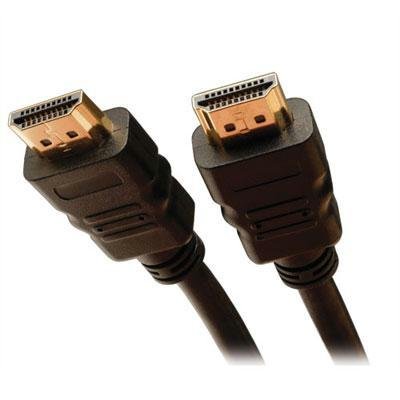
The image above displays the Generic 25-foot High-Speed HDMI Cable with Ethernet. It features standard HDMI Type A connectors on both ends, designed for secure and reliable connections. The cable is constructed to support the latest HDMI specifications, ensuring optimal signal integrity over its 25-foot length.
4. ຄໍາແນະນໍາການຕິດຕັ້ງ
Follow these steps to connect your HDMI cable:
- ກໍານົດພອດ: ຊອກຫາພອດອອກ HDMI ຢູ່ໃນອຸປະກອນແຫຼ່ງຂອງທ່ານ (ເຊັ່ນ: ເຄື່ອງຫຼິ້ນ Blu-ray, ເຄື່ອງຫຼິ້ນເກມ, ຄອມພິວເຕີ) ແລະພອດເຂົ້າ HDMI ຢູ່ໃນອຸປະກອນສະແດງຜົນຂອງທ່ານ (ເຊັ່ນ: ໂທລະພາບ, ຈໍພາບ, ໂປເຈັກເຕີ).
- ແຫຼ່ງເຊື່ອມຕໍ່: ຄ່ອຍໆສຽບປາຍສາຍ HDMI ດ້ານໜຶ່ງເຂົ້າໄປໃນພອດອອກ HDMI ຂອງອຸປະກອນແຫຼ່ງທີ່ມາຂອງທ່ານ. ໃຫ້ແນ່ໃຈວ່າມັນຕິດຕັ້ງແໜ້ນດີແລ້ວ.
- ເຊື່ອມຕໍ່ຈໍສະແດງຜົນ: ຄ່ອຍໆສຽບປາຍອີກດ້ານໜຶ່ງຂອງສາຍ HDMI ເຂົ້າໄປໃນພອດປ້ອນຂໍ້ມູນ HDMI ຂອງອຸປະກອນສະແດງຜົນຂອງທ່ານ. ໃຫ້ແນ່ໃຈວ່າມັນຢູ່ໃນຕຳແໜ່ງທີ່ເໝາະສົມ.
- ເປີດໃຊ້ອຸປະກອນ: ເປີດທັງອຸປະກອນແຫຼ່ງ ແລະອຸປະກອນສະແດງຜົນຂອງທ່ານ.
- ເລືອກການປ້ອນຂໍ້ມູນ: On your display device, use the remote control or on-screen menu to select the correct HDMI input source (e.g., HDMI 1, HDMI 2) that corresponds to the port you used.
ໝາຍເຫດ: For optimal performance, ensure both devices are powered off before connecting or disconnecting the cable.
5. ຄໍາແນະນໍາການດໍາເນີນງານ
Once the HDMI cable is correctly connected and the input source is selected on your display device, the cable operates automatically. It will transmit digital video and audio signals from your source device to your display. If your devices support HDMI Ethernet Channel (HEC) and Audio Return Channel (ARC), these features will also function automatically when enabled on your devices.
- ວິດີໂອ: The cable supports various video resolutions, including 1080p, 4K, and 3D content, depending on the capabilities of your connected devices.
- ສຽງ: High-quality digital audio, including multi-channel surround sound, will be transmitted.
- ອີເທີເນັດ: If both connected devices support HEC, they can share an internet connection without additional Ethernet cables.
6. ການບໍາລຸງຮັກສາແລະການດູແລ
To ensure the longevity and optimal performance of your HDMI cable, follow these maintenance guidelines:
- ຈັດການດ້ວຍຄວາມລະມັດລະວັງ: Avoid bending the cable sharply or putting excessive strain on the connectors.
- ຮັກສາຄວາມສະອາດ: Use a soft, dry cloth to gently wipe the cable and connectors if they become dusty. Do not use liquid cleaners directly on the connectors.
- ການເກັບຮັກສາທີ່ເຫມາະສົມ: When not in use, coil the cable loosely. Avoid tight coiling or kinking, which can damage internal wires.
- ຫຼີກລ້ຽງສະພາບທີ່ຮ້າຍແຮງ: Do not expose the cable to extreme temperatures, direct sunlight for prolonged periods, or excessive moisture.
7. ການແກ້ໄຂບັນຫາ
If you encounter issues with your HDMI cable, consider the following troubleshooting steps:
- ບໍ່ມີຮູບພາບ/ສຽງ:
- ໃຫ້ແນ່ໃຈວ່າສາຍເຊື່ອມຕໍ່ຢ່າງປອດໄພກັບອຸປະກອນທັງສອງ.
- ກວດສອບວ່າໄດ້ເລືອກອິນພຸດ HDMI ທີ່ຖືກຕ້ອງໃນອຸປະກອນສະແດງຜົນຂອງທ່ານແລ້ວ.
- ລອງເຊື່ອມຕໍ່ສາຍກັບພອດ HDMI ອື່ນໃນອຸປະກອນສະແດງຜົນຂອງທ່ານ.
- Test the cable with another HDMI-compatible device to rule out issues with the source or display.
- ເລີ່ມຕົ້ນໃໝ່ທັງອຸປະກອນຕົ້ນທາງ ແລະ ອຸປະກອນສະແດງຜົນ.
- Poor Picture Quality (Flickering, Static):
- ກວດເບິ່ງຄວາມເສຍຫາຍທາງດ້ານຮ່າງກາຍຕໍ່ກັບສາຍຫຼືຕົວເຊື່ອມຕໍ່.
- Ensure the cable is not running near sources of strong electromagnetic interference.
- ຫຼຸດຄວາມລະອຽດ ຫຼື ອັດຕາການໂຫຼດໜ້າຈໍຄືນໃໝ່ໃນອຸປະກອນຕົ້ນທາງຂອງທ່ານເພື່ອເບິ່ງວ່າບັນຫາຍັງຄົງຢູ່ຫຼືບໍ່.
- No Ethernet/ARC Functionality:
- Confirm that both connected devices support HDMI Ethernet Channel (HEC) and Audio Return Channel (ARC) and that these features are enabled in their settings.
- Consult the user manuals of your source and display devices for specific instructions on enabling these features.
8. ຂໍ້ກໍານົດດ້ານວິຊາການ
| ຂໍ້ມູນຈໍາເພາະ | ລາຍລະອຽດ |
|---|---|
| ASIN | B0F8172RB8 |
| ຜູ້ຜະລິດ | ຫຼັກ 212 |
| ວັນທີທໍາອິດທີ່ມີ | ວັນທີ 8 ພະຈິກ 2023 |
9. ການຮັບປະກັນແລະການສະຫນັບສະຫນູນ
For information regarding warranty coverage or technical support for your Generic 25-foot High-Speed HDMI Cable with Ethernet, please refer to the documentation provided at the point of purchase or contact the retailer directly. Specific warranty terms and support procedures may vary.