
1. ບົດແນະນຳ
ຂອບໃຈສໍາລັບການຊື້asing the Greadio CD-W16 Multifunction Portable CD Player. This device offers a comprehensive audio experience with multiple playback options including CD, cassette, FM radio, Bluetooth 5.1, USB, AUX, and TF/SD card. Designed for ease of use and portability, it features a rechargeable battery, remote control, and high-quality stereo sound. Please read this manual carefully to ensure proper operation and to fully enjoy all the features of your new audio system.
2. ຂໍ້ມູນຄວາມປອດໄພ
- ຫ້າມບໍ່ໃຫ້ອຸປະກອນຖືກຝົນ ຫຼື ຄວາມຊຸ່ມຊື້ນເພື່ອປ້ອງກັນໄຟ ຫຼື ໄຟຟ້າຊັອດ.
- ຫ້າມເປີດຄasing. ອ້າງເຖິງການບໍລິການກັບບຸກຄະລາກອນທີ່ມີຄຸນວຸດທິເທົ່ານັ້ນ.
- ຫຼີກເວັ້ນການວາງເຄື່ອງໄວ້ໃກ້ກັບແຫຼ່ງຄວາມຮ້ອນ ຫຼືຢູ່ໃນແສງແດດໂດຍກົງ.
- ໃຊ້ພຽງແຕ່ອະແດບເຕີໄຟແລະສາຍທີ່ລະບຸ.
- ຮັກສາໃຫ້ໄກຈາກເດັກນ້ອຍ.
3. ເນື້ອໃນຊຸດ
- Greadio CD-W16 CD Radio Cassette Player x 1
- ສາຍໄຟ AUX x 1
- ສາຍໄຟ Type-C x 1
- ການຄວບຄຸມໄລຍະໄກ x 1
- ຄູ່ມືຜູ້ໃຊ້ x 1
4. ຜະລິດຕະພັນເກີນview
The Greadio CD-W16 is a versatile audio system designed for various listening preferences. It combines classic and modern features in a compact, portable design.
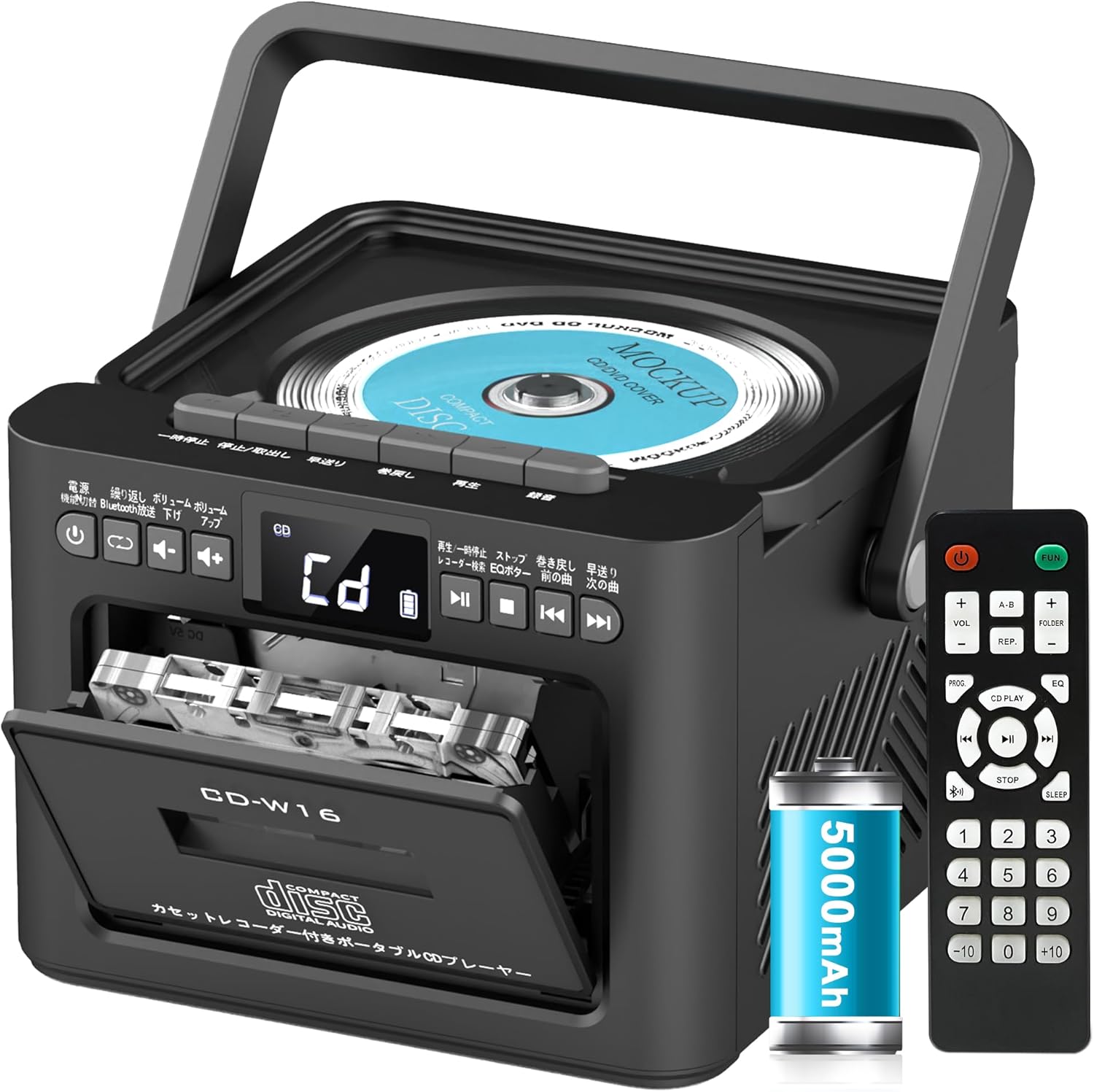
ຄຸນນະສົມບັດທີ່ສໍາຄັນປະກອບມີ:
- CD Player (CD, CD-R, CD-RW compatible)
- Cassette Player & Recorder
- ວິທະຍຸ FM (76-108MHz)
- Bluetooth 5.1 (Transmitter & Receiver)
- ການຫຼິ້ນ USB
- ການປ້ອນຂໍ້ມູນ AUX
- TF/SD Card Playback
- ແບັດເຕີຣີ 5000mAh ສາມາດສາກໄດ້
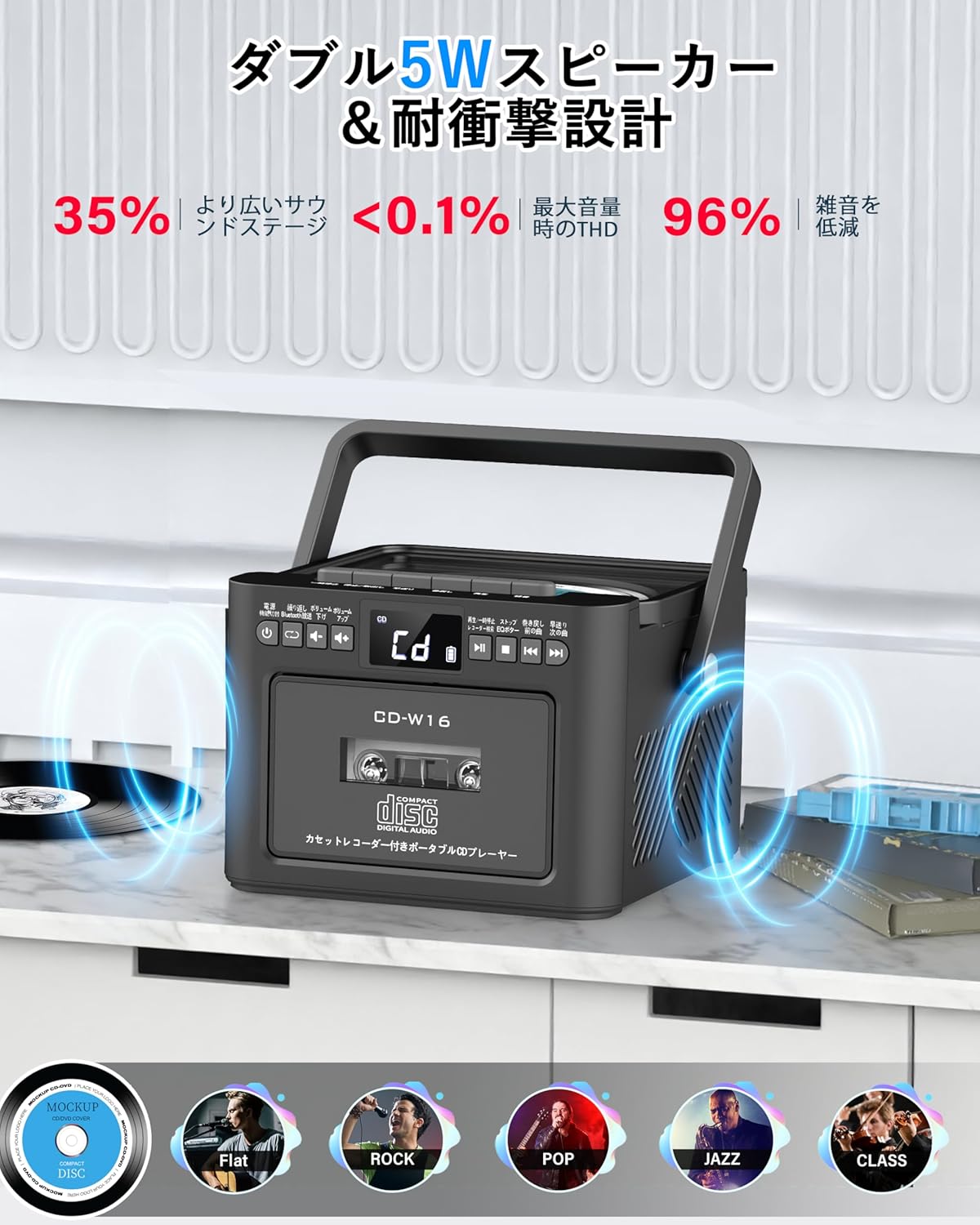
- ລຳໂພງສະເຕີຣິໂອ 5W ຄູ່
- ການຄວບຄຸມໄລຍະໄກ
- ຈັບເວລານອນ
- ໂໝດສຽງ 5 EQ

5. ຕັ້ງຄ່າ
5.1. ການສາກແບັດເຕີຣີ
The Greadio CD-W16 is equipped with a built-in 5000mAh rechargeable battery. To charge the device:
- Connect the provided Type-C cable to the charging port on the unit.
- Connect the other end of the Type-C cable to a 5V/2A USB power adapter (not included).
- The charging indicator will illuminate. A full charge takes approximately 3 hours and provides up to 16 hours of playback.

5.2. ເປີດ/ປິດ
To power on or off the CD player:
- ກົດຄ້າງໄວ້ ປຸ່ມເປີດປິດ on the unit or the remote control for 2 seconds.
- ອີກທາງເລືອກ, ກົດສັ້ນ ປຸ່ມເປີດປິດ on the remote control to toggle the CD player on/off.
6. ຄໍາແນະນໍາການດໍາເນີນງານ
6.1. General Controls (Remote Control)
The remote control provides convenient access to all functions. Refer to the video below for a demonstration of remote control operations.
- ເປີດ/ປິດ: ກົດສັ້ນ ປຸ່ມເປີດປິດ.
- Function Mode Selection: ກົດສັ້ນ FUNC. ປຸ່ມ to cycle through CD, Bluetooth, Radio, Cassette, AUX, USB, and TF/SD card modes.
- ການປັບລະດັບສຽງ: ກົດສັ້ນ VOL+ or VOL- ປຸ່ມ.
- ຕິດຕາມການນໍາທາງ: ກົດສັ້ນ NEXT (>>|) for the next track or PREV (|<<) ສໍາລັບເພງທີ່ຜ່ານມາ.
- Fast Forward/Rewind: ກົດຍາວ NEXT (>>|) for fast forward or PREV (|<<) ສຳລັບການຖອຍຫຼັງ.
- Direct Track Selection: In CD mode, input 0-9 on the remote to quickly skip to the desired track.
- ໂEດ EQ: ກົດສັ້ນ ປຸ່ມ EQ to cycle through NORMAL, ROCK, POP, JAZZ, and CLASS sound modes.
- ຮູບແບບການຊໍ້າຄືນ: ກົດສັ້ນ ປຸ່ມ REP to cycle through repeat options (ONE, FOLDER, ALL, SHUFFLE, OFF).
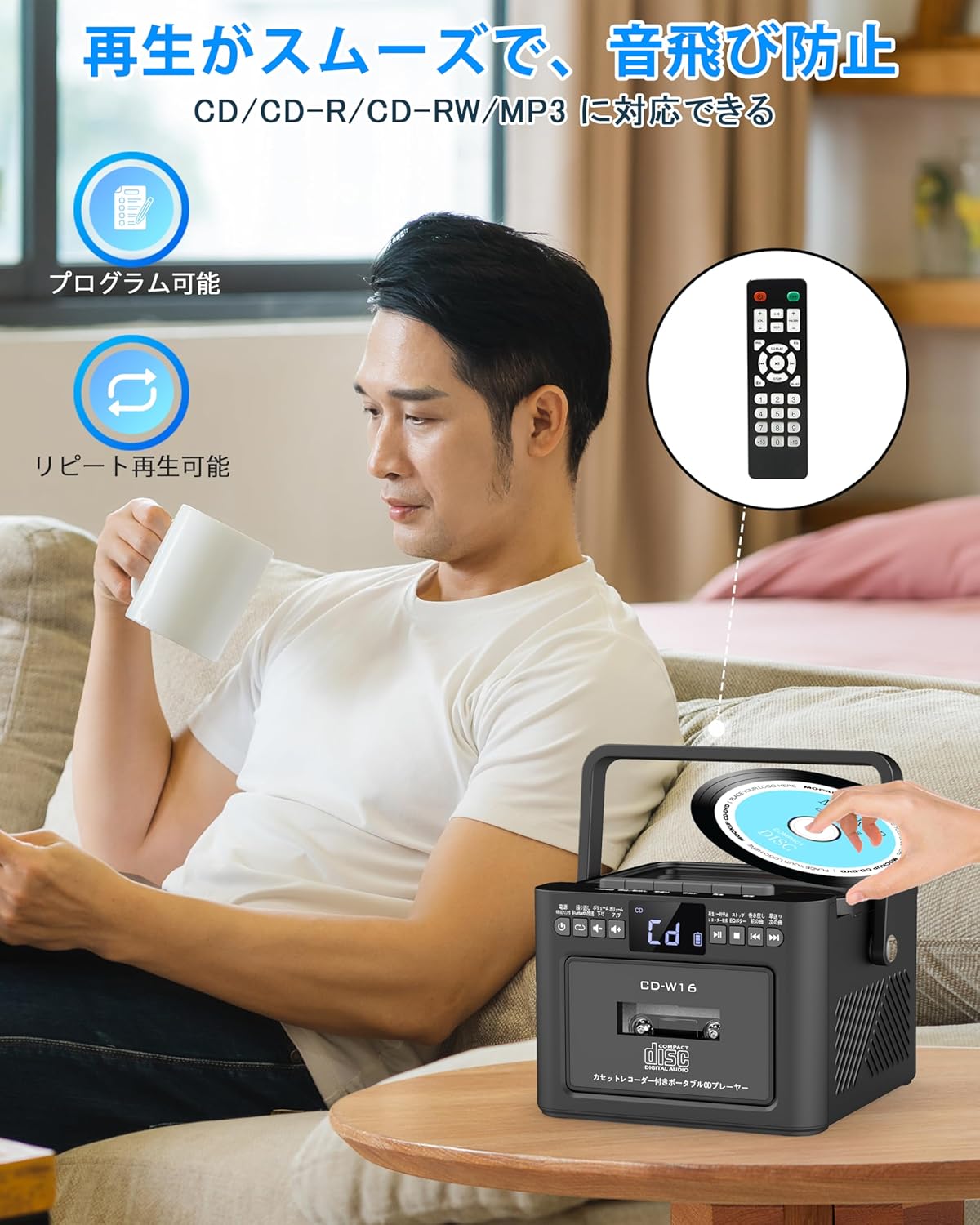
6.2. ການຫຼິ້ນ CD
- ກວດໃຫ້ແນ່ໃຈວ່າເຄື່ອງເປີດຢູ່.
- ກົດສັ້ນ FUNC. ປຸ່ມ to select CD mode. The display will show "CD".
- ເປີດຝາຊ່ອງ CD ໂດຍການຍົກມັນອອກຄ່ອຍໆ.
- Place a CD (CD, CD-R, CD-RW compatible) onto the spindle with the label side facing up.
- ປິດຝາປິດຊ່ອງໃສ່ຊີດີ. ຊີດີຈະເລີ່ມຫຼິ້ນໂດຍອັດຕະໂນມັດ.
- ໃຊ້ Play/Pause (||) button for temporary stop/resume.
- ໃຊ້ NEXT (>>|) ແລະ PREV (|<<) ປຸ່ມສຳລັບການນຳທາງແທຣັກ.
6.3. Cassette Playback & Recording
- ກົດສັ້ນ FUNC. ປຸ່ມ to select Tape mode. The display will show "TAPE".
- ກົດ STOP/EJ. button to open the cassette compartment.
- Insert a cassette tape into the compartment and close the lid.
- ກົດ ປຸ່ມຫຼິ້ນ to start cassette playback.
- To fast forward or rewind, long press the FFWD or FREW ປຸ່ມຕາມລໍາດັບ.
- To stop playback, short press the STOP/EJ. button.
ການບັນທຶກສຽງແບບເທບ:
To record audio from other modes (CD, FM Radio, USB, AUX, TF/SD) onto a blank cassette:
- Insert a blank cassette into the cassette compartment.
- Select the desired source mode (e.g., CD, FM Radio).
- ພ້ອມກັນກົດ ຫຼິ້ນ ແລະ REC (ບັນທຶກ) buttons. Recording will begin.
- ກົດ STOP/EJ. button ເພື່ອຢຸດການບັນທຶກ.

6.4. ການດໍາເນີນງານວິທະຍຸ FM
- ກົດສັ້ນ FUNC. ປຸ່ມ to select FM Radio mode. The display will show the FM frequency.
- ຂະຫຍາຍເສົາອາກາດ telescopic ສໍາລັບການຮັບທີ່ດີກວ່າ.
Auto Scan & Preset Stations:
- ກົດຄ້າງໄວ້ ປຸ່ມສະແກນ to automatically scan and save available FM stations. The unit can store up to 30 preset stations.
- ກົດສັ້ນ ປຸ່ມສະແກນ to recall preset stations (P01, P02, etc.).
ຄູ່ມືການປບັຄູ່ມື:
- ກົດສັ້ນ NEXT (>>|) or PREV (|<<) buttons to manually tune to the desired frequency.

6.5. ການດໍາເນີນງານ Bluetooth
The Greadio CD-W16 supports Bluetooth 5.1 for both transmitting and receiving audio.
ໂໝດເຄື່ອງສົ່ງ Bluetooth:
To transmit audio from the CD player to a Bluetooth speaker or headphones:
- ກົດຄ້າງໄວ້ ປຸ່ມ Bluetooth on the unit or remote to activate Bluetooth transmission mode. The display will show "BT".
- Ensure your Bluetooth receiving device (speaker, headphones) is in pairing mode.
- The CD-W16 will automatically search for nearby Bluetooth devices. Once found, it will connect.

ໂໝດເຄື່ອງຮັບ Bluetooth:
To play audio from your smartphone or other Bluetooth device through the CD player's speakers:
- ກົດສັ້ນ FUNC. ປຸ່ມ to select Bluetooth mode. The display will show "BLUE".
- ໃນສະມາດໂຟນ ຫຼືອຸປະກອນ Bluetooth ຂອງທ່ານ, ເປີດໃຊ້ Bluetooth ແລະຊອກຫາອຸປະກອນທີ່ມີຢູ່.
- Select "CD-W16" from the list to connect.
- Once connected, you can play music from your device, and the audio will output through the CD-W16 speakers.
6.6. USB & TF/SD Card Playback
The unit supports playback from USB drives and TF/SD cards (up to 32GB, not included).
- ກົດສັ້ນ FUNC. ປຸ່ມ to select USB mode or TF/SD card mode. The display will show "USB" or "TF" respectively.
- Insert your USB drive into the USB port or your TF/SD card into the card slot.
- The unit will automatically detect and begin playing MP3 audio files.
- ໃຊ້ NEXT (>>|) ແລະ PREV (|<<) ປຸ່ມສຳລັບການນຳທາງແທຣັກ.

6.7. ເຄື່ອງປ້ອນຂໍ້ມູນ AUX
ເພື່ອຫຼິ້ນສຽງຈາກອຸປະກອນພາຍນອກຜ່ານສາຍ AUX:
- ກົດສັ້ນ FUNC. ປຸ່ມ to select AUX mode. The display will show "LINE".
- Connect one end of the provided AUX cable to the AUX port on the CD-W16.
- Connect the other end to the audio output of your external device (e.g., smartphone, MP3 player).
- Play audio on your external device, and it will be output through the CD-W16 speakers.
6.8. ເຄື່ອງຈັບເວລານອນ
The sleep timer allows you to set a duration after which the unit will automatically power off.
- ກົດສັ້ນ ປຸ່ມນອນ on the remote control. The display will show the current sleep timer setting (e.g., 10, 20, 30 minutes).
- ໃຊ້ NEXT (>>|) or PREV (|<<) buttons to adjust the sleep timer duration (10-120 minutes).
- ກົດສັ້ນ ປຸ່ມນອນ ອີກເທື່ອຫນຶ່ງເພື່ອຢືນຢັນການຕັ້ງຄ່າ.

6.9. ໂໝດສຽງ EQ
Customize your audio experience with five different EQ sound modes.
- ກົດສັ້ນ ປຸ່ມ EQ on the unit or remote control to cycle through the available modes: NORMAL, ROCK, POP, JAZZ, and CLASS.
7. ບໍາລຸງຮັກສາ
7.1. ທໍາຄວາມສະອາດ
- ເຊັດເຄື່ອງດ້ວຍຜ້າອ່ອນ, ແຫ້ງ. ຢ່າໃຊ້ເຄື່ອງເຮັດຄວາມສະອາດຂັດຫຼືສານລະລາຍ.
- ສໍາລັບເລນ CD, ໃຊ້ເຄື່ອງເຮັດຄວາມສະອາດເລນ CD ສະເພາະ.
- Keep the cassette head clean to ensure optimal playback and recording quality.
7.2. ການເກັບຮັກສາ
- ເກັບຮັກສາເຄື່ອງໄວ້ໃນບ່ອນທີ່ເຢັນ, ແຫ້ງ, ຫ່າງຈາກແສງແດດໂດຍກົງແລະອຸນຫະພູມທີ່ສຸດ.
- ເອົາແບັດເຕີຣີອອກຈາກຣີໂໝດຄວບຄຸມຖ້າບໍ່ໄດ້ໃຊ້ເປັນເວລາດົນ.
8. ການແກ້ໄຂບັນຫາ
| ບັນຫາ | ສາເຫດທີ່ເປັນໄປໄດ້ | ການແກ້ໄຂ |
|---|---|---|
| ບໍ່ມີພະລັງງານ | Battery depleted or power cable not connected. | Charge the unit or ensure the power cable is securely connected. |
| CD ບໍ່ໄດ້ຫຼິ້ນ | CD inserted incorrectly, dirty, scratched, or incompatible format. | Reinsert CD correctly, clean the CD, try a different CD. Ensure it's CD/CD-R/CD-RW. |
| Cassette ບໍ່ຫຼິ້ນ / ບັນທຶກ | Cassette inserted incorrectly, tape damaged, or dirty head. | Reinsert cassette, try a different tape, clean the cassette head. |
| ການຮັບວິທະຍຸ FM ບໍ່ດີ | Antenna not extended or weak signal area. | ຍືດເສົາອາກາດແບບຍືດໄດ້ອອກຈົນສຸດ. ລອງປັບຕຳແໜ່ງຂອງເຄື່ອງໃໝ່. |
| Bluetooth ບໍ່ເຊື່ອມຕໍ່ | Device not in pairing mode, too far, or already connected to another device. | Ensure both devices are in pairing mode and within range. Disconnect from other devices. |
| USB/TF/SD card not recognized | Card/drive not inserted correctly, incompatible format, or damaged. | Reinsert, ensure files are MP3 format, try a different card/drive. |
9. ຂໍ້ມູນຈໍາເພາະ
- ຍີ່ຫໍ້: ເກຣດີໂອ
- ຕົວແບບ: CD-W16
- ເຕັກໂນໂລຍີການເຊື່ອມຕໍ່: AUX, Bluetooth, USB
- ສີ: ດຳ
- ປະເພດລຳໂພງ: ສະເຕຣິໂອ
- ແຫຼ່ງພະລັງງານ: ພະລັງງານຫມໍ້ໄຟ
- ອຸປະກອນທີ່ເຂົ້າກັນໄດ້: Smartphones, Tablets, PCs
- ວັດtage: 5 W (Dual 5W speakers)
- ຮູບແບບສຽງທີ່ຮອງຮັບ: CD/CD-R/CD-RW
- ຈໍານວນລໍາໂພງ: 2
- ໂModeດອອກສຽງ: ສະເຕຣິໂອ
- ຄວາມອາດສາມາດຫມໍ້ໄຟ: 5000mAh
- ເວລາສາກໄຟ: ປະມານ. 3 ຊົ່ວໂມງ
- ເວລາຫຼິ້ນ: ສູງສຸດ 16 ຊົ່ວໂມງ
- ລະດັບຄວາມຖີ່ຂອງ FM: 76-108MHz
10. ການຮັບປະກັນແລະການສະ ໜັບ ສະ ໜູນ
This product comes with a 1-year manufacturer's warranty. For any issues or support inquiries, please contact Greadio customer service.