
1. ຜະລິດຕະພັນເກີນview
The DAYTECH WiFi Caregiver Call Bell System is designed to provide reliable and real-time assistance for individuals requiring care, such as the elderly, patients, or children. This system ensures that caregivers, whether in the same household or remotely, are immediately notified when assistance is needed. It combines a physical receiver unit with a wearable SOS button and integrates with a smartphone application for enhanced monitoring and control.
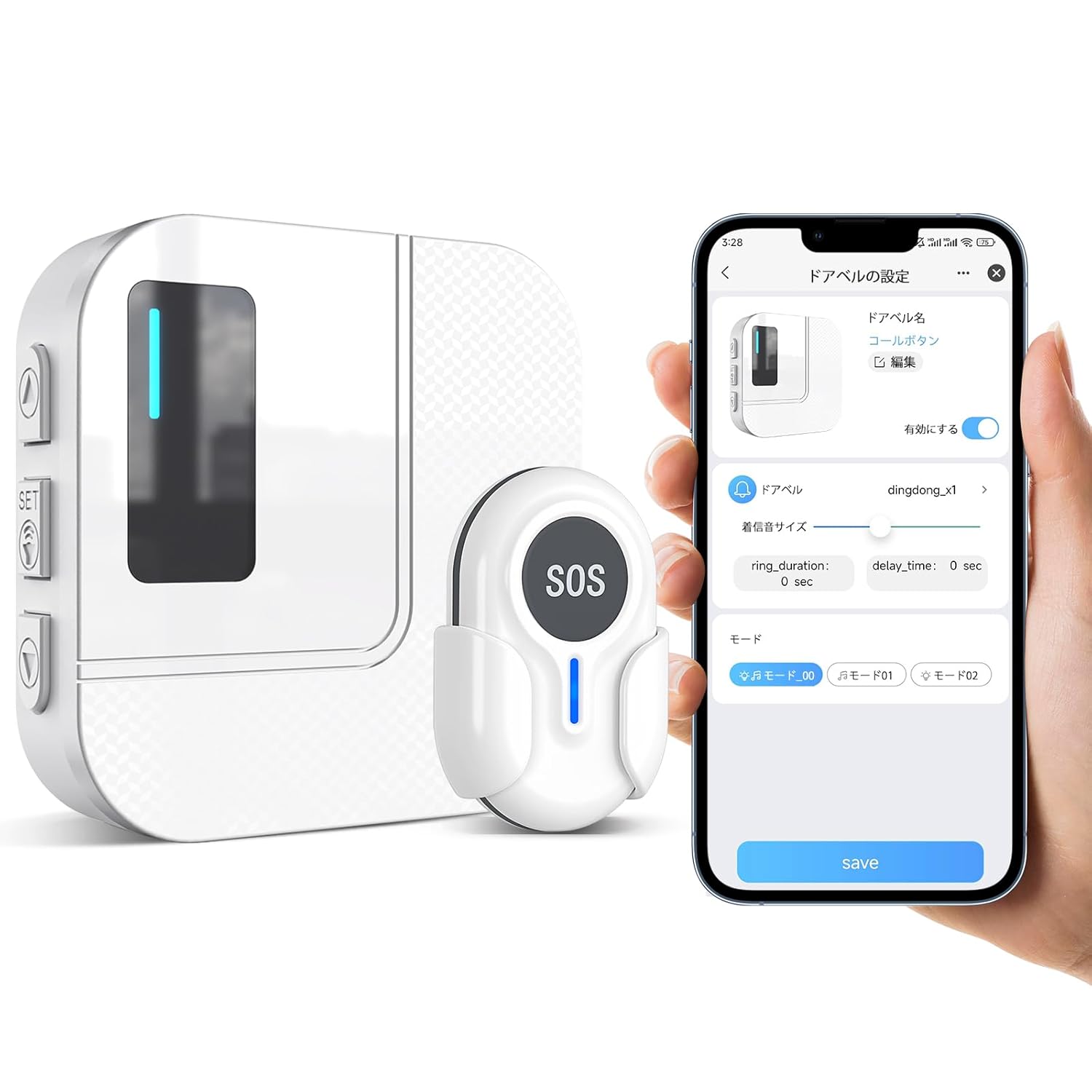
Figure 1: Main components of the DAYTECH WiFi Caregiver Call Bell System, including the receiver, SOS button, and a smartphone showing the Tuya Smart app interface.
2. ສ່ວນປະກອບຂອງລະບົບ
- ໜ່ວຍ ຮັບ: The main unit that plugs into a power outlet. It emits an audible alert and flashes an LED light upon receiving a signal from the SOS button. It connects to your home's 2.4GHz WiFi network.
- SOS Button (Transmitter): A compact, wearable device that sends an alert signal to the receiver unit and connected smartphones when pressed. It can be worn as a wristband or hung around the neck. Features a low battery indicator.
- ແອັບ Tuya Smart: A dedicated smartphone application (available for iOS and Android) that allows for remote monitoring, system configuration, and receiving notifications from the call bell system.
- ອຸປະກອນເສີມ: Includes double-sided tape for mounting the SOS button.

Figure 2: The SOS button can be worn around the neck or mounted on a wall using screws or the included double-sided tape for convenient access.
3. ຄູ່ມືການຕິດຕັ້ງ
3.1 ການຕິດຕັ້ງເບື້ອງຕົ້ນ
- Power On the Receiver: Plug the receiver unit into a standard electrical outlet. The LED indicator on the receiver will light up.
- Install Tuya Smart App: Download the "Tuya Smart" application from your smartphone's app store (Google Play Store for Android or Apple App Store for iOS).
- ສ້າງບັນຊີ: Open the Tuya Smart app and register for a new account or log in if you already have one.
3.2 Connecting the Receiver to the App
Ensure your smartphone is connected to a 2.4GHz WiFi network. The system does not support 5GHz networks during the pairing process. If your router uses 5GHz, temporarily switch to 2.4GHz for pairing, then you can switch back.
- ໃສ່ໂModeດການຈັບຄູ່: On the receiver unit, press and hold the "SET" button for 5-8 seconds until the LED indicator starts blinking rapidly. This indicates it's in pairing mode.
- ເພີ່ມອຸປະກອນໃນແອັບ: In the Tuya Smart app, tap "Add Device" or the "+" icon.
- ເລືອກປະເພດອຸປະກອນ: Choose "Security & Sensor" or "Others" and then select "Caregiver Call Bell" or a similar option.
- ຢືນຢັນໂໝດການຈັບຄູ່: Follow the in-app prompts to confirm the receiver's LED is blinking rapidly.
- ໃສ່ລະຫັດຜ່ານ WiFi: Input your 2.4GHz WiFi network password when prompted.
- ເຊື່ອມຕໍ່: The app will attempt to connect to the receiver. Once connected, the receiver's LED will stop blinking and remain solid, and the app will confirm successful pairing.

Figure 3: Visual guide for connecting the receiver unit to the Tuya Smart application on your smartphone.
3.3 Pairing SOS Button with Receiver
The SOS button is typically pre-paired with the receiver. If not, or if you are adding additional buttons:
- ເຂົ້າສູ່ໂໝດການຮຽນຮູ້: On the receiver unit, briefly press the "SET" button once. The LED indicator will light up steadily.
- Press SOS Button: Within 5 seconds, press the SOS button on the transmitter. The receiver will chime or flash to confirm successful pairing.
- Exit Learning Mode: The receiver will automatically exit learning mode after a few seconds, or you can press the "SET" button again.
4. ຄໍາແນະນໍາການດໍາເນີນງານ
4.1 Initiating an Alert
- To send an alert, simply press the large "SOS" button on the transmitter.
- Upon pressing, the transmitter sends a signal to the receiver unit and simultaneously to all linked smartphones via the Tuya Smart app.
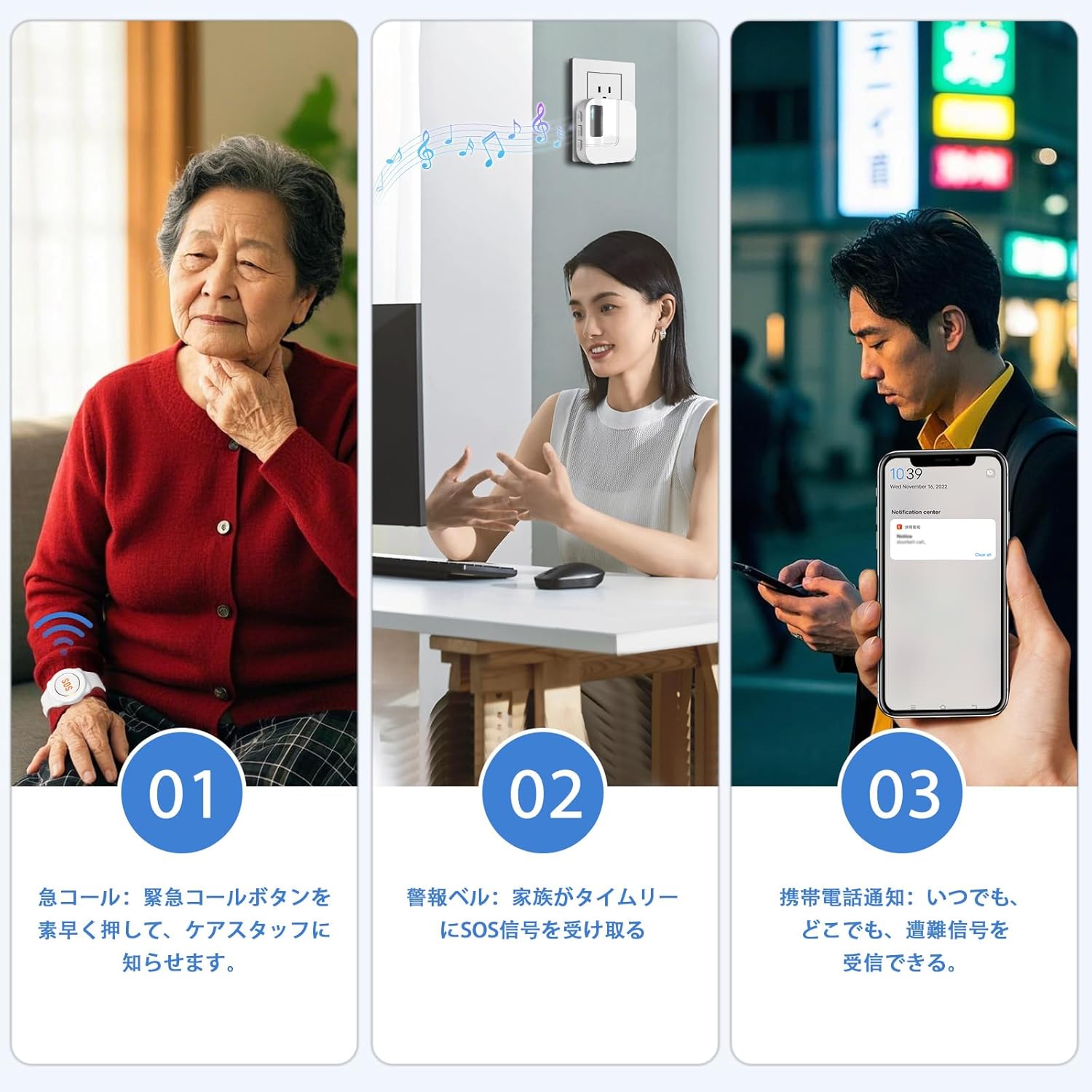
Figure 4: The alert process: (1) Pressing the SOS button, (2) Receiver unit alerts, (3) Smartphone notification.
4.2 ການຮັບການແຈ້ງເຕືອນ
- ໜ່ວຍ ຮັບ: The receiver will emit an audible chime and its LED light will flash.
- ແອັບໂທລະສັບສະຫຼາດ: All smartphones linked to the system via the Tuya Smart app will receive a push notification. This notification is real-time and works even when you are away from home, provided your smartphone has an internet connection (WiFi or mobile data).

Figure 5: The mobile app allows for remote alert notifications, enabling caregivers to respond even when away from home.
4.3 App Functions (Tuya Smart)
- ການເລືອກສຽງເອີ້ນເຂົ້າ: Choose from 38 different ringtones for the receiver unit.
- ການປັບລະດັບສຽງ: Adjust the receiver's alert volume (5 levels available, including mute).
- ການຈັດການອຸປະກອນ: Add or remove additional SOS buttons or other compatible devices.
- ການຕັ້ງຄ່າການແຈ້ງເຕືອນ: Configure app notifications, including "Do Not Disturb" mode.
- ການແບ່ງປັນຄອບຄົວ: Share device access with multiple family members, allowing everyone to receive alerts and manage settings.

Figure 6: The Tuya Smart app provides comprehensive control over the call bell system, including ringtone and volume settings.
5. ບໍາລຸງຮັກສາ
5.1 Battery Replacement (SOS Button)
The SOS button is powered by a CR2032 coin cell battery. When the battery is low, the LED indicator on the SOS button will flash to notify you. Replace the battery promptly to ensure continuous operation.
- ເປີດ Casing: Use a small screwdriver to carefully open the back casing of the SOS button.
- ເອົາແບັດເກົ່າອອກ: Gently remove the old CR2032 battery.
- ໃສ່ແບັດໃໝ່: ໃສ່ແບັດ CR2032 ໃໝ່ ໂດຍໃຫ້ດ້ານບວກ (+) ຫັນໜ້າຂຶ້ນ.
- ປິດ Casing: Securely close the back casing.

Figure 7: Instructions for replacing the CR2032 battery in the SOS button.
5.2 ການທໍາຄວາມສະອາດ
- Wipe the receiver unit and SOS button with a soft, dry cloth.
- Do not use abrasive cleaners or immerse the devices in water.
6. ການແກ້ໄຂບັນຫາ
6.1 Receiver Not Connecting to WiFi
- Check WiFi Frequency: Ensure your router is broadcasting a 2.4GHz WiFi signal. The device does not support 5GHz networks for initial pairing. If your router is dual-band, temporarily disable the 5GHz band or ensure your phone is connected to the 2.4GHz band during setup.
- ຄວາມໃກ້ຊິດຂອງເຣົາເຕີ: Place the receiver closer to your WiFi router during the setup process.
- Router Reboot: Try restarting your WiFi router.
- App Reinstallation: Uninstall and reinstall the Tuya Smart app.
- ຄວາມໝັ້ນຄົງເຄືອຂ່າຍ: Ensure your WiFi network is stable. Unstable networks can affect device addition.

Figure 8: Common troubleshooting steps for WiFi connectivity problems.
6.2 SOS Button Not Triggering Alert
- ກວດສອບຫມໍ້ໄຟ: Verify the SOS button's battery. If the LED indicator is flashing, replace the battery.
- ການຈັບຄູ່: Ensure the SOS button is properly paired with the receiver unit. Refer to Section 3.3 for pairing instructions.
- ຊ່ວງ: Check if the SOS button is within the effective wireless transmission range of the receiver (up to 150m in open areas, 0-70m indoors with obstacles).

Figure 9: Wireless transmission range of the DAYTECH system, indicating varying distances depending on environmental factors.
6.3 No Smartphone Notifications
- ການອະນຸຍາດແອັບ: Ensure the Tuya Smart app has permission to send notifications on your smartphone.
- ການເຊື່ອມຕໍ່ອິນເຕີເນັດ: Verify your smartphone has an active internet connection (WiFi or mobile data).
- ການຕັ້ງຄ່າແອັບ App: Check notification settings within the Tuya Smart app to ensure they are enabled.
- ໂຫຼດແອັບພື້ນຫຼັງຄືນໃໝ່: For iOS, ensure "Background App Refresh" is enabled for the Tuya Smart app. For Android, ensure the app is not restricted by battery optimization settings.
7. ຂໍ້ມູນຈໍາເພາະ
| ຄຸນສົມບັດ | ລາຍລະອຽດ |
|---|---|
| ໝາຍເລກຕົວແບບ | TY01-CC02 |
| ການເຊື່ອມຕໍ່ | WiFi 2.4GHz |
| SOS Button Battery | CR2032 Coin Cell (1 required) |
| ພະລັງງານຮັບ | ປລັກອິນ AC |
| Range ໄຮ້ສາຍ | Up to 150 meters (open area), 0-70 meters (indoor with obstacles) |
| ຂະໜາດຕົວຮັບ | ປະມານ. ຂະ ໜາດ 10.8 x 8.3 x 7.9 ຊມ |
| ນ້ຳໜັກສິນຄ້າ | ປະມານ. 160 g |
| ຄວາມເຂົ້າກັນໄດ້ຂອງ App | Tuya Smart (iOS ແລະ Android) |
| Ringtone Options | ມີທັງ ໝົດ 38 ບົດ |
| ລະດັບສຽງ | 5 levels (including mute) |
8. ການຮັບປະກັນແລະການສະຫນັບສະຫນູນ
The DAYTECH WiFi Caregiver Call Bell System comes with an 18-month warranty from the date of purchase. This warranty covers manufacturing defects and malfunctions under normal use.
If you encounter any issues or require technical assistance, please contact DAYTECH customer support. Provide your model number (TY01-CC02) and a detailed description of the problem for prompt assistance.
For support, please visit the official DAYTECH store on Amazon or refer to the contact information provided with your product packaging.
ຮ້ານ Online: DAYTECH Official Store on Amazon.co.jp