
ແນະນຳ
This user manual provides comprehensive instructions for the safe and effective operation of your HelloBaby Baby Monitor with Camera and Audio, Model HB6363. This system is designed to provide secure and reliable monitoring of your baby, offering features such as a large 6-inch display, pan-tilt-zoom camera, night vision, two-way talk, and long battery life without relying on WiFi.
ຂໍ້ມູນຄວາມປອດໄພທີ່ສໍາຄັນ
Please read and understand all safety warnings and instructions before using this product. Failure to follow these instructions may result in injury or damage.
- ອັນຕະລາຍ Strangulation: Children have been strangled in cords. Keep cords out of reach of children (more than 3 feet / 0.9 meters away). Never place camera or cords within reach of the crib.
- ອັນຕະລາຍຕໍ່ເນື່ອງ This product contains small parts. Keep small parts away from children when assembling.
- ແຫຼ່ງຄວາມຮ້ອນ: ຢ່າວາງຈໍພາບ ຫຼື ກ້ອງຖ່າຍຮູບໄວ້ໃກ້ກັບແຫຼ່ງຄວາມຮ້ອນ ເຊັ່ນ: ເຄື່ອງເຮັດຄວາມຮ້ອນ, ເຄື່ອງບັນທຶກຄວາມຮ້ອນ, ເຕົາໄຟ ຫຼື ເຄື່ອງໃຊ້ອື່ນໆທີ່ຜະລິດຄວາມຮ້ອນ.
- ຄວາມຊຸ່ມ: Do not expose the product to water or moisture. This product is not water resistant.
- ການລະບາຍອາກາດ: ຢ່າອຸດຕັນຊ່ອງລະບາຍອາກາດ. ຮັບປະກັນໃຫ້ມີກະແສລົມໄຫຼວຽນຢ່າງພຽງພໍອ້ອມຮອບເຄື່ອງ.
- ແຫຼ່ງພະລັງງານ: Use only the AC power adapters provided with the product. Using other adapters may damage the product.
- ຄວາມປອດໄພຫມໍ້ໄຟ: The monitor unit contains a rechargeable battery. Do not attempt to replace the battery yourself. Do not expose the battery to excessive heat or direct sunlight.
- ແຊກແຊງ: This product operates on 2.4GHz FHSS technology. Keep it away from other 2.4GHz devices to avoid interference.
- ການເບິ່ງແຍງຜູ້ໃຫຍ່: This product is intended to assist in monitoring, but it is not a substitute for responsible adult supervision.
ເນື້ອໃນຊຸດ
ກວດສອບວ່າລາຍການທັງຫມົດແມ່ນມີຢູ່ໃນຊຸດຂອງທ່ານ:
- HelloBaby 6-inch Video Monitor Unit (Parent Unit)
- HelloBaby Baby Camera Unit (Baby Unit)
- Power Adapter for Monitor Unit
- Power Adapter for Camera Unit
- ຄູ່ມືຜູ້ໃຊ້ (ເອກະສານນີ້)
ສິນຄ້າເກີນview

Image: The HelloBaby monitor and camera, highlighting the 6-inch IPS LCD screen and the camera's 320° pan and 120° tilt capabilities.

ຮູບພາບ: ຫຼາຍກວ່າview of the monitor's key functions including camera view, temperature monitoring, lullabies, ECO mode, timer, and language settings. Also shows icons for 4000mAh battery, auto night vision, 2-way talk, multi-camera support, remote pan/tilt/zoom, long range, temperature alarm, 8 lullabies, and 150 languages.
ໜ່ວຍແມ່ (ຈໍພາບ)
- 6-inch IPS LCD Display: Provides a clear and detailed video feed of your baby.
- ປຸ່ມຄວບຄຸມ: Intuitive buttons for navigation, volume, brightness, zoom, and menu access.
- ໄມໂຄຣໂຟນ ແລະລຳໂພງໃນຕົວ: For two-way communication.
- ເສົາອາກາດ: For stable 2.4GHz FHSS wireless connection.
- ແບັດເຕີຣີທີ່ສາມາດສາກໄດ້: 4000mAh capacity for extended use.
- ເຊັນເຊີອຸນຫະພູມ: ສະແດງອຸນຫະພູມຫ້ອງ.
ໜ່ວຍ ເດັກ (ກ້ອງຖ່າຍຮູບ)
- ເລນກ້ອງຖ່າຍຮູບ: ບັນທຶກຟີດວິດີໂອ.
- LEDs ອິນຟາເລດ: ສຳລັບວິໄສທັດໃນຕອນກາງຄືນແບບອັດຕະໂນມັດ.
- ໄມໂຄຣໂຟນ ແລະ ລຳໂພງ: For two-way communication and playing lullabies.
- Pan & Tilt Mechanism: Allows remote adjustment of camera angle (320° horizontal, 120° vertical).
- ຕົວເລືອກການຕິດຕັ້ງ: Designed for freestanding, wall mount, or ceiling mount.
ຕັ້ງຄ່າ
1. ການສາກໄຟຂອງຫນ່ວຍງານແມ່
- Connect the smaller end of the monitor's power adapter to the DC-Jack port on the side of the Parent Unit.
- Plug the larger end of the power adapter into a wall outlet.
- The battery indicator on the screen will show charging status. For optimal performance, charge the Parent Unit for at least 4 hours before first use.
- The 4000mAh battery provides up to 16-30 hours of battery life depending on usage (30 hours in ECO mode).

Image: Illustrates the battery performance, showing 18 hours with the screen on and up to 30 hours in ECO mode, powered by a 4000mAh battery.
2. Powering the Baby Unit (ກ້ອງຖ່າຍຮູບ)
- Connect the power adapter to the DC-Jack port on the back of the Baby Unit.
- Plug the power adapter into a wall outlet. The Baby Unit does not operate on battery and must remain plugged in.
3. Positioning the Baby Unit (Camera)
- Place the Baby Unit on a flat surface, such as a dresser or shelf, at least 3 feet (0.9 meters) away from the crib to prevent strangulation hazards from the power cord.
- Ensure the camera has a clear line of sight to the baby.
- Alternatively, the camera can be wall-mounted or ceiling-mounted using appropriate hardware (not included).
4. ການເຊື່ອມຕໍ່ເບື້ອງຕົ້ນ
- Once both units are powered on, they should automatically connect. The Parent Unit will display the video feed from the Baby Unit.
- If the units do not connect, ensure they are within range (up to 1000ft outdoor, 165ft indoor) and try moving them closer.
- This system uses 2.4GHz FHSS technology, providing a secure and private connection without WiFi or app requirements, eliminating hacking risks.

Image: Diagram illustrating the secure and stable 2.4GHz FHSS transmission, emphasizing no app, no WiFi, and no hacking troubles, with indicated indoor and outdoor ranges.
ຄໍາແນະນໍາການດໍາເນີນງານ
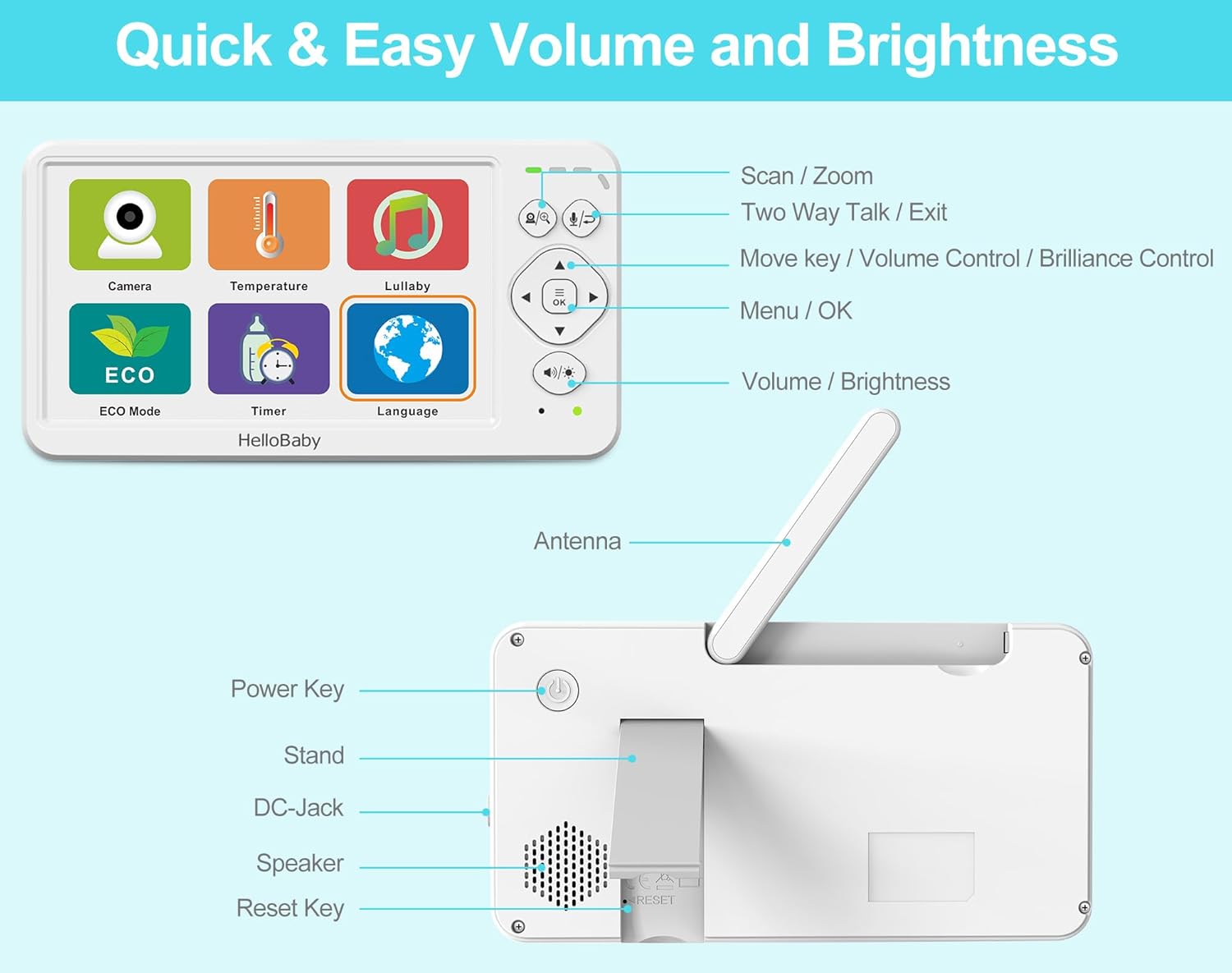
ຮູບພາບ: ລາຍລະອຽດ view of the HelloBaby monitor's front controls (Scan/Zoom, Two-Way Talk/Exit, Move/Volume/Brilliance, Menu/OK, Volume/Brightness) and rear ports (Power Key, Stand, DC-Jack, Speaker, Reset Key, Antenna).
ການຄວບຄຸມຫນ່ວຍງານແມ່
- Power Key: Press and hold to turn the monitor On/Off.
- Menu / OK Button: Press to access the main menu or confirm a selection.
- ປຸ່ມນຳທາງ (ຂຶ້ນ/ລົງ/ຊ້າຍ/ຂວາ): Use to navigate through menu options or control camera pan/tilt.
- Volume / Brightness Buttons: Adjust audio volume or screen brightness directly.
- Scan / Zoom Button: Press to activate scan mode (if multiple cameras are paired) or to zoom in/out on the video feed (2x digital zoom).
- Two-Way Talk / Exit Button: Press and hold to speak to your baby through the camera's speaker. Press briefly to exit a menu.
ຄຸນນະສົມບັດແລະຫນ້າທີ່ທີ່ສໍາຄັນ
ການສົນທະນາສອງຝ່າຍ
Press and hold the "Two-Way Talk" button on the Parent Unit to speak to your baby. Your voice will be transmitted through the camera's speaker. Release the button to hear your baby again.
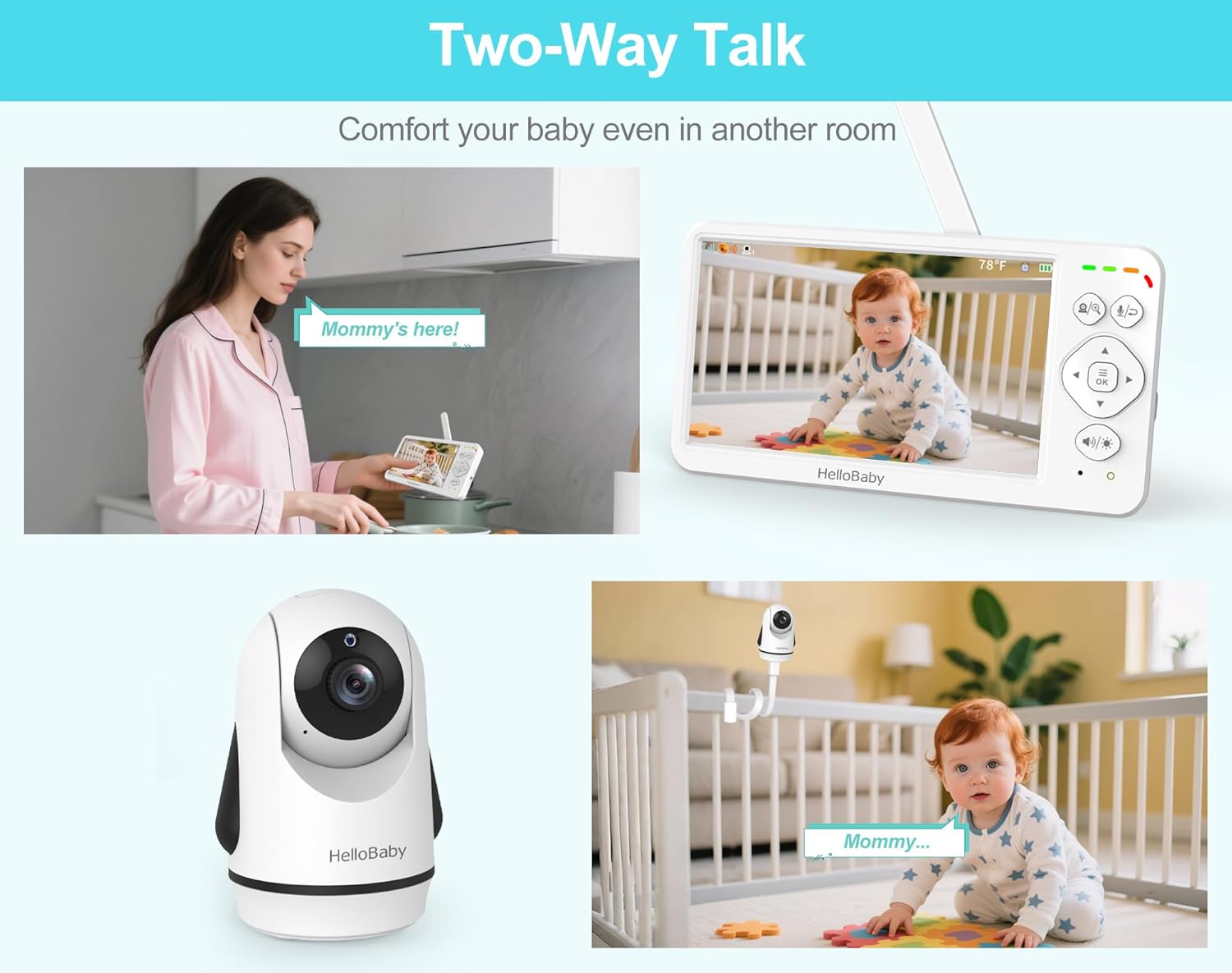
Image: Depicts scenarios of using the two-way talk feature, allowing parents to comfort their baby from another room.
ແພນ, ອຽງ ແລະ ຊູມ (PTZ)
Use the navigation buttons on the Parent Unit to remotely adjust the camera's viewing angle. The camera supports 320° horizontal pan and 120° vertical tilt. Press the "Scan / Zoom" button to activate 2x digital zoom for a closer look.
ວິໄສທັດກາງຄືນອັດຕະໂນມັດ
The Baby Unit is equipped with infrared LEDs that automatically activate in low-light conditions, providing a clear black and white video feed up to 5 meters away. The monitor will automatically switch between day (color) and night (black and white) modes.

Image: Illustrates the automatic night vision feature, showing how the monitor switches between day and night modes for continuous monitoring of a sleeping baby.
ບົດເພງລູກທຸ່ງ
The monitor includes 8 pre-programmed lullabies and natural white noise sounds. Access the Lullaby menu to select a single song or enable loop playback to soothe your baby.

Image: Shows the monitor's interface for selecting from 8 lullabies and choosing from 150 language options, catering to global families.
ECO Mode (Audio Power Saving)
Activate ECO mode to conserve battery life. In this mode, the screen turns off and audio is muted when no sound is detected from the baby's room. The monitor will automatically activate when sound is detected, alerting you to your baby's needs. This extends battery life up to 30 hours.
ການຕິດຕາມອຸນຫະພູມ
The Baby Unit has a built-in temperature sensor that displays the room temperature on the Parent Unit. You can set temperature alerts to be notified if the room becomes too hot or too cold for your baby.
Multi-Camera Expansion
The system supports up to 4 cameras (additional cameras sold separately). You can switch between cameras manually or use the scan mode to cycle through all paired cameras automatically.
ຕົວເລືອກພາສາ
The monitor supports 150 language options. Navigate to the Language settings in the menu to select your preferred language.
ບໍາລຸງຮັກສາ
- ທໍາຄວາມສະອາດ: Disconnect both units from power before cleaning. Use a soft, dry cloth to wipe the surfaces of the monitor and camera. Do not use cleaning sprays or liquid cleaners.
- ການດູແລຫມໍ້ໄຟ: To prolong battery life, avoid fully discharging the Parent Unit battery frequently. If storing the unit for an extended period, charge it periodically.
- ການເກັບຮັກສາ: Store the units in a cool, dry place away from direct sunlight and moisture when not in use.
ການແກ້ໄຂບັນຫາ
| ບັນຫາ | ສາເຫດທີ່ເປັນໄປໄດ້ | ການແກ້ໄຂ |
|---|---|---|
| No picture/sound on Parent Unit. | Units are not powered on or not paired. Out of range. | Ensure both units are plugged in and powered on. Move Parent Unit closer to Baby Unit. Re-pair if necessary (refer to pairing instructions in full manual, if applicable). |
| Picture is frozen or distorted. | ສັນຍານອ່ອນຫຼືການແຊກແຊງ. | Move Parent Unit closer to Baby Unit. Avoid placing units near other 2.4GHz devices (e.g., Wi-Fi routers, microwaves). |
| ອາຍຸແບັດເຕີຣີສັ້ນ. | Battery not fully charged. ECO mode not enabled. | Charge Parent Unit for at least 4 hours. Enable ECO mode for extended battery life. |
| Two-way talk not working. | Microphone muted or button not pressed correctly. | Ensure microphone is not muted. Press and hold the Two-Way Talk button firmly. |
| ການອ່ານອຸນຫະພູມເບິ່ງຄືວ່າບໍ່ຖືກຕ້ອງ. | Camera placed near a heat source or draft. | Relocate the Baby Unit to an area with stable ambient temperature. |
ຂໍ້ມູນຈໍາເພາະ

Image: Dimensions of the HelloBaby monitor and camera units, providing measurements in centimeters and inches.
| ຄຸນສົມບັດ | ລາຍລະອຽດ |
|---|---|
| ຊື່ຕົວແບບ | Hellobaby 6'' Baby Monitor HB6363 |
| ຂະໜາດໜ້າຈໍ | 6 ນິ້ວ IPS LCD |
| ຄວາມລະອຽດການຖ່າຍວິດີໂອ | 480p |
| ເຕັກໂນໂລຊີໄຮ້ສາຍ | 2.4GHz FHSS (No WiFi) |
| ລະບົບສາຍສົ່ງ | ສູງສຸດ 1000 ຟຸດ (ກາງແຈ້ງ), 165 ຟຸດ (ໃນອາຄານ) |
| ມຸມກ້ອງ | 320° ອອກຕາມລວງນອນ |
| ມຸມອຽງກ້ອງຖ່າຍຮູບ | 120° ຕັ້ງ |
| ຊູມດິຈິຕອລ | 2x |
| ຂອບເຂດວິໄສທັດກາງຄືນ | ເຖິງ 5 ແມັດ |
| ໝໍ້ໄຟໜ່ວຍໃຫຍ່ | 4000mAh (16-30 hours battery life) |
| ແຫຼ່ງພະລັງງານ | Battery-Powered (Screen) & Corded Electric (Camera) |
| ວັດສະດຸ | Plastic Electronic Components |
| ຂະໜາດລາຍການ (L x W x H) | 13 x 4.6 x 10.2 Centimeters (Monitor) |
| ນ້ໍາຫນັກລາຍການ | 739 g |
| Max Cameras Supported | 4 |
| ບົດເພງລູກທຸ່ງ | 8 |
| ຕົວເລືອກພາສາ | 150 |
ການຮັບປະກັນແລະການສະຫນັບສະຫນູນ
This HelloBaby Baby Monitor comes with a ການຄຸ້ມຄອງ 1 ປີ ຈາກວັນທີ່ຊື້. ການຮັບປະກັນນີ້ກວມເອົາຄວາມບົກຜ່ອງດ້ານການຜະລິດແລະການເຮັດວຽກພາຍໃຕ້ການນໍາໃຊ້ປົກກະຕິ.
For technical support, warranty claims, or any questions regarding your product, please contact the seller or HelloBaby customer service. Refer to your purchase documentation for specific contact details.
For additional cameras (HB6363-2, HB6363TX) or compatible accessories, please contact your seller before purchasing ເພື່ອຮັບປະກັນຄວາມເຂົ້າກັນໄດ້.