
1. ຜະລິດຕະພັນເກີນview
The Baseus Mini MagSafe Powerbank 5000 mAh is a compact, Qi2 certified portable charger designed for convenience and efficiency. It features a 5000 mAh capacity, 20W Power Delivery (PD) via USB-C, and 15W wireless charging. The integrated foldable stand allows for hands-free viewing while charging. Its strong magnetic attachment ensures secure connection to compatible devices.
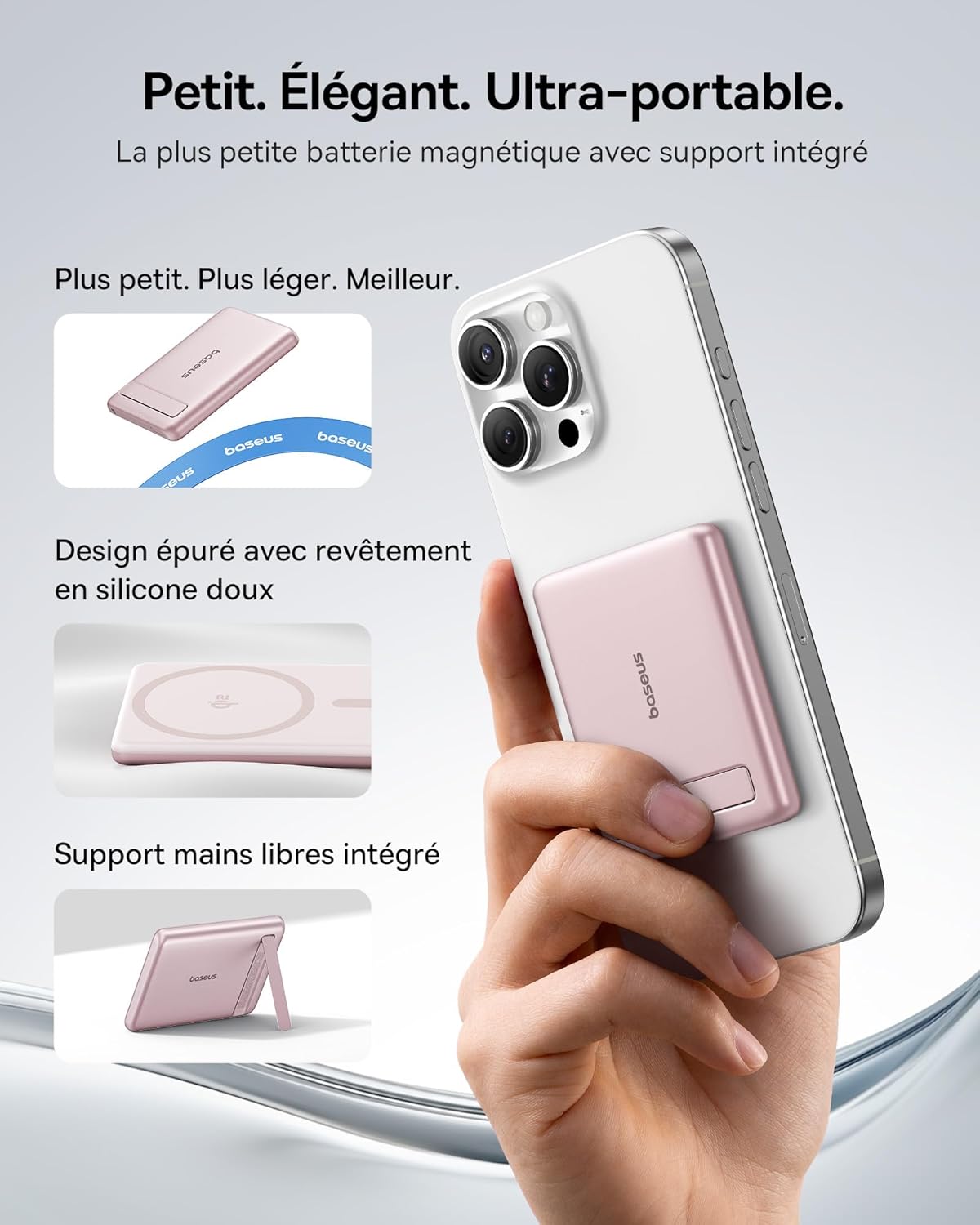
Image: The Baseus Mini MagSafe Powerbank securely attached to an iPhone, demonstrating its compact form factor and the convenience of the integrated kickstand for hands-free use.
2. ເນື້ອໃນຊຸດ
- Baseus Mini MagSafe Powerbank (Model: PPKPC-0520S)
- USB-C to USB-C Charging Cable (30 cm)
- ຄູ່ມືຜູ້ໃຊ້

Image: The Baseus Mini MagSafe Powerbank and its accompanying USB-C charging cable, highlighting the included accessories.
3. ຄຸນລັກສະນະຂອງຜະລິດຕະພັນ
- Compact and Premium Design: Smaller than a credit card with a 5000 mAh capacity, featuring a thin aluminum casing and soft-touch silicone finish. Ergonomic curved edges enhance grip, and an LED display indicates battery status.
- Qi2 Fast Charging: Provides up to 15W wireless fast charging for iPhones and other Qi2-compatible devices. Qi2 technology ensures secure magnetic alignment for faster and more reliable power delivery.
- Integrated Foldable Stand: The built-in aluminum kickstand allows for hands-free viewing in both portrait and landscape modes while your phone charges wirelessly.
- ການຕິດແມ່ເຫຼັກທີ່ເຂັ້ມແຂງ: Equipped with N52 rubidium magnets offering 3500 GS magnetic power, ensuring a secure lock for instant charging without obstructing the camera lens.
- Wired and Wireless Charging with Advanced Cooling: Charge two devices simultaneously via wireless and USB-C. A three-layer cooling system maintains optimal temperature during extended use.

Image: An iPhone receiving 15W wireless fast charging from the Baseus MagSafe Powerbank, demonstrating the Qi2 certification and efficient power transfer.
4. ຕັ້ງຄ່າ
- ຄ່າ ທຳ ນຽມ: Before first use, fully charge the power bank using the included USB-C cable and a compatible power adapter (not included). The LED indicators will show the charging progress.
- ເປີດ: The power bank typically activates automatically when a device is attached or connected. Some models may have a power button to initiate charging.
5. ຄໍາແນະນໍາການດໍາເນີນງານ
5.1 ການສາກໄຟ Power Bank
- Connect the included USB-C cable to the power bank's USB-C port.
- Connect the other end of the cable to a USB-C power adapter (e.g., 20W PD charger) or a computer's USB-C port.
- The LED indicators will illuminate to show the current battery level and charging status.
5.2 Wireless Charging (MagSafe/Qi2)
- Ensure your device is compatible with MagSafe or Qi2 wireless charging (e.g., iPhone 12 series and newer).
- Align the back of your compatible device with the magnetic surface of the power bank. The magnets will snap into place, ensuring proper alignment.
- Wireless charging will begin automatically. The LED indicators may show charging activity.
5.3 ການສາກໄຟດ້ວຍສາຍ (USB-C)
- Connect your device to the power bank's USB-C port using a compatible USB-C to USB-C cable (or your device's charging cable).
- Wired charging will begin automatically, supporting up to 20W Power Delivery.
5.4 ການນໍາໃຊ້ຂາຕັ້ງສາມາດພັບໄດ້
- ຄ່ອຍໆດຶງຂາຕັ້ງທີ່ປະສົມປະສານອອກຈາກດ້ານຫຼັງຂອງທະນາຄານພະລັງງານ.
- Place your wirelessly charging device onto the power bank.
- ປັບຂາຕັ້ງຕາມທີ່ທ່ານຕ້ອງການ viewing angle for portrait or landscape orientation.

Image: The Baseus MagSafe Powerbank simultaneously charging two iPhones, one via USB-C cable and another wirelessly, demonstrating its dual-charging capability.
6. ບໍາລຸງຮັກສາ
- ທໍາຄວາມສະອາດ: Wipe the power bank with a soft, dry cloth. Avoid using harsh chemicals or abrasive materials.
- ການເກັບຮັກສາ: ເກັບຮັກສາ Power bank ໃນບ່ອນທີ່ເຢັນ, ແຫ້ງ, ຫ່າງຈາກແສງແດດໂດຍກົງ ແລະອຸນຫະພູມທີ່ຮຸນແຮງ.
- ການດູແລຫມໍ້ໄຟ: For optimal battery life, fully charge and discharge the power bank at least once every three months if not in regular use.
- ຫຼີກລ້ຽງການຫຼຸດລົງ: ປົກປ້ອງອຸປະກອນຈາກການຕົກແລະຜົນກະທົບ, ເຊິ່ງສາມາດທໍາລາຍອົງປະກອບພາຍໃນ.
7. ການແກ້ໄຂບັນຫາ
- ອຸປະກອນບໍ່ໄດ້ສາກໄຟ:
- ກວດໃຫ້ແນ່ໃຈວ່າໄດ້ສາກໄຟພຽງພໍແລ້ວ.
- ກວດສອບການເຊື່ອມຕໍ່ສາຍໄຟສຳລັບການສາກໄຟແບບມີສາຍ.
- For wireless charging, ensure proper alignment and that your device is Qi2/MagSafe compatible. Remove any thick phone cases that might interfere.
- ການສາກໄຟຊ້າ:
- Ensure you are using a compatible cable and power adapter for optimal charging speeds (e.g., PD 20W for wired, Qi2 for wireless).
- ການສາກໄຟຫຼາຍອຸປະກອນພ້ອມກັນອາດຈະຫຼຸດຄວາມໄວໃນການສາກແຕ່ລະອັນ.
- ການຍຶດຕິດແມ່ເຫຼັກອ່ອນແອ:
- Ensure your phone or case has MagSafe compatibility.
- Remove any non-MagSafe compatible cases or accessories that might block the magnetic connection.
- ແບັດເຕີຣີພະລັງງານຮ້ອນເກີນໄປ:
- While the power bank has advanced cooling, prolonged high-power usage can generate heat. If it becomes excessively hot, disconnect it and allow it to cool down.
- ຫຼີກລ່ຽງການສາກໄຟໃນບ່ອນທີ່ມີແສງແດດໂດຍກົງ ຫຼື ຢູ່ໃນບໍລິເວນປິດ.
8. ຂໍ້ມູນຈໍາເພາະ
| ໝາຍເລກຕົວແບບ | PPKPC-0520S |
| ປະເພດຫມໍ້ໄຟ | ລີໂທມໂພລີເມີ |
| ຄວາມອາດສາມາດ | 5000 mAh |
| Wired Output (USB-C) | Up to 20W Power Delivery (PD) |
| Wireless Output | ສູງສຸດ 15W (Qi2 ຮັບການຮັບຮອງ) |
| ການປ້ອນຂໍ້ມູນ Voltage | 20 ໂວນ (ສູງສຸດ) |
| ຂະໜາດ (L x W x H) | 10 x 6.7 x 0.9 cm |
| ນ້ຳໜັກ | 180 ກຣາມ |
| ອຸປະກອນທີ່ເຂົ້າກັນໄດ້ | Smartphones (iPhone 12-17 Pro/Pro Max, Android compatible) |
| ມາດຕະຖານການສາກໄຟໄຮ້ສາຍ | Qi |

Image: The Baseus Mini MagSafe Powerbank positioned next to an iPhone and a soda can, illustrating its ultra-compact and portable size.
9. ຂໍ້ມູນຄວາມປອດໄພ
ກະລຸນາອ່ານ ແລະ ປະຕິບັດຕາມຄຳແນະນຳດ້ານຄວາມປອດໄພເຫຼົ່ານີ້ເພື່ອປ້ອງກັນຄວາມເສຍຫາຍຕໍ່ຜະລິດຕະພັນ ຫຼື ການບາດເຈັບຕໍ່ຕົວທ່ານເອງ:
- ຫ້າມບໍ່ໃຫ້ສາຍສາກໄຟຖືກນ້ຳ, ຄວາມຊຸ່ມ, ຫຼືອຸນຫະພູມທີ່ຮຸນແຮງ.
- Avoid disassembling, puncturing, or modifying the device.
- ຮັກສາໃຫ້ໄກຈາກເດັກນ້ອຍ.
- Do not use if the power bank is visibly damaged or swollen.
- ກໍາຈັດຜະລິດຕະພັນຢ່າງມີຄວາມຮັບຜິດຊອບຕາມລະບຽບການທ້ອງຖິ່ນ.
10. ການຮັບປະກັນແລະການສະຫນັບສະຫນູນ
This Baseus Mini MagSafe Powerbank comes with a ຮັບປະກັນ 2 ປີ ຈາກວັນທີ່ຊື້. ການຮັບປະກັນນີ້ກວມເອົາຄວາມບົກຜ່ອງດ້ານການຜະລິດແລະການເຮັດວຽກພາຍໃຕ້ການນໍາໃຊ້ປົກກະຕິ.
For technical support, warranty claims, or any product-related inquiries, please contact Baseus customer service through the retailer where you purchased the product or visit the official Baseus webເວັບໄຊສໍາລັບຂໍ້ມູນຕິດຕໍ່.

Image: A display of various iPhone models and Android devices, all compatible with the Baseus MagSafe Powerbank, highlighting its broad device compatibility.