
1. ຜະລິດຕະພັນເກີນview
The Orbic Speed (RC400L) is a compact and portable 4G LTE MiFi Mobile Hotspot Router designed to provide secure and reliable Wi-Fi connectivity on the go. It allows you to connect up to 10 Wi-Fi enabled devices simultaneously, offering high-speed internet access for various activities such as checking email, streaming media, and working remotely. This device features a long-lasting rechargeable battery and dual-band 802.11ac Wi-Fi for optimal performance and range.
ຄຸນນະສົມບັດທີ່ສໍາຄັນ
- Unlocked Connectivity: Compatible with various carriers (originally Verizon).
- ອາຍຸແບັດເຕີຣີທີ່ຂະຫຍາຍອອກ: ໃຊ້ຕໍ່ເນື່ອງໄດ້ເຖິງ 12 ຊົ່ວໂມງຕໍ່ການສາກຄັ້ງດຽວ.
- Wi-Fi ໄວ: Dual-band 802.11ac Wi-Fi for high-speed data and extended range.
- ຮອງຮັບຫຼາຍອຸປະກອນ: Securely connect up to 10 Wi-Fi enabled devices.
- ກະທັດຮັດ ແລະ ແບບພົກພາ: Lightweight design for easy travel and discreet placement.
- Informative LCD Display: Provides real-time status updates of the mobile hotspot.
ແມ່ນຫຍັງຢູ່ໃນກ່ອງ
- Orbic Speed (RC400L) Mobile Hotspot Router
- ສາຍ USB
- ແບັດເຕີຣີລິທຽມໄອອອນ (ຕິດຕັ້ງລ່ວງໜ້າ ຫຼື ແຍກຕ່າງຫາກ)
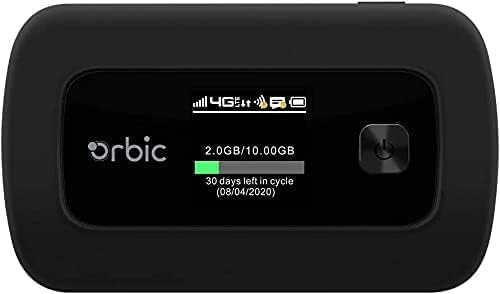
Figure 1: Orbic Speed (RC400L) Front View ກັບຈໍສະແດງຜົນ
2. ການເລີ່ມຕົ້ນ: ການຕິດຕັ້ງ
2.1. ການສາກອຸປະກອນ
Before initial use, fully charge your Orbic Speed hotspot. Connect the provided USB cable to the device's charging port and the other end to a compatible USB power adapter (not included) or a computer's USB port. The device's display will indicate charging status.
- ໃຊ້ພຽງແຕ່ອຸປະກອນເສີມການສາກໄຟທີ່ໄດ້ຮັບການອະນຸມັດ.
- Avoid leaving the device plugged in for extended periods after it is fully charged to prolong battery life.
2.2. ການໃສ່ຊິມກາດ
The Orbic Speed (RC400L) requires a compatible 4G LTE SIM card (not included) to access cellular data networks. Follow these steps to insert the SIM card:
- ໃຫ້ແນ່ໃຈວ່າອຸປະກອນປິດຢູ່.
- Carefully remove the back cover of the device. The back cover is designed to snap off easily without tools.
- ຊອກຫາຊ່ອງໃສ່ຊິມກາດ.
- Insert the SIM card into the slot with the gold contacts facing down and the notched corner aligned correctly. Push gently until it clicks into place.
- ປິດຝາປິດດ້ານຫຼັງຄືນ, ຮັບປະກັນວ່າມັນຕິດແໜ້ນດີ.

Figure 2: Orbic Speed (RC400L) Back View (SIM card slot is under the cover)
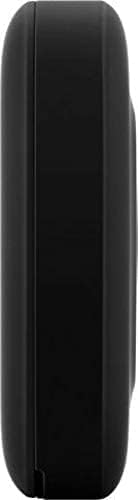
Figure 3: Orbic Speed (RC400L) Side View (Charging port location)
2.3. ເປີດ / ປິດພະລັງງານ
- ເພື່ອເປີດເຄື່ອງ: Press and hold the Power button (usually located on the front or side) until the display lights up.
- ປິດເຄື່ອງ: Press and hold the Power button until the "Power Off" option appears on the display, then confirm. Alternatively, hold the power button for several seconds until the device shuts down.
3. Operating the Hotspot
3.1. ການເຊື່ອມຕໍ່ອຸປະກອນຜ່ານ Wi-Fi
Once your Orbic Speed hotspot is powered on and has established a cellular connection, you can connect your Wi-Fi enabled devices (laptops, tablets, smartphones, etc.) to it.
- ໃນອຸປະກອນຂອງທ່ານ, ເປີດການຕັ້ງຄ່າ Wi-Fi.
- ສະແກນຫາເຄືອຂ່າຍ Wi-Fi ທີ່ມີຢູ່.
- Select the network name (SSID) displayed on your Orbic Speed's screen.
- Enter the Wi-Fi password (Key) also displayed on the hotspot's screen.
- ອຸປະກອນຂອງທ່ານຄວນຈະເຊື່ອມຕໍ່ກັບອິນເຕີເນັດຜ່ານຈຸດເຊື່ອມຕໍ່ແລ້ວ.
The Orbic Speed supports both 2.4GHz and 5GHz Wi-Fi bands. You can switch between these or configure them via the web ການໂຕ້ຕອບການບໍລິຫານ.
3.2. ການເຂົ້າເຖິງ Web Administration Interface
For advanced settings, network monitoring, and configuration, you can access the Orbic Speed's web administration interface from a connected device.
- Ensure your device is connected to the Orbic Speed's Wi-Fi network.
- ເປີດ ກ web browser (ເຊັ່ນ: Chrome, Firefox, Edge).
- ໃນແຖບທີ່ຢູ່, ພິມທີ່ຢູ່ IP ເລີ່ມຕົ້ນສໍາລັບຮັອດສະປອດ (ທົ່ວໄປ 192.168.1.1 or 192.168.0.1, refer to your device's display or packaging for the exact address).
- Enter the administrator username and password when prompted. Default credentials are often "admin" for both, but it is highly recommended to change these for security.
ຈາກ web interface, you can manage Wi-Fi settings, view connected devices, monitor data usage, change passwords, and configure other network parameters.
3.3. ຄວາມເຂົ້າໃຈກ່ຽວກັບຈໍສະແດງຜົນ LCD
The Orbic Speed's LCD display provides essential information at a glance:
- ຄວາມແຮງຂອງສັນຍານ: Bars indicating the strength of the cellular network signal.
- ປະເພດເຄືອຂ່າຍ: Icons for 4G LTE, 3G, etc.
- ສະຖານະ Wi-Fi: ຊີ້ບອກວ່າ Wi-Fi ເປີດຢູ່ ແລະ ອຸປະກອນຕ່າງໆໄດ້ເຊື່ອມຕໍ່ແລ້ວ.
- ລະດັບຫມໍ້ໄຟ: Icon showing remaining battery charge.
- ການນຳໃຊ້ຂໍ້ມູນ: Displays current data consumption (e.g., GB used out of total plan).
- ອຸປະກອນທີ່ເຊື່ອມຕໍ່: ຈຳນວນອຸປະກອນທີ່ເຊື່ອມຕໍ່ກັບຮັອດສະປອດໃນປະຈຸບັນ.
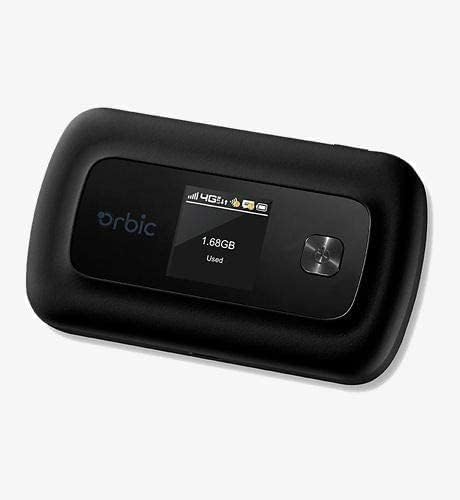
Figure 4: Orbic Speed (RC400L) Display in Use
4. ບໍາລຸງຮັກສາ
4.1. ການດູແລຫມໍ້ໄຟ
To maximize the lifespan of your device's battery:
- ຫຼີກເວັ້ນອຸນຫະພູມທີ່ຮຸນແຮງ.
- Do not leave the device continuously plugged in for extended periods (e.g., 24/7) if not necessary, as this can degrade battery health over time.
- ຖ້າເກັບຮັກສາອຸປະກອນໄວ້ເປັນເວລາດົນນານ, ໃຫ້ສາກໄຟປະມານ 50% ກ່ອນການເກັບຮັກສາ.
- The battery is designed for easy replacement. Should replacement be necessary, the back casing can be snapped off to access the battery without tools.
4.2. ທຳ ຄວາມສະອາດອຸປະກອນ
Use a soft, dry, lint-free cloth to clean the exterior of the device. Do not use liquid cleaners or aerosols directly on the device.
4.3. ການປັບປຸງຊອບແວ
ກວດສອບການອັບເດດຊອບແວເປັນໄລຍະຜ່ານທາງ web administration interface. Updates can improve performance, add features, and enhance security.
5. ການແກ້ໄຂບັນຫາ
| ບັນຫາ | ສາເຫດທີ່ເປັນໄປໄດ້ | ການແກ້ໄຂ |
|---|---|---|
| ບໍ່ມີການເຊື່ອມຕໍ່ອິນເຕີເນັດ | No SIM card, SIM not activated, poor cellular signal, data plan exhausted. |
|
| ອຸປະກອນບໍ່ເປີດ | Low battery, faulty charger/cable. |
|
| ຄວາມໄວ Wi-Fi ຊ້າ | Poor cellular signal, too many connected devices, interference. |
|
| ບໍ່ສາມາດເຂົ້າເຖິງໄດ້ Web UI | Incorrect IP address, not connected to hotspot Wi-Fi. |
|
If problems persist, consider performing a factory reset (refer to the web administration interface for instructions, as this will erase all custom settings) or contact customer support.
6. ຂໍ້ມູນຈໍາເພາະ
| ຄຸນສົມບັດ | ລາຍລະອຽດ |
|---|---|
| ຊື່ຕົວແບບ | Orbic Speed (RC400L) |
| ເຕັກໂນໂລຊີການເຊື່ອມຕໍ່ | USB, Wi-Fi (4G LTE) |
| ມາດຕະຖານໄຮ້ສາຍ | 802.11ac (Dual-Band) |
| ອຸປະກອນທີ່ເຂົ້າກັນໄດ້ | Laptop, Tablet, Smartphone, etc. |
| ສີ | ດຳ |
| ນ້ໍາຫນັກລາຍການ | 7.8 ອອນ |
| ຂະໜາດແພັກເກັດ | 5.75 x 3.46 x 2.2 ນິ້ວ |
| ແບັດເຕີຣີ | ແບັດເຕີຣີ Lithium Ion 1 ອັນ (ລວມ) |
| ຄຸນນະສົມບັດພິເສດ | ຕົວຊີ້ວັດ LED |
| ຜູ້ຜະລິດ | ໂຄນ |
7. ການຮັບປະກັນແລະການສະຫນັບສະຫນູນ
This product is sold as an Amazon ປັບປຸງໃຫມ່ item. Amazon Renewed products are pre-owned and refurbished by qualified suppliers to work and look like new. They come with the Amazon Renewed Guarantee, which provides a replacement or refund within 90 days of receipt if the product does not work as expected.
For technical support or warranty claims, please refer to the Amazon Renewed program details or contact the seller directly through your Amazon order history. For general product inquiries or advanced troubleshooting not covered in this manual, you may also visit the official Orbic support webເວັບໄຊຖ້າມີ.
For additional information regarding your purchase, please visit your Amazon Order History.