
1. ບົດແນະນຳ
Thank you for choosing the PELONIS 40-Inch Tower Fan. This oscillating fan features an innovative washable design, providing 2000 CFM airflow at 28ft/s, 4 speeds, 2 modes, and 90° oscillation with a quiet 23dB operation. This manual provides important information for the safe and efficient use of your new tower fan. Please read it thoroughly before operation and retain it for future reference.

Figure 1: PELONIS 40-Inch Tower Fan (Model PSFZ40DR5ALG)
2. ຄໍາແນະນໍາຄວາມປອດໄພທີ່ສໍາຄັນ
ເມື່ອນຳໃຊ້ເຄື່ອງໃຊ້ໄຟຟ້າ, ຄວນລະມັດລະວັງຂັ້ນພື້ນຖານສະເໝີ ເພື່ອຫຼຸດຜ່ອນຄວາມສ່ຽງຕໍ່ການເກີດອັກຄີໄພ, ໄຟຟ້າຊ໋ອດ ແລະ ການບາດເຈັບຕໍ່ບຸກຄົນ ລວມທັງສິ່ງຕໍ່ໄປນີ້:
- ອ່ານຄໍາແນະນໍາທັງຫມົດກ່ອນທີ່ຈະໃຊ້ພັດລົມນີ້.
- ໃຊ້ພັດລົມນີ້ຕາມທີ່ໄດ້ອະທິບາຍໄວ້ໃນຄູ່ມືນີ້ເທົ່ານັ້ນ. ການນຳໃຊ້ອື່ນໆທີ່ບໍ່ໄດ້ແນະນຳໂດຍຜູ້ຜະລິດອາດຈະເຮັດໃຫ້ເກີດໄຟໄໝ້, ໄຟຟ້າຊັອດ, ຫຼື ການບາດເຈັບຕໍ່ບຸກຄົນ.
- Do not operate the fan with a damaged cord or plug. Discard the fan or return to an authorized service facility for examination and/or repair.
- ຢ່າແລ່ນສາຍໄຟພາຍໃຕ້ຜ້າພົມ. ຫ້າມປົກສາຍດ້ວຍຜ້າປູບ່ອນຖິ້ມ, ເຄື່ອງແລ່ນ, ຫຼືຜ້າປົກທີ່ຄ້າຍຄືກັນ. ຈັດວາງສາຍໄຟໃຫ້ຫ່າງຈາກພື້ນທີ່ຈະລາຈອນ ແລະບ່ອນທີ່ມັນຈະບໍ່ຖືກຂ້າມໄປ.
- ເພື່ອຕັດການເຊື່ອມຕໍ່ພັດລົມ, ໃຫ້ປິດການຄວບຄຸມ, ຈາກນັ້ນຖອດປລັກອອກຈາກເຕົ້າສຽບ.
- ຫ້າມໃສ່ ຫຼືປ່ອຍໃຫ້ສິ່ງຕ່າງປະເທດເຂົ້າໄປໃນທໍ່ລະບາຍອາກາດ ຫຼືທໍ່ລະບາຍອາກາດ ເພາະອາດຈະເຮັດໃຫ້ເກີດໄຟຟ້າ ຫຼືໄຟໄໝ້ ຫຼືເຮັດໃຫ້ພັດລົມເສຍຫາຍ.
- Do not operate in areas where gasoline, paint, or flammable liquids are used or stored.
- Always unplug the fan before moving, cleaning, or when not in use.
- ພັດລົມນີ້ມີຈຸດປະສົງເພື່ອໃຊ້ໃນຄົວເຮືອນເທົ່ານັ້ນ.
3. ເນື້ອໃນຊຸດ
ກະລຸນາກວດເບິ່ງເນື້ອໃນຂອງແພັກເກດເມື່ອເປີດ. ຖ້າລາຍການໃດຂາດຫາຍໄປ ຫຼືເສຍຫາຍ, ໃຫ້ຕິດຕໍ່ຝ່າຍຊ່ວຍເຫຼືອລູກຄ້າ.
- PELONIS 40-Inch Tower Fan Unit
- Fan Base (2 parts)
- ການຄວບຄຸມໄລຍະໄກ
- ຄູ່ມືຜູ້ໃຊ້ (ເອກະສານນີ້)
4. ການຕິດຕັ້ງແລະການປະກອບ
Follow these steps to assemble your PELONIS Tower Fan:
- ປະກອບພື້ນຖານ: Connect the two halves of the fan base together. Ensure they snap securely into place.
- Attach Base to Fan Unit: Align the assembled base with the bottom of the main fan unit. Secure the base to the fan unit using the provided nut, turning clockwise until tight. Route the power cord through the designated channel in the base for stability.
- ຫມໍ້ໄຟຄວບຄຸມໄລຍະໄກ: Open the battery compartment on the remote control and insert the required batteries (not always included, check packaging).
- ການຈັດວາງ: Place the fan on a firm, level surface. Ensure there is adequate space around the fan for proper airflow and oscillation.
- ການເຊື່ອມຕໍ່ພະລັງງານ: ສຽບສາຍໄຟເຂົ້າໄປໃນປ່ຽງໄຟຟ້າ 120V AC ມາດຕະຖານ.

Figure 2: Effortless Setup - Twist Lock and Lift the Upper Body
Video 1: How to install Pelonis Washable Tower Fan. This video demonstrates the assembly process for the PELONIS tower fan, including attaching the base and preparing it for use.
5. ຄໍາແນະນໍາການດໍາເນີນງານ
Your PELONIS Tower Fan can be operated using the control panel on the top of the unit or the included remote control.
ແຜງຄວບຄຸມ ແລະຟັງຊັນໄລຍະໄກ:
- ປຸ່ມເປີດປິດ (⏻): ເປີດ ຫຼືປິດພັດລົມ.
- ປຸ່ມຄວາມໄວ (⇌): Cycles through 4 fan speeds (Low, Medium, High, Turbo).
- ປຸ່ມໂໝດ (☽): Selects between 2 wind modes:
- ໂໝດປົກກະຕິ: ສະຫນອງການໄຫຼວຽນຂອງອາກາດທີ່ສອດຄ່ອງ.
- ຮູບແບບການນອນ: Gradually decreases fan speed for quiet operation during sleep.
- ປຸ່ມ Oscillation (↻): Activates or deactivates the 90° oscillation feature, distributing air across a wider area.
- ປຸ່ມຈັບເວລາ (⏱): Sets the auto-off timer for up to 7 hours. Press repeatedly to cycle through timer settings.

Figure 3: Remote Control and Fan Settings

Figure 4: 90° Oscillation for Wide Coverage
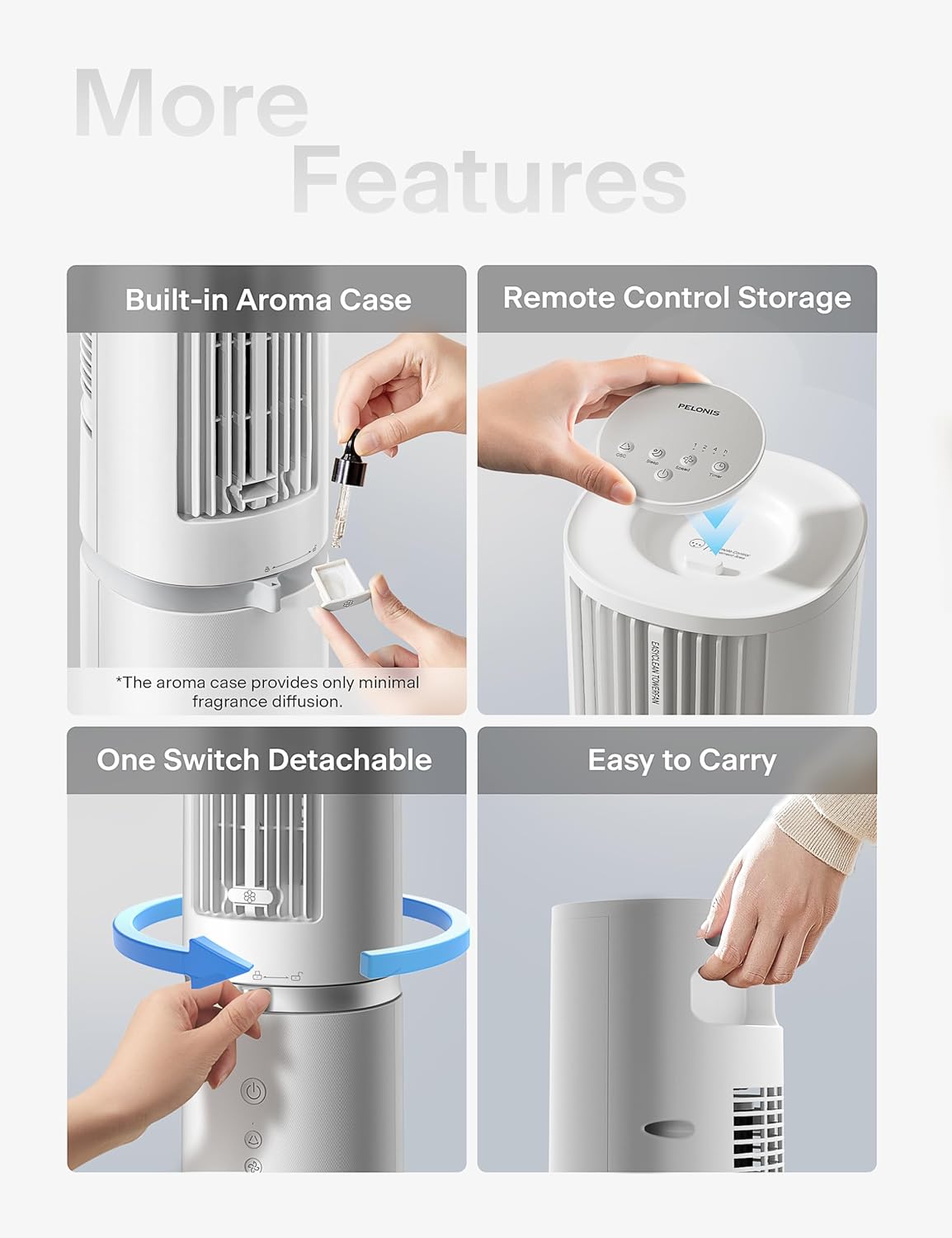
Figure 5: Additional Features including Aroma Case and Remote Storage
6. ການບໍາລຸງຮັກສາແລະການທໍາຄວາມສະອາດ
The PELONIS Tower Fan features an innovative washable design for easy cleaning. Regular cleaning ensures optimal performance and extends the life of your fan.
ຄໍາແນະນໍາການທໍາຄວາມສະອາດ:
- ຖອດພັດລົມ: ໃຫ້ແນ່ໃຈວ່າໄດ້ຖອດພັດລົມອອກຈາກປລັກສຽບໄຟກ່ອນທີ່ຈະທໍາຄວາມສະອາດ.
- Detach Upper Body: The fan's upper body is detachable for thorough cleaning. Twist the lock mechanism at the base of the upper section and lift it off the motor unit.
- ສ່ວນປະກອບທີ່ສາມາດລ້າງໄດ້: The detachable upper body, including the air outlet grille and internal components, can be washed directly with water. Use mild soap and a soft cloth or sponge if necessary. Ensure no electronic components are exposed to water.
- ເຊັດໃຫ້ແຫ້ງ: Allow all washed parts to air dry completely before reassembling. Ensure no moisture remains, especially in crevices.
- Wipe Base Unit: Wipe the motor base unit with a soft, damp ຜ້າ. ຢ່າເອົາຫົວຫນ່ວຍພື້ນຖານຢູ່ໃນນ້ໍາ.
- ປະກອບຄືນໃໝ່: Once all parts are dry, carefully reattach the upper body to the motor unit, ensuring it locks securely into place.
Note: The aroma case (if present) can be cleaned by wiping it with a damp ຜ້າ. ຢ່າໃຊ້ສານເຄມີທີ່ຮຸນແຮງ.
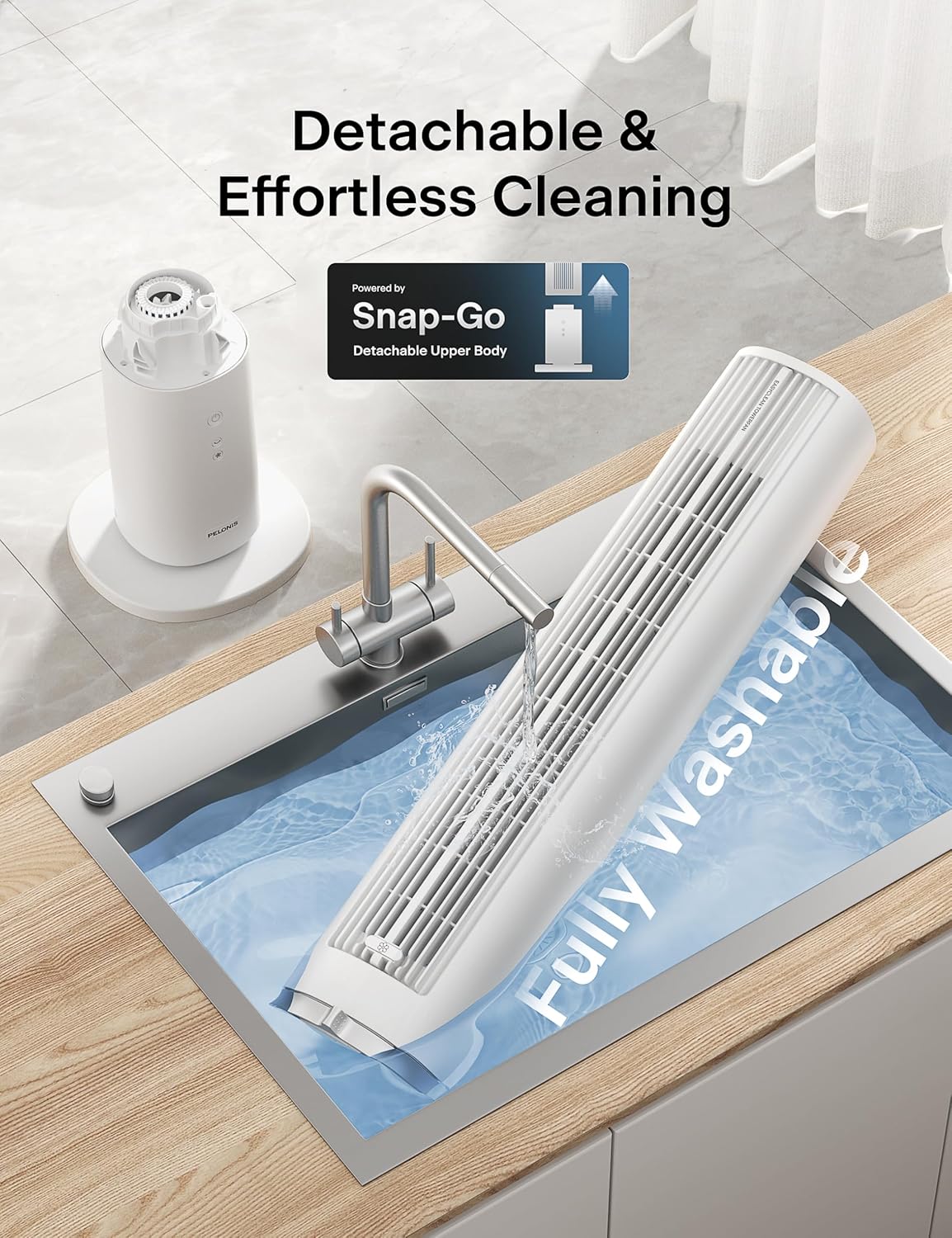
Figure 6: Detachable and Fully Washable Design

Figure 7: One-Twist Detachable Mechanism
7. ຄູ່ມືການແກ້ໄຂບັນຫາ
ຖ້າພັດລົມຂອງທ່ານບໍ່ເຮັດວຽກຢ່າງຖືກຕ້ອງ, ກະລຸນາອ້າງອີງເຖິງບັນຫາ ແລະ ວິທີແກ້ໄຂທົ່ວໄປຕໍ່ໄປນີ້:
| ບັນຫາ | ສາເຫດທີ່ເປັນໄປໄດ້ | ການແກ້ໄຂ |
|---|---|---|
| ພັດລົມບໍ່ເປີດ. | ບໍ່ສຽບ; ປ່ຽງໄຟບໍ່ເຮັດວຽກ; ບໍ່ໄດ້ກົດປຸ່ມເປີດປິດ. | Ensure fan is securely plugged into a working outlet. Press the power button. |
| ອາກາດອ່ອນ ຫຼື ບໍ່ມີກະແສລົມ. | Fan speed too low; air intake/outlet blocked; internal components dirty. | Increase fan speed. Check for obstructions. Clean the fan as per maintenance instructions. |
| Fan is noisy during operation. | Fan not on a level surface; internal components dirty; foreign object inside. | Place fan on a flat, stable surface. Clean the fan. If noise persists, contact support. |
| ການຄວບຄຸມໄລຍະໄກບໍ່ເຮັດວຽກ. | Batteries are dead or incorrectly inserted; remote not pointed at receiver. | Replace batteries. Ensure correct polarity. Point remote towards the fan's control panel. |
| Oscillation ບໍ່ເຮັດວຽກ. | ຟັງຊັນ Oscillation ບໍ່ໄດ້ເປີດໃຊ້ງານ. | ກົດປຸ່ມ oscillation ໃນແຜງຄວບຄຸມຫຼືຣີໂໝດ. |
8. ຂໍ້ມູນຈໍາເພາະຂອງຜະລິດຕະພັນ
| ຄຸນສົມບັດ | ລາຍລະອຽດ |
|---|---|
| ຍີ່ຫໍ້ | PELONIS |
| ຊື່ຕົວແບບ | PSFZ40DR5ALG |
| ໝາຍເລກຕົວແບບ | PSFZ40DR5ALG |
| ສີ | ສີຂາວ |
| ແບບ | Upgraded with Washable Design |
| ຂະໜາດສິນຄ້າ (ກວ້າງ x ຍາວ x ສູງ) | 10.82"D x 10.82"W x 40.6"H |
| ນ້ໍາຫນັກລາຍການ | 7.03 ກິໂລກຣາມ |
| ແຫຼ່ງພະລັງງານ | AC/DC |
| ວັດtage | 45 ວັດ |
| ສະບັບtage | 120 ໂວນ |
| ຈໍານວນຄວາມໄວ | 4 |
| ແບບລົມ | Normal, Sleep |
| ການສັ່ນສະເທືອນ | 90° |
| ລະດັບສຽງ | 23 Decibels |
| ຄວາມອາດສາມາດການໄຫຼວຽນຂອງອາກາດ | 2000 ລູກບາດຟຸດຕໍ່ນາທີ (CFM) |
| ຄວາມໄວທາງອາກາດ | 28 ຟຸດຕໍ່ວິນາທີ (ft/s) |
| ໂມງຈັບເວລາ | ສູງສຸດ 7 ຊົ່ວໂມງ |
| ວິທີການຄວບຄຸມ | Button Control, Remote Control |
| ອົງປະກອບລວມ | ໄລຍະໄກ |
| ການນຳໃຊ້ພາຍໃນ/ນອກ | ພາຍໃນ |
9. ການຮັບປະກັນແລະການສະຫນັບສະຫນູນລູກຄ້າ
PELONIS products are manufactured to the highest quality standards. For specific warranty information, please refer to the warranty card included with your product or visit the official PELONIS webເວັບໄຊ.
If you encounter any issues or have questions regarding your PELONIS 40-Inch Tower Fan, please contact our customer support team:
- ສະຫນັບສະຫນູນອອນໄລນ໌: ຢ້ຽມຢາມ ຮ້ານ PELONIS ໃນ Amazon ສຳລັບຄຳຖາມທີ່ຖືກຖາມເລື້ອຍໆ ແລະ ຂໍ້ມູນຜະລິດຕະພັນ.
- ຂໍ້ມູນຕິດຕໍ່: Refer to your product packaging or the official PELONIS website for direct customer service contact details (phone, email).
Please have your model number (PSFZ40DR5ALG) and purchase date ready when contacting support.


