
1. ບົດແນະນຳ
The MiLESEEY S7 Pro is an advanced laser distance meter designed for precise and efficient measurements in various environments, particularly large outdoor projects. Featuring a digital viewfinder, P2P technology, and app connectivity, this tool offers enhanced accuracy and functionality for professional and DIY users. This manual provides detailed instructions for the safe and effective operation of your device.
2. ຂໍ້ມູນຄວາມປອດໄພ
ກະລຸນາອ່ານ ແລະ ເຂົ້າໃຈຄຳແນະນຳດ້ານຄວາມປອດໄພທັງໝົດກ່ອນທີ່ຈະໃຊ້ອຸປະກອນ. ການບໍ່ປະຕິບັດຕາມຄຳແນະນຳເຫຼົ່ານີ້ອາດຈະເຮັດໃຫ້ເກີດການສຳຜັດກັບລັງສີເລເຊີ, ໄຟຟ້າຊັອດ, ໄຟໄໝ້ ຫຼື ການບາດເຈັບສາຫັດ.
- ລັງສີເລເຊີ: This device emits Class 2 laser radiation. Do not stare into the laser beam or direct it at other people or animals.
- ການປົກປ້ອງຕາ: Always wear appropriate eye protection when operating the device, especially in bright conditions where the laser dot may be difficult to see.
- ເດັກນ້ອຍ: ຮັກສາອຸປະກອນໃຫ້ໄກຈາກເດັກນ້ອຍ.
- ສະພາບແວດລ້ອມ: Do not operate the device in explosive atmospheres or near flammable liquids or gases.
- ການແກ້ໄຂ: ຢ່າພະຍາຍາມດັດແປງ ຫຼື ຖອດອຸປະກອນອອກ. ການສ້ອມແປງຄວນປະຕິບັດໂດຍພະນັກງານບໍລິການທີ່ໄດ້ຮັບອະນຸຍາດເທົ່ານັ້ນ.
- ຄວາມປອດໄພຫມໍ້ໄຟ: Use only the specified rechargeable AAA batteries. Ensure correct polarity when inserting batteries. Do not mix old and new batteries or different types of batteries.
3. ເນື້ອໃນຊຸດ
ກວດສອບວ່າລາຍການທັງຫມົດແມ່ນມີຢູ່ໃນຊຸດຂອງທ່ານ:
- 1x MiLESEEY S7 Pro Outdoor Laser Measure
- 1x ກະເປົາຖື
- ສາຍຮັດມື 1x
- 1x ຄູ່ມືຜູ້ໃຊ້ (ເອກະສານນີ້)
- 3x Rechargeable AAA Battery
- ສາຍໄຟສາກ USB 1x

Image: Contents of the MiLESEEY S7 Pro package, showing the device, case, strap, manual, and batteries.
4. ຕັ້ງຄ່າ
4.1 ການຕິດຕັ້ງຫມໍ້ໄຟ
- ຊອກຫາຝາປິດຊ່ອງໃສ່ຫມໍ້ໄຟຢູ່ດ້ານຫຼັງຂອງອຸປະກອນ.
- Open the cover and insert the three rechargeable AAA batteries, ensuring correct polarity (+/-).
- ປິດຝາປິດຊ່ອງໃສ່ຫມໍ້ໄຟຢ່າງປອດໄພ.
4.2 ການສາກອຸປະກອນ
Connect the device to a USB power source using the provided USB charging cable. The battery indicator on the display will show charging status. Ensure the device is fully charged before first use for optimal performance.
4.3 ການເປີດ/ປິດ
- ເພື່ອເປີດເຄື່ອງ, ກົດປຸ່ມຄ້າງໄວ້ ພະລັງງານ ປຸ່ມ (
 ) ຈົນກວ່າໜ້າຈໍຈະສະຫວ່າງຂຶ້ນ.
 - ເພື່ອປິດໄຟ, ກົດປຸ່ມແລະກົດປຸ່ມ ພະລັງງານ button again. The device will also automatically power off after a period of inactivity to conserve battery.
5. ຄໍາແນະນໍາການດໍາເນີນງານ
5.1 ການວັດແທກພື້ນຖານ
- ຊີ້ຮູຮັບແສງເລເຊີໄປຫາເປົ້າໝາຍ.
- ກົດ MEAS ປຸ່ມ () once to activate the laser.
- ກົດ MEAS button again to take a measurement. The result will be displayed on the screen.
5.2 ດິຈິຕອລ Viewຜູ້ຊອກຫາ
The integrated 4X adjustable zoom digital camera with on-screen targeting crosshairs allows you to easily locate the laser spot and confidently measure outdoors, even in bright sunlight conditions.
- ໄດ້ viewfinder display shows a live image of the target area.
- Use the crosshairs to precisely align the laser with your desired measurement point.
- Adjust the zoom level as needed for better visibility of distant targets.

Image: The MiLESEEY S7 Pro's digital viewfinder displaying a target with crosshairs for accurate laser point location.

Image: A user aiming the MiLESEEY S7 Pro laser distance meter outdoors, utilizing the digital viewfinder for precise targeting.
5.3 P2P Technology (Point-to-Point)
The 360° high-accuracy tilt sensor and integrated smart base enable P2P technology, allowing you to capture accurate measurements between any two points from a single remote location. This is ideal for complex measurements where direct access to both points is difficult.
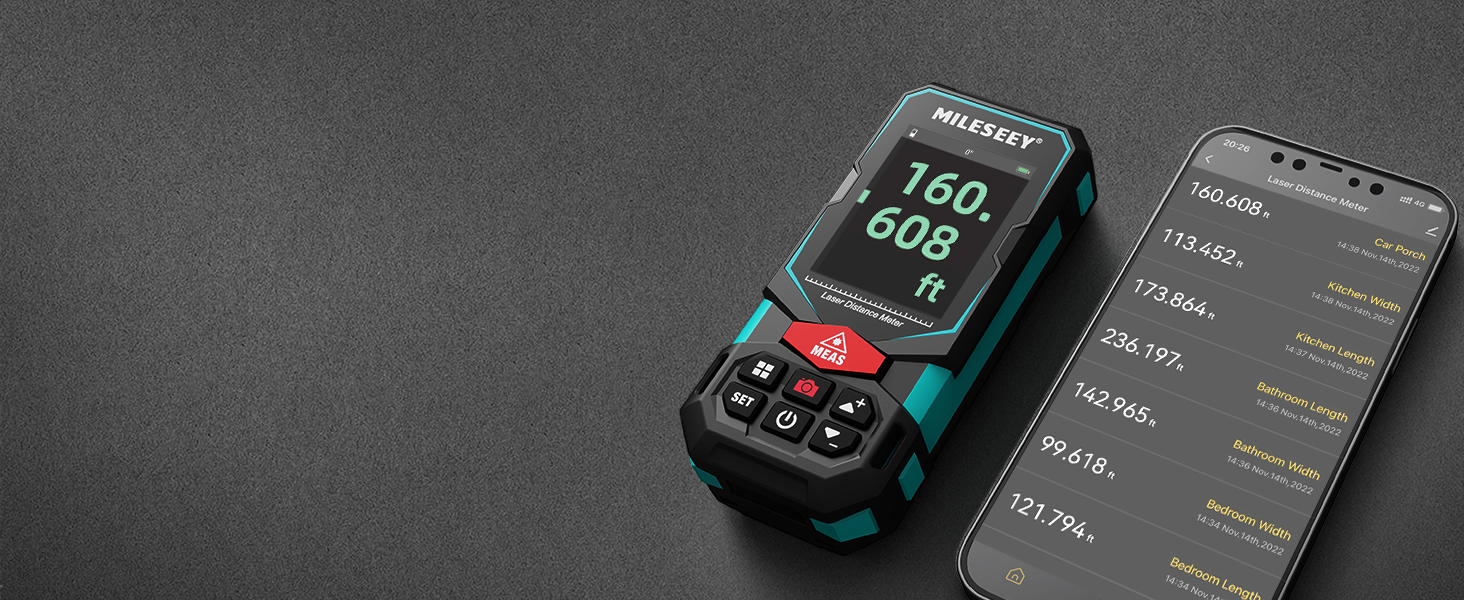
Image: An illustration of the P2P measurement capability, demonstrating how the device measures the distance between two points (P1 and P2) from a single vantagຈຸດ e.
5.4 ການເຊື່ອມຕໍ່ແອັບຯ
The MiLESEEY S7 Pro connects to a dedicated app, allowing you to transfer measurement data directly to your smartphone or tablet. Within the app, you can:
- Enter dimensions onto on-site photographs.
- Draw projects and construct plans.
- Store up to 1,000 groups of data in the app's memory.
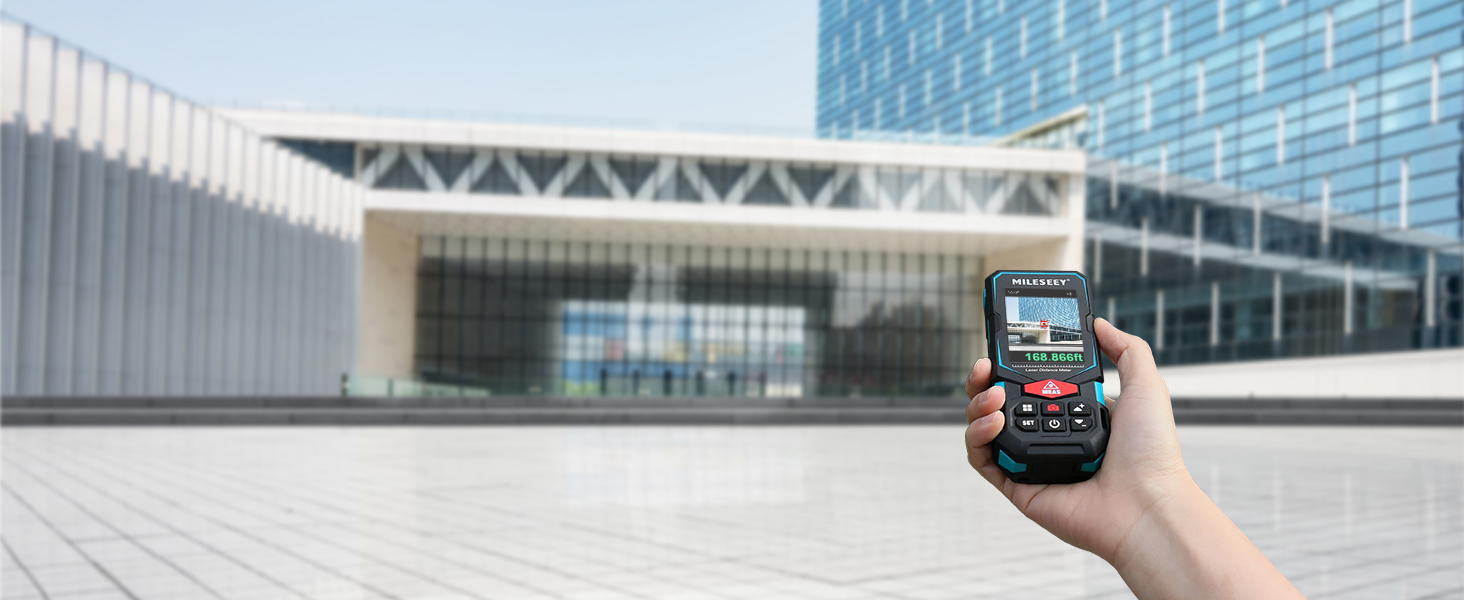
Image: The MiLESEEY S7 Pro connected to a smartphone, showing measurement data being displayed and managed within the companion application.
5.5 ຮູບແບບການວັດແທກ
The device offers a variety of measurement modes accessible through its intuitive user interface:
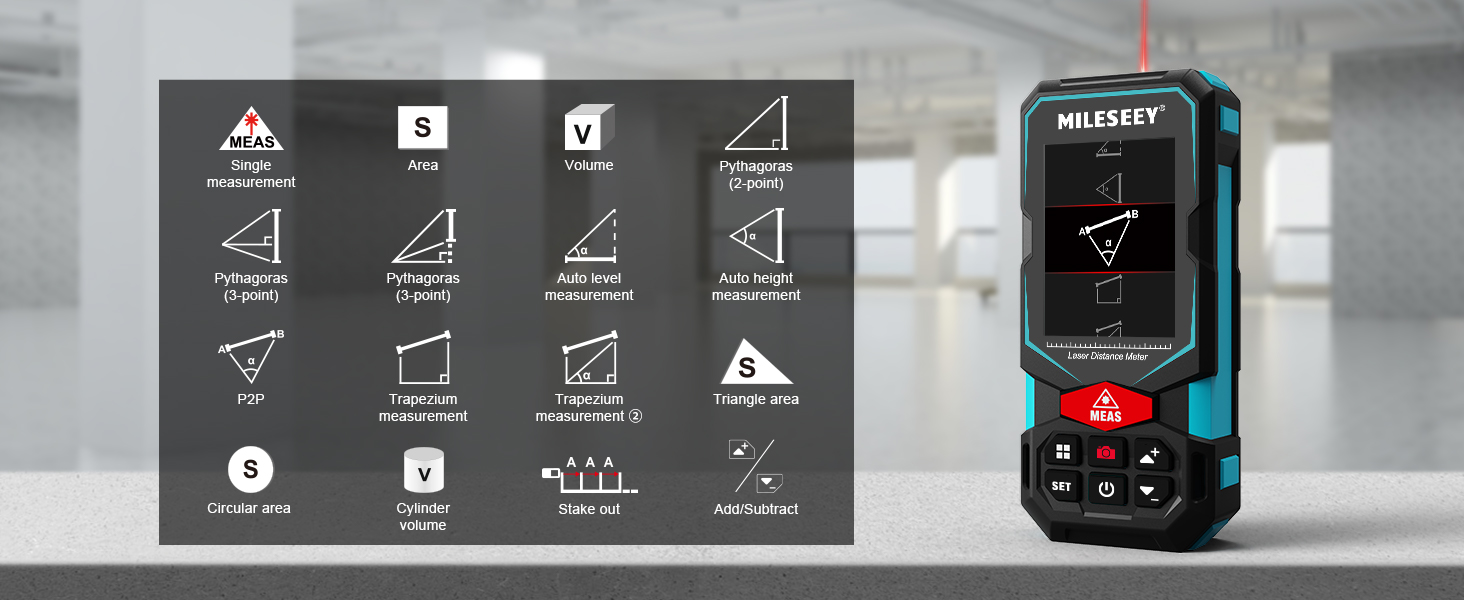
Image: A visual guide to the various measurement functions available on the MiLESEEY S7 Pro, including single measurement, area, volume, and advanced calculations.
- ການວັດແທກດ່ຽວ: ການວັດແທກໄລຍະທາງມາດຕະຖານ.
- ພື້ນທີ່: ຄິດໄລ່ເນື້ອທີ່ຂອງໜ້າດິນ.
- ປະລິມານ: ຄິດໄລ່ປະລິມານຂອງພື້ນທີ່.
- Pythagoras (2-point & 3-point): Indirect measurement using the Pythagorean theorem.
- Auto Level Measurement: ວັດແທກໄລຍະທາງອອກຕາມແນວນອນໂດຍອັດຕະໂນມັດ.
- Auto Height Measurement: Measures vertical height automatically.
- P2P: Point-to-point measurement (as described above).
- Trapezium Measurement: Calculates area of a trapezium.
- Triangle Area: Calculates the area of a triangle.
- Circular Area: Calculates the area of a circle.
- ປະລິມານກະບອກສູບ: Calculates the volume of a cylinder.
- Stake Out: Helps mark out specific distances.
- ບວກ/ລົບ: Allows for addition or subtraction of measurements.
5.6 ສ່ວນຕິດຕໍ່ຜູ້ໃຊ້ ແລະການສະແດງຜົນ
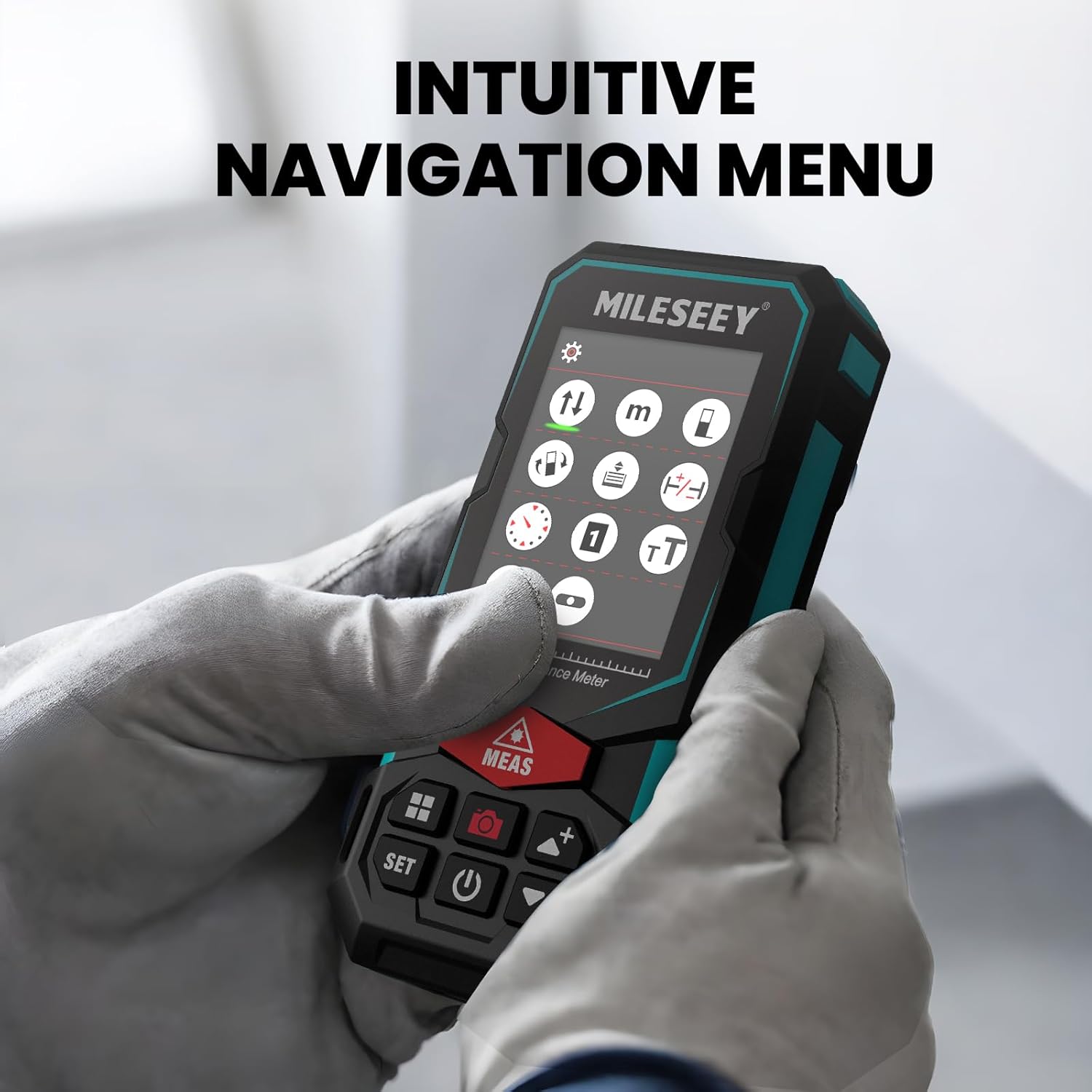
The S7 Pro features a humanized user interface with an intuitive navigation menu and a large 2.4" IPS backlit display. The rotation display keeps measurements aligned with the device, ensuring clear readability from any angle. You can easily switch between white text on a black screen and black text on a white screen for optimal visibility in varying light conditions.

Image: The MiLESEEY S7 Pro's display showcasing its intuitive navigation menu with various function icons.
Image: A user interacting with the MiLESEEY S7 Pro, highlighting the intuitive navigation menu on its screen.
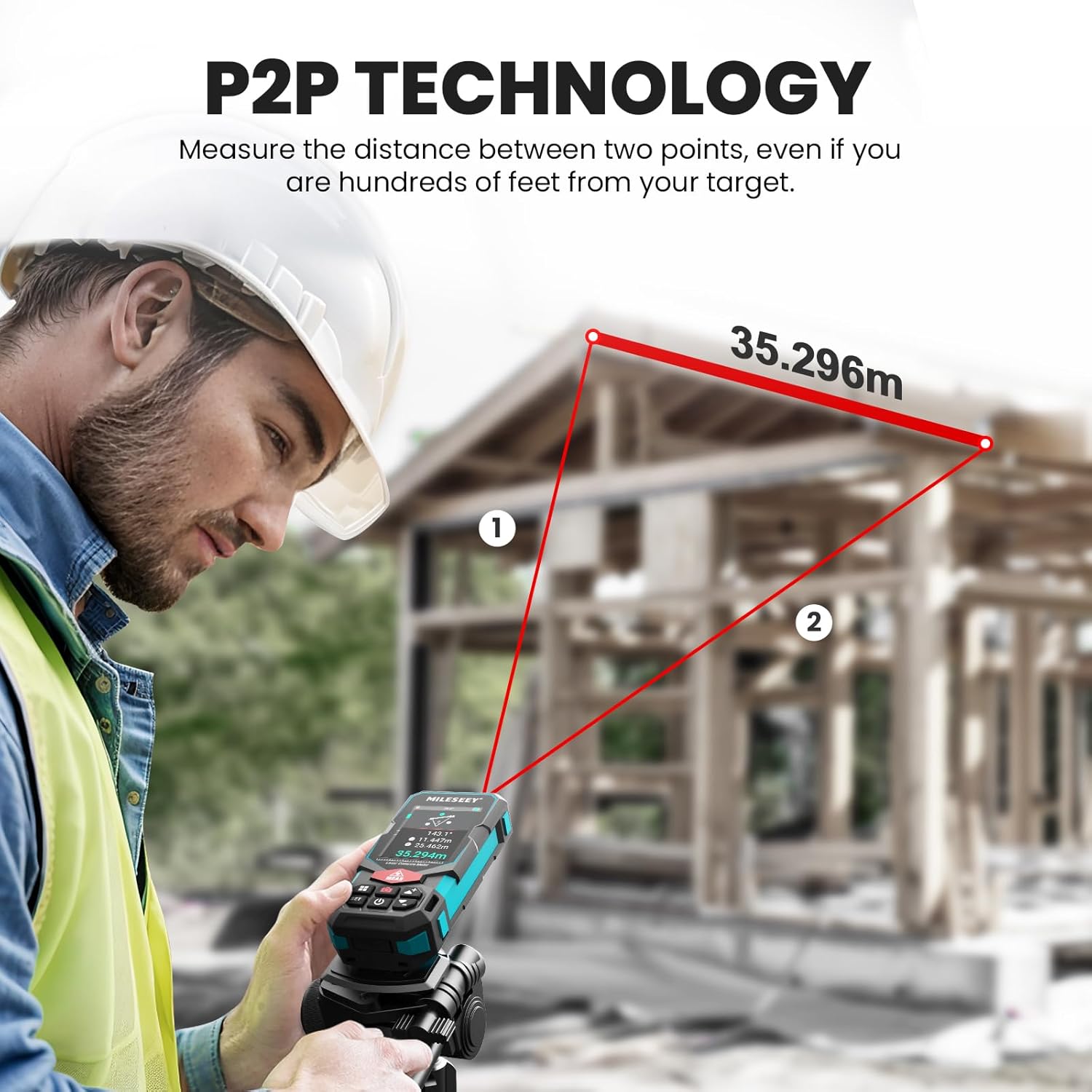
Image: The MiLESEEY S7 Pro's display demonstrating excellent visibility in both bright sunlight and low light environments.
6. ບໍາລຸງຮັກສາ
Proper maintenance ensures the longevity and accuracy of your MiLESEEY S7 Pro.
- ທໍາຄວາມສະອາດ: ໃຊ້ອ່ອນ, ງamp cloth to clean the device. Do not use harsh chemicals or abrasive cleaners. Clean the lens regularly with a soft, lint-free cloth.
- ການເກັບຮັກສາ: Store the device in its carrying case in a cool, dry place when not in use. Avoid extreme temperatures and direct sunlight.
- ການດູແລຫມໍ້ໄຟ: If the device will not be used for an extended period, remove the batteries to prevent leakage. Recharge batteries regularly to maintain their capacity.
- ການປົກປ້ອງ IP65: The device features IP65 protection, making it resistant to dust and water splashes. However, it is not designed for submersion. Clean off any dust or dirt after use in harsh conditions.

Image: The MiLESEEY S7 Pro demonstrating its IP65 protection, shown covered in dust but still functional.

Image: The MiLESEEY S7 Pro, designed with IP65 protection, shown in a dusty environment, highlighting its durability.
7. ການແກ້ໄຂບັນຫາ
If you encounter issues with your MiLESEEY S7 Pro, refer to the following common problems and solutions:
| ບັນຫາ | ສາເຫດທີ່ເປັນໄປໄດ້ | ການແກ້ໄຂ |
|---|---|---|
| ອຸປະກອນບໍ່ເປີດ. | ຫມໍ້ໄຟຕ່ໍາຫຼືຕາຍ; ການຕິດຕັ້ງຫມໍ້ໄຟບໍ່ຖືກຕ້ອງ. | Charge the batteries or replace them. Ensure batteries are inserted with correct polarity. |
| ການວັດແທກບໍ່ຖືກຕ້ອງ. | Laser beam obstructed; unstable surface; device not calibrated. | Ensure clear line of sight. Place device on a stable surface. Perform self-calibration if available (refer to device menu). |
| ບັນຫາການເຊື່ອມຕໍ່ແອັບຯ. | ບໍ່ໄດ້ເປີດໃຊ້ Bluetooth; ບໍ່ໄດ້ອັບເດດແອັບ; ບໍ່ໄດ້ຈັບຄູ່ອຸປະກອນ. | Ensure Bluetooth is active on both devices. Update the app to the latest version. Follow app pairing instructions. |
| Display not clear in bright light. | ການຕັ້ງຄ່າຈໍສະແດງຜົນ. | Switch display mode to black text on white screen for better contrast. |
8. ຂໍ້ມູນຈໍາເພາະ
Key technical specifications for the MiLESEEY S7 Pro Laser Distance Meter:
- ຍີ່ຫໍ້: ໄມເລຊີ
- ໝາຍເລກຕົວແບບ: MCLD-CA-MS-S7
- ໄລຍະການວັດແທກ: Up to 330 ft (100 yards)
- ຄວາມຖືກຕ້ອງ: Up to +/- 2mm (1/16")
- ດິຈິຕອລ Viewຜູ້ຊອກ: 4X Adjustable Zoom Camera
- ການເຊື່ອມຕໍ່: App Connected (P2P Technology)
- ປະເພດການປົກປ້ອງ: IP65 (ກັນຝຸ່ນ ແລະ ນ້ຳກະເດັນ)
- ຈໍສະແດງຜົນ: 2.4" IPS Backlit Display
- ແບັດເຕີຣີ: 3x Rechargeable AAA Battery (Included)
- ວັດສະດຸ: Acrylonitrile Butadiene Styrene, Rubber
- ນ້ໍາຫນັກລາຍການ: 300 ກຣາມ
- ຂະໜາດຜະລິດຕະພັນ: 12L x 5W x 2.5H ຊັງຕີແມັດ
9. ການຮັບປະກັນແລະການສະຫນັບສະຫນູນ
The MiLESEEY S7 Pro Laser Distance Meter comes with a ຮັບປະກັນ 24 ເດືອນ from the date of purchase, covering manufacturing defects. For warranty claims, technical support, or any inquiries, please contact Mileseey Direct, the manufacturer's contact. Please retain your proof of purchase for warranty validation.