
1. ບົດແນະນຳ
This manual provides essential information for setting up, operating, maintaining, and troubleshooting your GIGABYTE AORUS Elite 16 BWH gaming laptop. The AORUS Elite 16 BWH is designed for high-performance gaming and demanding applications, featuring an Intel Core Ultra 9 processor, NVIDIA GeForce RTX 5070 laptop GPU, a 16-inch WQXGA 165Hz display, and Windows 11 Pro.
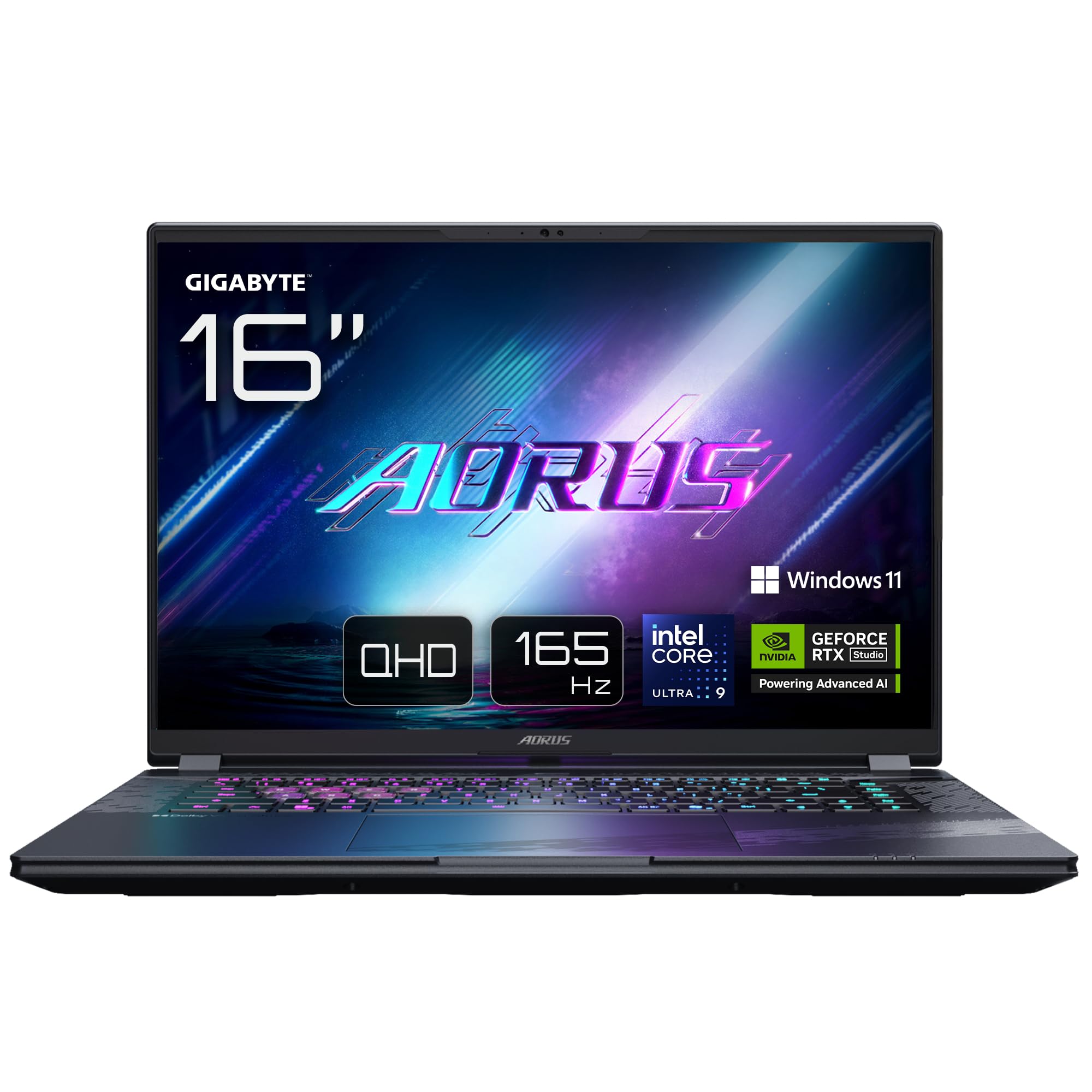
Image: The GIGABYTE AORUS Elite 16 BWH gaming laptop, showcasing its open display and keyboard.
2. ຕັ້ງຄ່າ
2.1 Unboxing ແລະ Initial Inspection
ເອົາຄອມພິວເຕີໂນດບຸກ ແລະ ອຸປະກອນເສີມທັງໝົດອອກຈາກການຫຸ້ມຫໍ່ຢ່າງລະມັດລະວັງ. ກວດສອບວ່າອຸປະກອນທັງໝົດທີ່ລະບຸໄວ້ໃນພາກ "ສິ່ງທີ່ຢູ່ໃນກ່ອງ" ແມ່ນມີຢູ່ ແລະ ບໍ່ເສຍຫາຍ.
- GIGABYTE AORUS ELITE 16 BWHC3FRC65SP Laptop
- ອະແດບເຕີສາຍໄຟ ແລະສາຍ
- ເອກະສານ (ຄູ່ມືນີ້, ໃບຮັບປະກັນ)
2.2 ການເຊື່ອມຕໍ່ພະລັງງານ
Connect the power adapter to the laptop's power input port and then plug the power cable into an electrical outlet. It is recommended to fully charge the battery before initial use.
2.3 ເປີດເຄື່ອງທຳອິດ
Press the power button to turn on the laptop. Follow the on-screen instructions to complete the Windows 11 Pro setup process, including language selection, network connection, and user account creation.
2.4 ການເຊື່ອມຕໍ່ອຸປະກອນຕໍ່ພ່ວງ ແລະ ເຄືອຂ່າຍ
The laptop features various ports for connecting external devices and networks.
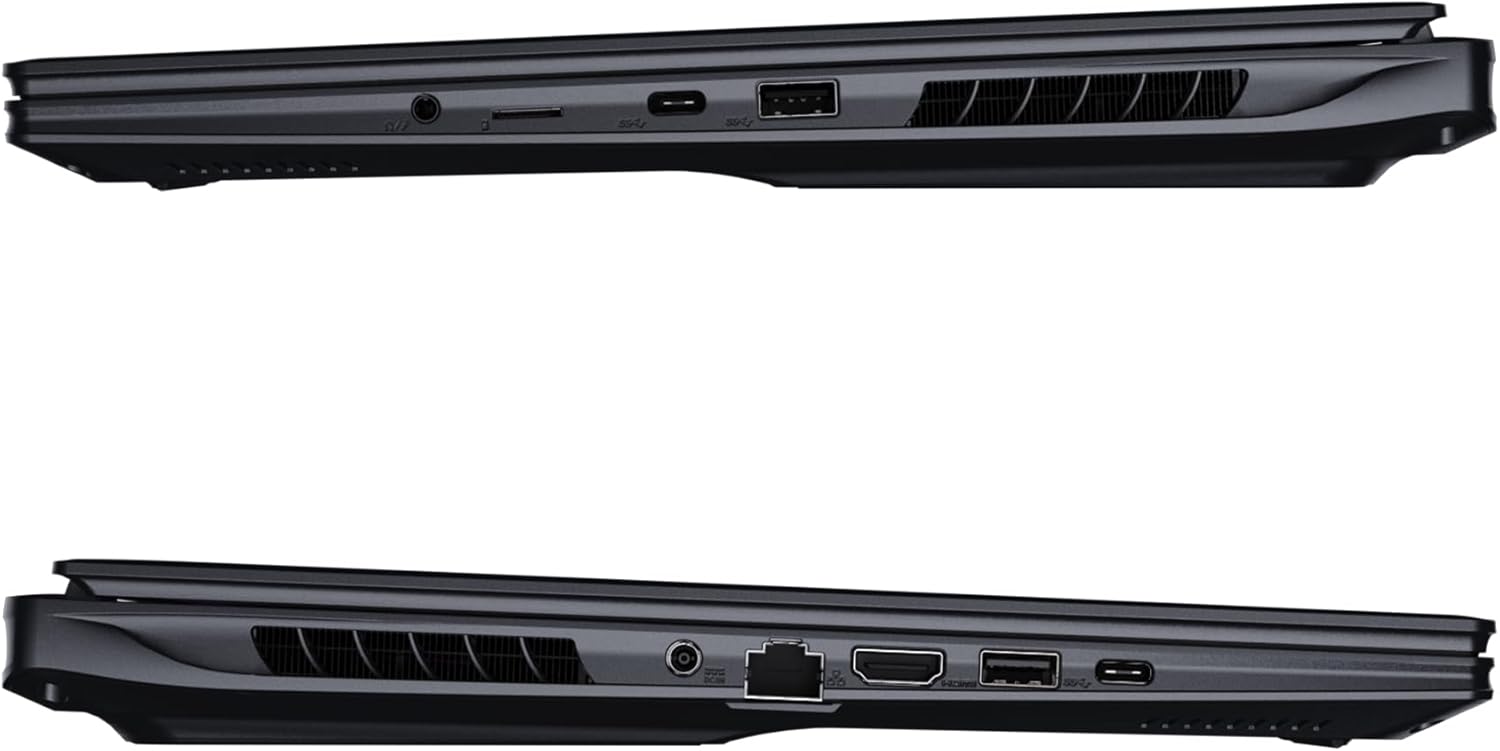
ຮູບພາບ: ຂ້າງ view of the laptop illustrating the available ports for connectivity.
- ພອດ USB: ເຊື່ອມຕໍ່ອຸປະກອນ USB ເຊັ່ນ: ເມົາສ໌, ແປ້ນພິມ ຫຼື ບ່ອນເກັບຂໍ້ມູນພາຍນອກ.
- HDMI Port: ເຊື່ອມຕໍ່ກັບຈໍສະແດງຜົນພາຍນອກ ຫຼື ໂທລະພາບ.
- Thunderbolt 4 Port: ສໍາລັບການໂອນຂໍ້ມູນຄວາມໄວສູງແລະການສະແດງຜົນອອກ.
- Port Ethernet: ສໍາລັບການເຊື່ອມຕໍ່ເຄືອຂ່າຍມີສາຍ.
- ຫູຟັງ Jack: ສໍາລັບສຽງອອກໄປຫາຫູຟັງຫຼືລໍາໂພງພາຍນອກ.
- Wi-Fi 7: Connect to wireless networks via the integrated Wi-Fi 7 module.
- Bluetooth 5.4: ຈັບຄູ່ກັບອຸປະກອນທີ່ເປີດໃຊ້ Bluetooth.
3. ການປະຕິບັດ Laptop ຂອງທ່ານ
3.1 ຄຸນສົມບັດການສະແດງ
Your AORUS Elite 16 BWH features a 16-inch WQXGA (2560x1600) IPS display with a 165Hz refresh rate and 16:10 aspect ratio, offering a wide viewing experience. It supports Dolby Vision for enhanced visual quality and is Pantone validated for color accuracy.

Image: The laptop's 16:10 aspect ratio display, highlighting its IPS panel and Pantone validation.
3.2 ແປ້ນພິມ ແລະ ແຜ່ນສໍາຜັດ
The laptop is equipped with a backlit keyboard for comfortable typing in various lighting conditions and a responsive touchpad for navigation.
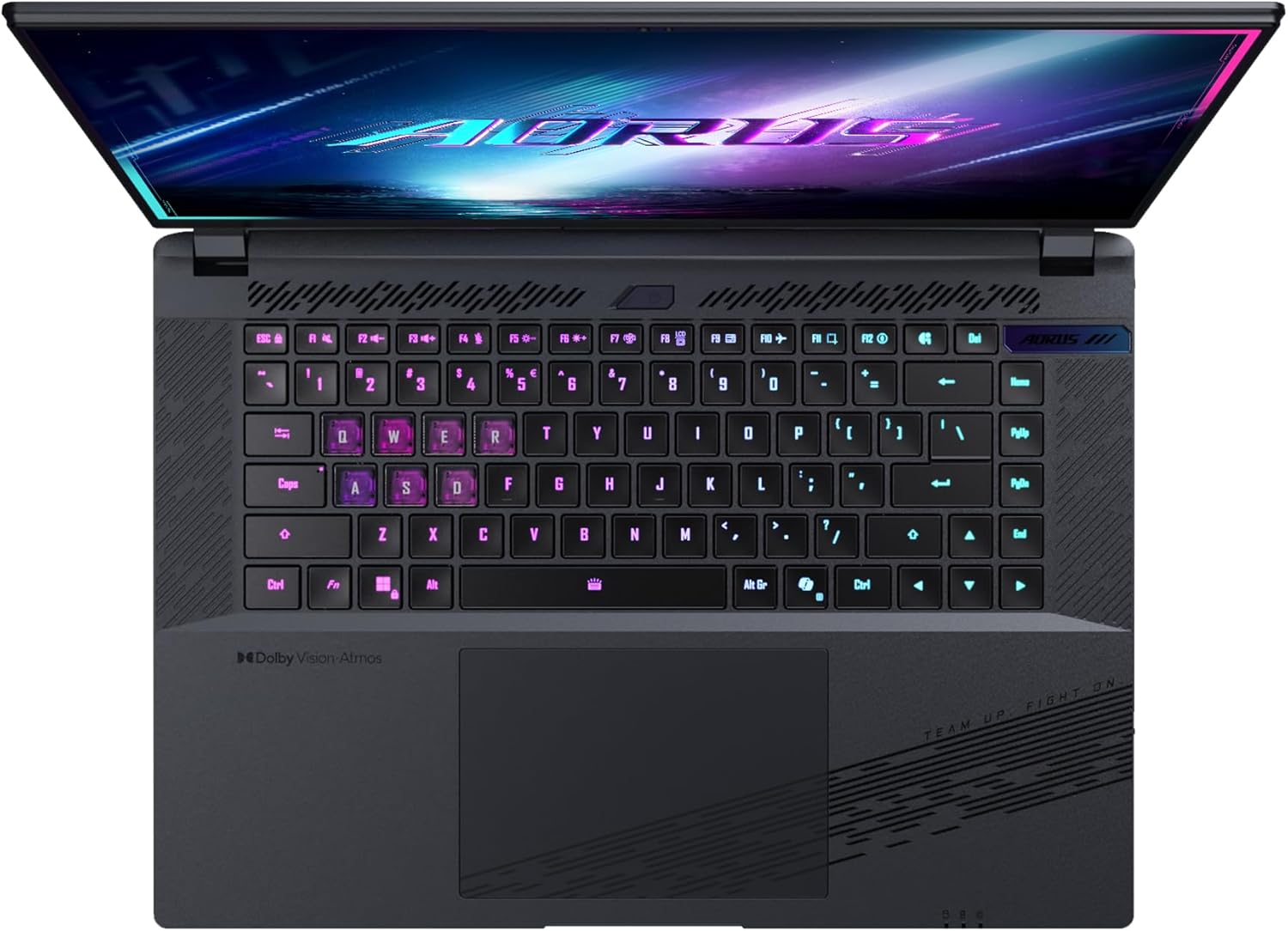
ຮູບພາບ: ເທິງລົງລຸ່ມ view ຂອງແປ້ນພິມຂອງຄອມພິວເຕີ, showcasing its backlit keys.
The keyboard also features a dedicated Copilot Key for quick access to AI functionalities in Windows 11.

Image: Close-up of the keyboard, highlighting the Copilot Key for AI features.
3.3 ລະບົບສຽງ
Experience immersive audio with Dolby Atmos support and integrated 2W speakers. The laptop also includes a built-in microphone for communication.

Image: Visual representation of Dolby Atmos and Dolby Vision audio and visual enhancements.
3.4 ຄຸນສົມບັດການປະຕິບັດ
The AORUS Elite 16 BWH is powered by an Intel Core Ultra 9 processor with an integrated NPU for AI acceleration and an NVIDIA GeForce RTX 5070 laptop GPU, ensuring high performance for gaming and demanding tasks. It also features Advanced Optimus with DDS Technology for optimized graphics performance.

ຮູບພາບ: A ລາຍລະອຽດ view of the Intel Core Ultra 9 processor chip.

ຮູບພາບ: A ລາຍລະອຽດ view of the NVIDIA GeForce RTX 50 Series laptop GPU chip.
3.5 GiMATE AI Agent
Utilize GiMATE, your personal AI agent, to optimize performance, manage smart cooling, enhance privacy, control power settings, and improve audio and voice functionalities.

Image: GiMATE AI Agent interface showing various optimization features.
4. ບໍາລຸງຮັກສາ
4.1 ລະບົບເຮັດຄວາມເຢັນ
The laptop features the WINDFORCE Infinity cooling system to maintain optimal temperatures during intensive use. Ensure the vents are clear of obstructions to allow proper airflow.

Image: Representation of the WINDFORCE Infinity cooling system.
4.2 ການທໍາຄວາມສະອາດ
ໃຊ້ຜ້າແພທີ່ອ່ອນນຸ່ມ, ບໍ່ມີສານດ່າງເພື່ອເຮັດຄວາມສະອາດຫນ້າຈໍແລະດ້ານນອກ. ສໍາລັບຮອຍແຂງ, ງampໃສ່ຜ້າເລັກນ້ອຍດ້ວຍນ້ໍາຫຼືການແກ້ໄຂເຮັດຄວາມສະອາດຫນ້າຈໍ. ຫຼີກເວັ້ນການສານເຄມີທີ່ຮຸນແຮງ.
4.3 ການດູແລຫມໍ້ໄຟ
To prolong battery life, avoid extreme temperatures and do not leave the laptop fully charged or fully discharged for extended periods.
4.4 ການປັບປຸງຊອບແວ
Regularly update your Windows operating system, drivers, and GIGABYTE software to ensure optimal performance and security.
5. ການແກ້ໄຂບັນຫາ
5.1 ບັນຫາພະລັງງານ
- ແລັບທັອບບໍ່ເປີດ: ໃຫ້ແນ່ໃຈວ່າອະແດບເຕີໄຟຟ້າໄດ້ເຊື່ອມຕໍ່ຢ່າງແໜ້ນໜາ ແລະ ປລັກສຽບຍັງໃຊ້ງານໄດ້. ກວດສອບລະດັບການສາກແບັດເຕີຣີ.
- ແບັດເຕີຣີບໍ່ສາກໄຟ: ກວດສອບວ່າອະແດບເຕີໄຟ ແລະ ສາຍໄຟບໍ່ເສຍຫາຍ. ລອງໃຊ້ປລັກສຽບອື່ນ.
5.2 ບັນຫາການສະແດງ
- ບໍ່ມີການສະແດງຜົນ: Connect an external monitor to check if the issue is with the laptop's screen. Ensure the laptop is powered on.
- ຈໍສະແດງຜົນກະພິບ ຫຼືບິດເບືອນ: ອັບເດດໄດຣເວີກຣາບຟິກ. ກວດສອບການເຊື່ອມຕໍ່ສາຍຈໍສະແດງຜົນຖ້າໃຊ້ຈໍພາບພາຍນອກ.
5.3 ບັນຫາການເຊື່ອມຕໍ່
- Wi-Fi ບໍ່ເຊື່ອມຕໍ່: ກວດເບິ່ງວ່າ Wi-Fi ຖືກເປີດໃຊ້ໃນການຕັ້ງຄ່າ Windows. ຣີສະຕາດເຣົາເຕີ ແລະແລັບທັອບຂອງທ່ານ.
- ອຸປະກອນ Bluetooth ບໍ່ໄດ້ຈັບຄູ່: ໃຫ້ແນ່ໃຈວ່າອຸປະກອນຢູ່ໃນໂໝດຈັບຄູ່ ແລະ ຢູ່ພາຍໃນຂອບເຂດ. ອັບເດດໄດຣເວີ Bluetooth.
5.4 ບັນຫາການປະຕິບັດທົ່ວໄປ
- ປະສິດທິພາບຊ້າ: Close unnecessary applications. Check for malware. Ensure sufficient free disk space.
- ຄວາມຮ້ອນເກີນ: ໃຫ້ແນ່ໃຈວ່າຊ່ອງລະບາຍຄວາມຮ້ອນໂລ່ງ. ໃຊ້ຄອມພິວເຕີໂນດບຸກເທິງພື້ນຜິວທີ່ແຂງແລະຮາບພຽງ.
For more complex issues, refer to the GIGABYTE support webເວັບໄຊ ຫຼືຕິດຕໍ່ບໍລິການລູກຄ້າ.
6. ຂໍ້ມູນຈໍາເພາະ
| ຄຸນສົມບັດ | ລາຍລະອຽດ |
|---|---|
| ຍີ່ຫໍ້ | GIGABYTE |
| ຊື່ຕົວແບບ | AORUS ELITE 16 BWHC3FRC65SP |
| ຂະໜາດໜ້າຈໍ | 16 ນິ້ວ |
| ສີ | ສີເທົາ |
| ຂະຫນາດຮາດດິດ | 2000 GB (2x 1TB SSD Gen4) |
| ຕົວແບບ CPU | Intel Core Ultra 9 275HX |
| ຂະໜາດ RAM ທີ່ຕິດຕັ້ງແລ້ວ | 32 GB DDR5 |
| ລະບົບປະຕິບັດການ | Windows 11 Pro |
| ຄຸນນະສົມບັດພິເສດ | Backlit Keyboard, Memory Card Slot |
| ລາຍລະອຽດບັດກາຟິກ | ອຸທິດຕົນ |
| Graphics Coprocessor | NVIDIA GeForce RTX 5070 |
| Hard Disk Technology | SSD |
| ນ້ໍາຫນັກລາຍການ | 2300 ກຣາມ |
| Webຄວາມສາມາດຂອງກ້ອງ | Yes (Frontal) |
| ຂະໜາດຂອງບັດກາຟິກ RAM | 8 GB GDDR6 |
| ຮອງຮັບ RAM ສູງສຸດ | 64 GB |
| ເນື້ອໃນພະລັງງານຫມໍ້ໄຟ | 99 Watt-hours (Lithium-polymer, 4 cells) |
| ການເຊື່ອມຕໍ່ | Bluetooth 5.4, Ethernet (10/1000 Mbit/s), HDMI (1 port), Thunderbolt 4 (1 port), USB 3.2 Gen 2 (2 ports), Wi-Fi 7 (802.11.be) |
| ຄວາມໄວປະມວນຜົນ | 2.7 GHz (Max 5.4 GHz) |
| ຈໍານວນຜູ້ປະມວນຜົນ | 24 |
| ຄວາມລະອຽດໜ້າຈໍ | 2560 x 1600 ພິກເຊວ (WQXGA) |
| ປະເພດການສະແດງ | IPS LCD |
| ຄຸນສົມບັດສຽງ | Dolby Atmos, 2x 2W Integrated Speakers, Integrated Microphone |
7. ຂໍ້ມູນການຮັບປະກັນ
Your GIGABYTE AORUS Elite 16 BWH laptop comes with a ຮັບປະກັນ 2 ປີຈໍາກັດ. This warranty covers manufacturing defects and hardware malfunctions under normal use. Please retain your proof of purchase for warranty claims. For detailed terms and conditions, refer to the warranty card included with your product or visit the official GIGABYTE webເວັບໄຊ.
8. ສະຫນັບສະຫນູນ
For technical assistance, driver downloads, and further product information, please visit the official GIGABYTE support webເວັບໄຊ. ທ່ານຍັງສາມາດຊອກຫາ FAQs ແລະກອງປະຊຸມຊຸມຊົນຢູ່ທີ່ນັ້ນ.
- GIGABYTE ຢ່າງເປັນທາງການ Webເວັບໄຊ: www.gigabyte.com
- ບໍລິການລູກຄ້າ: Refer to your regional GIGABYTE webເວັບໄຊທ for ສໍາລັບຂໍ້ມູນການຕິດຕໍ່ທ້ອງຖິ່ນ.