
1. ຄໍາແນະນໍາຄວາມປອດໄພທີ່ສໍາຄັນ
Please read this manual carefully before operating your Daitsu Alisios Premium APD09FX2 portable air conditioner. Keep it for future reference.
- ໃຫ້ແນ່ໃຈວ່າເຄື່ອງໄດ້ຖືກວາງຢູ່ເທິງພື້ນຜິວທີ່ຮາບພຽງ, ຫມັ້ນຄົງເພື່ອປ້ອງກັນການບິດ.
- ຫ້າມປິດທາງເຂົ້າຫຼືຊ່ອງອອກອາກາດ. ຮັກສາການເກັບກູ້ທີ່ພຽງພໍຮອບຫນ່ວຍສໍາລັບການໄຫຼຂອງອາກາດທີ່ເຫມາະສົມ.
- Always use a grounded power outlet. Do not use extension cords or adapters.
- ຫ້າມໃຊ້ອຸປະກອນທີ່ມີສາຍໄຟ ຫຼືປລັກສຽບເສຍຫາຍ.
- ຮັກສາເດັກນ້ອຍ ແລະສັດລ້ຽງຢູ່ຫ່າງຈາກໜ່ວຍບໍລິການໃນລະຫວ່າງການປະຕິບັດງານ.
- Before cleaning or maintenance, always unplug the unit from the power supply.
- If the unit has been tilted or laid on its side during transport, allow it to stand upright for at least 12-24 hours before plugging it in. This allows the refrigerant and oils to settle, preventing damage to the compressor.
- ເຄື່ອງໃຊ້ໄຟຟ້ານີ້ໃຊ້ສານເຮັດຄວາມເຢັນ R290, ເຊິ່ງໄວໄຟໄດ້. ໃຫ້ໃຊ້ດ້ວຍຄວາມລະມັດລະວັງ ແລະ ຮັບປະກັນການລະບາຍອາກາດທີ່ເໝາະສົມໃນລະຫວ່າງການຕິດຕັ້ງ ແລະ ການບຳລຸງຮັກສາ.
2. ຜະລິດຕະພັນເກີນview
The Daitsu Alisios Premium APD09FX2 is a versatile portable air conditioner designed for cooling, dehumidifying, and ventilation in rooms up to 22 m². It features Wi-Fi connectivity for smart control and a compact design for easy portability.
ອົງປະກອບຫຼັກ
- ໜ່ວຍຫຼັກ (ເຄື່ອງປັບອາກາດແບບພົກພາ)
- ທໍ່ລະບາຍອາກາດ
- Window Kit (Adjustable Panel)
- ການຄວບຄຸມໄລຍະໄກ
- ທໍ່ລະບາຍນໍ້າ
ຜະລິດຕະພັນ Views


3. ຕັ້ງຄ່າ
3.1 ການຫຸ້ມຫໍ່ແລະການຈັດວາງ
- ເອົາຫົວຫນ່ວຍແລະອຸປະກອນເສີມທັງຫມົດອອກຈາກການຫຸ້ມຫໍ່ຢ່າງລະມັດລະວັງ.
- Place the unit on a firm, level surface. The integrated wheels allow for easy movement.
- Ensure there is at least 30 cm of space around the unit for proper air circulation.
3.2 ການຕິດຕັ້ງທໍ່ລະບາຍອາກາດ ແລະຊຸດປ່ອງຢ້ຽມ
The exhaust hose is crucial for expelling hot air outside the room, ensuring efficient cooling.
- Attach the exhaust hose to the designated outlet on the back of the air conditioner.
- Assemble the adjustable window kit panels to fit your window opening.
- ໃສ່ຕົວປັບທໍ່ລະບາຍອາກາດເຂົ້າໄປໃນຊ່ອງເປີດຂອງຊຸດປ່ອງຢ້ຽມ.
- Secure the window kit in your window frame, ensuring a tight seal to prevent hot air from re-entering the room.


3.3 Drainage Hose Connection
For continuous dehumidification or in high humidity environments, connect the drainage hose for continuous water removal.
- Locate the drainage outlet on the back of the unit.
- Connect the provided drainage hose to this outlet.
- Direct the other end of the hose to a suitable drain or collection container.
3.4 Visual Guide: Product Features and Setup
4. ຄໍາແນະນໍາການດໍາເນີນງານ
4.1 ກະດານຄວບຄຸມ
The intuitive control panel on top of the unit allows direct access to all functions. The LED display shows the current temperature and selected settings.
4.2 ການຄວບຄຸມໄລຍະໄກ
Use the remote control for convenient operation from a distance. It allows you to adjust temperature, mode, fan speed, and timer settings.
4.3 ຮູບແບບການໃຊ້ງານ
- ໂໝດເຮັດຄວາມເຢັນ: Provides powerful cooling to maintain a comfortable room temperature.
- ໂໝດຫຼຸດຄວາມຊຸ່ມ: Reduces excess humidity in the air, improving air quality and comfort.
- ແບບພັດລົມ: Circulates air without cooling, providing a constant fresh breeze.
4.4 Smart Control (Wi-Fi)
The unit includes integrated Wi-Fi, allowing you to control it remotely via the Daitsu Connect application on your smartphone or tablet. Download the app to configure temperature, set the 24-hour timer, or select your preferred mode from anywhere.
4.5 ໜ້າທີ່ພິເສດ
- ໂມງຈັບເວລາ 24 ຊົ່ວໂມງ: ໂປຣແກມໜ່ວຍເພື່ອເປີດ ຫຼືປິດອັດຕະໂນມັດ.
- ຮູບແບບການນອນ: ປັບອຸນຫະພູມ ແລະ ຄວາມໄວພັດລົມເພື່ອການນອນຫຼັບທີ່ງຽບສະຫງົບ ແລະ ສະບາຍ.
- Auto Fan: Automatically adjusts fan speed based on ambient temperature for energy efficiency.
- swing ອັດຕະໂນມັດ: Ensures uniform air distribution throughout the room.

5. ບໍາລຸງຮັກສາ
ການບໍາລຸງຮັກສາເປັນປົກກະຕິຮັບປະກັນປະສິດທິພາບທີ່ດີທີ່ສຸດແລະອາຍຸຍືນຂອງເຄື່ອງປັບອາກາດຂອງທ່ານ.
5.1 ການທໍາຄວາມສະອາດເຄື່ອງກອງອາກາດ
- The unit features an easy-to-wash air filter.
- Periodically remove the air filter (located on the back or side of the unit).
- Clean it with warm water and a mild detergent. Rinse thoroughly and allow it to dry completely before reinserting.
5.2 ການລະບາຍນ້ໍາຂອງຖັງ
- The unit has an internal water tank that collects condensed water.
- When the tank is full, the unit will stop operating and an indicator light will illuminate.
- To drain, place a shallow pan or container under the drainage outlet.
- Remove the rubber stopper from the drainage outlet to allow water to flow out.
- Replace the stopper once the tank is empty.
5.3 ການເກັບຮັກສາ
- Before long-term storage, ensure the water tank is completely drained.
- Clean the air filter and allow the unit to dry for a few hours in fan-only mode.
- ເກັບຮັກສາເຄື່ອງໄວ້ໃນບ່ອນເຢັນ, ແຫ້ງ, ດີກວ່າຢູ່ໃນບັນຈຸພັນຕົ້ນສະບັບຂອງມັນ.
6. ການແກ້ໄຂບັນຫາ
ຖ້າຫາກທ່ານພົບບັນຫາກັບຫນ່ວຍບໍລິການຂອງທ່ານ, ເບິ່ງບັນຫາທົ່ວໄປດັ່ງຕໍ່ໄປນີ້ແລະການແກ້ໄຂ:
| ບັນຫາ | ສາເຫດທີ່ເປັນໄປໄດ້ | ການແກ້ໄຂ |
|---|---|---|
| ຫນ່ວຍບໍລິການບໍ່ເປີດ | No power supply; Water tank full | Check power connection; Empty water tank. |
| ຄວາມເຢັນບໍ່ພຽງພໍ | Blocked air filter; Room too large; Doors/windows open | Clean air filter; Ensure room size is within unit capacity; Close all doors/windows. |
| ສຽງດັງໃນລະຫວ່າງການປະຕິບັດງານ | ຫນ່ວຍງານບໍ່ຢູ່ໃນລະດັບ; ການຂັດຂວາງໃນພັດລົມ | ວາງເຄື່ອງໄວ້ເທິງໜ້າດິນທີ່ຮາບພຽງ; ກວດສອບ ແລະ ເອົາສິ່ງກີດຂວາງອອກ. |
| ນ້ໍາຮົ່ວ | Drainage hose not properly connected or blocked | Check drainage hose connection; Clear any blockages. |
7. ຂໍ້ມູນຈໍາເພາະ
Detailed technical information for the Daitsu Alisios Premium APD09FX2.
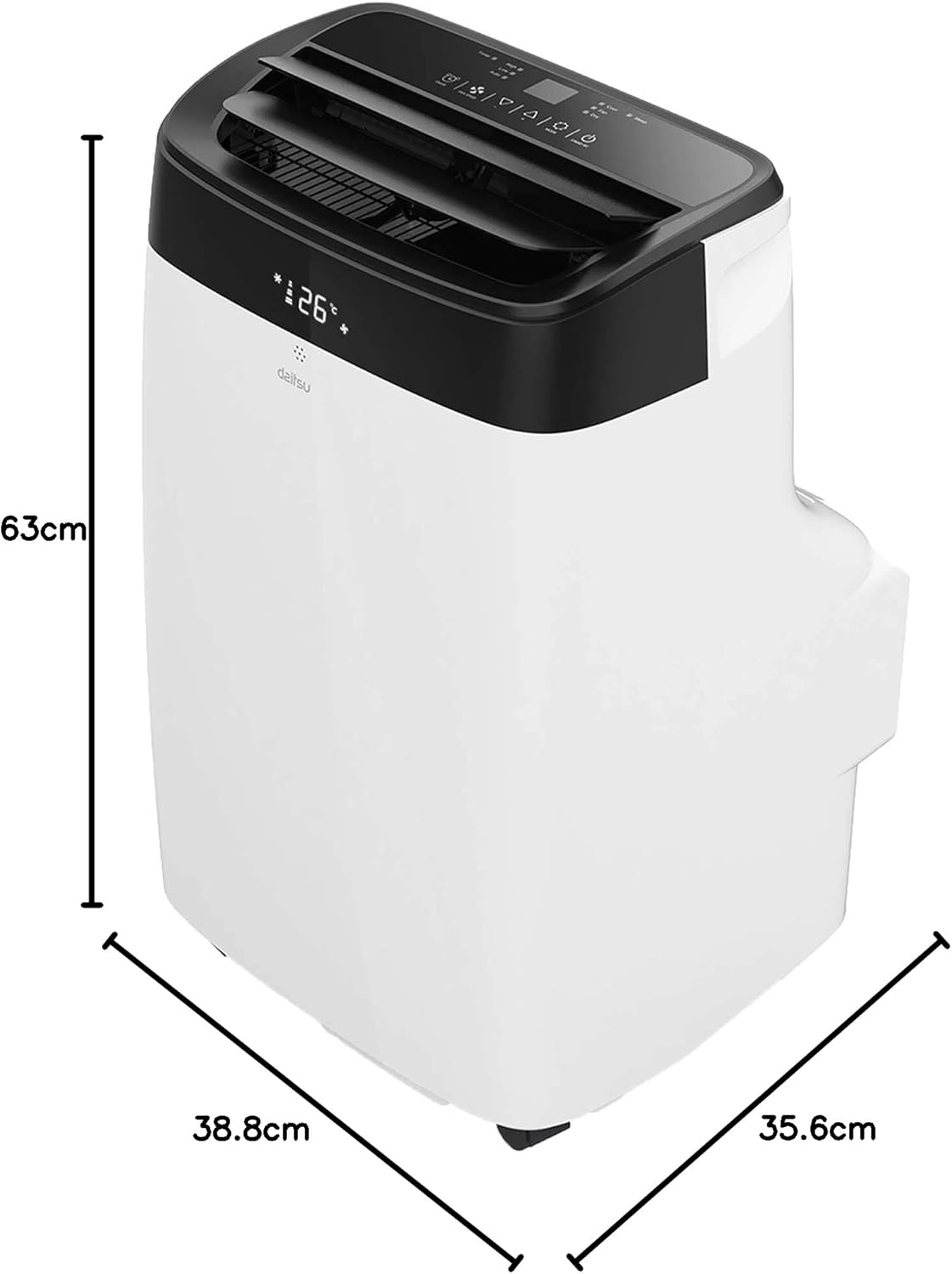
| ຄຸນສົມບັດ | ລາຍລະອຽດ |
|---|---|
| ໝາຍເລກຕົວແບບ | APD09FX2 |
| ຄວາມອາດສາມາດເຮັດຄວາມເຢັນ | 2.6 ກິໂລວັດ |
| ພື້ນທີ່ຄອບຄຸມ | ເຖິງ 22 m² |
| ຕູ້ເຢັນ | R-290 |
| ປະສິດທິພາບພະລັງງານ (SEER) | 3.5 |
| ລະດັບສຽງ | 53 Decibels |
| ຂະ ໜາດ (D x W x H) | 35.6 x 38.8 x 63 cm |
| ນ້ຳໜັກ | 25 ກິໂລກຣາມ |
| ການສະຫນອງພະລັງງານ | 230 Volts (Wired Electric) |
| ວິທີການຄວບຄຸມ | App, Remote Control, Touch |
| ຄຸນນະສົມບັດພິເສດ | Remote control, Dehumidifier, Silent mode, Wi-Fi enabled |
8. ການຮັບປະກັນແລະການສະຫນັບສະຫນູນ
The Daitsu Alisios Premium APD09FX2 comes with a two-year manufacturer's warranty.
- For warranty claims or technical support, please contact Daitsu customer service or your retailer.
- ຮັກສາຫຼັກຖານການຊື້ຂອງທ່ານສໍາລັບການຮັບປະກັນຄວາມຖືກຕ້ອງ.
- Refer to the full warranty terms and conditions provided in the separate warranty document.