
1. ບົດແນະນຳ
Thank you for choosing the Acekool 12000 BTUs Portable Air Conditioner. This appliance is designed to provide powerful cooling, efficient dehumidification, and effective air circulation through its fan function, creating a comfortable indoor environment. This manual provides detailed instructions for safe operation, installation, maintenance, and troubleshooting to ensure optimal performance and longevity of your unit. Please read this manual thoroughly before operating the appliance and retain it for future reference.
2. ຂໍ້ມູນຄວາມປອດໄພ
ເພື່ອປ້ອງກັນການບາດເຈັບຕໍ່ກັບຜູ້ໃຊ້ຫຼືຄົນອື່ນແລະຄວາມເສຍຫາຍດ້ານຊັບສິນ, ຕ້ອງປະຕິບັດຕາມຄໍາແນະນໍາຕໍ່ໄປນີ້. ການປະຕິບັດງານທີ່ບໍ່ຖືກຕ້ອງເນື່ອງຈາກການລະເລີຍຄໍາແນະນໍາອາດຈະເຮັດໃຫ້ເກີດອັນຕະລາຍຫຼືເສຍຫາຍໄດ້.
- Always operate the unit on a stable, flat surface.
- Do not block the air inlets or outlets. Maintain at least 20 cm (8 inches) clearance from walls or other objects.
- ໃຫ້ແນ່ໃຈວ່າການສະຫນອງພະລັງງານກົງກັບ voltage ລະບຸໄວ້ໃນປ້າຍການຈັດອັນດັບ.
- ຫ້າມໃຊ້ອຸປະກອນທີ່ມີສາຍໄຟ ຫຼືປລັກສຽບເສຍຫາຍ.
- ຖອດປລັກເຄື່ອງອອກກ່ອນທຳຄວາມສະອາດ ຫຼືໃຫ້ບໍລິການ.
- ຮັກສາເຄື່ອງໃຫ້ຫ່າງຈາກແຫຼ່ງຄວາມຮ້ອນ, ແສງແດດໂດຍກົງ, ແລະວັດຖຸທີ່ຕິດໄຟໄດ້.
- ເຄື່ອງໃຊ້ນີ້ບໍ່ໄດ້ມີຈຸດປະສົງເພື່ອໃຊ້ໂດຍບຸກຄົນ (ລວມທັງເດັກນ້ອຍ) ທີ່ມີຄວາມສາມາດທາງຮ່າງກາຍ, ຄວາມຮູ້ສຶກ ຫຼືຈິດໃຈທີ່ຫຼຸດລົງ, ຫຼືຂາດປະສົບການ ແລະຄວາມຮູ້, ເວັ້ນເສຍແຕ່ວ່າພວກເຂົາໄດ້ຮັບການຊີ້ນໍາ ຫຼືຄໍາແນະນໍາກ່ຽວກັບການນໍາໃຊ້ເຄື່ອງໃຊ້ໂດຍບຸກຄົນທີ່ຮັບຜິດຊອບຄວາມປອດໄພຂອງເຂົາເຈົ້າ.
- ຫ້າມໃຊ້ສານລະລາຍເຄມີ (ເຊັ່ນ: ເບນຊີນ, ເຫຼົ້າ, ນ້ຳມັນແອັດຊັງ) ເພື່ອທຳຄວາມສະອາດເຄື່ອງ.
3. ຜະລິດຕະພັນເກີນview
3.1. ສ່ວນປະກອບ
The Acekool Portable Air Conditioner comes with the main unit and several accessories for installation and operation.

ຮູບທີ 3.1: The Acekool Portable Air Conditioner unit shown with its included accessories, which consist of a remote control, exhaust hose, window slider kit, and a user manual.
- ເຄື່ອງປັບອາກາດແບບພົກພາ
- ການຄວບຄຸມໄລຍະໄກ
- ທໍ່ລະບາຍອາກາດ
- Window Slider Kit (includes slider bracket, inlet and outlet hoses, locking screws)
- ລະບາຍ Hose
- ຄູ່ມືຜູ້ໃຊ້
3.2. ກະດານຄວບຄຸມແລະການຄວບຄຸມໄລຍະໄກ
The unit can be operated via the LED display on top of the air conditioner or through the included remote control. Both offer intuitive access to all functions.
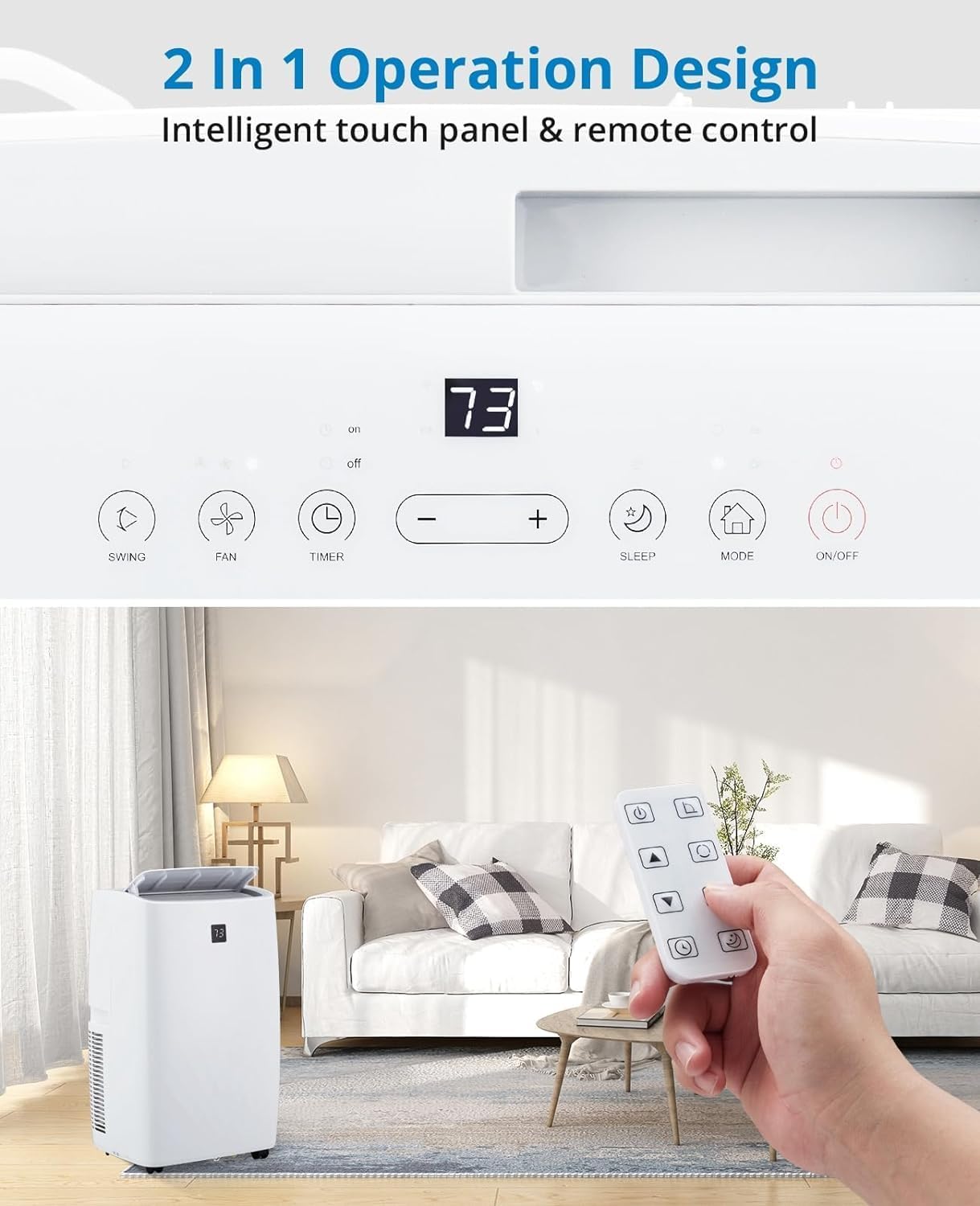
ຮູບທີ 3.2: ລາຍລະອຽດ view of the unit's intelligent touch control panel and the remote control. The control panel features buttons for Swing, Fan, Timer, Sleep, Mode, and On/Off, along with temperature adjustment buttons and a digital display.
ຫນ້າທີ່ສໍາຄັນປະກອບມີ:
- ປຸ່ມເປີດ/ປິດ: ເປີດ ຫຼື ປິດເຄື່ອງ.
- ປຸ່ມ MODE: ໝູນວຽນຜ່ານໂໝດເຄື່ອງເຮັດຄວາມເຢັນ, ເຄື່ອງຫຼຸດຄວາມຊຸ່ມ, ແລະພັດລົມ.
- +/- ປຸ່ມ: ປັບການຕັ້ງຄ່າອຸນຫະພູມ ຫຼື ໄລຍະເວລາຂອງໂມງຈັບເວລາ.
- ປຸ່ມພັດລົມ: ເລືອກຄວາມໄວພັດລົມ (ຕ່ຳ, ກາງ, ສູງ, ອັດຕະໂນມັດ).
- ປຸ່ມນອນ: ເປີດໃຊ້ໂໝດນອນຫຼັບເພື່ອການເຮັດວຽກທີ່ງຽບສະຫງົບ ແລະ ປະຫຍັດພະລັງງານ.
- ປຸ່ມໂມງຈັບເວລາ: ຕັ້ງໂມງຈັບເວລາເປີດ ຫຼືປິດອັດຕະໂນມັດ.
- ປຸ່ມ SWING: Controls the oscillation of the air outlet louvers.
4. ຕັ້ງຄ່າ
4.1. ການຫຸ້ມຫໍ່
Carefully remove the air conditioner and all accessories from the packaging. Inspect the unit for any shipping damage. Keep the original packaging for future storage or transport.
4.2. ຊຸດຕິດຕັ້ງປ່ອງຢ້ຽມ
The unit includes a window kit designed for easy installation in various window types, including double/single-hung windows and sliding sash windows. No screws or nails are typically required for standard installation.

ຮູບທີ 4.2: This image illustrates the compatibility of the window kit with double/single-hung windows and sliding sash windows, showing an adjustable range of 20.47 to 39.9 inches. The portable AC unit's dimensions are also provided: 17.2 inches (width), 13.1 inches (depth), and 27.7 inches (height).
4.3. ຂັ້ນຕອນການຕິດຕັ້ງ
- ການກະກຽມປ່ອງຢ້ຽມ: ເປີດປ່ອງຢ້ຽມໃຫ້ມີຄວາມກວ້າງທີ່ຕ້ອງການ.
- Assemble Window Slider Kit: Adjust the window slider bracket to fit your window opening. Secure the sections if necessary.
- ຄັດຕິດທໍ່ລະບາຍອາກາດ: Connect one end of the exhaust hose to the exhaust outlet on the back of the air conditioner unit.
- ເຊື່ອມຕໍ່ກັບຊຸດປ່ອງຢ້ຽມ: ແນບປາຍທໍ່ລະບາຍອາກາດໃສ່ກັບອະແດັບເຕີໃນຊຸດເລື່ອນປ່ອງຢ້ຽມ.
- ຕິດຕັ້ງຊຸດປ່ອງຢ້ຽມ: Place the assembled window kit into the window opening and close the window securely against it to seal.
- ຕໍາແຫນ່ງຫນ່ວຍງານ: Place the portable air conditioner unit near the window, ensuring the exhaust hose is not kinked or bent sharply.
- ປລັກອິນ: ສຽບສາຍໄຟໃສ່ບ່ອນສຽບໄຟຟ້າທີ່ມີດິນ.
5. ການເຮັດວຽກ
5.1. ເປີດ / ປິດພະລັງງານ
ກົດ ເປີດ/ປິດ ປຸ່ມເທິງແຜງຄວບຄຸມຫຼືການຄວບຄຸມໄລຍະໄກເພື່ອເປີດຫຼືປິດຫນ່ວຍບໍລິການ.
5.2. ຮູບແບບການເຮັດວຽກ
ກົດ ໂໝດ button to cycle through the available operating modes: Cool, Dry (Dehumidifier), and Fan.

ຮູບທີ 5.2: This image displays three portable AC units, each representing one of the three operational modes: Cooling (64°F-90°F), Dry (dehumidification up to 75 pints/day), and Fan (High, Low, Auto speeds). The visual emphasizes the unit's ability to make living spaces cool, clean, dry, and comfortable.
- ໂໝດເຮັດຄວາມເຢັນ: Provides powerful cooling for rooms up to 550 sq.ft. Use the +/- buttons to set the desired temperature (typically 64°F - 90°F). The compressor operation adjusts automatically based on the current temperature.
- ໂໝດເຄື່ອງດູດຄວາມຊຸ່ມ (ແຫ້ງ): Efficiently removes moisture from the air, with a capacity of up to 75 pints per day. This mode helps create a healthier and more comfortable indoor environment.
- ແບບພັດລົມ: Circulates air without cooling. Press the ແຟນAN button to select fan speed: High, Low, or Auto.
5.3. Smart Mode
In Smart Mode, the portable air conditioner automatically adjusts between cooling and fan modes based on the room temperature, optimizing comfort and energy efficiency.
5.4. ໂໝດນອນ
Sleep Mode maintains optimal temperatures at low fan speeds, reducing noise levels to as low as 48dB. This mode is designed to improve energy efficiency and minimize energy costs while providing a quiet and comfortable sleeping environment.

ຮູບທີ 5.4: This image highlights the quiet operation of the Acekool portable air conditioner in Sleep Mode, with noise levels as low as 48dB. It also shows features like a 24-hour smart timer, auto shut-off, and ultra-quiet operation, ideal for nighttime use.
5.5. ຟັງຊັນຈັບເວລາ
The 24-hour timer allows you to program the unit to automatically turn on or off at a specified time, enhancing convenience and energy savings.
5.6. ການປະຕິບັດການຄວບຄຸມໄລຍະໄກ
The remote control provides full functionality from a distance, allowing you to adjust settings without needing to approach the unit. Ensure batteries are correctly inserted.
6. ບໍາລຸງຮັກສາ
6.1. ການເຮັດຄວາມສະອາດການກັ່ນຕອງ
The unit is equipped with a removable and washable double-layer filter. Regular cleaning of the filter is essential to maintain air quality and unit efficiency. Clean the filter every two weeks or more frequently depending on usage and air quality.
- ຖອດເຄື່ອງປັບອາກາດອອກຈາກປລັກສຽບໄຟ.
- Locate and remove the filter from the back or side of the unit.
- ລ້າງການກັ່ນຕອງພາຍໃຕ້ນ້ໍາແລ່ນ (ອົບອຸ່ນ, ບໍ່ຮ້ອນ) ຫຼືໃຊ້ເຄື່ອງດູດຝຸ່ນເພື່ອເອົາຝຸ່ນ.
- ປ່ອຍໃຫ້ການກັ່ນຕອງອາກາດແຫ້ງຫມົດກ່ອນທີ່ຈະໃສ່ມັນເຂົ້າໄປໃນຫນ່ວຍບໍລິການ. ຫ້າມບໍ່ໃຫ້ຖືກແສງແດດໂດຍກົງ.
6.2. ການລະບາຍນ້ຳ
The Acekool portable air conditioner features a self-evaporation system, which significantly reduces the need for manual water drainage. Most condensed water is evaporated and expelled through the exhaust hose.

ຮູບທີ 6.2: ຮູບພາບນີ້ສະຫນອງການໃກ້ຊິດ view of the rear of the portable air conditioner, highlighting the self-evaporation system and the internal components that manage water drainage, effectively reducing the need for manual emptying.
In high humidity conditions, the internal water tank may fill up. If this occurs, the unit will stop operating and display an error code (refer to troubleshooting). Connect the provided drain hose to the drainage port and place the other end into a suitable container or floor drain to empty the water.
6.3. ການເກັບຮັກສາ
ເມື່ອເກັບຮັກສາຫນ່ວຍບໍລິການສໍາລັບໄລຍະເວລາຂະຫຍາຍ:
- ລະບາຍນ້ໍາທີ່ຍັງເຫຼືອອອກຈາກຫນ່ວຍ.
- ເຮັດຄວາມສະອາດເຄື່ອງກອງອາກາດ.
- ຖອດສາຍໄຟອອກ ແລະ ມ້ວນມັນໃຫ້ສະອາດ.
- Store the unit in a cool, dry place, preferably in its original packaging, away from direct sunlight and extreme temperatures.
7. ການແກ້ໄຂບັນຫາ
ກ່ອນທີ່ຈະຕິດຕໍ່ສະຫນັບສະຫນູນລູກຄ້າ, ກະລຸນາເບິ່ງຕາຕະລາງຕໍ່ໄປນີ້ສໍາລັບບັນຫາທົ່ວໄປແລະການແກ້ໄຂຂອງພວກເຂົາ.
| ບັນຫາ | ສາເຫດທີ່ເປັນໄປໄດ້ | ການແກ້ໄຂ |
|---|---|---|
| ຫນ່ວຍບໍລິການບໍ່ເປີດ. | No power supply; Power cord damaged; Water tank full. | Check power outlet and plug; Inspect power cord; Drain water tank. |
| ເຄື່ອງເຮັດຄວາມເຢັນບໍ່ພຽງພໍ. | Air filter clogged; Room too large; Doors/windows open; Exhaust hose blocked/leaking. | Clean air filter; Ensure room size is within capacity (550 sq.ft.); Close all openings; Check exhaust hose for kinks or leaks. |
| ໜ່ວຍມີສຽງດັງ. | ໜ່ວຍບໍ່ໄດ້ຢູ່ເທິງໜ້າດິນທີ່ຮາບພຽງ; ຄວາມໄວພັດລົມສູງເກີນໄປ. | Place unit on a flat, stable surface; Reduce fan speed. |
| ນໍ້າຮົ່ວ. | Drain plug not properly sealed; Unit tilted. | Ensure drain plug is securely closed; Place unit on a level surface. |
| ການຄວບຄຸມໄລຍະໄກບໍ່ເຮັດວຽກ. | ແບັດເຕີຣີໝົດ ຫຼື ໃສ່ບໍ່ຖືກຕ້ອງ; ມີສິ່ງກີດຂວາງລະຫວ່າງຣີໂໝດ ແລະ ເຄື່ອງ. | ປ່ຽນແບັດເຕີຣີ; ໃຫ້ແນ່ໃຈວ່າສາຍສັນຍານຂອງເຄື່ອງສາມາດເບິ່ງເຫັນໄດ້ຢ່າງຊັດເຈນ. |
8. ຂໍ້ມູນຈໍາເພາະ
Detailed technical specifications for the Acekool 12000 BTUs Portable Air Conditioner.
| ຄຸນສົມບັດ | ຂໍ້ມູນຈໍາເພາະ |
|---|---|
| ຍີ່ຫໍ້ | Acekool |
| ຊື່ຕົວແບບ | FDP35-3034R3 |
| ພະລັງງານຄວາມເຢັນ | 12000 BTUs |
| ພື້ນທີ່ຄອບຄຸມ | ເຖິງ 550 sq.ft. |
| ຟັງຊັນ | ຄວາມເຢັນ, ເຄື່ອງດູດຄວາມຊຸ່ມຊື່ນ, ພັດລົມ |
| ຄວາມອາດສາມາດ Dehumidification | 60 Pints (approx. 7.5 gallons) |
| ລະດັບສຽງ | 51 dB (ຕໍ່າສຸດ 48dB ໃນໂໝດນອນ) |
| ສະບັບtage | 115V |
| ວັດtage | 1200 ວັດ |
| ນ້ໍາຫນັກລາຍການ | 76.8 ປອນ |
| ຂະໜາດສິນຄ້າ (ກວ້າງ x ຍາວ x ສູງ) | 18.5 x 15.35 x 35.24 ນິ້ວ |
| ອົງປະກອບລວມ | Remote Control, Window Kit, Exhaust Hose, Drain Hose |
| ຄຸນນະສົມບັດພິເສດ | Fast Cooling, Smart/Sleep Mode, 24H Timer, Self-Evaporation |
9. ການຮັບປະກັນແລະການສະຫນັບສະຫນູນ
For warranty information and customer support, please refer to the warranty card included with your product or visit the official Acekool website. If you encounter any issues not covered in this manual, please contact Acekool customer service for assistance. Please have your model number (FDP35-3034R3) and purchase details ready when contacting support.