
1. ບົດແນະນຳ
This manual provides instructions for the safe and efficient use of your Brother CP2160F Computerized Sewing Machine. Please read this manual thoroughly before operating the machine to ensure proper function and to prevent damage or injury. Keep this manual in a safe place for future reference.
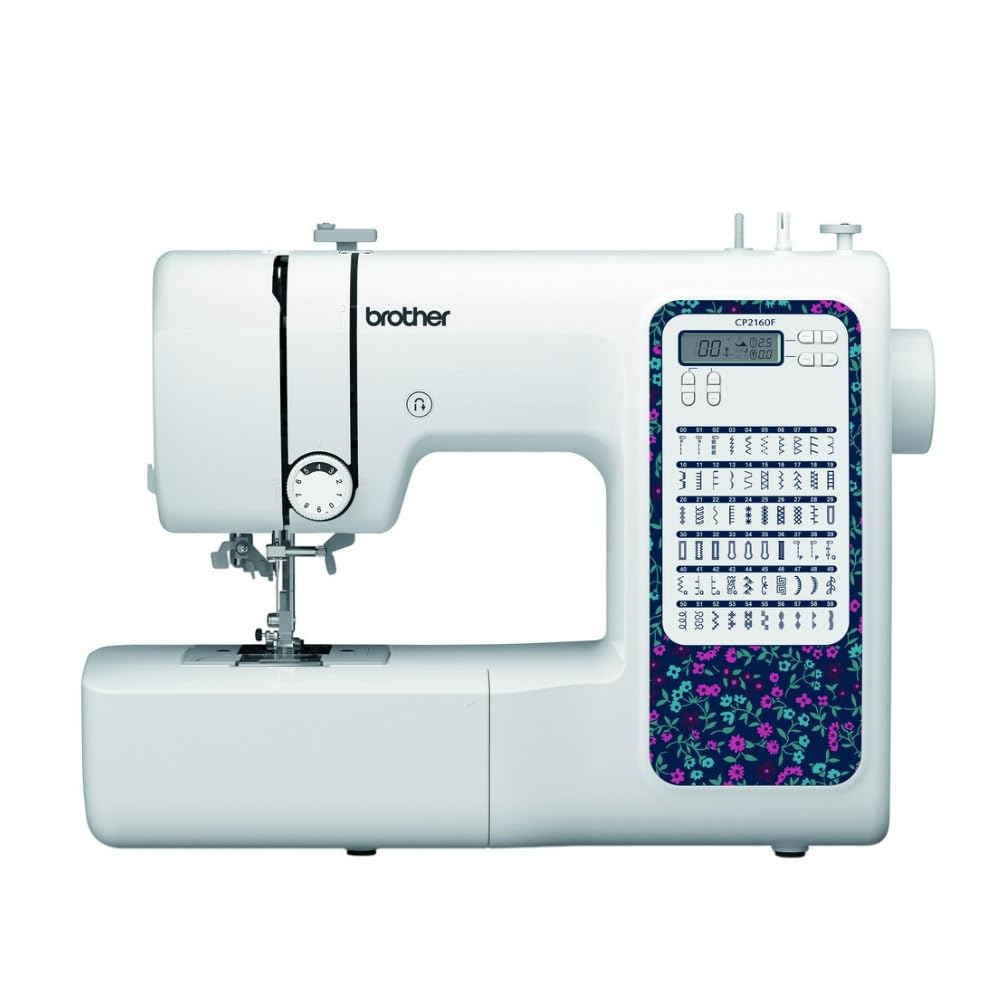
Figure 1: Brother CP2160F Computerized Sewing Machine. This image shows the overall view of the sewing machine, highlighting its compact design and the LCD screen for stitch selection.
2. ຄໍາແນະນໍາຄວາມປອດໄພທີ່ສໍາຄັນ
ເມື່ອໃຊ້ເຄື່ອງໃຊ້ໄຟຟ້າ, ຄວນລະວັງຄວາມປອດໄພຂັ້ນພື້ນຖານສະເໝີ, ລວມທັງສິ່ງຕໍ່ໄປນີ້:
- ອ່ານຄໍາແນະນໍາທັງຫມົດກ່ອນທີ່ຈະໃຊ້ເຄື່ອງຫຍິບນີ້.
- ເອົານິ້ວມືຫ່າງຈາກທຸກໆສ່ວນທີ່ເຄື່ອນຍ້າຍ. ຕ້ອງມີການດູແລພິເສດຮອບເຂັມຂັດຂອງເຄື່ອງຫຍິບ.
- ໃຊ້ແຜ່ນເຂັມທີ່ຖືກຕ້ອງສະເໝີ. ແຜ່ນທີ່ບໍ່ຖືກຕ້ອງສາມາດເຮັດໃຫ້ເຂັມແຕກ.
- ປິດເຄື່ອງຈັກຫຍິບເມື່ອເຮັດການປັບແຕ່ງໃດໆໃນບໍລິເວນເຂັມ, ເຊັ່ນ: ການສອດເຂັມ, ການປ່ຽນເຂັມ, ການສອດກະບອກເຂັມ, ຫຼື ການປ່ຽນຕີນກົດ.
- ຖອດເຄື່ອງຫຍິບອອກຈາກປ່ຽງໄຟຟ້າທຸກເທື່ອເມື່ອຖອດຝາປິດ, ນໍ້າມັນຫຼໍ່ຫຼອມ, ຫຼືເມື່ອມີການປັບປ່ຽນການບໍລິການຜູ້ໃຊ້ອື່ນໆທີ່ໄດ້ກ່າວໄວ້ໃນຄູ່ມືຄໍາແນະນໍາ.
- ຫ້າມຖິ້ມ ຫຼືໃສ່ວັດຖຸໃດນຶ່ງໃສ່ບ່ອນເປີດໃດໆ.
- ຢ່າໃຊ້ນອກ.
- ຢ່າປະຕິບັດບ່ອນທີ່ຜະລິດຕະພັນ aerosol (ສີດ) ຖືກໃຊ້ຫຼືບ່ອນທີ່ອົກຊີຖືກປະຕິບັດ.
- ເພື່ອຕັດການເຊື່ອມຕໍ່, ຫັນການຄວບຄຸມທັງຫມົດໄປຫາຕໍາແຫນ່ງປິດ, ຫຼັງຈາກນັ້ນເອົາສຽບອອກຈາກເຕົ້າສຽບ.
3. ເນື້ອໃນຊຸດ
ກວດສອບວ່າອົງປະກອບທັງໝົດມີຢູ່ໃນຊຸດ:
- Brother CP2160F Computerized Sewing Machine
- ສາຍໄຟ
- ຜູ້ຄວບຄຸມຕີນ
- Accessory Bag (containing bobbins, needle set, twin needle, screwdriver, spool caps, extra spool pin, seam ripper, cleaning brush)
- 7 Sewing Feet: Buttonhole foot, Zipper foot, Blind stitch foot, Button sewing foot, Overcasting foot, Monogramming foot, Zigzag foot (on machine)
- ຄູ່ມືແນະ ນຳ (ເອກະສານນີ້)
4. ຕັ້ງຄ່າ
4.1 ການເຊື່ອມຕໍ່ພະລັງງານ
- ວາງເຄື່ອງຢູ່ເທິງພື້ນທີ່ຮາບພຽງທີ່ຫມັ້ນຄົງ.
- Insert the machine plug into the jack on the right side of the machine.
- Insert the power supply plug into a standard electrical outlet.
- Turn on the main power switch, located on the right side of the machine. The LCD screen will illuminate.
4.2 ການມ້ວນດ້າມ
- ວາງ spool ຂອງ thread ສຸດ pin spool ໄດ້.
- Guide the thread through the upper thread guide and around the pre-tension disc.
- Place an empty bobbin onto the bobbin winder shaft and push it to the right.
- Wrap the thread clockwise around the bobbin a few times.
- Press the foot controller (or Start/Stop button) to begin winding. The machine will stop automatically when the bobbin is full.
- Cut the thread, push the bobbin winder shaft to the left, and remove the wound bobbin.
4.3 Threading the Machine (Upper Thread)
- ຍົກເຄື່ອງຍົກຕີນຂອງນັກກົດຂື້ນ.
- ວາງ spool ຂອງ thread ສຸດ pin spool ໄດ້.
- ນຳພາດ້າຍຜ່ານຄູ່ມືດ້າຍດ້ານເທິງ.
- Follow the numbered threading path indicated on the machine, ensuring the thread passes through the tension discs and takes up lever.
- Use the advanced needle threading system: Lower the presser foot, lower the needle, then push down the needle threader lever to engage it. Guide the thread through the hook and release the lever.
- Pull the thread loop through the needle eye.
4.4 ການຕິດຕັ້ງເຂັມ
- ປິດໄຟເຄື່ອງ.
- ພວນເຂັມ clamp ສະກູໂດຍການໝຸນມັນທວນກັບເຂັມໂມງ.
- ເອົາເຂັມເກົ່າອອກ.
- Insert the new needle with the flat side facing the back of the machine, pushing it up as far as it will go.
- Tighten ເຂັມ clamp screw ຢ່າງປອດໄພ.
5. ການດໍາເນີນງານ
5.1 ການເລືອກຮອຍຕໍ່
The CP2160F features 60 built-in stitches. Use the stitch selector buttons (usually '+' and '-') to navigate through the stitch patterns displayed on the LCD screen. The recommended stitch length and width will be displayed automatically, but can be adjusted if desired.
5.2 Automatic Buttonholes
This machine includes 7 auto-size buttonhole styles. Attach the buttonhole foot. Place the button you wish to match into the buttonhole foot's holder. Select the desired buttonhole stitch. The machine will automatically sew a buttonhole to the correct size.
5.3 Free-Arm Sewing
To convert to free-arm sewing, slide off the accessory box located at the front of the machine. This exposes the free arm, ideal for sewing cylindrical items like cuffs, sleeves, and pant hems.
5.4 ການຫຍິບຜ້າໜາ
The CP2160F's robust feed system and fixed needle bar are designed to handle thick materials such as denim and tweed. Ensure you use the correct needle type and size for the fabric thickness to prevent needle breakage and ensure smooth feeding.
5.5 Using Included Sewing Feet
The machine comes with seven specialized sewing feet. Refer to the specific stitch instructions for which foot to use. To change a presser foot:
- ຍົກເຂັມແລະຕີນກົດດັນ.
- Press the black lever at the back of the presser foot holder to release the current foot.
- Align the new foot with the pin on the presser foot holder and lower the presser foot lever until it snaps into place.
6. ບໍາລຸງຮັກສາ
6.1 ການທໍາຄວາມສະອາດເຄື່ອງຈັກ
Regular cleaning helps maintain optimal performance. Always unplug the machine before cleaning.
- ໃຫ້ອາຫານໝາ: Remove the needle plate and use the cleaning brush to remove lint and dust from the feed dogs and bobbin area.
- Hook Race: Carefully remove the bobbin case and clean the hook race area with the brush.
- ພາຍນອກ: Wipe the exterior surfaces with a soft, dry cloth. Do not use liquid cleaners or harsh chemicals.
Note: This machine does not require user lubrication.
7. ການແກ້ໄຂບັນຫາ
ກ່ອນທີ່ຈະຕິດຕໍ່ສະຫນັບສະຫນູນລູກຄ້າ, review ບັນຫາທົ່ວໄປເຫຼົ່ານີ້ ແລະ ວິທີແກ້ໄຂຂອງພວກມັນ:
| ບັນຫາ | ສາເຫດທີ່ເປັນໄປໄດ້ | ການແກ້ໄຂ |
|---|---|---|
| ເຂັມຂັດ | Incorrect needle size/type for fabric; bent needle; needle not fully inserted; pulling fabric while sewing. | Use correct needle; replace bent needle; re-insert needle correctly; guide fabric gently. |
| ຂ້າມຮອຍຕໍ່ໄປແລ້ວ | Needle bent or dull; incorrect needle insertion; improper threading; wrong needle for fabric. | Replace needle; re-insert needle; re-thread machine; use appropriate needle. |
| Thread jams | Improper threading; lint in bobbin case; bobbin wound unevenly. | Re-thread machine; clean bobbin area; re-wind bobbin evenly. |
| ເຄື່ອງບໍ່ເປີດ | Power cord not connected; power switch off; electrical outlet issue. | Check power cord connections; ensure switch is ON; test outlet with another appliance. |
8. ຂໍ້ມູນຈໍາເພາະ
- ຕົວແບບ: Brother CP2160F
- Stitch Count: 60 ເຂັມຂັດໃນຕົວ
- ຮູປຸ່ມ: 7 One-step auto-size buttonholes
- ເຄື່ອງຕອກເຂັມ: Advanced Needle Threading System
- ຈໍສະແດງຜົນ: ຈໍ LCD
- Sewing Area: Free-arm capability
- ລະບົບອາຫານ: Exceptional feed for thick fabrics
- Included Feet: 7 (Buttonhole, Zipper, Blind Stitch, Button Sewing, Overcasting, Monogramming, Zigzag)
- ສີ: ສີຂາວ
- ວັດສະດຸ: ໂລຫະ, ພາດສະຕິກ
- ຂະໜາດສິນຄ້າ (D x W x H): 6.65" x 12.2" x 16.26"
- ນ້ໍາຫນັກລາຍການ: 226 ອໍ (ປະມານ 14.1 ປອນ)
- ແຫຼ່ງພະລັງງານ: ໄຟຟ້າສາຍ
- UPC: 196271536956
9. ການຊ່ວຍເຫຼືອລູກຄ້າແລະການຮັບປະກັນ
For technical assistance, warranty information, or service inquiries, please contact Brother customer support. Refer to the official Brother webເວັບໄຊທ໌ ຫຼື ເອກະສານທີ່ມາພ້ອມກັບການຊື້ຂອງທ່ານ ສຳລັບລາຍລະອຽດການຕິດຕໍ່ລ່າສຸດ ແລະ ເງື່ອນໄຂການຮັບປະກັນ.
ສະຫນັບສະຫນູນອອນໄລນ໌: www.brother-usa.com/support
Note: Warranty terms may vary by region and retailer. Keep your proof of purchase for warranty claims.