
1. ບົດແນະນຳ
This manual provides essential information for the safe and efficient use of your Philips B4000 Soundbar. Please read these instructions carefully before using the product and retain them for future reference. The Philips B4000 Soundbar is designed to enhance your television's audio experience with clear 2.0 channel sound and versatile connectivity options.

Image: The Philips B4000 Soundbar, its remote control, and a television displaying colorful content, illustrating the product in use.
2. ເນື້ອໃນຊຸດ
ກວດສອບວ່າລາຍການທັງຫມົດແມ່ນມີຢູ່ໃນຊຸດຂອງທ່ານ:
- Philips B4000 Soundbar
- ການຄວບຄຸມໄລຍະໄກ
- 2 x ຫມໍ້ໄຟ AAA (ສໍາລັບການຄວບຄຸມໄລຍະໄກ)
- ວົງເລັບຕິດຝາ
- ຄູ່ມືເລີ່ມຕົ້ນດ່ວນ
- ບັດຮັບປະກັນ
3. ຜະລິດຕະພັນເກີນview
The Philips B4000 Soundbar features a compact design with integrated speakers and various input options for seamless integration with your home entertainment system.

Image: The Philips B4000 Soundbar positioned below a television in a living room, emphasizing its 2.0 channel audio, 60W maximum output power, and dual full-range speakers.
4. ການຕິດຕັ້ງແລະການຕິດຕັ້ງ
4.1 ຕົວເລືອກການຈັດວາງ
The soundbar offers flexible placement to suit your setup:
- ຕຳແໜ່ງໂທລະທັດ: Place the soundbar on a flat surface directly in front of your TV. Ensure it does not obstruct the TV's remote sensor.
- ຕົວຍຶດຕິດWallາ: Use the included wall mount brackets to attach the soundbar to the wall below your TV. Refer to the Quick Start Guide for detailed wall mounting instructions.
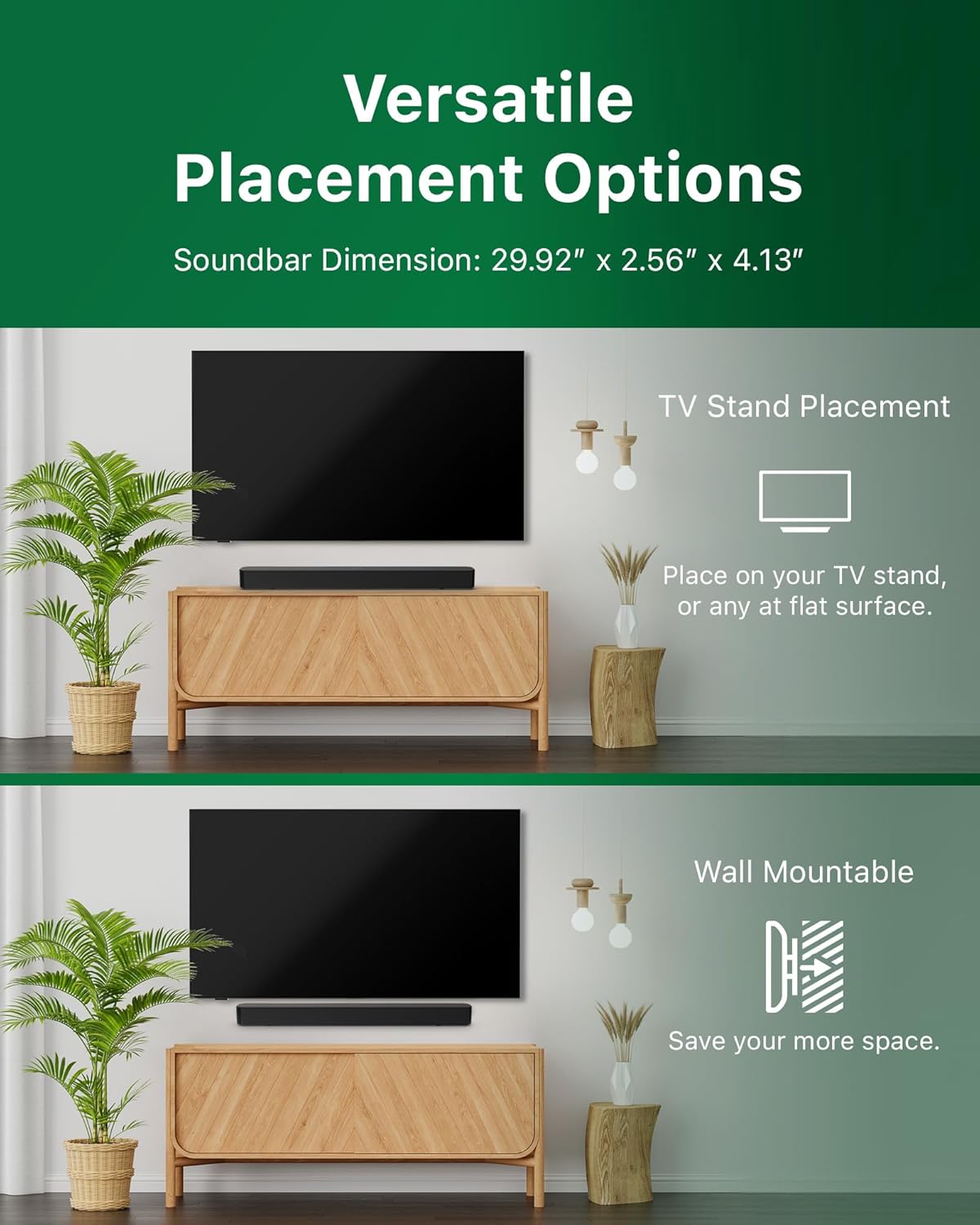
Image: Illustrations demonstrating the two primary placement methods for the soundbar: resting on a TV stand and securely mounted on a wall.
4.2 ການເຊື່ອມຕໍ່ກັບໂທລະພາບຂອງທ່ານ
The soundbar supports multiple connection types:
- HDMI ARC (ແນະນໍາ): Connect an HDMI cable (not included) from the HDMI ARC port on your TV to the HDMI ARC port on the soundbar. This allows for audio return and control via your TV remote.
- Bluetooth: For wireless audio streaming, pair your soundbar with a Bluetooth-enabled device.
- USB: Connect a USB device for audio playback.
- DC ໃນ: Connect the power adapter to the DC IN port.

Image: A visual representation of the soundbar's available audio input ports, including HDMI (ARC), USB, Bluetooth, and DC IN for power.
4.3 Roku TV Ready Setup
The Philips B4000 Soundbar is Roku TV Ready certified, simplifying setup and control when paired with a Roku TV.
- Connect the soundbar to your Roku TV via HDMI ARC.
- Your Roku TV should automatically detect and configure the soundbar.
- Use your Roku TV remote to control the soundbar's power and volume.

Image: The Philips B4000 Soundbar seamlessly integrated with a television, illustrating its 'Roku TV Ready' certification for simplified setup and control.
4.4 ຕັ້ງຄ່າຄວບຄຸມໄລຍະໄກ
Insert the two included AAA batteries into the remote control, ensuring correct polarity.
5. ການດໍາເນີນງານ
5.1 ເປີດ/ປິດ
ກົດປຸ່ມເປີດ/ປິດຢູ່ເທິງແຖບສຽງ ຫຼື ຣີໂໝດຄວບຄຸມເພື່ອເປີດ ຫຼື ປິດເຄື່ອງ.
5.2 ການຄັດເລືອກການປ້ອນຂໍ້ມູນ
Press the 'Source' button on the remote control to cycle through available input sources (HDMI ARC, Bluetooth, USB).
5.3 ການຄວບຄຸມປະລິມານ
Use the 'Volume Up' and 'Volume Down' buttons on the remote control to adjust the audio level. If connected via HDMI ARC to a Roku TV, your TV remote may also control the volume.
5.4 ການຈັບຄູ່ Bluetooth
- Press the 'Bluetooth' button on the remote control to enter Bluetooth pairing mode. The indicator light on the soundbar will flash.
- On your mobile device, search for Bluetooth devices and select 'Philips B4000'.
- ເມື່ອຈັບຄູ່ແລ້ວ, ໄຟຕົວຊີ້ວັດຈະກາຍເປັນແຂງ, ແລະທ່ານສາມາດຖ່າຍທອດສຽງແບບໄຮ້ສາຍໄດ້.
5.5 ໂໝດສຽງ ແລະ ຕົວປັບສຽງ
The soundbar may offer various sound modes or equalizer settings to optimize audio for different content types (e.g., Movie, Music, News). Use the remote control to access and adjust these settings. While specific equalizer details are not extensively documented, experimentation with available settings is encouraged to find your preferred audio profile.

Image: The Philips soundbar remote control in the foreground, with a television screen in the background displaying the EasyLink 2.0 menu for adjusting sound styles, including Bass, Treble, and Custom Equalize options.
6. ບໍາລຸງຮັກສາ
ເພື່ອຮັບປະກັນອາຍຸຍືນ ແລະປະສິດທິພາບທີ່ດີທີ່ສຸດຂອງແຖບສຽງຂອງທ່ານ, ປະຕິບັດຕາມຄໍາແນະນໍາການບໍາລຸງຮັກເຫຼົ່ານີ້:
- ທໍາຄວາມສະອາດ: Use a soft, dry cloth to clean the surface of the soundbar. Do not use liquid cleaners or abrasive materials, as they may damage the finish.
- ການລະບາຍອາກາດ: Ensure the soundbar's ventilation openings are not blocked. Proper airflow prevents overheating.
- ການເກັບຮັກສາ: ຖ້າເກັບຮັກສາແຖບສຽງໄວ້ເປັນເວລາດົນ, ໃຫ້ຖອດມັນອອກຈາກສາຍໄຟ ແລະເກັບໄວ້ໃນບ່ອນທີ່ເຢັນ, ແຫ້ງ.
7. ການແກ້ໄຂບັນຫາ
If you encounter issues with your Philips B4000 Soundbar, refer to the following common problems and solutions:
| ບັນຫາ | ສາເຫດທີ່ເປັນໄປໄດ້ | ການແກ້ໄຂ |
|---|---|---|
| ບໍ່ມີສຽງຈາກແຖບສຽງ |
|
|
| ສຽງຄົງທີ່ ຫຼື ສຽງບິດເບືອນ |
|
|
| ບັນຫາການຈັບຄູ່ Bluetooth |
|
|
| ການຄວບຄຸມໄລຍະໄກບໍ່ເຮັດວຽກ |
|
|
8. ຂໍ້ມູນຈໍາເພາະ
| ຄຸນສົມບັດ | ລາຍລະອຽດ |
|---|---|
| ຊື່ຕົວແບບ | TAB4000/37 |
| ປະເພດລຳໂພງ | ແຖບສຽງ |
| ການຕັ້ງຄ່າຊ່ອງສຽງອ້ອມຮອບ | 2.0 |
| ລຳໂພງກຳລັງຜົນຜະລິດສູງສຸດ | 60 ວັດ |
| ເຕັກໂນໂລຊີການເຊື່ອມຕໍ່ | Bluetooth (5.4), HDMI ARC, USB |
| ຄຸນນະສົມບັດພິເສດ | Advanced Bluetooth 5.4 Connectivity, Bass Boost, Roku TV Ready™ Certification, Wall mountable |
| ຂະໜາດສິນຄ້າ | 4.1"D x 30"W x 2.56"H |
| ນ້ໍາຫນັກລາຍການ | 4.89 ປອນ (2.22 ກິໂລກຣາມ) |
| ແຫຼ່ງພະລັງງານ | Battery Powered (for remote), AC Power (for soundbar) |
| ການປ້ອນຂໍ້ມູນ Voltage | 120 ໂວນ |
| ອົງປະກອບລວມ | Battery, Quick Start Guide, Remote, Wall Mount Bracket, Warranty Card |
9. ການຮັບປະກັນແລະການສະຫນັບສະຫນູນ
9.1 ຂໍ້ມູນການຮັບປະກັນ
The Philips B4000 Soundbar comes with a Limited Warranty. Please refer to the included Warranty Card for specific terms, conditions, and duration of coverage. Retain your proof of purchase for warranty claims.
9.2 ສະຫນັບສະຫນູນລູກຄ້າ
ສຳລັບການຊ່ວຍເຫຼືອເພີ່ມເຕີມ, ການສະໜັບສະໜູນດ້ານເຕັກນິກ, ຫຼື ການສອບຖາມກ່ຽວກັບການບໍລິການ, ກະລຸນາເຂົ້າເບິ່ງທີ່ຝ່າຍສະໜັບສະໜູນຢ່າງເປັນທາງການຂອງ Philips webເວັບໄຊ ຫຼືຕິດຕໍ່ບໍລິການລູກຄ້າຂອງເຂົາເຈົ້າ. ໂດຍທົ່ວໄປແລ້ວລາຍລະອຽດການຕິດຕໍ່ສາມາດພົບໄດ້ໃນ Philips webເວັບໄຊ ຫຼືໃນຄູ່ມືເລີ່ມຕົ້ນດ່ວນ.