
1. ບົດແນະນຳ
The Marstek Venus-E is an advanced 5.12 kWh AC-coupled all-in-one energy storage system designed for balcony power plants. This system allows for efficient storage and utilization of solar energy, optimizing self-consumption and providing backup power. This manual provides essential information for the safe and effective installation, operation, and maintenance of your Venus-E unit.
2. ຂໍ້ມູນຄວາມປອດໄພ
Please read all safety instructions carefully before installation and operation. Failure to follow these instructions may result in electric shock, fire, serious injury, or property damage.
- ຄວາມປອດໄພທາງໄຟຟ້າ: Ensure all connections are secure and correctly wired. Do not attempt to open or modify the unit. Only qualified personnel should perform electrical work.
- ການຈັດວາງ: Install the unit in a well-ventilated area, away from flammable materials, direct sunlight, and extreme temperatures. Ensure the unit is stable and cannot be easily knocked over.
- ການເປີດເຜີຍນ້ໍາ: Although the unit is IP65 rated for water resistance, avoid submerging it or exposing it to high-pressure water jets. Ensure all covers and seals are properly closed.
- ເດັກນ້ອຍແລະສັດລ້ຽງ: Keep the unit out of reach of children and pets to prevent accidental injury or damage.
- ສຸກເສີນ: In case of fire, use a CO2 or dry chemical extinguisher. Do not use water. In case of electric shock, immediately disconnect power if safe to do so and seek medical attention.
3. ຜະລິດຕະພັນເກີນview
3.1. ຄຸນນະສົມບັດທີ່ສໍາຄັນ
- 5.12 kWh Capacity: High-capacity energy storage for extended use.
- AC-Coupled System: Seamless integration with existing AC grids and balcony power plants.
- ສຽບ ແລະ ຫຼິ້ນ: Simplified installation for quick setup.
- ແບັດເຕີຣີ LiFePO4: Utilizes exceptionally safe and durable Lithium Iron Phosphate battery technology with 6000+ cycle life.
- Island Operation (Backup): Provides up to 2500W of power for essential loads during grid outages.
- Smart Meter Integration: Supports anti-feed-in protection and optimizes 100% self-consumption.
- ການຄວບຄຸມແອັບ: Dual Bluetooth and WiFi modules for real-time data monitoring and remote control via the Marstek App.
- ການອອກແບບທີ່ເຂັ້ມແຂງ: IP65 waterproof rating and operational in ultra-low temperatures down to -20°C.
- Universal PV Compatibility: Compatible with various photovoltaic (PV) systems.
3.2. ສ່ວນປະກອບຕ່າງໆ (ສິ່ງທີ່ຢູ່ໃນກ່ອງ)
The Marstek Venus-E system typically includes the following:
- Marstek Venus-E Main Unit (referred to as Navi 2000 x 1)
- ສາຍໄຟ
- ຄູ່ມືຜູ້ໃຊ້ (ເອກະສານນີ້)
- Additional accessories may vary by package.

Figure 3.2.1: Marstek Venus-E 5kW High-Performance Plug and Play Storage connected to a wall socket, illustrating its AC-coupled nature and ease of connection.
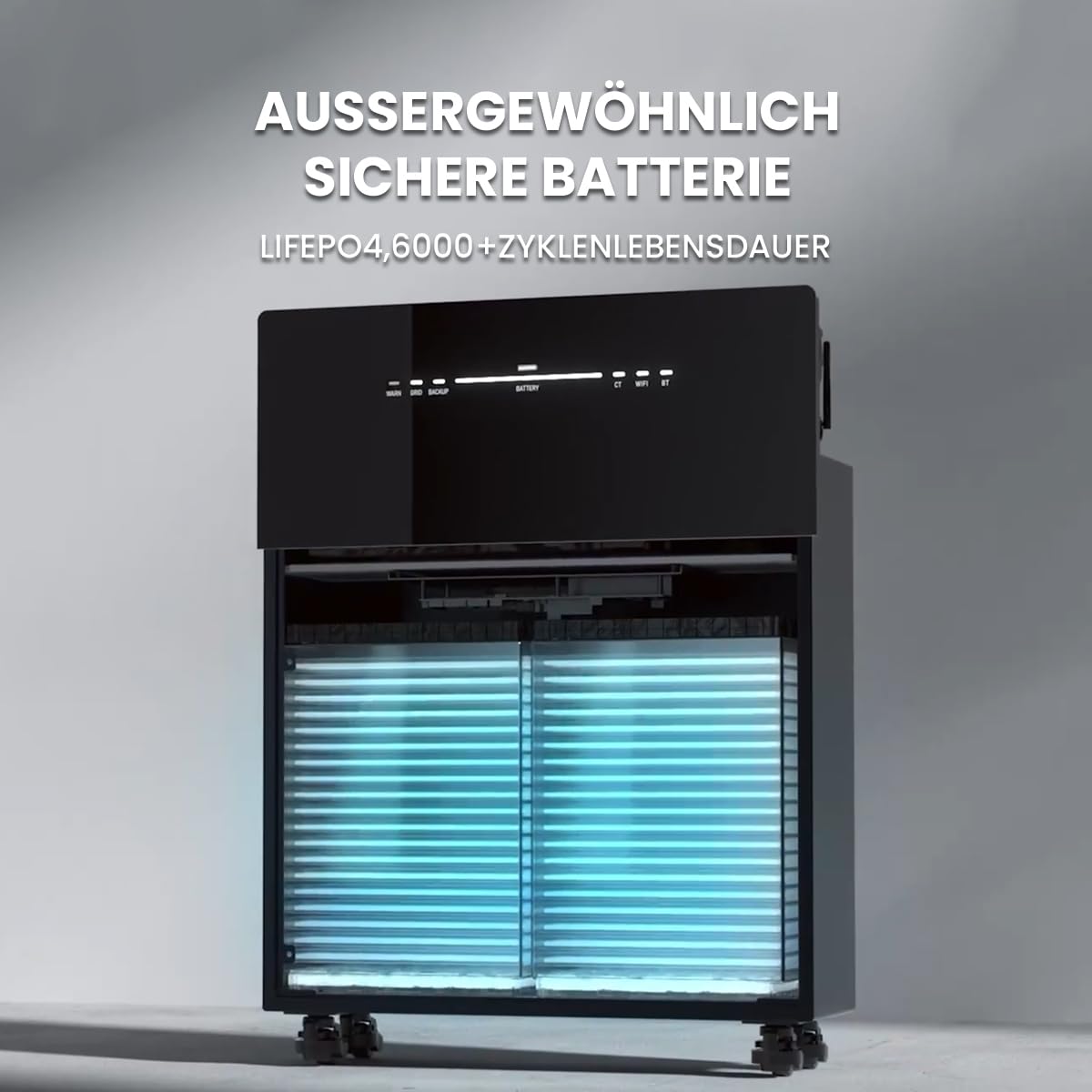
ຮູບທີ 3.2.2: ພາຍໃນ view of the Marstek Venus-E, highlighting its LiFePO4 battery cells, designed for exceptional safety and a long cycle life of over 6000 cycles.
4. ຕັ້ງຄ່າ
4.1. ການຫຸ້ມຫໍ່ແລະການກວດກາ
- Carefully unpack the Marstek Venus-E unit and all accessories.
- Inspect the unit for any signs of damage during transit. If damage is found, contact your supplier immediately.
- ໃຫ້ແນ່ໃຈວ່າອົງປະກອບທັງຫມົດທີ່ລະບຸໄວ້ໃນພາກ 3.2 ມີຢູ່.
4.2. ບັນຈຸເຂົ້າຮຽນ
- Choose a location that is dry, well-ventilated, and protected from direct sunlight.
- Ensure the ambient temperature is within the operating range specified in Section 7.
- The unit is IP65 waterproof, allowing for outdoor installation, but protection from extreme weather conditions is recommended for longevity.
- Place the unit on a flat, stable surface. The unit is equipped with wheels for easier positioning.

Figure 4.2.1: The Marstek Venus-E is designed for operation in ultra-low temperatures down to -20°C and features an IP65 waterproof rating, making it suitable for various environmental conditions.
4.3. ການເຊື່ອມຕໍ່ໄຟຟ້າ
- Connect the Marstek Venus-E to a standard AC wall outlet using the provided power cable. This establishes the AC-coupled connection to your home grid.
- For optimal energy management and anti-feed-in protection, integrate a compatible smart meter (e.g., Shelly) into your main electrical distribution panel. Follow the smart meter's installation instructions for proper wiring.
- Ensure your balcony PV system is connected according to its manufacturer's instructions. The Venus-E is compatible with various PV systems.

Figure 4.3.1: The Marstek Venus-E demonstrates compatibility with various photovoltaic (PV) systems, allowing flexible integration into existing solar setups.

Figure 4.3.2: Illustration of the Marstek Venus-E system with smart meter integration, enabling anti-feed-in protection and optimizing for 100% self-consumption within the household.
5. ຄໍາແນະນໍາການດໍາເນີນງານ
5.1. ເປີດ / ປິດພະລັງງານ
- ເປີດ: Locate the power button on the unit and press it to turn on the system. Status indicators will illuminate.
- ປິດພະລັງງານ: Press and hold the power button until the unit powers down.
5.2. Marstek App Control
The Marstek App provides real-time monitoring and remote control capabilities for your Venus-E system. It connects via dual Bluetooth and WiFi modules.
- Download the Marstek App from your device's app store.
- Register an account and follow the in-app instructions to connect your Venus-E unit via Bluetooth or WiFi.
- Once connected, you can monitor battery status, power flow, and configure operating modes.

Figure 5.2.1: The Marstek App interface, offering easy control and real-time data monitoring for the Venus-E system via dual Bluetooth and WiFi modules. It includes modes like 'Electricity Trading Mode', 'Self-Adaptation Mode', and 'Manual Mode'.
5.3. ຮູບແບບການເຮັດວຽກ
The Marstek App allows you to select various operating modes to optimize energy usage:
- Electricity Trading Mode (Stromhandel Modus): Optimizes charging and discharging based on dynamic electricity tariffs to maximize savings.
- Self-Adaptation Mode (Selbstanpassung Modus): The system intelligently learns your energy consumption patterns and solar generation to automatically optimize self-consumption.
- Manual Mode (Manueller Modus): Allows you to manually set charging and discharging schedules and parameters.

Figure 5.3.1: This graph illustrates how the AC-coupled energy storage system can achieve greater savings by adapting to dynamic electricity tariffs, optimizing charge and discharge cycles based on price fluctuations.
5.4. Island Operation / Backup Mode
ໃນກໍລະນີຂອງຕາຂ່າຍໄຟຟ້າ outage, the Venus-E can automatically switch to island operation, providing up to 2500W of backup power for essential household loads.
- Ensure critical appliances are connected to circuits supported by the backup function.
- The system will automatically detect a grid failure and provide power from the stored energy.
- Monitor the remaining battery capacity via the Marstek App during backup operation.
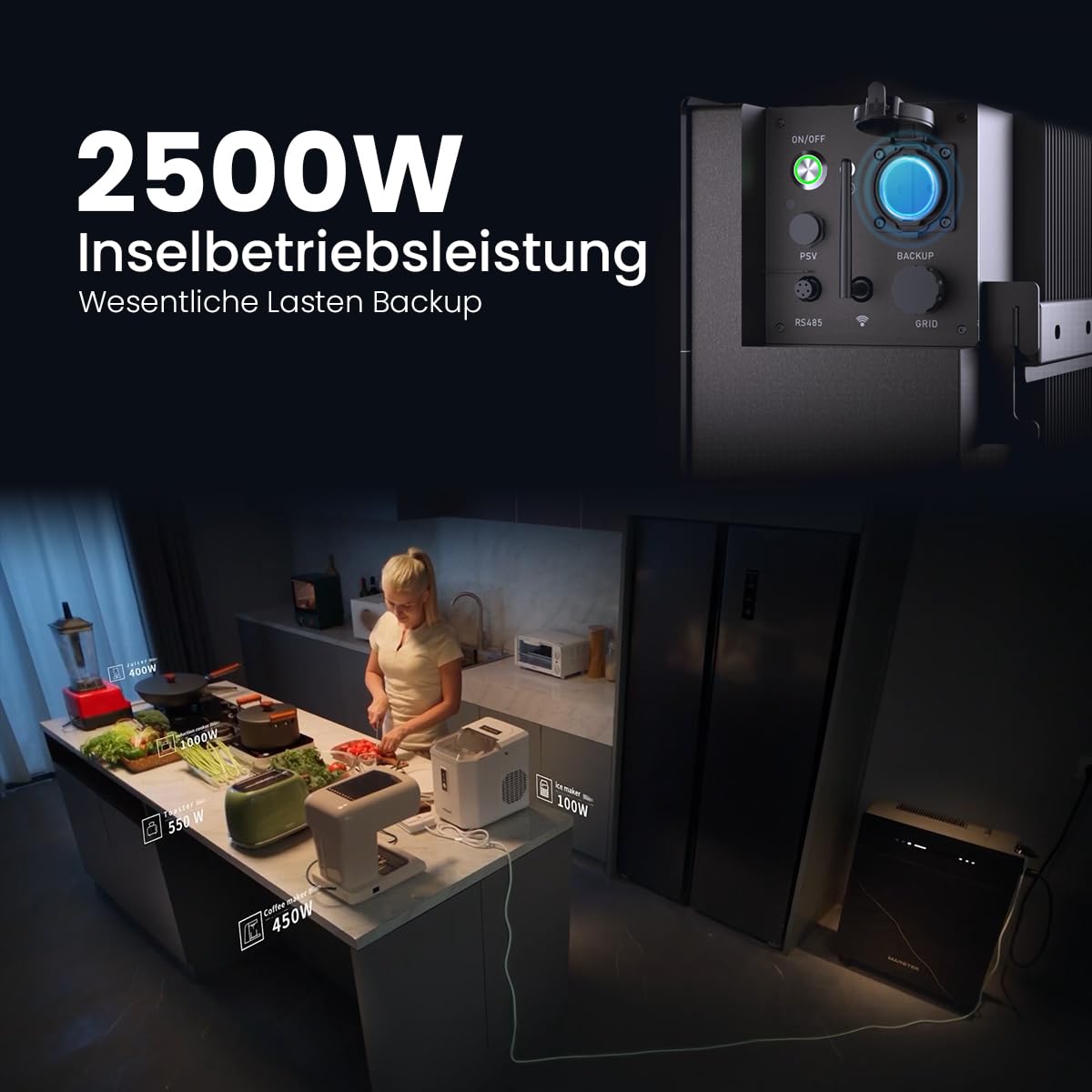
Figure 5.4.1: The Marstek Venus-E providing 2500W of power in island operation mode, demonstrating its capability to serve as a backup power source for essential household loads during grid interruptions.
6. ບໍາລຸງຮັກສາ
Regular maintenance ensures the longevity and optimal performance of your Marstek Venus-E system.
- ທໍາຄວາມສະອາດ: ທຳຄວາມສະອາດດ້ານນອກຂອງຕົວເຄື່ອງເປັນໄລຍະດ້ວຍຜ້າອ່ອນໆແລະແຫ້ງ. ຢ່າໃຊ້ນໍ້າຢາທຳຄວາມສະອາດທີ່ມີສີຂັດ ຫຼື ຕົວລະລາຍ. ຮັບປະກັນວ່າຊ່ອງລະບາຍອາກາດບໍ່ມີຝຸ່ນ ແລະ ສິ່ງເສດເຫຼືອ.
- ການອັບເດດເຟີມແວ: Check the Marstek App regularly for available firmware updates. Install updates to ensure your system has the latest features and performance enhancements.
- ກວດສອບການເຊື່ອມຕໍ່: ກວດກາສາຍເຊື່ອມຕໍ່ໄຟຟ້າທັງໝົດເປັນໄລຍະເພື່ອເບິ່ງຄວາມແໜ້ນໜາ ແລະ ຮ່ອງຮອຍຂອງການສວມໃສ່ ຫຼື ການກັດກ່ອນ.
- ເງື່ອນໄຂສິ່ງແວດລ້ອມ: Ensure the unit remains within its specified operating temperature range and is not exposed to excessive moisture or heat.
7. ການແກ້ໄຂບັນຫາ
If you encounter issues with your Marstek Venus-E, refer to the following common troubleshooting steps:
| ບັນຫາ | ສາເຫດທີ່ເປັນໄປໄດ້ | ການແກ້ໄຂ |
|---|---|---|
| ຫນ່ວຍບໍລິການບໍ່ເປີດ. | ບໍ່ມີແຫຼ່ງຈ່າຍໄຟ; ປຸ່ມເປີດປິດບໍ່ໄດ້ກົດຢ່າງຖືກຕ້ອງ. | Check AC power cable connection. Ensure the power button is pressed firmly. |
| No power output in backup mode. | Battery depleted; Overload; Incorrect wiring. | Check battery level via app. Reduce connected load. Verify backup circuit wiring. |
| App cannot connect to the unit. | Bluetooth/WiFi off; Unit too far; Network issues. | Ensure Bluetooth/WiFi is enabled on unit and phone. Move closer to the unit. Check home WiFi network. Restart unit and app. |
| Solar energy not being stored. | PV system not generating; Incorrect settings; Full battery. | Check PV system operation. Verify operating mode in the app. Battery may be at 100% charge. |
ຖ້າບັນຫາຍັງຄົງຢູ່ຫຼັງຈາກພະຍາຍາມແກ້ໄຂເຫຼົ່ານີ້, ກະລຸນາຕິດຕໍ່ຝ່າຍຊ່ວຍເຫຼືອລູກຄ້າ.
8. ຂໍ້ມູນຈໍາເພາະ
| ຄຸນສົມບັດ | ລາຍລະອຽດ |
|---|---|
| ຊື່ຕົວແບບ | Venus-E |
| ຜູ້ຜະລິດ | Powerness |
| ເລກທີ່ອ້າງອີງ / ລຸ້ນ | 1 |
| ຄວາມອາດສາມາດຫມໍ້ໄຟ | 5.12 kWh |
| ປະເພດຫມໍ້ໄຟ | LiFePO4 (Lithium Iron Phosphate) |
| ວົງຈອນຊີວິດ | 6000+ ຮອບວຽນ |
| ປະເພດລະບົບ | AC-Coupled, All-in-One |
| Island Operation Power | 2500W |
| ການເຊື່ອມຕໍ່ | Dual Bluetooth, WiFi |
| ການຈັດອັນດັບການປົກປ້ອງຂາເຂົ້າ (IP). | IP65 (ກັນນ້ຳ) |
| ອຸນຫະພູມປະຕິບັດການ | Down to -20°C (Ultra-low temperature operation) |
| ຊິ້ນສ່ວນລວມ | Navi 2000 x 1 (Main Unit) |
| ການມີອາໄຫຼ່ | ບໍ່ມີຂໍ້ມູນ |
9. ການຮັບປະກັນແລະການສະຫນັບສະຫນູນ
9.1. ຂໍ້ມູນການຮັບປະກັນ
The Marstek Venus-E comes with a manufacturer's warranty. Please refer to the warranty card included with your product or visit the official Powerness webເວັບໄຊສໍາລັບຂໍ້ກໍານົດແລະເງື່ອນໄຂລະອຽດ. ຮັກສາຫຼັກຖານການຊື້ຂອງທ່ານສໍາລັບການຮ້ອງຂໍການຮັບປະກັນ.
9.2. ການຊ່ວຍເຫຼືອລູກຄ້າ
For technical assistance, troubleshooting beyond this manual, or warranty inquiries, please contact Powerness customer support:
- Webເວັບໄຊ: ຢ້ຽມຢາມ Powerness Brand Store ສໍາລັບຂໍ້ມູນຕິດຕໍ່ແລະ FAQs.
- ອີເມວ: ອ້າງເຖິງການຫຸ້ມຫໍ່ຜະລິດຕະພັນຫຼືຢ່າງເປັນທາງການ webເວັບໄຊທ໌ສໍາລັບທີ່ຢູ່ອີເມລ໌ສະຫນັບສະຫນູນ.
- ໂທລະສັບ: ອ້າງເຖິງການຫຸ້ມຫໍ່ຜະລິດຕະພັນຫຼືຢ່າງເປັນທາງການ website for the support phone number.
When contacting support, please have your product model (Venus-E) and ASIN (B0F444MXGP) ready.