
ແນະນຳ
Thank you for choosing the Citizen Vagary Smartwatch X04A-002VY. This device combines modern technology with a stylish design, offering a range of features to enhance your daily life. This manual provides essential information for setting up, operating, and maintaining your smartwatch to ensure optimal performance and longevity.
The Vagary men's Smart Watch features a 51 mm black ABS case, a 1.5-inch TFT-LCD digital screen with various view options, and a blue silicone strap with a pin buckle. It is designed for durability with IP68 water resistance and offers a battery life of up to 7 days.
ຂໍ້ມູນຄວາມປອດໄພ
Please read all safety instructions before using the device to prevent injury or damage. Keep the device away from extreme temperatures, direct sunlight, and moisture. Do not attempt to disassemble or repair the device yourself. Use only approved chargers and accessories. Consult a medical professional before starting any new fitness regimen, especially if you have pre-existing health conditions.
ເນື້ອໃນຊຸດ
ໃຫ້ແນ່ໃຈວ່າທຸກລາຍການຢູ່ໃນຊຸດ:
- Citizen Vagary Smartwatch X04A-002VY
- Blue Silicone Strap (pre-attached or separate)
- ສາຍສາກ
- ຄູ່ມືເລີ່ມຕົ້ນດ່ວນ (ຖ້າລວມ)
ຕັ້ງຄ່າ
1. ການສາກ Smartwatch
Before first use, fully charge your smartwatch. Connect the charging cable to the charging port on the back of the watch and plug the other end into a USB power adapter (not included) or a computer's USB port. The screen will indicate charging status. A full charge typically takes approximately 2 hours.
2. ເປີດ/ປິດ
- ເພື່ອເປີດເຄື່ອງ: ກົດປຸ່ມຂ້າງຄ້າງໄວ້ຈົນກວ່າໜ້າຈໍຈະສະຫວ່າງຂຶ້ນ.
- ປິດເຄື່ອງ: ກົດປຸ່ມດ້ານຂ້າງຄ້າງໄວ້, ຈາກນັ້ນເລືອກ 'ປິດເຄື່ອງ' ໃນໜ້າຈໍ.
3. ການຕິດຕັ້ງແອັບ ແລະ ການຈັບຄູ່
To unlock the full functionality of your smartwatch, you need to install the dedicated Verfyfit app ໃນໂທລະສັບສະຫຼາດຂອງທ່ານ.
- ດາວນ໌ໂຫລດ Verfyfit app from your smartphone's app store (Google Play Store for Android).
- ໃຫ້ແນ່ໃຈວ່າ Bluetooth ຖືກເປີດໃຊ້ຢູ່ໃນໂທລະສັບສະຫຼາດຂອງທ່ານ.
- ເປີດ Verfyfit app and follow the on-screen instructions to create an account or log in.
- In the app, select 'Add Device' or similar option. The app will search for your smartwatch.
- Select 'X04A-002VY' from the list of available devices to pair. Confirm the pairing request on both your smartphone and smartwatch if prompted.
ເມື່ອຈັບຄູ່ແລ້ວ, ໂມງອັດສະລິຍະຈະຊິ້ງຄ໌ຂໍ້ມູນກັບໂທລະສັບຂອງທ່ານ, ແລະທ່ານສາມາດປັບແຕ່ງການຕັ້ງຄ່າຜ່ານແອັບໄດ້.
ຄໍາແນະນໍາການດໍາເນີນງານ
ການນໍາທາງ
The smartwatch features a 1.5-inch TFT-LCD digital touchscreen. Swipe left, right, up, or down to navigate through menus and features. Tap to select an option. The side button typically serves as a 'back' or 'home' button.
ຄຸນນະສົມບັດທີ່ສໍາຄັນ
- Health Parameter Detection: Monitor your heart rate, sleep duration, distance covered, and step count. Access these features through the health menu on the watch or the Verfyfit ແອັບ.
- ການຄວບຄຸມກ້ອງຖ່າຍຮູບ: Use your smartwatch as a remote shutter for your smartphone's camera. Activate this feature via the app.
- ການຮັບສາຍ: Receive and answer calls directly from your wrist when connected to your smartphone.
- Alexa Voice Assistant: Utilize the integrated Alexa voice assistant for various commands and queries.
- ການຕິດຕາມການນອນ: Automatically tracks your sleep patterns, providing insights into sleep quality.
- GPS ປະສົມປະສານ: Track your outdoor activities and routes with the built-in GPS.
- 100 ຮູບແບບກິລາ: Choose from a wide range of sports modes to accurately track your workouts and fitness data.
- ສຽງດັງ: Customize alert sounds for notifications and calls.
ກັນນ້ຳ (IP68)
The smartwatch is rated IP68 for water resistance, meaning it can withstand immersion in water up to 1 meter deep for a limited time. It is suitable for daily use, such as washing hands or light rain. Avoid prolonged immersion, hot water, or use during swimming or diving, as this may compromise the seal.
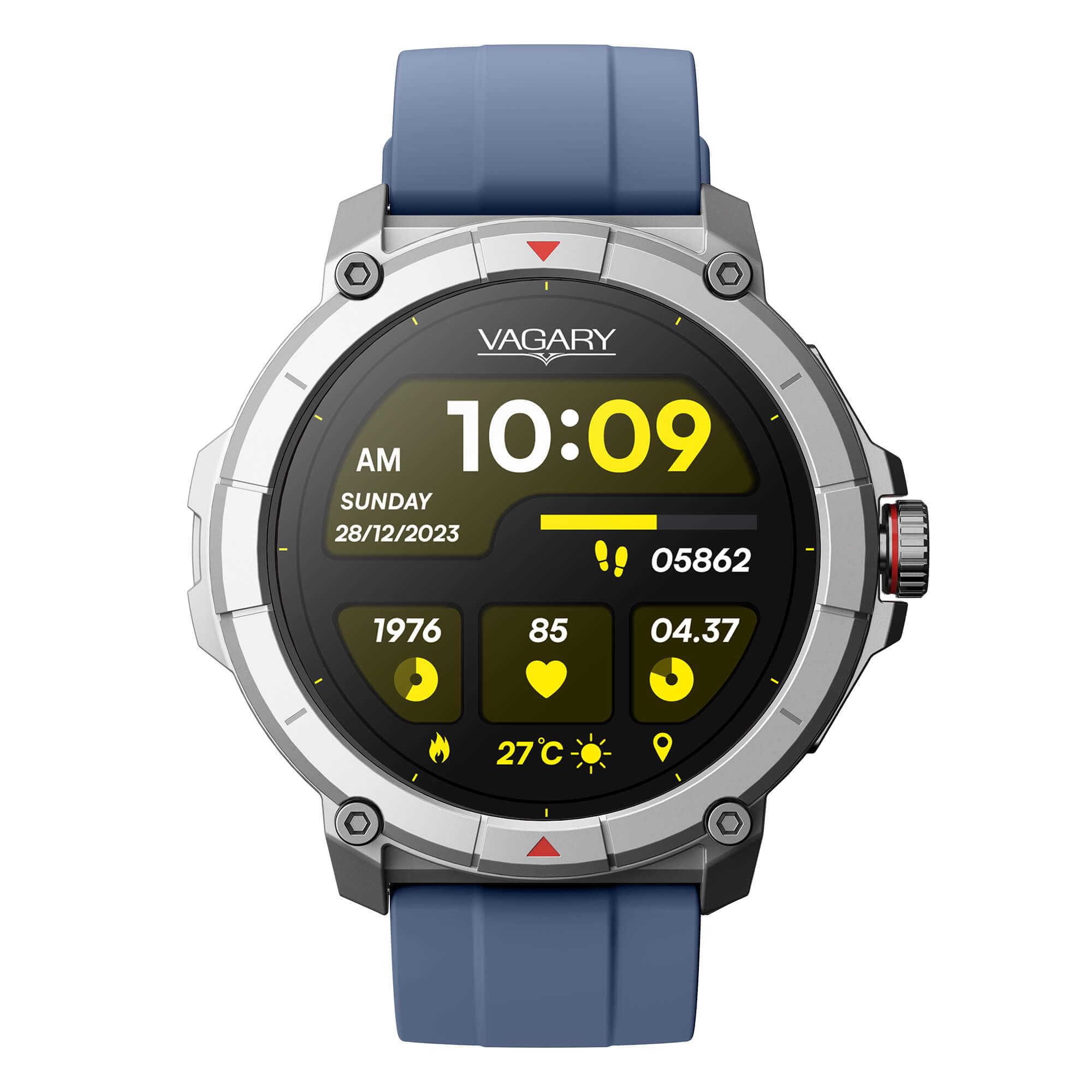
ດ້ານໜ້າ view of the Citizen Vagary Smartwatch X04A-002VY, featuring a black case and a blue silicone strap.
ບໍາລຸງຮັກສາ
ທໍາຄວາມສະອາດ
Regularly clean your smartwatch and strap to prevent skin irritation and maintain appearance. Use a soft, damp cloth to wipe the screen and case. For the silicone strap, mild soap and water can be used. Ensure the device is completely dry before charging or prolonged use.
ການດູແລຫມໍ້ໄຟ
The smartwatch has an average battery life of 7 days. To maximize battery longevity, avoid fully discharging the battery frequently. Charge the device when the battery level is low. Store the device in a cool, dry place if not used for extended periods.
ການແກ້ໄຂບັນຫາ
- ອຸປະກອນບໍ່ເປີດ: Ensure the device is fully charged. If it still doesn't turn on, try a different charging cable or power source.
- ບໍ່ສາມາດຈັບຄູ່ກັບສະມາດໂຟນໄດ້: Make sure Bluetooth is enabled on both devices. Ensure the smartwatch is within range of your phone. Restart both devices and try pairing again. Check if the Verfyfit ແອັບໄດ້ຖືກອັບເດດເປັນເວີຊັນຫຼ້າສຸດ.
- ຂໍ້ມູນສຸຂະພາບບໍ່ຖືກຕ້ອງ: Ensure the smartwatch is worn snugly on your wrist, not too tight or too loose. Clean the sensors on the back of the watch.
- ຊີວິດຫມໍ້ໄຟສັ້ນ: Reduce screen brightness, disable unnecessary notifications, and limit continuous heart rate monitoring if not needed. Ensure background app usage is optimized.
- ໜ້າຈໍບໍ່ຕອບສະໜອງ: Restart the smartwatch by holding the side button. If the issue persists, contact support.
ຂໍ້ມູນຈໍາເພາະ
| ໝາຍເລກຕົວແບບ | X04A-002VY |
| ຍີ່ຫໍ້ | ພົນລະເມືອງ |
| ຂະຫນາດຈໍສະແດງຜົນ | 1.5 ນິ້ວ |
| ປະເພດການສະແດງ | TFT-LCD |
| ວັດສະດຸກໍລະນີ | ABS |
| ວັດສະດຸສາຍ | Silicone (Blue) |
| ການຕໍ່ຕ້ານນ້ໍາ | IP68 (up to 1 meter depth) |
| ອາຍຸຫມໍ້ໄຟສະເລ່ຍ | 7 ມື້ |
| ການເຊື່ອມຕໍ່ | Bluetooth, Wi-Fi, GPS |
| ລະບົບປະຕິບັດການ | Wear OS |
| ອຸປະກອນທີ່ເຂົ້າກັນໄດ້ | Smartphones (Android), Laptops, Tablets, PCs |
| ຄຸນນະສົມບັດພິເສດ | Health monitoring (Heart Rate, Sleep, Steps, Distance), Camera Control, Call Answering, Alexa Voice Assistant, Integrated GPS, 100 Sports Modes |
| ປະເພດປິດ | ສາຍຮັດ |
| User Interface Interaction | ໄມໂຄຣໂຟນ |
ຂໍ້ມູນການຮັບປະກັນ
The Citizen Vagary Smartwatch X04A-002VY comes with a limited warranty. Please refer to the warranty card included in your product packaging or visit the official Citizen webເວັບໄຊທ໌ສຳລັບຂໍ້ກຳນົດ ແລະ ເງື່ອນໄຂລະອຽດກ່ຽວກັບການຄຸ້ມຄອງ, ໄລຍະເວລາ ແລະ ຂັ້ນຕອນການບໍລິການ. ເກັບຮັກສາຫຼັກຖານການຊື້ຂອງທ່ານໄວ້ເພື່ອການຮຽກຮ້ອງການຮັບປະກັນ.
ສະຫນັບສະຫນູນ
For further assistance, technical support, or service inquiries, please contact Citizen customer support. You can typically find contact information on the official Citizen webເວັບໄຊທ໌ຫຼືໃນເອກະສານທີ່ສະຫນອງໃຫ້ກັບຜະລິດຕະພັນຂອງທ່ານ.