
ແນະນຳ
Thank you for choosing the Billboard Soul Advance True Wireless Stereo (TWS) Earbuds. These earbuds are designed to provide a superior audio experience with Active Noise Cancellation (ANC), Environmental Noise Cancellation (ENC), and a comfortable, splash-resistant design. This manual will guide you through the setup, operation, and maintenance of your new earbuds.
ຂໍ້ມູນຄວາມປອດໄພ
- Do not expose the earbuds or charging case to extreme temperatures or direct sunlight for extended periods.
- ຫຼີກເວັ້ນການຫຼຸດລົງຫຼືໃຊ້ແຮງຫຼາຍເກີນໄປໃສ່ອຸປະກອນ.
- Keep the earbuds and charging case away from water and liquids, except for light splashes as per IPX4 rating. Do not submerge.
- ຢ່າພະຍາຍາມ disassemble ຫຼືດັດແປງຜະລິດຕະພັນ. ນີ້ຈະເປັນການຍົກເລີກການຮັບປະກັນ.
- ໃຊ້ພຽງແຕ່ສາຍສາກທີ່ສະໜອງໃຫ້ ຫຼືສາຍທຽບເທົ່າທີ່ໄດ້ຮັບການຮັບຮອງ.
- Listening at high volumes for prolonged periods can cause hearing damage. Adjust volume to a safe level.
ເນື້ອໃນຊຸດ
- Billboard Soul Advance TWS Earbuds (Left and Right)
- ກ່ອງສາກ
- ສາຍສາກ USB
- ຄູ່ມືຜູ້ໃຊ້
ສິນຄ້າເກີນview
Familiarize yourself with the components of your Billboard Soul Advance TWS Earbuds and charging case.
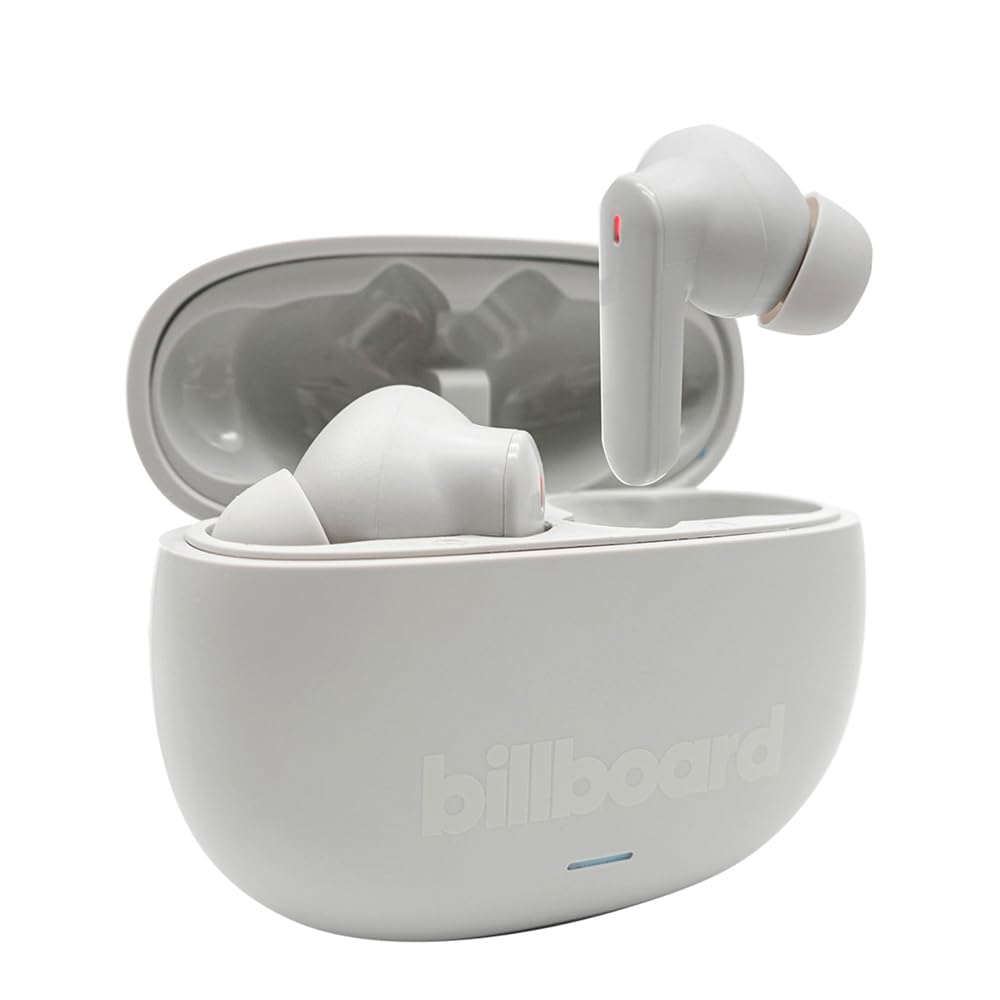
Image: The Billboard Soul Advance TWS Earbuds resting inside their open charging case. The earbuds are grey with red indicator lights visible, and the case is also grey with the 'billboard' logo embossed on the front.

Image: The Billboard Soul Advance TWS Earbuds charging case in a closed position. The case is grey with the 'billboard' logo embossed on the front and a small indicator light at the bottom.
Image: A person holding a single Billboard Soul Advance TWS earbud and the open charging case, demonstrating the compact size and design.
ຕັ້ງຄ່າ
1. ການສາກຫູຟັງ ແລະ ເຄສ
ກ່ອນທີ່ຈະໃຊ້ຄັ້ງທຳອິດ, ໃຫ້ສາກຫູຟັງຫູຟັງ ແລະ ຊ່ອງສາກໃຫ້ເຕັມ.
- ວາງຫູຟັງໃສ່ຊ່ອງສາກໄຟ. ໃຫ້ແນ່ໃຈວ່າເຂົາເຈົ້ານັ່ງຢ່າງຖືກຕ້ອງຢູ່ໃນຊ່ອງຂອງເຂົາເຈົ້າ.
- ເຊື່ອມຕໍ່ສາຍສາກໄຟ USB ເຂົ້າກັບພອດສາກໄຟຢູ່ເທິງເຄສ ແລະ ເຂົ້າກັບແຫຼ່ງພະລັງງານ USB (ເຊັ່ນ: ຄອມພິວເຕີ, ອະແດບເຕີຕິດຝາ).
- The indicator light on the case will show charging status. Once fully charged, the indicator will change or turn off. A full charge takes approximately 5 hours for the case and earbuds.
2. ການຈັບຄູ່ກັບອຸປະກອນ
To connect your earbuds to a smartphone or other Bluetooth-enabled device:
- ເປີດກ່ອງສາກໄຟ. ຫູຟັງເອຍບັດຈະເຂົ້າສູ່ໂໝດການຈັບຄູ່ໂດຍອັດຕະໂນມັດ, ສະແດງໂດຍໄຟກະພິບຢູ່ຫູຟັງ.
- ໃນອຸປະກອນຂອງທ່ານ, ໄປທີ່ການຕັ້ງຄ່າ Bluetooth ແລະໃຫ້ແນ່ໃຈວ່າ Bluetooth ຖືກເປີດໃຊ້.
- ຊອກຫາ available devices and select "Billboard Soul Advance" from the list.
- ເມື່ອເຊື່ອມຕໍ່ແລ້ວ, ໄຟສະແດງຫູຟັງຫູຟັງຈະຢຸດກະພິບ.
- ຫູຟັງເອຍບັດຈະເຊື່ອມຕໍ່ໃໝ່ໂດຍອັດຕະໂນມັດກັບອຸປະກອນທີ່ຈັບຄູ່ສຸດທ້າຍເມື່ອຖອດອອກຈາກເຄສ, ຖ້າ Bluetooth ຖືກເປີດໃຊ້ໃນອຸປະກອນ.
ປະຕິບັດການ
ແຕະການຄວບຄຸມ
The earbuds feature touch-sensitive controls on their outer surface. Specific functions may vary slightly by device or app.
| ການປະຕິບັດ | ຟັງຊັນ |
|---|---|
| ແຕະເທື່ອດຽວ (ຊ້າຍ/ຂວາ) | ຫຼິ້ນ/ຢຸດເພງ, ຮັບສາຍ/ວາງສາຍ |
| ແຕະສອງເທື່ອ (ຂວາ) | ຕິດຕາມຕໍ່ໄປ |
| ແຕະສອງເທື່ອ (ຊ້າຍ) | ເພງກ່ອນໜ້າ |
| ແຕະສາມເທື່ອ (ຊ້າຍ/ຂວາ) | ເປີດໃຊ້ຜູ້ຊ່ວຍສຽງ |
| ກົດຄ້າງໄວ້ (ຊ້າຍ/ຂວາ) | ສະຫຼັບໂໝດ ANC/ຄວາມໂປ່ງໃສ |
| Incoming Call Long Press | ປະຕິເສດການໂທ |
Active Noise Cancellation (ANC) & Environmental Noise Cancellation (ENC)
The Soul Advance earbuds feature both ANC and ENC for an optimized listening and calling experience.
- Active Noise Cancellation (ANC): Reduces external ambient noise, allowing for a more immersive audio experience. Activate/deactivate by long-pressing an earbud.
- ການຍົກເລີກສິ່ງລົບກວນສິ່ງແວດລ້ອມ (ENC): Utilizes 4 built-in microphones to filter out background noise during calls, ensuring clearer conversations for both you and the listener. This feature is active automatically during calls.

Image: A graphic illustrating the concept of Ultra ANC (Active Noise Cancellation), showing sound waves being blocked by headphones, emphasizing a quiet listening experience.
ບໍາລຸງຮັກສາ
ທໍາຄວາມສະອາດ
- ເຊັດຫູຟັງຫູຟັງ ແລະ ກະເປົ໋າສາກໄຟດ້ວຍຜ້າແພອ່ອນໆ, ແຫ້ງ, ບໍ່ມີເຈັ້ຍ.
- ຢ່າໃຊ້ເຄື່ອງເຮັດຄວາມສະອາດຂັດ, ເຫຼົ້າ, ຫຼືສານລະລາຍສານເຄມີ.
- ໃຫ້ແນ່ໃຈວ່າຈຸດສາກໄຟຢູ່ຫູຟັງທັງສອງຂ້າງ ແລະ ກ່ອງແມ່ນສະອາດ ແລະ ແຫ້ງເພື່ອການສາກໄຟທີ່ດີທີ່ສຸດ.
ການເກັບຮັກສາ
ເມື່ອບໍ່ໄດ້ໃຊ້, ໃຫ້ເກັບຫູຟັງເອຍບັດໃສ່ໃນກະເປົ໋າສາກໄຟເພື່ອປົກປ້ອງພວກມັນ ແລະ ສືບຕໍ່ສາກໄຟ.
ການແກ້ໄຂບັນຫາ
| ບັນຫາ | ການແກ້ໄຂ |
|---|---|
| ຫູຟັງບໍ່ຈັບຄູ່ | ກວດໃຫ້ແນ່ໃຈວ່າໄດ້ສາກຫູຟັງຫູຟັງແລ້ວ. ປິດ ແລະເປີດ Bluetooth ຂອງອຸປະກອນຂອງທ່ານ. ລືມອຸປະກອນໃນການຕັ້ງຄ່າ Bluetooth ແລະຈັບຄູ່ຄືນໃໝ່. |
| ຫູຟັງຫູຟັງອັນດຽວເຮັດວຽກໄດ້ | Place both earbuds back in the case, close it, then open again. Ensure both are charged. |
| ບໍ່ມີສຽງ | ກວດສອບລະດັບສຽງຂອງອຸປະກອນ. ໃຫ້ແນ່ໃຈວ່າຫູຟັງເອຍບັດເຊື່ອມຕໍ່ແລ້ວ. ລອງຫຼິ້ນສຽງອື່ນ. |
| ບັນຫາການສາກໄຟ | Ensure charging cable is securely connected. Clean charging contacts. Try a different USB port or cable. |
ຂໍ້ມູນຈໍາເພາະ
- ຊື່ຕົວແບບ: Soul Advance
- ເຕັກໂນໂລຍີການເຊື່ອມຕໍ່: ໄຮ້ສາຍ
- ອົງປະກອບລວມ: ສະຖານີສາກໄຟ
- ການນໍາໃຊ້ສະເພາະ: Outdoor activities, Sports
- ເວລາສາກໄຟ: ປະມານ 5 ຊົ່ວໂມງ
- ອຸປະກອນທີ່ເຂົ້າກັນໄດ້: ໂທລະສັບ, ແທັບເລັດ
- ລະດັບຄວາມຕ້ານທານນ້ໍາ: IPX4 (ທົນທານຕໍ່ Splash)
- ອາຍຸຫມໍ້ໄຟສະເລ່ຍ: 27 ຊົ່ວໂມງ (ມີກ່ອງສາກ)
- ການວາງຫູ: ໃນຫູ
- ປັດໄຈແບບຟອມ: ໃນຫູ
- ການຄວບຄຸມສິ່ງລົບກວນ: Active Noise Cancellation

Image: A graphic highlighting long battery life, showing headphones with '40H' and earbuds with '42H*' (battery + case), indicating extended usage times.
ວິດີໂອຜະລິດຕະພັນຢ່າງເປັນທາງການ
Video: Product demonstration video (0:49 duration).
Video: Product feature overview (0:44 duration).
Video: Additional product details (0:44 duration).
Video: Short product highlight (0:24 duration).
Video: Product feature showcase (0:24 duration).
Video: Detailed product review/demonstration (1:57 duration).
Video: Quick product overview (0:34 duration).
Video: Comprehensive product guide (2:00 duration).
ການຮັບປະກັນແລະການສະຫນັບສະຫນູນ
Your Billboard Soul Advance TWS Earbuds come with a standard manufacturer's warranty. For detailed warranty information, please refer to the warranty card included in your package or visit the official Billboard website. For technical support or customer service, please contact the retailer or manufacturer directly.
For returns, a 30-day free return policy is available from the purchase date.