
PGST PGST A01F
ຄູ່ມືຜູ້ໃຊ້ລະບົບເຕືອນໄພຄວາມປອດໄພໃນເຮືອນ PGST
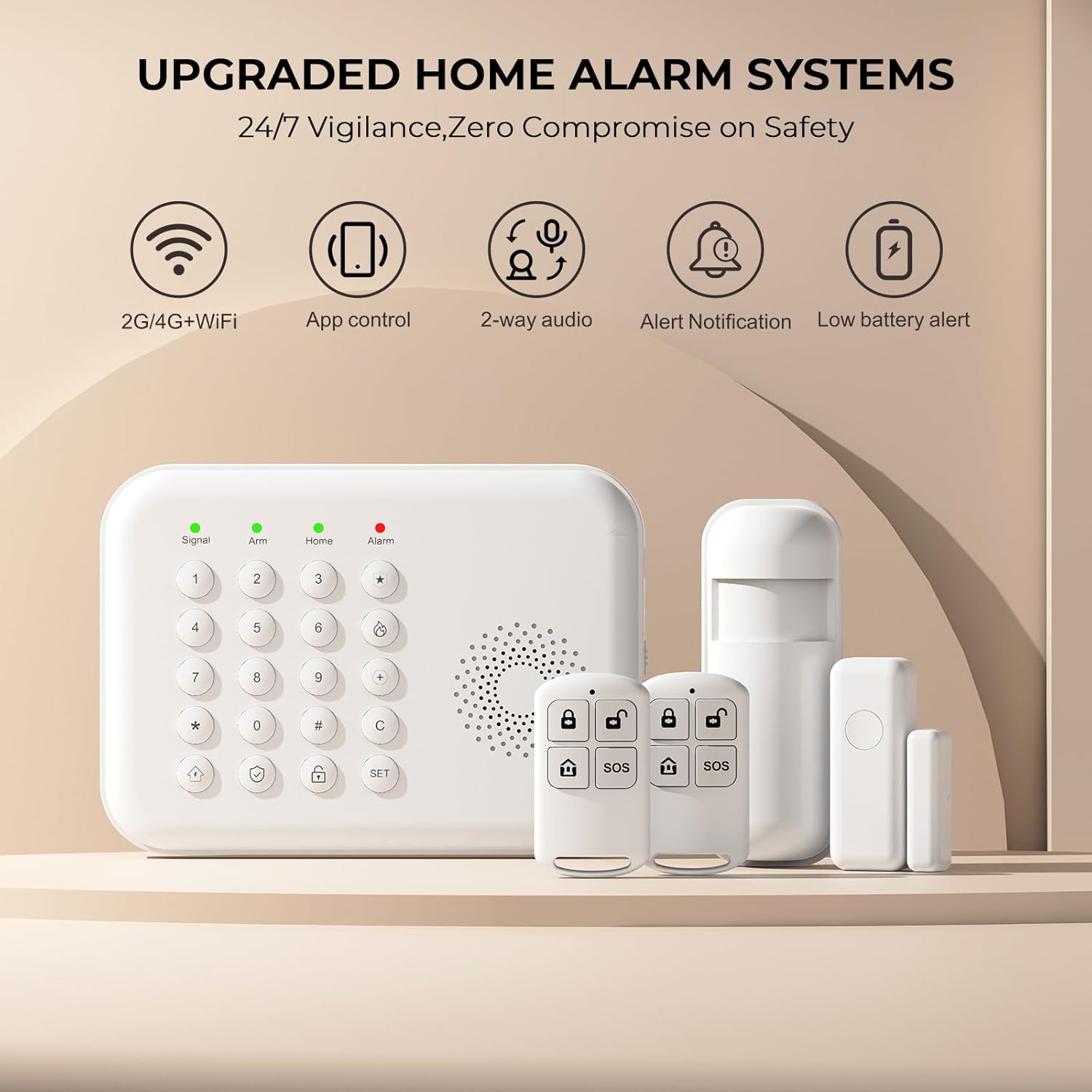
Model: PGST A01F (5 PIECE KITS)
1. ບົດແນະນຳ
The PGST Home Security Alarm System is a comprehensive wireless solution designed to provide 24/7 monitoring and real-time alerts for your home. This 5-piece kit includes a smart keypad, door/window sensors, motion sensors, and remote controls, offering enhanced safety features for families and individuals. The system supports both 2.4GHz WiFi and 4G GSM connectivity, ensuring reliable communication and alerts via the Tuya or Smart Life mobile applications.

2. ເນື້ອໃນຊຸດ
ກະລຸນາກວດສອບວ່າລາຍການທັງຫມົດທີ່ລະບຸໄວ້ຂ້າງລຸ່ມນີ້ແມ່ນລວມຢູ່ໃນຊຸດຂອງທ່ານ:
- 1 x PGST A01F Smart Keypad Alarm Host
- 1 x Motion Sensor (PIR Detector)
- 1 x Door/Window Sensor
- 2 x ການຄວບຄຸມໄລຍະໄກ
- 1 x Power Adapter
- ຮາດແວຕິດຕັ້ງ (ສະກູ, ສະມໍ)
- 1 x ຄູ່ມືຜູ້ໃຊ້
3. ການຕິດຕັ້ງແລະການຕິດຕັ້ງ
The PGST Home Security Alarm System is designed for easy DIY installation without complex steps. Follow these guidelines for a smooth setup:
3.1 ການຕິດຕັ້ງເບື້ອງຕົ້ນ
- ເປີດ: Connect the keypad alarm host to a power outlet using the provided power adapter. Ensure the power switch on the side of the unit is set to 'ON'.
- ດາວໂຫລດແອັບ:: ດາວໂຫຼດແອັບ 'Tuya Smart' ຫຼື 'Smart Life' ຈາກຮ້ານແອັບໃນໂທລະສັບສະຫຼາດຂອງທ່ານ.
- ການລົງທະບຽນບັນຊີ: ລົງທະບຽນສຳລັບບັນຊີໃໝ່ ຫຼື ເຂົ້າສູ່ລະບົບຖ້າທ່ານມີບັນຊີແລ້ວ.
- ເພີ່ມອຸປະກອນ: Follow the in-app instructions to add your PGST A01F Smart Keypad Alarm Host. Ensure your phone is connected to a 2.4GHz Wi-Fi network (5GHz Wi-Fi is not supported).
3.2 Connecting to Wi-Fi and Setting Alarm Numbers
The system supports both Wi-Fi (2.4GHz only) and a 4G GSM SIM card for alerts. You can receive app push notifications via Wi-Fi, and the 4G card enables calls or SMS messages during emergencies.

3.3 Adding Accessories (Sensors and Remotes)
The system is expandable, allowing you to add more sensors and accessories from the PGST store. Follow the pairing instructions below:

3.4 ການວາງເຊັນເຊີ
- ເຊັນເຊີປະຕູ/ປ່ອງຢ້ຽມ: Install these magnetic contacts on door and window frames. They detect when an opening occurs and send instant alerts.
- Motion Sensors (PIR Detectors): Place these in high-traffic areas like hallways or living rooms. They use infrared technology to sense movement and distinguish between human motion and other disturbances.

4. ການດໍາເນີນງານຂອງລະບົບ
The PGST alarm system offers multiple ways to arm, disarm, and manage your home security.
4.1 ການປະກອບອາວຸດ ແລະ ການປົດອາວຸດ
- ປຸ່ມກົດ: Use the keypad to enter your security code to arm or disarm the system.
- ການຄວບຄຸມໄລຍະໄກ: The included remote controls provide quick arm/disarm functionality.
- ແອັບຯມືຖື: Arm or disarm the system remotely from anywhere using the Tuya Smart or Smart Life app.

4.2 ການຕິດຕາມໄລຍະໄກ ແລະການແຈ້ງເຕືອນ
The mobile app enables you to monitor and control your system from anywhere. You can check the status of sensors and receive real-time alerts on your smartphone. If an emergency occurs, the system can send app push notifications and, if a 4G SIM card is installed, make calls or send messages to preset numbers.


4.3 SOS Button Functionality
The SOS button is a crucial safety feature, especially beneficial for elderly family members or children. In case of an emergency, pressing the SOS button will trigger an immediate alert to the preset emergency contacts.

4.4 ການປະສົມປະສານການຄວບຄຸມດ້ວຍສຽງ
The PGST alarm system is compatible with popular voice assistants like Amazon Alexa and Google Assistant, allowing for convenient voice commands to arm or disarm your system.

5. ສ່ວນປະກອບຂອງລະບົບ
5.1 Smart Keypad Alarm Host
The central unit of your security system, featuring a compact design for easy wall mounting and a user-friendly keypad for operation.


6. ບໍາລຸງຮັກສາ
6.1 ຂໍ້ມູນຫມໍ້ໄຟ
The PGST A01F Home Alarm System is equipped with a built-in Lithium Polymer battery, allowing it to function normally even during a power outage. The system will provide a low battery alert when charging is needed.

6.2 ການເບິ່ງແຍງທົ່ວໄປ
- Keep the devices clean and free from dust.
- Avoid exposing the devices to extreme temperatures or humidity.
- Do not attempt to disassemble or repair the devices yourself. Contact customer support if issues arise.
7. ການແກ້ໄຂບັນຫາ
This section addresses common questions and issues you might encounter with your PGST Home Security Alarm System.
7.1 ຄຳຖາມທີ່ຖາມເລື້ອຍໆ (FAQs)
- Q: What network does this home security system support?
- A: It only supports 2.4GHz Wi-Fi (not 5G Wi-Fi) and a 4G GSM card. You can receive Tuya app alert pushes, while the 4G card can call you or send you a message if an emergency happens.
- Q: What should I do if I don't know how to set it up after receiving it?
- A: Refer to the detailed instructions in this manual and the mobile application. Additional operation videos can be provided if necessary. Contact customer support for further assistance.
- Q: Does this device support adding more sensors and accessories?
- A: Yes, the system is expandable. You can add more sensors and accessories, such as sirens or cameras, available from the PGST store.
7.2 ບັນຫາທົ່ວໄປ
- Sensors Disconnecting: Ensure sensors are within range of the alarm host and have fresh batteries. Re-pair them if necessary following the 'How to Add Accessories' instructions.
- ບໍ່ມີການແຈ້ງເຕືອນແອັບ: Check your Wi-Fi connection (ensure it's 2.4GHz), app notification settings on your phone, and ensure the app is running in the background. If using 4G, verify the SIM card is active and has credit.
- ປຸ່ມກົດບໍ່ຕອບສະໜອງ: Check the power connection and ensure the power switch is 'ON'. If battery-powered, check battery level.
8. ຂໍ້ມູນຈໍາເພາະ
| ຄຸນສົມບັດ | ລາຍລະອຽດ |
|---|---|
| ຍີ່ຫໍ້ | PGST |
| ໝາຍເລກຕົວແບບ | PGST A01F |
| ແຫຼ່ງພະລັງງານ | ພະລັງງານຫມໍ້ໄຟ |
| ອຸປະກອນທີ່ເຂົ້າກັນໄດ້ | ໂທລະສັບສະຫຼາດ, ແທັບເລັດ |
| ຂະໜາດລາຍການ (L x W x H) | 1 x 1 x 1 ນິ້ວ |
| ວິທີການຄວບຄຸມ | ແອັບ |
| ອົງປະກອບຂອງຈຸລັງຫມໍ້ໄຟ | ລີໂທມໂພລີເມີ |
| ນ້ໍາຫນັກລາຍການ | 1.08 ປອນ |
| UPC | 735083581367 |
9. ການຮັບປະກັນແລະການສະຫນັບສະຫນູນ
For warranty information and customer support, please refer to the official PGST website or contact the retailer where you purchased the product. The PGST Home Security Alarm System is designed to provide reliable security without recurring contract fees.

Ask a question about this manual
Ask about setup, troubleshooting, compatibility, parts, safety, or missing instructions. Manuals+ will review the question and use this page’s manual context to help answer it.