
1. ຜະລິດຕະພັນເກີນview
This manual provides detailed instructions for the installation, operation, and maintenance of your Inefala 4+64G Android 15 Car Radio. This unit is specifically designed for Peugeot 407 models manufactured between 2004 and 2011, offering advanced features such as wireless Carplay/Android Auto, GPS navigation, FM/RDS radio, Digital Sound Processor (DSP), WiFi connectivity, Bluetooth, Steering Wheel Control (SWC) compatibility, USB ports, and AHD rear camera support.

Figure 1: Inefala 4+64G Android 15 Car Radio main unit.
2. ເນື້ອໃນຊຸດ
ກວດສອບວ່າລາຍການທັງຫມົດທີ່ລະບຸໄວ້ຂ້າງລຸ່ມນີ້ແມ່ນລວມຢູ່ໃນຊຸດຂອງທ່ານ:
- Inefala Car Radio for Peugeot 407
- ສາຍໄຟ
- ຕູ້ Canbus
- ສາຍ RCA
- GPS Antenna
- ສາຍປ້ອນກ້ອງຫຼັງ
- AHD Emergency Camera (Rear Camera)
- ໄມໂຄຣໂຟນພາຍນອກ
- 2 ສາຍ USB
- ເສົາອາກາດວິທະຍຸ
- ອຸປະກອນເສີມ
- Mounting ສະຫນັບສະຫນູນ
- ເຄື່ອງມືການຕິດຕັ້ງ

ຮູບທີ 2: ລາຍລະອຽດ view of wiring harnesses and included accessories.
3. ການຕິດຕັ້ງແລະການຕິດຕັ້ງ
ການຕິດຕັ້ງແບບມືອາຊີບແມ່ນແນະນໍາໃຫ້. ກວດໃຫ້ແນ່ໃຈວ່າໄດ້ຕັດການເຊື່ອມຕໍ່ໄຟຟ້າຂອງລົດກ່ອນທີ່ຈະເລີ່ມການຕິດຕັ້ງ.
3.1 ແຜນວາດສາຍ
Refer to the following diagram for proper connection of the radio and its peripherals, including the reverse camera.

Figure 3: Wiring connections for the radio and reverse camera.
3.2 ການເຊື່ອມຕໍ່ກ້ອງຖ່າຍຮູບດ້ານຫຼັງ
The reverse input cable must be plugged in even if the reverse camera is not used, as it may affect Bluetooth and WiFi signal reception.
- Cable 1 and Cable 6: Connect the positive pole of the car reversing light cable.
- ສາຍ 2: Connect the negative pole of the car reversing light cable.
- Cable 3 and Cable 4: Connect to the reverse trigger wire of the power cable (labeled "Reverse/Back"). No need to connect if without this wire. Pull it out and connect it if the last step doesn't work.

Figure 4: AHD Rear Camera unit.
3.3 ຜົນກະທົບຂອງການຕິດຕັ້ງ
Observe the visual transformation of your car's dashboard before and after the installation of the Inefala car radio.

Figure 5: Before and After Installation in Peugeot 407.
4. ຄໍາແນະນໍາການດໍາເນີນງານ
4.1 Android System and Performance
The unit features a 4GB RAM + 64GB ROM configuration, providing strong and stable processing and storage capabilities for a smooth user experience. It runs on the latest Android 15 operating system, offering fast performance and access to millions of applications.

Figure 6: System features including 4+64G storage, navigation, UI themes, EQ, and Bluetooth 5.0.
4.2 Carplay ໄຮ້ສາຍ ແລະ Android Auto
Connect your smartphone wirelessly to the unit to access Carplay or Android Auto. This allows for hands-free calling, messaging, music playback, and navigation using voice commands or touch controls. The unit also supports Mirror Link functionality, mirroring your phone's screen to the car display.
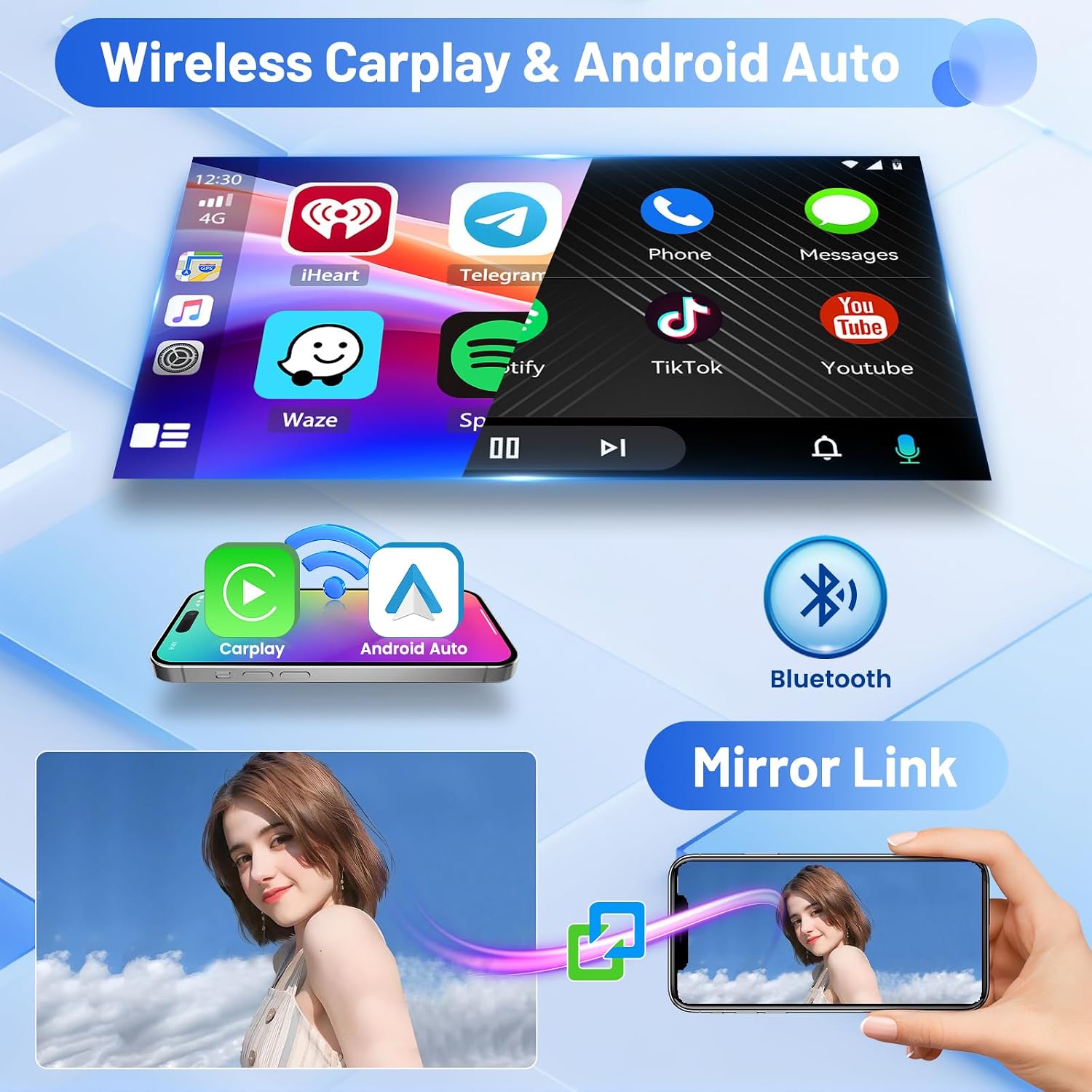
Figure 7: Wireless Carplay, Android Auto, Bluetooth, and Mirror Link capabilities.
4.3 GPS Navigation and WiFi
The unit provides GPS navigation with both online and offline map support. Connect to WiFi to download navigation apps, stream music, and videos, or access other online content.

Figure 8: WiFi connectivity and GPS navigation interface.
4.4 FM/RDS Radio and Bluetooth
Enjoy FM/RDS radio with clear reception. The built-in Bluetooth allows you to pair your devices for wireless music streaming, hands-free calling, and file ການໂອນຍ້າຍ.

Figure 9: FM/RDS Radio and Bluetooth features.
4.5 DSP and 32-Band EQ Function
The integrated Digital Sound Processor (DSP) and 32-band Equalizer (EQ) allow for precise audio customization, enhancing your listening experience with various sound profiles.
4.6 ຟັງຊັນ Split Screen
ໃຊ້ຄຸນສົມບັດການແບ່ງໜ້າຈໍເພື່ອແລ່ນສອງແອັບພລິເຄຊັນພ້ອມໆກັນ, ເຊັ່ນ: ການນຳທາງ ແລະ ການຫຼິ້ນເພງ, ສຳລັບການເພີ່ມປະສິດທິພາບການເຮັດວຽກຫຼາຍຢ່າງ.

Figure 10: Split Screen and 32-Band EQ interfaces.
4.7 ດ້ານຫຼັງ View ການດໍາເນີນງານກ້ອງຖ່າຍຮູບ
When the vehicle is shifted into reverse gear, the screen automatically displays the rear view camera feed, providing a safer parking and reversing experience.
4.8 ການຄວບຄຸມພວງມາໄລ (SWC)
The unit supports steering wheel controls, allowing you to manage calls, adjust volume, and change tracks safely without taking your hands off the wheel.
- Without CANBUS Decoder: Connect the plugs or the steering wheel control wires (Key1/Key2) in the power cable to the corresponding port or wire of your original car. Then go to "SWC" manual match to activate the button function.
- With CANBUS Decoder: Connect the CANBUS before powering on the radio. Then follow this path: Apps > Settings > Factory Settings (8888) > Vehicle > Automotive type to make SWC work properly. First, select the brand of the CANBUS decoder, then select the matching model and year according to the situation.

ຮູບ 11: ດ້ານຫລັງ View Camera display and Steering Wheel Control interface.
5. ບໍາລຸງຮັກສາ
To ensure the longevity and optimal performance of your Inefala car radio, follow these maintenance guidelines:
- ທໍາຄວາມສະອາດ: ໃຊ້ຜ້າອ່ອນແລະແຫ້ງເພື່ອທຳຄວາມສະອາດໜ້າຈໍ ແລະ ພື້ນຜິວພາຍນອກ. ຫຼີກລ່ຽງນ້ຳຢາທຳຄວາມສະອາດທີ່ມີສີຂັດ ຫຼື ຕົວລະລາຍທີ່ອາດຈະທຳລາຍພື້ນຜິວໄດ້.
- ອຸນຫະພູມ: ຫຼີກລ້ຽງການເປີດເຄື່ອງຢູ່ໃນອຸນຫະພູມທີ່ຮ້າຍແຮງ, ທັງຮ້ອນແລະເຢັນ, ສໍາລັບໄລຍະເວລາຕໍ່ໄປ.
- ຄວາມຊຸ່ມ: ຮັກສາເຄື່ອງໃຫ້ແຫ້ງ. ຫ້າມໃຫ້ມັນຖືກນໍ້າ ຫຼື ຄວາມຊຸ່ມຊື່ນຫຼາຍເກີນໄປ.
- ອັບເດດຊອບແວ: Periodically check for available software updates to ensure the system runs efficiently and has the latest features and security patches.
6. ການແກ້ໄຂບັນຫາ
If you encounter issues with your Inefala car radio, refer to the following common troubleshooting steps:
- ບໍ່ມີພະລັງງານ: Check all power connections and ensure the vehicle's ignition is on. Verify fuses are intact.
- ບໍ່ມີສຽງ: Check speaker connections, volume levels, and audio source selection. Ensure the mute function is not activated.
- ບັນຫາການເຊື່ອມຕໍ່ Bluetooth: Ensure Bluetooth is enabled on both the car radio and your smartphone. Try unpairing and re-pairing the devices.
- ການສູນເສຍສັນຍານ GPS: ໃຫ້ແນ່ໃຈວ່າເສົາອາກາດ GPS ຖືກຕິດຕັ້ງຢ່າງຖືກຕ້ອງແລະມີຄວາມຊັດເຈນ view ຂອງທ້ອງຟ້າ.
- ໜ້າຈໍສໍາຜັດບໍ່ຕອບສະໜອງ: ລອງຣີສະຕາດໜ່ວຍ. ຖ້າບັນຫາຍັງຄົງຢູ່, ການຣີເຊັດເປັນຄ່າໂຮງງານອາດຈະຈຳເປັນ (ໝາຍເຫດ: ນີ້ຈະລຶບຂໍ້ມູນຜູ້ໃຊ້ທັງໝົດ).
- ກ້ອງຫຼັງບໍ່ສະແດງ: Verify the camera's power and video connections. Ensure the reverse trigger wire is correctly connected.
For persistent issues, please contact technical support.
7. ຂໍ້ມູນຈໍາເພາະ
| ຄຸນສົມບັດ | ລາຍລະອຽດ |
|---|---|
| ຍີ່ຫໍ້ | Inefala |
| ໝາຍເລກຕົວແບບ | Inefala-A7688A3662H1MI2IT53 |
| ລະບົບປະຕິບັດການ | Android 15 |
| ໜ່ວຍຄວາມຈຳ/ບ່ອນເກັບມ້ຽນ | RAM 4GB + ROM 64GB |
| ຂະໜາດໜ້າຈໍ | 9 ນິ້ວ |
| ເຕັກໂນໂລຊີການເຊື່ອມຕໍ່ | Bluetooth, USB, Wi-Fi |
| ຄຸນນະສົມບັດພິເສດ | Carplay, Android Auto, Mirror Link, FM/RDS Radio, 32-band EQ, GPS, SWC |
| ອຸປະກອນທີ່ເຂົ້າກັນໄດ້ | ໂທລະສັບສະຫຼາດ |
| ຮູບແບບການອອກສຽງ | APE/FLAC/WAV/MP3/WMA |
| ການເຂົ້າລະຫັດວິດີໂອ | MKV/RMVB/AVI/MP4/MDV |
| ພະລັງງານຜົນຜະລິດ | 45 ວັດ x 4 ຊ່ອງ |
| ວິທີການຄວບຄຸມ | ແຕະ |
| ປະເພດປ້ອນຂໍ້ມູນ | RCA, AHD |
| ນ້ໍາຫນັກລາຍການ | 1.39 ກິໂລກຣາມ |
| ປະເທດຕົ້ນກໍາເນີດ | ຈີນ |
8. ຂໍ້ມູນການຮັບປະກັນ
This Inefala car radio comes with a ຮັບປະກັນ 24 ເດືອນ. Inefala provides lifetime online assistance for inquiries and aims to respond within 24 hours.
9. ສະຫນັບສະຫນູນດ້ານວິຊາການ
For any technical assistance, questions, or support needs, please contact Inefala directly through the platform where you purchased the product. Look for the seller's name (Inefala) and an option to 'Ask a question' or 'Contact Seller'.

Figure 12: How to contact Inefala for technical support.


