
ແນະນຳ
This manual provides detailed instructions for the proper use and maintenance of your SMALLRIG Magnetic Metal Phone Mount, Model 5156. This versatile accessory is designed to securely attach your MagSafe-compatible iPhone or other smartphones (with a magnetic case/ring) to cameras, tripods, and stabilizers, enhancing your photography, videography, and live-streaming capabilities.
ແມ່ນຫຍັງຢູ່ໃນກ່ອງ
- Phone Mount Support x 1
- Allen Wrench x 1

Image: The package contents, showing the phone mount support and the included Allen wrench.
ຕັ້ງຄ່າ
ຄວາມເຂົ້າກັນໄດ້
The SMALLRIG Magnetic Metal Phone Mount (Model 5156) is designed for iPhone models with MagSafe functionality (iPhone 17 / 17 Pro / 17 Pro Max / 16 / 16 Pro / 16 Pro Max / 15 / 15 Pro / 15 Pro Max / 14 / 14 Pro / 14 Pro Max / 13 / 13 Pro / 13 Pro Max / 12 Pro Max). It also supports other smartphones when used with a compatible magnetic case or magnetic ring.
Attaching Your Phone
Align your MagSafe-compatible phone with the magnetic plate on the mount. The strong magnetic connection will securely hold the phone in place. Ensure the phone is centered for optimal grip.

Image: A smartphone is shown magnetically attaching to the SMALLRIG phone mount, highlighting the secure connection.
Mounting to Camera or Tripod
The phone mount features a 1/4"-20 threaded hole and a cold shoe at its base. This allows for versatile attachment to various camera accessories such as tripods, camera cages, or cold shoe mounts on cameras or rigs.
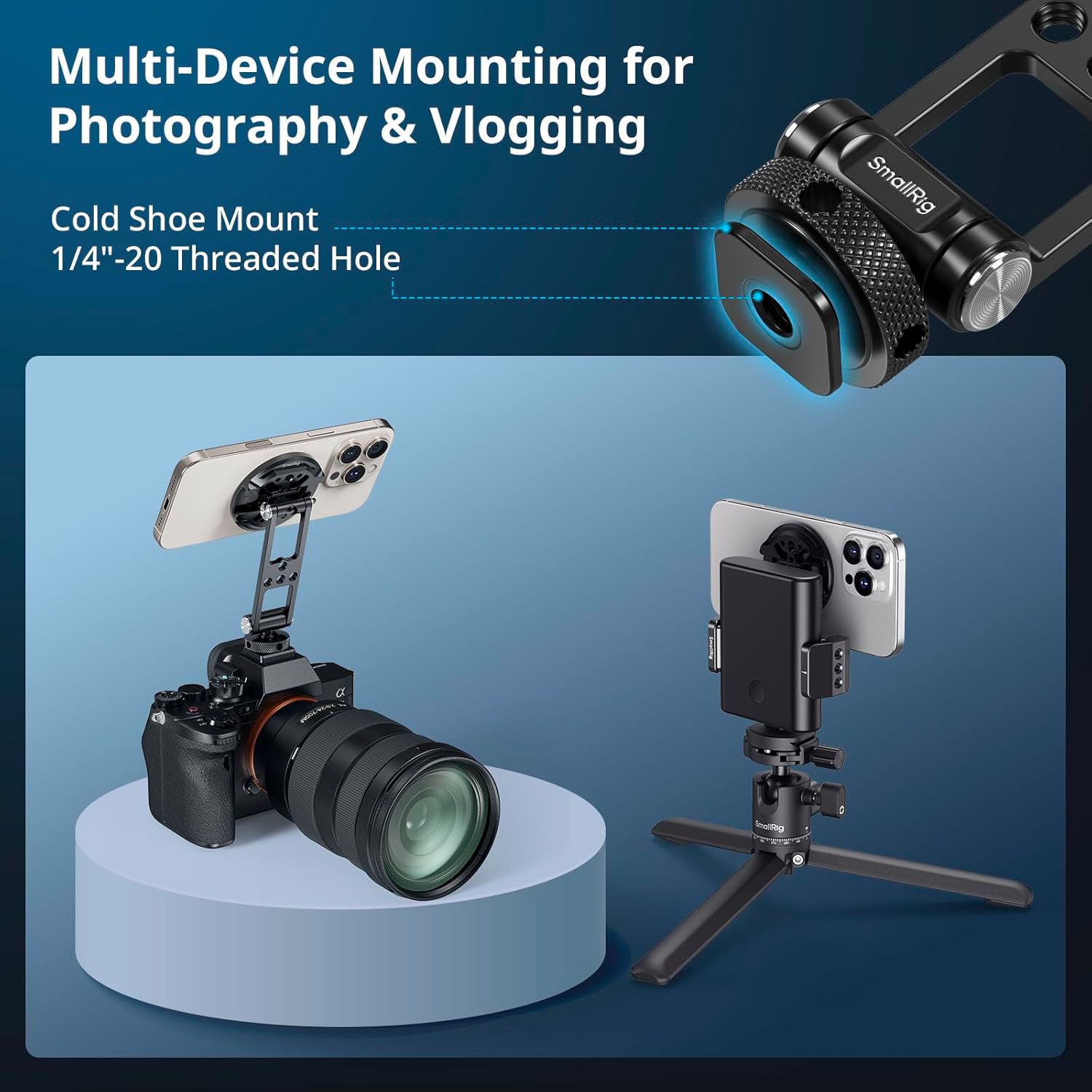
Image: The SMALLRIG phone mount is shown securely attached to a camera's cold shoe, providing a stable platform for the phone.
Video: Official SmallRig demonstration of the Magnetic Metal Phone Mount, showcasing its features and how it attaches to a camera setup.
ຄໍາແນະນໍາການດໍາເນີນງານ
ການປັບມຸມ ແລະທິດທາງ
The mount features dual rotating shafts, allowing for flexible adjustments. The upper shaft provides 360° rotation, enabling quick switching between portrait and landscape orientations. The lower shaft offers 180° tilt adjustment for precise angle positioning.

Image: A visual guide demonstrating the 360-degree rotation and 180-degree tilt capabilities of the phone mount for optimal positioning.
ການຂະຫຍາຍອຸປະກອນເສີມ
The modular design includes multiple standard threaded holes in the middle section, suitable for attaching accessories such as power bank holders (e.g., SmallRig ID 2336). The top round plate can be detached and utilized as a multi-functional mounting plate for other accessories like microphones or ball-head selfie sticks, expanding your creative possibilities.

Image: The phone mount is shown with its detachable plate and various expansion interfaces, illustrating how additional accessories can be connected.
ບໍາລຸງຮັກສາ
To ensure the longevity and optimal performance of your SMALLRIG Magnetic Metal Phone Mount, follow these maintenance guidelines:
- ທໍາຄວາມສະອາດ: Wipe the mount with a soft, dry cloth. Avoid using abrasive cleaners or harsh chemicals, as these can damage the finish or magnetic components.
- ການກວດກາ: Periodically check all screws and connections to ensure they are secure. If any looseness is detected, use the provided Allen wrench to tighten them.
- ການເກັບຮັກສາ: Store the mount in a clean, dry environment away from extreme temperatures and direct sunlight when not in use.
ການແກ້ໄຂບັນຫາ
Phone Detaches Easily
- ຄວາມເຂົ້າກັນໄດ້: Ensure your phone is a MagSafe-compatible model or is equipped with a strong magnetic case/ring. Standard phone cases without magnetic properties may reduce magnetic strength.
- ຈຳກັດນ້ຳໜັກ: The maximum load capacity for this mount is 500g. Exceeding this weight may lead to instability or detachment.
- External Impacts: Avoid sudden movements or external impacts during use, as these can cause the device to detach.
Mount Feels Unstable on Camera/Tripod
- ໄຟລ໌ແນບທີ່ປອດໄພ: Verify that the cold shoe or 1/4"-20 threaded connection is fully tightened to your camera or tripod. Use the Allen wrench if necessary for the threaded connection.
- Cold Shoe Fit: Ensure the cold shoe mount is fully inserted into your camera's cold shoe and the locking mechanism is engaged.
ຂໍ້ມູນຈໍາເພາະ
| ຄຸນສົມບັດ | ລາຍລະອຽດ |
|---|---|
| ໝາຍເລກຕົວແບບ | 5156 |
| ຂະໜາດສິນຄ້າ (ກວ້າງ x ຍາວ x ສູງ) | 1.09"D x 1.09"W x 2.32"H (27.4 x 27.6 x 59.0 ມມ) |
| ນ້ໍາຫນັກລາຍການ | 80 ກຣາມ |
| ຄໍາແນະນໍານ້ໍາຫນັກສູງສຸດ | 500 ກຣາມ |
| ວັດສະດຸ | ໂລຫະປະສົມອາລູມິນຽມ, ຊິລິໂຄນ, ສະແຕນເລດ |
| ອຸປະກອນທີ່ເຂົ້າກັນໄດ້ | iPhone 17/16/15/14/13/12 (Plus Pro Max) / Magnetic Phone Cases / Other Cellphones with MagSafe Ring |
| ຕົວເລືອກການຕິດຕັ້ງ | Cold Shoe Mount, 1/4"-20 Threaded Hole |
| ພືດຫມູນວຽນ | 360° (upper shaft) |
| ອຽງ | 180° (lower shaft) |
ການຮັບປະກັນແລະການສະຫນັບສະຫນູນ
ຂໍ້ມູນການຮັບປະກັນ
This SMALLRIG product is covered by a 2-year warranty from the date of purchase. This warranty covers manufacturing defects and issues arising from normal use. Please retain your proof of purchase for warranty claims.
ການຊ່ວຍເຫຼືອລູກຄ້າ
For technical assistance, troubleshooting not covered in this manual, or warranty inquiries, please visit the official SMALLRIG website or contact their customer support directly. Contact information can typically be found on the product packaging or the official brand webເວັບໄຊ.


