
ແນະນຳ
This manual provides essential information for the safe and efficient operation of your BE COOL BCPSN2L01 Pedestal Fan. Please read these instructions carefully before use and retain them for future reference. The BCPSN2L01 combines powerful airflow with an integrated mist function and ambient lighting to enhance your indoor environment.
ຄໍາແນະນໍາຄວາມປອດໄພທີ່ສໍາຄັນ
ປະຕິບັດຕາມຄວາມລະມັດລະວັງດ້ານຄວາມປອດໄພຂັ້ນພື້ນຖານສະເໝີເມື່ອໃຊ້ເຄື່ອງໃຊ້ໄຟຟ້າເພື່ອຫຼຸດຜ່ອນຄວາມສ່ຽງຕໍ່ການເກີດອັກຄີໄພ, ໄຟຟ້າຊອດ ແລະ ການບາດເຈັບ.
- ຮັບປະກັນການສະຫນອງພະລັງງານ voltage ກົງກັບປ້າຍການຈັດອັນດັບໃນເຄື່ອງໃຊ້.
- ຢ່າຈຸ່ມພັດລົມ, ສາຍໄຟ ຫຼື ປລັກໄຟລົງໃນນໍ້າ ຫຼື ຂອງແຫຼວອື່ນໆ.
- ຖອດພັດລົມອອກຈາກເຕົ້າສຽບໃນເວລາທີ່ບໍ່ໄດ້ໃຊ້, ກ່ອນທີ່ຈະເຮັດຄວາມສະອາດ, ຫຼືກ່ອນການເຄື່ອນຍ້າຍ.
- ຮັກສາພັດລົມໃຫ້ໄກຈາກເດັກນ້ອຍ ແລະສັດລ້ຽງ.
- ຢ່າໃຊ້ພັດລົມດ້ວຍສາຍໄຟ ຫຼືປລັກສຽບທີ່ເສຍຫາຍ.
- Avoid placing the fan near curtains or other objects that could be drawn into the fan blades.
- ຢ່າເອົານິ້ວມື ຫຼືສິ່ງຂອງອື່ນໆເຂົ້າໄປຜ່ານເຕົາໄຟເມື່ອພັດລົມເຮັດວຽກ.
- Use the fan only on a stable, level surface.
- ຫ້າມປິດຊ່ອງທາງອາກາດ.
- Only use clean, distilled water in the water tank for the mist function.
ສິນຄ້າເກີນview
The BE COOL BCPSN2L01 is a versatile pedestal fan designed to provide efficient cooling and air circulation with an integrated mist function and ambient lighting.
ອົງປະກອບ
- ຫົວພັດລົມພ້ອມຕະແກງ ແລະ ໃບມີດ
- ຂາຕັ້ງສາມາດປັບໄດ້
- ຖານ
- ຖັງນ້ຳ (ຄວາມຈຸ 2 ລິດ)
- Control Panel (Touch-sensitive)
- ການຄວບຄຸມໄລຍະໄກ
- ສາຍໄຟ
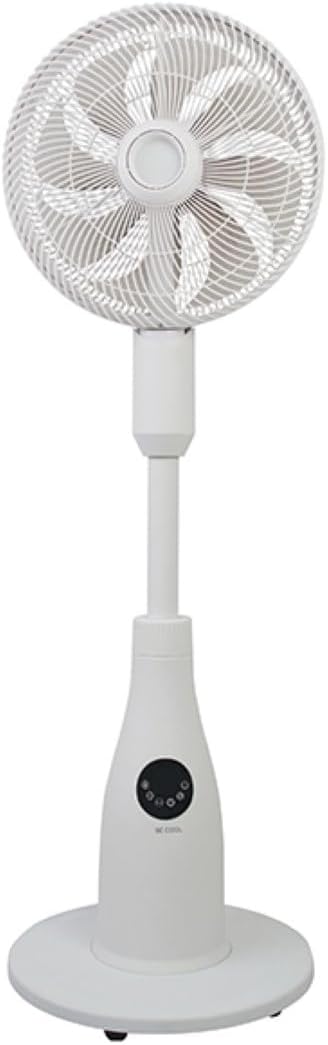
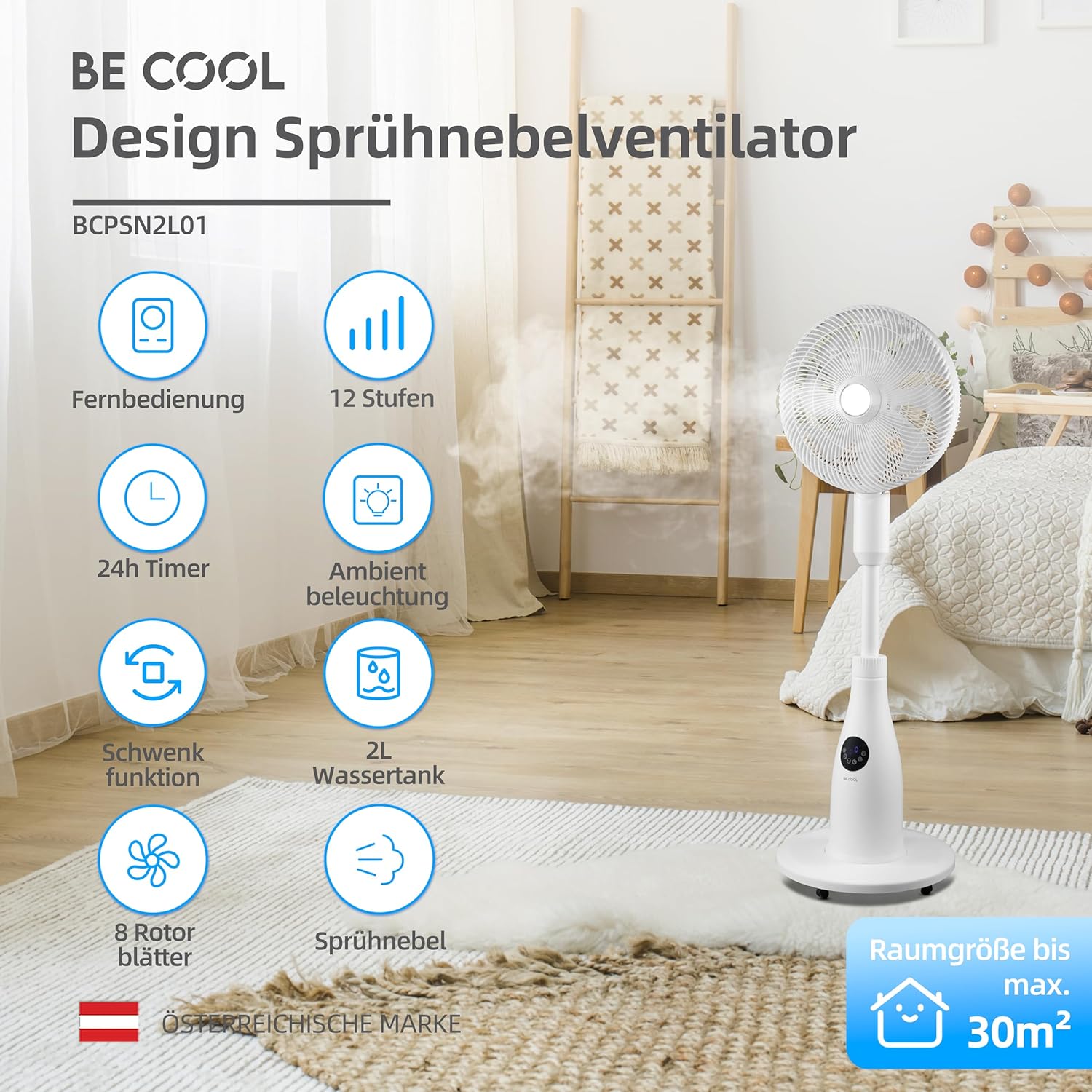
ກະດານຄວບຄຸມແລະການຄວບຄຸມໄລຍະໄກ
The fan can be operated using the touch-sensitive control panel on the unit or the included remote control.
ຟັງຊັນແຜງຄວບຄຸມ:
- ປຸ່ມເປີດປິດ: ເປີດ ຫຼືປິດພັດລົມ.
- ປຸ່ມຄວາມໄວ: Adjusts fan speed (12 levels).
- ປຸ່ມໂໝດ: Cycles through Normal, Nature, and Sleep modes.
- ປຸ່ມໝອກ: Activates or deactivates the mist function.
- ແກວ່ງປຸ່ມ: Toggles the oscillation feature.
- ປຸ່ມຈັບເວລາ: ຕັ້ງໂມງຈັບເວລາປິດອັດຕະໂນມັດ (ສູງສຸດ 24 ຊົ່ວໂມງ).
- ປຸ່ມແສງສະຫວ່າງ: Controls the ambient lighting.


ຄໍາແນະນໍາການຕິດຕັ້ງ
ສະພາແຫ່ງ
- ຖອດສ່ວນປະກອບທັງໝົດອອກຈາກເຄື່ອງຫຸ້ມຫໍ່ຢ່າງລະມັດລະວັງ.
- Assemble the fan head, stand, and base according to the diagrams in the quick start guide (if provided separately). Ensure all connections are secure.
- ວາງພັດລົມໃສ່ພື້ນຜິວທີ່ແຫນ້ນຫນາ.
ການຕື່ມຖັງນ້ໍາ
- Locate the water tank at the rear of the fan's base.
- ຄ່ອຍໆດຶງຖັງນໍ້າອອກ.
- Fill the tank with clean, distilled water. Do not exceed the maximum fill line.
- Carefully reinsert the water tank into its position until it clicks securely.
- Ensure the water tank is properly seated before operating the mist function.

ຄໍາແນະນໍາການດໍາເນີນງານ
ສຽບສາຍໄຟເຂົ້າໄປໃນບ່ອນສຽບໄຟຟ້າທີ່ເຫມາະສົມ.
ເປີດ/ປິດ
ກົດ ປຸ່ມເປີດປິດ on the control panel or remote control to turn the fan on or off.
ປັບຄວາມໄວພັດລົມ
ກົດ ປຸ່ມຄວາມໄວ repeatedly to cycle through the 12 available fan speed levels.
ເລືອກຮູບແບບການປະຕິບັດ
ກົດ ປຸ່ມໂໝດ to switch between the following modes:
- ໂໝດປົກກະຕິ: ສະຫນອງການໄຫຼວຽນຂອງອາກາດຄົງທີ່ໃນຄວາມໄວທີ່ເລືອກ.
- ໂໝດທຳມະຊາດ: Simulates natural breezes by varying fan speed intermittently.
- ຮູບແບບການນອນ: Operates at a lower, quieter speed with reduced display brightness for undisturbed rest.

Activating Mist Function
ໃຫ້ແນ່ໃຈວ່າຖັງນໍ້າເຕັມແລ້ວ. ກົດປຸ່ມ ປຸ່ມໝອກ to activate or deactivate the refreshing mist function.
Using Oscillation
ກົດ ປຸ່ມ Oscillation to start or stop the fan's oscillation, which distributes air across a wider area.

ຕັ້ງຄ່າໂມງຈັບເວລາ
ກົດ ປຸ່ມຈັບເວລາ repeatedly to set the desired auto-off time, from 1 to 24 hours. The fan will automatically turn off after the set duration.
ແສງສະພາບແວດລ້ອມ
ກົດ ປຸ່ມແສງສະຫວ່າງ to turn the ambient lighting on or off. This feature provides a soft glow, particularly useful in Sleep Mode.
ການບໍາລຸງຮັກສາແລະການທໍາຄວາມສະອາດ
ການທຳຄວາມສະອາດເປັນປະຈຳຈະຊ່ວຍຮັກສາປະສິດທິພາບຂອງພັດລົມ ແລະ ຍືດອາຍຸການໃຊ້ງານຂອງມັນ. ໃຫ້ຖອດປລັກພັດລົມອອກກ່ອນທຳຄວາມສະອາດສະເໝີ.
ທໍາຄວາມສະອາດພາຍນອກ
ເຊັດພື້ນຜິວພາຍນອກຂອງພັດລົມໃຫ້ອ່ອນໆ, ງamp ຜ້າ. ຢ່າໃຊ້ເຄື່ອງເຮັດຄວາມສະອາດຂັດຫຼືສານລະລາຍ.
ການເຮັດຄວາມສະອາດຖັງນ້ໍາ
- ເອົາຖັງນ້ໍາອອກຈາກຫນ່ວຍ.
- ລ້າງນ້ຳທີ່ເຫຼືອ.
- Rinse the tank thoroughly with clean water. For deeper cleaning, use a mild detergent and a soft brush, then rinse completely.
- Allow the tank to air dry before refilling and reinserting.
Cleaning Fan Blades and Grille
Periodically, dust may accumulate on the fan blades and inside the grille. Refer to the product's specific instructions for safely removing the front grille to clean the blades. Use a soft cloth or vacuum cleaner with a brush attachment to remove dust.
ການແກ້ໄຂບັນຫາ
ຖ້າເຈົ້າພົບບັນຫາກັບພັດລົມຂອງເຈົ້າ, ກະລຸນາເບິ່ງບັນຫາ ແລະວິທີແກ້ໄຂບັນຫາທົ່ວໄປຕໍ່ໄປນີ້:
- ພັດລົມບໍ່ເປີດ:
- ກວດໃຫ້ແນ່ໃຈວ່າໄດ້ສຽບສາຍໄຟເຂົ້າກັບປລັກໄຟຟ້າທີ່ເຮັດວຽກຢ່າງປອດໄພ.
- ກວດເບິ່ງວ່າປຸ່ມເປີດປິດໄດ້ຖືກກົດ.
- Verify there is no power outage ໃນເຂດຂອງທ່ານ.
- Mist function is not working:
- Check if the water tank is filled with water.
- Ensure the water tank is correctly seated in the unit.
- Clean the mist nozzle if it appears blocked.
- ພັດລົມມີສຽງດັງ:
- ໃຫ້ແນ່ໃຈວ່າພັດລົມຖືກວາງຢູ່ເທິງພື້ນຜິວທີ່ມີລະດັບຄວາມຫມັ້ນຄົງ.
- Check for any obstructions around the fan blades or grille.
- Dust accumulation on blades can cause imbalance; clean the blades if necessary.
- ການຄວບຄຸມໄລຍະໄກບໍ່ຕອບສະໜອງ:
- Check and replace the battery (1 CR2 battery included).
- ໃຫ້ແນ່ໃຈວ່າບໍ່ມີສິ່ງກີດຂວາງລະຫວ່າງທາງໄກ ແລະເຄື່ອງຮັບຂອງພັດລົມ.
ຂໍ້ມູນຈໍາເພາະ
| ຄຸນສົມບັດ | ຂໍ້ມູນຈໍາເພາະ |
|---|---|
| ຍີ່ຫໍ້ | ເຢັນ |
| ໝາຍເລກຕົວແບບ | BCPSN2L01 |
| ພະລັງງານ | 80 ວັດ |
| ສະບັບtage | 230 ໂວນ (AC) |
| ຄວາມອາດສາມາດຂອງກະແສລົມ | 1500 m³/ຊມ |
| ຄວາມອາດສາມາດຂອງຖັງນໍ້າ | 2 ລິດ |
| ອັດຕາການພັດທະນາ | 0.25 L/h (approx.) |
| ຈໍານວນຄວາມໄວ | 12 |
| ການສັ່ນສະເທືອນ | ແມ່ນແລ້ວ |
| ໂມງຈັບເວລາ | ສູງສຸດ 24 ຊົ່ວໂມງ |
| ການຄວບຄຸມໄລຍະໄກ | ແມ່ນແລ້ວ (ມີແບັດເຕີຣີ CR1 2 ອັນ) |
| ຂະໜາດສິນຄ້າ (ກວ້າງ x ຍາວ x ສູງ) | 42.9 x 42.9 x 114.5 cm |
| ນ້ໍາຫນັກລາຍການ | 6.9 ກິໂລກຣາມ |
| ຂະໜາດຫ້ອງທີ່ແນະນຳ | ເຖິງ 30 m² |

ການຮັບປະກັນແລະການສະຫນັບສະຫນູນ
For warranty information, please refer to the documentation provided at the time of purchase or contact your retailer. For technical support or service inquiries, please contact the manufacturer's customer service department.
ຜູ້ຜະລິດ: ເຢັນດີ