
1. ບົດແນະນຳ
This manual provides essential information for the installation, operation, and maintenance of the CFguang T-CON Logic Board. This board is designed to ensure reliable performance for your television's display. It is compatible with various Samsung TV models, extending the life of your television by replacing a faulty T-CON board.
Compatible Part Models: BN41-02111A, BN96-30163A, BN96-30162A, BN95-01304A, BN95-01305A, BN95-01305C, BN95-01306A, BN95-02146A.
Applicable TV Models (including but not limited to):
- ຮຸ່ນ 32 ນິ້ວ: UA32J5100AJXZK, UA32J5100AKXXD, UA32J5100AKXXT, UA32J5100ARLSG, UA32J5100ARLXL, UA32J5300ARLSG, UA32J5300ARLXL, UA32K5005AJXZK, UE32J5000AKXMS, UE32J5000AKXRU, UE32J5000AKXUA, UE32J5000AKXXU, UE32J5000AKXZT, UE32J5000AWXBT, UE32J5000AWXXC, UE32J5000AWXXH, UE32J5000AWXXN, UE32J5000AWXZF, UE32J5000AWXZG, UE32J5005AKXRU, UE32J5005AKXXE, UE32J5200AKXKZ, UE32J5200AKXRU, UE32J5200AKXUA, UE32J5200AKXXU, UE32J5200AKXZT, UE32J5200AWXXC, UE32J5200AWXXH, UE32J5200AWXXN, UE32J5205AKXRU, UE32J5205AKXXE, UE32J5250ASXZG, UE32J5270ASXZG, UE32J5373ASXTK, UN32J5003AFXZA, UN32J5003AFXZC, UN32J5205AFXZA, UN32J5205AFXZC, UN32J525DAFXZA, UN32J5500AFXZA, UN32J5500AFXZC, UN32J5500AGXZB, UN32J5500AGXZD, UN32J5500AGXZS.
- ຮຸ່ນ 40 ນິ້ວ: UA40H5500AKXKE, UA40H5500AKXMR, UA40H5500AKXXA, UA40H5500AKXXM, UA40H5500AKXXS, UA40H5500AKXXT, UA40H5500AKXXV, UA40H5500ARLXL, UA40H5500ARXEG, UA40H5500ARXMM, UA40H5500ARXSJ, UA40H5500ARXSW, UA40H5500ARXTW, UA40H5500ARXUM, UA40H5500ARXXM, UA40H5500ARXXP, UA40H5500ARXZN, UA40H5500ASXRD, UA40H5500AWXJG, UA40H5500AWXSQ, UA40H5500AWXXD, UA40H5500AWXXY, UA40H5500AWXZW, UA40H5501TKXXT, UA40H5510AKXXV, UA40H5550AKXXD, UA40H5552AKXXV, UA40H5552ARXXM, UA40H5562AKXXV, UA40H5570AULXL, UA40J5100AKXBG, UA40J5100AKXKE, UA40J5100AKXLY, UA40J5100AKXMR, UA40J5100AKXWT, UA40J5100AKXXA, UA40J5100AKXXD, UA40J5100AKXXT, UA40J5100AKXXV, UA40J5100AKXZN, UA40J5100ARLSG, UA40J5100ARLXL, UA40J5100ARXBG, UA40J5100ARXEG, UA40J5100ARXMM, UA40J5100ARXMZ, UA40J5100ARXSJ, UA40J5100ARXSK, UA40J5100ARXTW, UA40J5100ARXUM, UA40J5100ARXXP, UA40J5100ARXZN, UA40J5100AWXNZ, UA40J5100AWXXY.
2. ຂໍ້ມູນຄວາມປອດໄພ
Please read and understand all safety precautions before attempting installation or repair. Improper handling of electronic components can lead to personal injury or damage to your television.
- ຕັດການເຊື່ອມຕໍ່ພະລັງງານ: Always unplug the television from the power outlet before opening the back panel or handling any internal components.
- ໄຟຟ້າສະຖິດ: Electronic components are sensitive to electrostatic discharge (ESD). Use an anti-static wrist strap and work on an anti-static mat to prevent damage.
- ແນະນຳການຕິດຕັ້ງແບບມືອາຊີບ: If you are not experienced with TV repair, it is highly recommended to seek assistance from a qualified technician.
- ຈັດການດ້ວຍຄວາມລະມັດລະວັງ: Avoid touching the surface of the board or its delicate components directly. Hold the board by its edges.
- ການລະບາຍອາກາດ: ຮັບປະກັນການລະບາຍອາກາດທີ່ເຫມາະສົມຮອບໂທລະທັດຫຼັງຈາກການຕິດຕັ້ງເພື່ອປ້ອງກັນຄວາມຮ້ອນເກີນ.
3. ຜະລິດຕະພັນເກີນview
The T-CON (Timing Controller) board is a critical component in LCD and LED televisions, responsible for processing video signals and sending them to the display panel. This CFguang T-CON board is a replacement part designed to restore display functionality.

ຮູບທີ 3.1: ທາງເທິງ view of the T-CON Logic Board, showing the main integrated circuits, ribbon cable connectors, and various surface-mount components.

ຮູບທີ 3.2: ລາຍລະອຽດ view of the left side of the T-CON board, featuring power regulation components and additional circuitry. Note the mounting holes for secure installation.

ຮູບທີ 3.3: ລາຍລະອຽດ view of the right side of the T-CON board, including additional ribbon cable connectors and various passive and active components.
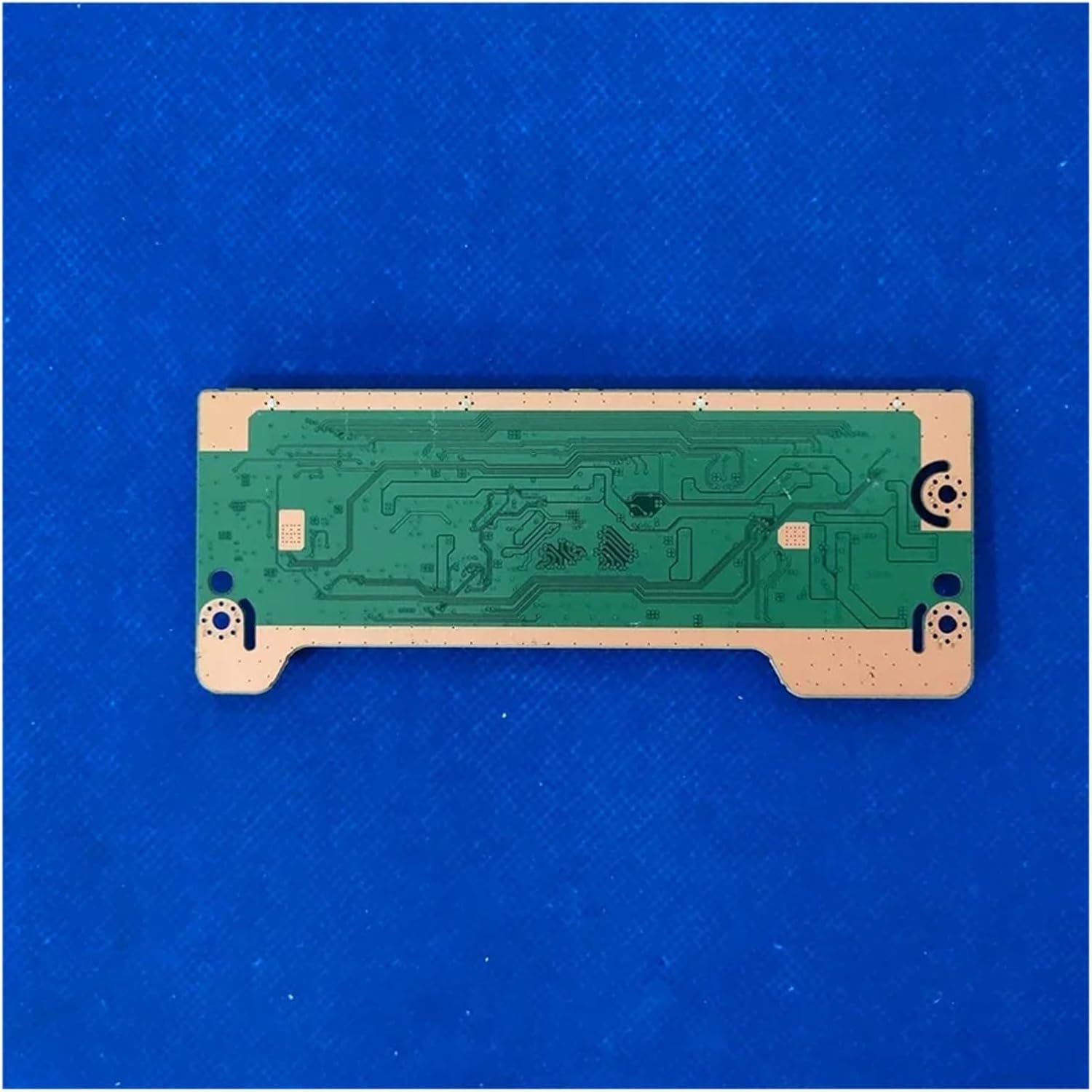
ຮູບທີ 3.4: ດ້ານລຸ່ມ view of the T-CON board, illustrating the circuit traces and the overall layout of the printed circuit board.
4. ການຕິດຕັ້ງແລະການຕິດຕັ້ງ
This section outlines the general steps for replacing a T-CON board. Due to the complexity and delicate nature of TV components, professional installation is strongly recommended.
4.1 ເຄື່ອງມືທີ່ຕ້ອງການ
- ໝວດ ຫົວ screwdriver Phillips
- Flathead screwdriver (for prying, if necessary)
- ສາຍແຂນ ແລະ ຜ້າປູພື້ນຕ້ານໄຟຟ້າສະຖິດ
- Plastic prying tools (optional, to avoid scratching)
4.2 ຂັ້ນຕອນການຕິດຕັ້ງ
- ການກະກຽມໂທລະພາບ: Ensure the television is completely unplugged from the power outlet and all other connected devices. Place the TV face down on a soft, clean surface to protect the screen.
- Remove Back Panel: Carefully remove the screws securing the TV's back panel. Use plastic prying tools to gently separate the panel if it has clips.
- Locate the T-CON Board: The T-CON board is typically located at the top center of the TV, often under a metal shield. It connects the main board to the display panel via ribbon cables.
- ຕັດການເຊື່ອມຕໍ່ສາຍ: With an anti-static wrist strap on, carefully disconnect all ribbon cables and power cables connected to the old T-CON board. Be gentle with the ribbon cable latches.
- ເອົາກະດານເກົ່າອອກ: Unscrew the old T-CON board from its mounting points and carefully remove it.
- ຕິດຕັ້ງກະດານໃໝ່: Position the new CFguang T-CON board in place and secure it with the screws.
- ເຊື່ອມຕໍ່ສາຍໄຟຄືນໃໝ່: Carefully reconnect all ribbon cables and power cables to the new T-CON board. Ensure all connections are firm and correctly seated. Double-check the orientation of the ribbon cables.
- Test (Before Closing): Before reattaching the back panel, temporarily plug in the TV and power it on to check if the display is working correctly. If the display is normal, unplug the TV again.
- ປະກອບໂທລະທັດຄືນໃໝ່: Reattach the back panel and secure all screws.
5. Functionality Check
ຫຼັງຈາກຕິດຕັ້ງສຳເລັດແລ້ວ, ໃຫ້ກວດສອບດັ່ງຕໍ່ໄປນີ້:
- ເປີດ: ສຽບປລັກໂທລະພາບແລະເປີດມັນ.
- Display Verification: Observe the screen for a clear picture, correct colors, and absence of flickering, lines, or distorted images.
- Input Test: Connect a video source (e.g., a set-top box, DVD player) to ensure proper signal processing and display.
If any issues persist, refer to the Troubleshooting section.
6. ບໍາລຸງຮັກສາ
The T-CON board itself requires no routine maintenance. To ensure its longevity and the overall health of your television:
- ຮັກສາຄວາມສະອາດ: ທຳຄວາມສະອາດດ້ານນອກຂອງໂທລະທັດຂອງທ່ານເປັນປະຈຳເພື່ອປ້ອງກັນການສະສົມຂອງຝຸ່ນເຊິ່ງສາມາດກີດຂວາງການລະບາຍອາກາດ.
- ຮັບປະກັນການລະບາຍອາກາດ: Do not block the ventilation openings on your TV. Adequate airflow prevents overheating of internal components, including the T-CON board.
- ຫຼີກລ້ຽງການຂອງແຫຼວ: Keep liquids away from the television to prevent accidental spills that could damage internal electronics.
7. ການແກ້ໄຂບັນຫາ
ຖ້າທ່ານພົບບັນຫາຫຼັງຈາກຕິດຕັ້ງກະດານ T-CON, ໃຫ້ພິຈາລະນາບັນຫາ ແລະ ວິທີແກ້ໄຂທົ່ວໄປຕໍ່ໄປນີ້:
| ບັນຫາ | ສາເຫດທີ່ເປັນໄປໄດ້ | ການແກ້ໄຂ |
|---|---|---|
| ບໍ່ມີຮູບ, ແຕ່ສຽງແມ່ນປະຈຸບັນ | Faulty T-CON board (if not replaced correctly), loose ribbon cables, faulty display panel. | Verify all ribbon cables are securely connected. Ensure the new T-CON board is correctly installed. If problem persists, the display panel or main board might be faulty. |
| Distorted picture, lines, or incorrect colors | Loose or damaged ribbon cables, incorrect T-CON board for the panel, faulty T-CON board. | Check all ribbon cable connections for proper seating and damage. Confirm the T-CON board is the correct model for your TV. |
| Flickering screen or intermittent display | Loose connections, power supply issue to T-CON, faulty T-CON board. | Ensure all power and data cables are firmly connected. Check for any visible damage on the board. |
| ໂທລະພາບບໍ່ເປີດ | Not related to T-CON board. Likely power supply board or main board issue. | Check power cable, power outlet, and other TV components. The T-CON board typically affects display, not power-on. |
ຖ້າຂັ້ນຕອນການແກ້ໄຂບັນຫາບໍ່ສາມາດແກ້ໄຂບັນຫາໄດ້, ແນະນໍາໃຫ້ປຶກສາກັບຊ່າງສ້ອມແປງໂທລະທັດມືອາຊີບ.
8. ຂໍ້ມູນຈໍາເພາະ
- ຮູບແບບສ່ວນ: BN41-02111A (also compatible with BN95-01304A, BN95-01305A, etc.)
- ຍີ່ຫໍ້: CFguang
- ຂະໜາດແພັກເກດ: 1.18 x 0.79 x 0.39 ນິ້ວ
- ນ້ໍາຫນັກລາຍການ: 1.76 ອອນ
- ASIN: B0DZVL88MM
- ວັນທີທໍາອິດທີ່ມີ: ວັນທີ 9 ມີນາ 2025
9. ການຮັບປະກັນແລະການສະຫນັບສະຫນູນ
For information regarding warranty coverage, returns, or technical support, please contact the seller or manufacturer directly through your purchase platform. Keep your purchase receipt or order number handy for faster service.