
1. ບົດແນະນຳ
The ACwO DwOTS Zing Wireless Earbuds are designed to provide a high-quality audio experience with advanced features. This manual will guide you through the setup, operation, and maintenance of your new earbuds.
Video 1: ACwO DwOTS Zing Wireless Earbuds Overview. This video provides a brief introduction to the product and its key features.
2. ສິ່ງທີ່ຢູ່ໃນກ່ອງ
Carefully unpack your ACwO DwOTS Zing Wireless Earbuds. The package should contain the following items:
- ACwO DwOTS Zing Wireless Earbuds (Left and Right)
- ກ່ອງສາກ
- ສາຍສາກ USB
- Eartips (ຂະຫນາດຕ່າງໆ)
- Scan Me Card (for digital manual/app access)
- ບັດຮັບປະກັນ
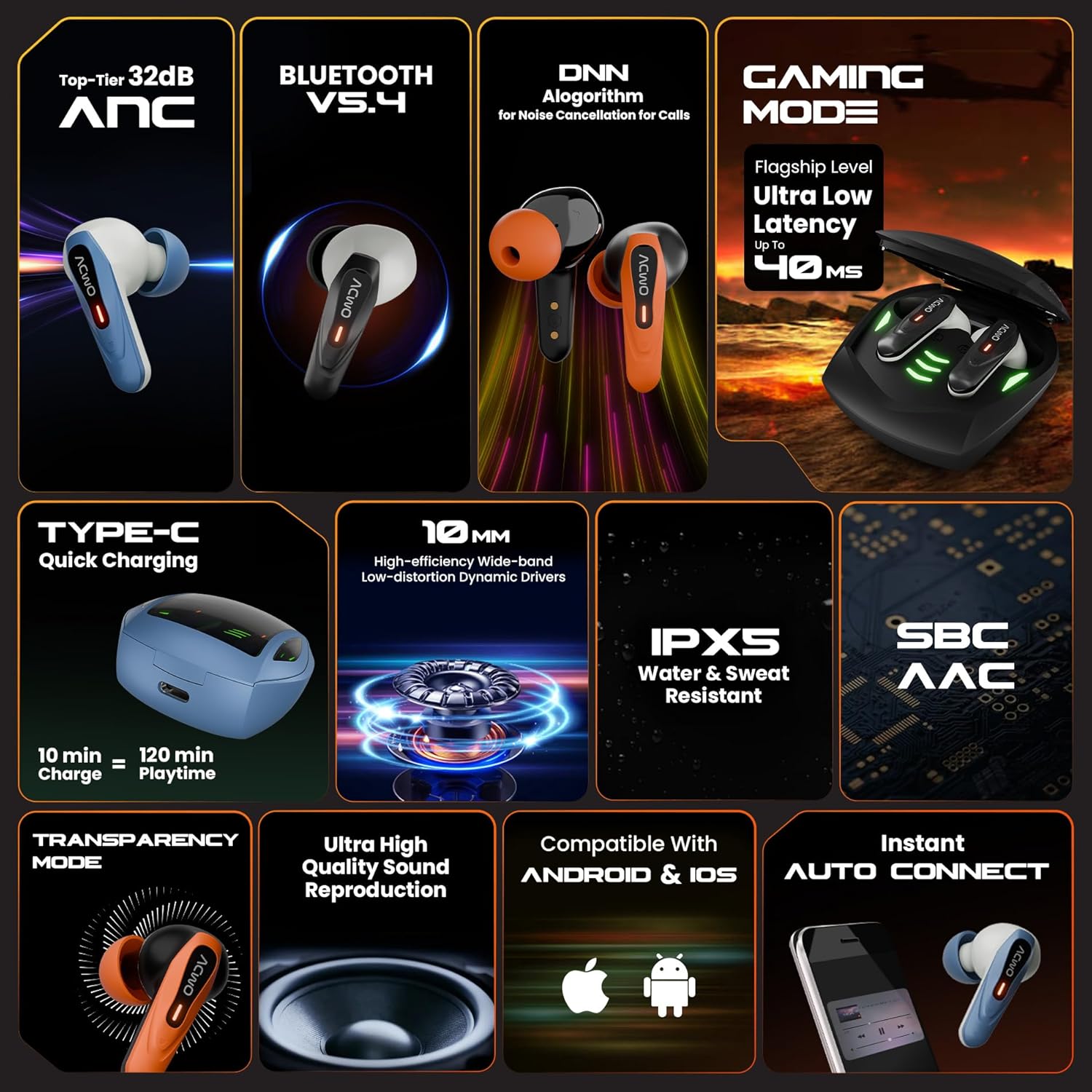
Image 1: Contents of the ACwO DwOTS Zing package, showing the earbuds, charging case, and accessories.
3. ຄຸນລັກສະນະຂອງຜະລິດຕະພັນ
The ACwO DwOTS Zing Wireless Earbuds incorporate several features for an enhanced audio experience:
- Active Noise Cancellation (ANC): Up to 32dB ANC for immersive listening.
- Bluetooth V5.4: ສຳລັບການເຊື່ອມຕໍ່ໄຮ້ສາຍທີ່ໝັ້ນຄົງ ແລະ ມີປະສິດທິພາບ.
- ເວລາຫຼິ້ນດົນ: ສູງສຸດ 55 ຊົ່ວໂມງຂອງເວລາຫຼິ້ນທັງຫມົດກັບກໍລະນີການສາກໄຟ.
- ການຕອບສະໜອງຕໍ່າ: 40ms low latency for gaming and video synchronization.
- HYPERBOOST™ Charging: 10 minutes of charge provides up to 120 minutes of playtime.
- 10mm Dynamic Drivers: High-efficiency, wide-band, low-distortion drivers for powerful bass.
- IPX5 ກັນນໍ້າ ແລະເຫື່ອ: Suitable for workouts and outdoor activities.
- ຕົວແປງສັນຍານສຽງ: Supports SBC and AAC for quality audio streaming.
- ໂໝດຄວາມໂປ່ງໃສ: ອະນຸຍາດໃຫ້ໄດ້ຍິນສຽງສະພາບແວດລ້ອມເພື່ອຮັບຮູ້ສະຖານະການ.
- Quad ENC Microphones: For clear call quality with environmental noise cancellation.
- Instant Auto Connect: Earbuds automatically connect to paired devices upon opening the case.
- ຄວາມເຂົ້າກັນໄດ້: ເຮັດວຽກກັບອຸປະກອນ Android ແລະ iOS.

Image 2: Visual representation of key features such as 32dB ANC, Bluetooth V5.4, 40ms low latency gaming mode, and HYPERBOOST charging.

ຮູບພາບທີ 3: ໄລຍະໃກ້ view of the earbuds highlighting the four ENC microphones for clear calls.
4. ຕັ້ງຄ່າ
4.1 ການສາກໄຟເບື້ອງຕົ້ນ
- ວາງຫູຟັງເອຍບັດທັງສອງໃສ່ໃນກ່ອງສາກ.
- Connect the USB charging cable to the Type-C port on the charging case and to a power source.
- The LED indicators on the case will show charging status. Ensure the earbuds and case are fully charged before first use.

Image 4: The charging case connected via a Type-C cable, illustrating the charging process.
4.2 ການຈັບຄູ່ Bluetooth
- ເປີດກ່ອງສາກໄຟ. ຫູຟັງເອຍບັດຈະເຂົ້າສູ່ໂໝດຈັບຄູ່ໂດຍອັດຕະໂນມັດ, ໂດຍຊີ້ບອກດ້ວຍໄຟ LED ກະພິບ.
- ໃນອຸປະກອນຂອງທ່ານ (ໂທລະສັບສະຫຼາດ, ແທັບເລັດ, ແລະອື່ນໆ), ເປີດໃຊ້ Bluetooth.
- ຊອກຫາ "ACwO DwOTS Zing" in the list of available Bluetooth devices.
- Select "ACwO DwOTS Zing" to connect. Once connected, the LED indicators on the earbuds will stop flashing.
- ຫູຟັງເອຍບັດຈະເຊື່ອມຕໍ່ໃໝ່ໂດຍອັດຕະໂນມັດກັບອຸປະກອນທີ່ຈັບຄູ່ສຸດທ້າຍເມື່ອເອົາອອກຈາກເຄສ.
4.3 ການໃສ່ຫູຟັງ
- Choose the eartips that provide the most comfortable and secure fit for optimal sound quality and ANC performance.
- ສຽບຫູຟັງເອຍບັດໃສ່ຫູຂອງເຈົ້າແລ້ວບິດມັນຄ່ອຍໆຈົນກວ່າພວກມັນຈະພໍດີ.
5. ຄໍາແນະນໍາການດໍາເນີນງານ
The ACwO DwOTS Zing Earbuds feature touch controls for various functions. Refer to the "Scan Me Card" included in your package for detailed touch control gestures, as these may vary.
5.1 Basic Controls (Typical)
- ຫຼິ້ນ/ຢຸດ: ແຕະເທື່ອດຽວໃສ່ຫູຟັງຫູຟັງ.
- ເພງຕໍ່ໄປ: ແຕະສອງເທື່ອໃສ່ຫູຟັງເບື້ອງຂວາ.
- ຕິດຕາມກ່ອນ ໜ້າ ນີ້: ແຕະສອງເທື່ອໃສ່ຫູຟັງທາງຊ້າຍ.
- ຮັບ/ສາຍໂທ: ແຕະເທື່ອດຽວໃສ່ຫູຟັງຫູຟັງ.
- ປະຕິເສດການໂທ: ກົດຄ້າງໃສ່ຫູຟັງທັງສອງຂ້າງ.
- ກະຕຸ້ນຜູ້ຊ່ວຍສຽງ: ແຕະສາມເທື່ອໃສ່ຫູຟັງຫູຟັງ.
5.2 ຮູບແບບ ANC ແລະຄວາມໂປ່ງໃສ
The earbuds support Active Noise Cancellation (ANC) and Transparency Mode. A long press (e.g., 2 seconds) on a specific earbud (refer to your "Scan Me Card" for exact configuration) typically cycles through these modes:
- ANC ເປີດ: ບລັອກສຽງລົບກວນຈາກສະພາບແວດລ້ອມ.
- ໂໝດຄວາມໂປ່ງໃສ: ອະນຸຍາດໃຫ້ທ່ານໄດ້ຍິນສິ່ງອ້ອມຂ້າງໃນຂະນະທີ່ຟັງສຽງ.
- ໂໝດປົກກະຕິ: Neither ANC nor Transparency is active.
5.3 ໂໝດການຫຼິ້ນເກມ
To activate the low latency Gaming Mode, perform the specific touch gesture indicated on your "Scan Me Card". This mode reduces audio delay, which is beneficial for gaming and video playback.

Image 5: User engaged in mobile gaming with the earbuds, demonstrating the low latency feature.
6. ບໍາລຸງຮັກສາ
6.1 ການທໍາຄວາມສະອາດ
- ອະນາໄມຫູຟັງຫູຟັງ ແລະກະເປົ໋າສາກໄຟເປັນປະຈຳດ້ວຍຜ້າແພທີ່ອ່ອນ, ແຫ້ງ, ບໍ່ມີສານຂັດ.
- ເອົາປາຍຫູຫູອອກແລ້ວເຮັດຄວາມສະອາດດ້ວຍສະບູອ່ອນໆ ແລະນໍ້າ, ຈາກນັ້ນເຊັດໃຫ້ແຫ້ງກ່ອນຕິດໃໝ່.
- ກວດໃຫ້ແນ່ໃຈວ່າລາຍຊື່ຜູ້ຕິດຕໍ່ທີ່ສາກໄຟຢູ່ທັງຫູຟັງເອຍບັດ ແລະເຄສແມ່ນສະອາດ ແລະບໍ່ມີສິ່ງເສດເຫຼືອ.
6.2 ການເກັບຮັກສາ
- ເກັບຮັກສາຫູຟັງເອຍບັດໃສ່ໃນກະເປົ໋າສາກໄຟຂອງເຂົາເຈົ້າເມື່ອບໍ່ໄດ້ໃຊ້ເພື່ອປົກປ້ອງພວກມັນ ແລະ ສືບຕໍ່ສາກໄຟ.
- ຫຼີກລ່ຽງການໃຫ້ຫູຟັງສຳຜັດກັບອຸນຫະພູມ, ຄວາມຊຸ່ມຊື່ນ ຫຼື ຂອງແຫຼວທີ່ກັດກ່ອນທີ່ສຸດ.
7. ການແກ້ໄຂບັນຫາ
If you encounter issues with your ACwO DwOTS Zing Earbuds, refer to the following common solutions:
| ບັນຫາ | ການແກ້ໄຂທີ່ເປັນໄປໄດ້ |
|---|---|
| ຫູຟັງບໍ່ຈັບຄູ່ |
|
| ບໍ່ມີສຽງຈາກຫູຟັງອັນໜຶ່ງ |
|
| ບັນຫາການສາກໄຟ |
|
| ຄຸນນະພາບການໂທບໍ່ດີ |
|
8. ຂໍ້ມູນຈໍາເພາະ
| ຄຸນສົມບັດ | ລາຍລະອຽດ |
|---|---|
| ໝາຍເລກຕົວແບບ | DWOTSZING-BLK |
| ລຸ້ນ Bluetooth | V5.4 |
| ການຍົກເລີກສິ່ງລົບກວນທີ່ໃຊ້ວຽກ (ANC) | ສູງເຖິງ 32dB |
| ເວລາຫຼິ້ນທັງໝົດ | ສູງສຸດເຖິງ 55 ຊົ່ວໂມງ (ພ້ອມກ່ອງໃສ່ສາກ) |
| ການຕອບສະໜອງຕໍ່າ | 40ms (ໂໝດເກມ) |
| ເທັກໂນໂລຍີການສາກໄຟ | HYPERBOOST™ (10 min charge = 120 min playtime) |
| ຂະໜາດຄົນຂັບ | 10mm Dynamic Drivers |
| ການຕໍ່ຕ້ານນ້ໍາ | IPX5 (Water & Sweat Resistant) |
| ໄມໂຄຣໂຟນ | Quad ENC Microphones |
| ການເຊື່ອມຕໍ່ | ໄຮ້ສາຍ (Bluetooth) |
| ຂະໜາດສິນຄ້າ | 61.5 x 54.5 x 32.5 cm |
| ນ້ໍາຫນັກລາຍການ | 42 g |
| ຜູ້ຜະລິດ | ACwO Lifestyle Pvt Ltd |
9. ການຮັບປະກັນແລະການສະຫນັບສະຫນູນ
Your ACwO DwOTS Zing Wireless Earbuds come with a standard brand warranty. Please refer to the included Warranty Card for details on warranty coverage and terms.
For further assistance, product registration, or to access the full digital manual, please use the "Scan Me Card" provided in the box or visit the official ACwO support webເວັບໄຊ.
You can also find more information on the product detail page on Amazon.in.